การแนะนำ
This manual provides essential instructions for the safe and effective use of your Sony FX30 Digital Cinema Camera. The Sony FX30 is designed for content creators and filmmakers, featuring an APS-C sensor for cinematic capture. Please read this manual thoroughly before operating the camera and retain it for future reference.
เนื้อหาแพ็คเกจ
ตรวจสอบว่าสินค้าทั้งหมดที่ระบุไว้ด้านล่างนี้รวมอยู่ในบรรจุภัณฑ์ของคุณแล้ว หากมีสินค้าใดสูญหายหรือเสียหาย โปรดติดต่อผู้ค้าปลีกของคุณ

Image: The Sony FX30 Digital Cinema Camera body with various accessories including a memory card, LED light, microphone, and stabilization grip.
Sony Manufacturer Items:
- Sony FX30 Digital Cinema Camera Body
- Sony NP-FZ100 Rechargeable Lithium-Ion Battery
- อะแดปเตอร์ไฟ Sony
- ฝาปิดตัวกล้อง Sony ALC-B1EM สำหรับกล้อง E-Mount
- ฝาครอบฐานเสียบมัลติฟังก์ชั่นของ Sony
- USB-A to USB-C Cable (USB 3.2)
Bundled Items:
- SanDisk 128GB High Speed Extreme Pro SD Memory Card
- High Power LED Light with Diffusers
- ไมโครโฟนแบบช็อตกัน
- Padded Deluxe Camera Bag
- U-Stabilization Grip
- Extra Replacement Battery (Compatible with NP-FZ100)
- Pistol Hand Grip
- Photo & Video Editing Software (1 Year Digital Download)
- USB Memory Card Reader
- Camera Hand Grip Strap
- Lens Pen
- โบลเวอร์เลนส์
- Camera Starter Kit (Microfiber Cloth, Memory Card Case, Buds)
การตั้งค่า
1. การติดตั้งแบตเตอรี่
Insert the provided Sony NP-FZ100 battery into the battery compartment located at the bottom of the camera. Ensure it clicks into place securely. Charge the battery fully before first use using the supplied AC adapter and USB-A to USB-C cable.
2. การติดตั้งการ์ดหน่วยความจำ
The FX30 supports SD memory cards. Open the memory card slot cover, typically located on the side of the camera. Insert the SanDisk 128GB Extreme Pro SD card with the label facing the correct direction until it clicks into place. The camera features dual card slots for extended recording or backup.

ภาพ: ด้านหลัง view of the Sony FX30 showing the open memory card slots with two SD cards partially inserted.
3. Attaching the Body Cap
When no lens is attached, always keep the Sony ALC-B1EM Body Cap on the camera's E-mount to protect the sensor from dust and damage.
4. เปิดเครื่องครั้งแรก
Press the power button to turn on the camera. Follow any on-screen prompts for initial setup, such as language selection and date/time settings.
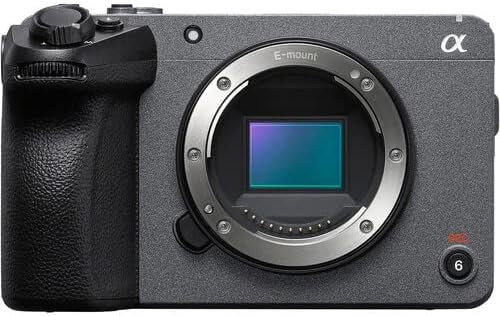
ภาพ: ด้านหน้า view of the Sony FX30 camera body, showcasing the E-mount lens interface and grip.
5. การติดตั้งอุปกรณ์เสริม
Attach the U-Stabilization Grip, Shotgun Microphone, and LED Light as needed for your shooting requirements. The camera features a Multi Interface Shoe for compatible accessories.
การใช้งานกล้อง
การควบคุมพื้นฐานview
Familiarize yourself with the camera's main controls for efficient operation.

ภาพ: ด้านหลัง view of the Sony FX30, highlighting the LCD screen, MODE dial, MENU button, and various control buttons and dials.
- MODE Dial: Selects shooting modes.
- ปุ่มเมนู: Accesses camera settings and functions.
- FOCUS MAG: Magnifies the display for precise focusing.
- ปุ่ม Fn (ฟังก์ชัน): ช่วยให้เข้าถึงการตั้งค่าที่ใช้บ่อยได้อย่างรวดเร็ว
- ปุ่ม DISP (แสดงผล): Changes the information displayed on the screen.
- วงล้อควบคุม: นำทางไปยังเมนูต่างๆ และปรับการตั้งค่า
- Zebra/Peaking: Assists with exposure and focus.

ภาพ: ด้านบน view of the Sony FX30, showing the Multi Interface Shoe, IRIS, WB, ISO buttons, and the REC button.
- IRIS Button: Adjusts aperture.
- WB (White Balance) Button: Sets white balance.
- ปุ่ม ISO: ปรับความไวแสง ISO
- ปุ่ม REC: เริ่มและหยุดการบันทึกวิดีโอ
การใช้งานหน้าจอสัมผัส
The FX30 features a touch-sensitive LCD screen for intuitive control. You can tap to select menu items, adjust focus, and navigate settings directly on the display.

Image: A hand interacting with the touch-sensitive LCD screen on the back of the Sony FX30 camera.
การบันทึกวิดีโอ
To begin recording, ensure a memory card is inserted and the battery is charged. Press the REC button to start recording. Press it again to stop. The camera supports video capture resolutions up to 4K and 1080p in MP4 format.
การเชื่อมต่อ
The Sony FX30 supports Wi-Fi connectivity for remote control, file transfer, and other smart functions. Refer to the camera's on-screen menu for Wi-Fi setup instructions.
การซ่อมบำรุง
- การทำความสะอาดตัวกล้อง: ใช้ผ้านุ่มและแห้งเช็ดตัวกล้อง สำหรับคราบสกปรกฝังแน่น ให้เช็ดเบาๆampชุบผ้าให้เปียกน้ำ หลีกเลี่ยงการใช้น้ำยาทำความสะอาดที่มีฤทธิ์กัดกร่อน
- การทำความสะอาดเลนส์และเซ็นเซอร์: Use a lens blower to remove dust from the lens and sensor. For smudges on the lens, use a lens pen or a specialized lens cleaning solution with a microfiber cloth. Sensor cleaning should be performed with extreme care or by a professional.
- การดูแลแบตเตอรี่ Store batteries in a cool, dry place. Avoid fully discharging batteries frequently to prolong their lifespan.
- พื้นที่จัดเก็บ: When not in use, store the camera in a dry, dust-free environment, preferably in the padded deluxe camera bag provided.
การแก้ไขปัญหา
This section addresses common issues you might encounter. For more detailed troubleshooting, refer to the official Sony support webเว็บไซต์.
- กล้องไม่เปิดใช้งาน: Ensure the battery is fully charged and correctly inserted. Try using the extra replacement battery.
- ข้อผิดพลาดการ์ดหน่วยความจำ: Reinsert the memory card. Ensure it is formatted correctly by the camera. Try a different memory card if the issue persists.
- ไม่มีการบันทึกวิดีโอ: Check if the memory card has sufficient free space. Verify that the camera is in a video recording mode.
- ปัญหาคุณภาพของภาพ: Check lens cleanliness. Ensure appropriate ISO, aperture, and shutter speed settings for your lighting conditions.
ข้อมูลจำเพาะ
| คุณสมบัติ | รายละเอียด |
|---|---|
| ขนาดสินค้า | 3.3 x 3.1 x 3.3 นิ้ว |
| น้ำหนักสินค้า | 8 ปอนด์ |
| ASIN | B0D1RWMS36 |
| หมายเลขรุ่นสินค้า | CC-FX30BODY-41524 |
| ผู้ผลิต | โซนี่ |
| ยี่ห้อ | โซนี่ |
| เทคโนโลยีโฟโต้เซนเซอร์ | เอพีเอส-ซี |
| ความละเอียดในการจับภาพวิดีโอ | 1080p, 4K |
| ประเภทหน่วยความจำแฟลช | SD |
| รูปแบบการจับภาพวิดีโอ | เอ็มพี 4 |
| รูปแบบเสียงที่รองรับ | เอเอซี, MP3 |
| ขนาดหน้าจอ | 3 นิ้ว |
| เทคโนโลยีการเชื่อมต่อ | ไวไฟ |
| สี | สีดำ |
| คุณสมบัติพิเศษ | ไร้สาย |
การรับประกันและการสนับสนุน
The Sony FX30 Digital Cinema Camera comes with a Limited 1-Year Manufacturer Warranty. Please retain your proof of purchase for warranty claims.
For technical support, service, or further information, please visit the official Sony support webหรือติดต่อฝ่ายบริการลูกค้า คุณสามารถดูข้อมูลเพิ่มเติมได้ที่ ฝ่ายสนับสนุนโซนี่ Webเว็บไซต์.


