1. คำแนะนำด้านความปลอดภัยที่สำคัญ
โปรดอ่านและทำความเข้าใจข้อมูลด้านความปลอดภัยทั้งหมดก่อนใช้ผลิตภัณฑ์นี้ การไม่ปฏิบัติตามคำแนะนำเหล่านี้อาจส่งผลให้เกิดไฟฟ้าช็อต ไฟไหม้ หรือการบาดเจ็บร้ายแรงได้
- ความปลอดภัยทางไฟฟ้า: Always ensure the charger is disconnected from the power outlet before making or breaking connections to the battery. Do not expose the charger to rain or wet conditions.
- ความปลอดภัยของแบตเตอรี่: แบตเตอรี่อาจก่อให้เกิดก๊าซระเบิดได้ ควรแน่ใจว่ามีการระบายอากาศที่เพียงพอขณะชาร์จ สวมอุปกรณ์ป้องกันดวงตาและเสื้อผ้าป้องกัน หลีกเลี่ยงประกายไฟหรือเปลวไฟใกล้แบตเตอรี่
- OBD2 Scanner Safety: Do not attempt to connect or disconnect the scanner while the vehicle's ignition is on or the engine is running. This could damage the vehicle's electronic system or the scanner.
- ข้อควรระวังทั่วไป: Keep out of reach of children. Do not operate if the product or cables are damaged. Use only as intended.
2. สินค้าหมดview
2.1 MOTOPOWER MP00205B 12V Battery Charger/Maintainer
The MOTOPOWER MP00205B is an automatic 12-volt battery charger and maintainer designed for lead-acid, flooded, or sealed maintenance-free batteries (AGM and gel cell). It features a compact and durable design, utilizing pulse charging technology to optimize battery performance and extend life. The charger incorporates multiple safety protections, including spark-free technology and automatic shut-off to prevent overcharging.

Figure 1: MOTOPOWER MP00205B 12V Battery Charger Maintainer in use.
2.2 MOTOPOWER MP69040 OBD2 Diagnostic Scanner
The MOTOPOWER MP69040 is an OBD2 diagnostic scanner designed to support all OBDII protocols, including KWP2000, J1850 VPW, ISO9141, J1850 PWM, and CAN. It is compatible with most 1996 US-based, 2003 EU-based, and 2008 Asian-based vehicles, as well as newer OBD2 and CAN vehicles. The scanner features a 2.8-inch TFT color screen and a user-friendly interface for efficient vehicle diagnostics.
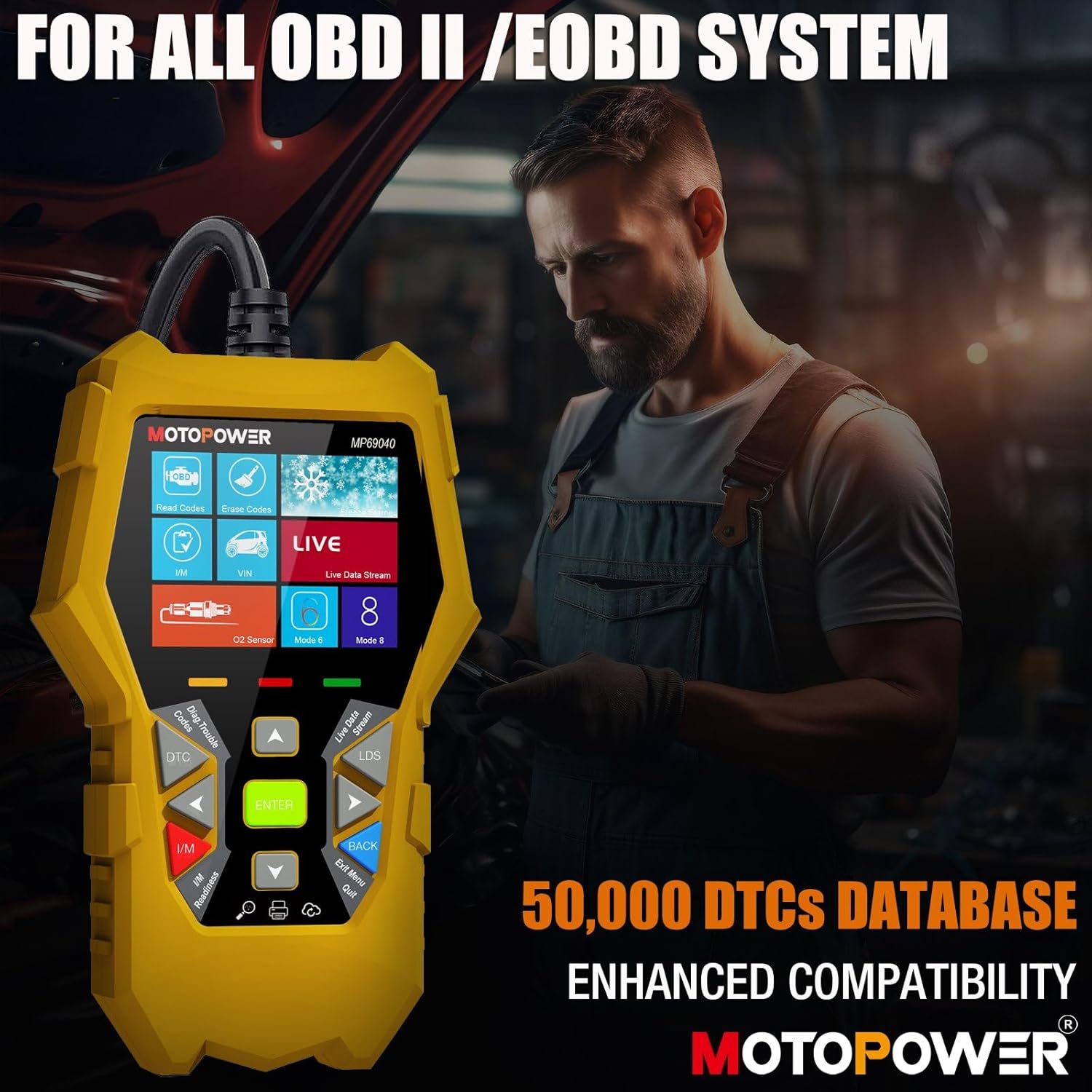
Figure 2: MOTOPOWER MP69040 OBD2 Diagnostic Scanner.
3. เนื้อหาบรรจุภัณฑ์
ตรวจสอบว่ามีรายการทั้งหมดอยู่ในแพ็คเกจ:
- MOTOPOWER MP00205B 12V Battery Charger/Maintainer
- อัลลิเกเตอร์ Clamp Harness (50amp)
- Ring Terminal Harness (7.5amp fuse protected)
- MOTOPOWER MP69040 OBD2 Diagnostic Scanner

Figure 3: MP00205B Charger and its accessories.
4. MOTOPOWER MP00205B Charger/Maintainer Setup and Operation
4.1 การเชื่อมต่อเครื่องชาร์จ
- ตรวจสอบให้แน่ใจว่าได้ถอดเครื่องชาร์จออกจากเต้าเสียบไฟ AC แล้ว
- เลือกตัวเชื่อมต่อที่เหมาะสม:
- อัลลิเกเตอร์ Clamps: เชื่อมต่อ cl สีแดงamp เข้าที่ขั้วบวก (+) ของแบตเตอรี่ และขั้วสีดำamp กับขั้วแบตเตอรี่ขั้วลบ (-)
- ขั้วแหวน: If permanently installing, connect the red ring terminal to the positive (+) battery post and the black ring terminal to the negative (-) battery post.
- Connect the SAE quick-release connector from the chosen harness to the charger's output cable.
- Plug the charger into a standard 120V AC power outlet.
4.2 กระบวนการชาร์จ
The MP00205B operates automatically. Once connected and powered, it will begin its multi-stagกระบวนการชาร์จอี:
- Desulfating: If the battery is deeply discharged or sulfated, the charger may enter a desulfation stage to recover the battery.
- การชาร์จ: The charger delivers a steady current to bring the battery to a full charge.
- การดูดซึม: The charger switches to a constant voltage, gradually reducing current as the battery approaches full capacity. This stage includes pulse charging technology to maximize battery performance.
- Charged/Maintain: Once fully charged, the charger automatically switches to maintenance mode, providing a float charge at 13.6V to keep the battery at optimal levels indefinitely without overcharging.
The LED indicators on the charger will show the current charging stage. The device features spark-free technology for enhanced safety during connection and disconnection.

Figure 4: Charger indicating Pulse Boost Technology and charging stagใช่

Figure 5: Charger displaying automatic operation and safety protections.
5. MOTOPOWER MP69040 OBD2 Scanner Setup and Operation
5.1 การเชื่อมต่อเครื่องสแกนเนอร์
- Locate the vehicle's 16-pin Data Link Connector (DLC), typically under the dashboard on the driver's side.
- ตรวจสอบให้แน่ใจว่ากุญแจรถอยู่ที่ OFF
- Plug the scanner's OBD2 cable into the vehicle's DLC.
- หมุนกุญแจรถไปที่ตำแหน่งเปิด (เครื่องยนต์สามารถดับอยู่ก็ได้) เครื่องสแกนจะเปิดใช้งานโดยอัตโนมัติ
5.2 ฟังก์ชั่นพื้นฐาน
The MP69040 scanner provides various diagnostic functions through its user-friendly interface:
- อ่านรหัส: ดึงข้อมูลรหัสปัญหาการวินิจฉัย (DTC) จากคอมพิวเตอร์ของรถยนต์
- ลบรหัส: Clears DTCs from the vehicle's computer. หมายเหตุ: การล้างรหัสข้อผิดพลาดไม่ได้แก้ไขปัญหาที่ต้นเหตุ
- ข้อมูลสด: Displays real-time data streams from the vehicle's sensors, such as Engine RPM, Fuel Pressure, and more.
- ความพร้อมของ I/M: ตรวจสอบสถานะของอุปกรณ์ตรวจวัดที่เกี่ยวข้องกับการปล่อยมลพิษ เพื่อพิจารณาว่ารถพร้อมสำหรับการทดสอบการปล่อยมลพิษหรือไม่
- Vehicle Identification (VIN): Reads the Vehicle Identification Number and other vehicle information.
- ห้องสมุด DTC: ให้คำจำกัดความสำหรับรหัสทั่วไปและรหัสเฉพาะของผู้ผลิต
- อัปเดต: Supports lifetime free online updates for the latest functions and vehicle compatibility.

Figure 6: MP69040 Scanner user interface.

Figure 7: Key features of the MP69040 Scanner.

Figure 8: Live Data display on the MP69040 Scanner.
6. การบำรุงรักษา
- การทำความสะอาด: เช็ดอุปกรณ์ด้วยผ้าแห้งเนื้อนุ่ม ห้ามใช้สารทำความสะอาดที่มีฤทธิ์กัดกร่อนหรือตัวทำละลาย
- พื้นที่จัดเก็บ: Store both the charger and scanner in a cool, dry place away from direct sunlight and extreme temperatures. Ensure cables are neatly coiled to prevent damage.
- การตรวจสอบสายเคเบิล: Regularly inspect all cables and connectors for any signs of damage, fraying, or corrosion. Replace if necessary.
7 การแก้ไขปัญหา
7.1 MP00205B Charger/Maintainer
- เครื่องชาร์จไม่เปิด: Check the AC power connection. Ensure the outlet is functional. Verify the battery connections are secure.
- ไฟแสดงสถานะการชาร์จไม่ติด: ยืนยันปริมาณแบตเตอรี่tage is above 2V. If the battery is severely discharged, it might take a few minutes for the charger to detect it. Ensure proper polarity.
- Charger not maintaining charge: Ensure the charger remains connected to both the AC outlet and the battery. Check for any loose connections.
7.2 MP69040 OBD2 Scanner
- สแกนเนอร์ไม่เปิดเครื่อง: Ensure the OBD2 cable is securely connected to the vehicle's DLC. Verify the vehicle's ignition is in the ON position.
- ข้อผิดพลาดในการสื่อสาร: Check the vehicle's ignition status. Ensure the OBD2 cable is not damaged. Try connecting to a different vehicle (if available) to rule out a vehicle-specific issue. Verify the vehicle is OBDII compliant.
- หน้าจอค้าง: ถอดสายสแกนเนอร์ออกจากรถ รอสักครู่ แล้วเสียบกลับเข้าไปใหม่
8. ข้อมูลจำเพาะ
8.1 MOTOPOWER MP00205B Charger/Maintainer
| ข้อมูลจำเพาะ | ค่า |
|---|---|
| อินพุต Voltage | 120V AC (Standard) |
| ปริมาณการส่งออกtage | กระแสตรง 12 โวลต์ |
| กระแสไฟขาออก | 1000มิลลิแอมป์ (1แอมป์) |
| ความยาวสายเคเบิล | Up to 8.5FT (18AWG UL standard) |
| คุณสมบัติด้านความปลอดภัย | Spark-free, Overcharge Protection |
| การรับรอง | CE,FCC,UL.รับรอง |
8.2 MOTOPOWER MP69040 OBD2 Scanner
| ข้อมูลจำเพาะ | ค่า |
|---|---|
| แสดง | หน้าจอสี TFT ขนาด 2.8 นิ้ว |
| โปรโตคอลที่รองรับ | KWP2000, J1850 VPW, ISO9141, J1850 PWM, CAN |
| ความเข้ากันได้ของยานพาหนะ | 1996 US-based, 2003 EU-based, 2008 Asian-based and newer OBD2/CAN vehicles (excluding new energy/hybrid) |
| ฐานข้อมูล DTC | 50,000+ codes |
| ภาษา | 10 ภาษาในตัว |
9. การรับประกันและการสนับสนุน
MOTOPOWER products are designed for reliability and performance. For warranty information, technical support, or service inquiries, please contact MOTOPOWER customer support through their official webโปรดติดต่อเว็บไซต์หรือร้านค้าที่คุณซื้อสินค้า โปรดเตรียมหมายเลขรุ่นสินค้าและวันที่ซื้อสินค้าให้พร้อมเมื่อติดต่อฝ่ายสนับสนุน


