1. บทนำ
This manual provides detailed instructions for the installation, setup, and operation of your ZTUZAUTO Wireless CarPlay Android Auto Retrofit Kit. This kit is designed to integrate advanced smartphone connectivity into your Audi's existing MMI 2G system, enhancing your driving experience with features like wireless CarPlay, Android Auto, and mirror linking.
โปรดอ่านคู่มือนี้อย่างละเอียดก่อนการติดตั้งและการใช้งาน เพื่อให้มั่นใจได้ว่าอุปกรณ์จะทำงานได้อย่างถูกต้อง และเพื่อหลีกเลี่ยงความเสียหายใดๆ ต่อรถยนต์หรือตัวผลิตภัณฑ์
2. ความเข้ากันได้
This retrofit kit is specifically designed for the following Audi models equipped with the MMI 2G System:
- Audi A1 (Model Years: 2012-2018)
- Audi Q3 (Model Years: 2013-2018)
Important: This kit is only compatible with vehicles featuring the MMI 2G System. Please verify your vehicle's MMI system version before proceeding with installation.

Image: Compatible Model List for Audi MMI 2G System, indicating RMC version, Audi model, years 2012-2018, and 6.5" screen size.
3. คุณสมบัติหลัก
- CarPlay แบบไร้สายและ Android Auto: Seamless integration for navigation, calls, messages, and music via Siri or Google Assistant.
- ฟังก์ชัน Mirror Link: Supports Airplay (for iOS) and AutoLink (for Android) to mirror your phone screen for YouTube, TV news, photos, and navigation.
- Enhanced Camera Support: Automatic activation of the reverse camera when shifting into reverse. Supports aftermarket reverse cameras, 360-degree cameras, and front view camera DVR with dynamic guidance lines.
- การติดตั้งแบบพลักแอนด์เพลย์: Designed for direct connection with original car wiring, eliminating the need for cutting or breaking wires. Retains the factory screen.
- ฟังก์ชันการทำงานดั้งเดิมของรถยนต์: Maintains full functionality of original car controls, including steering wheel buttons and MMI controls for navigation and audio.

Image: Dashboard display showcasing both Wireless CarPlay and Android Auto interfaces, highlighting various compatible applications.

Image: Visual representation of the product's core functionalities: Wireless CarPlay, Wireless Android Auto, and Wireless Mirror Link.
4. เนื้อหาบรรจุภัณฑ์
โปรดตรวจสอบให้แน่ใจว่ามีอุปกรณ์ครบถ้วนก่อนเริ่มการติดตั้ง:
- ZTUZAUTO CarPlay/Android Auto Module
- สายไฟ
- เสาอากาศ WiFi
- LVDS In Cable
- LVDS Out Cable
- DB Cable
- ไมโครโฟน
- Installation Manual & Tool (if included)

Image: Contents of the product package, including the main module and various connecting cables and accessories.
5. คู่มือการติดตั้ง
The installation process involves connecting the retrofit kit to your vehicle's existing wiring harness. It is designed to be plug-and-play without requiring wire cutting. However, professional installation is recommended if you are not familiar with car electronics.
5.1. ข้อควรระวัง
- Before installation, ensure your car's model and year are compatible with the kit.
- Refer to the provided wiring diagram and dial code (if applicable) that matches your car's model.
- After installation, confirm all functions of the module work correctly before reassembling the dashboard to avoid inconvenience.
- ถอดแบตเตอรี่รถยนต์ออกก่อนเริ่มงานเกี่ยวกับระบบไฟฟ้าใดๆ
5.2. General Steps (Refer to specific wiring diagram for your model)
- Carefully remove the necessary trim panels and the original MMI unit from your dashboard.
- Connect the provided power cable to the original car's power harness.
- Connect the LVDS IN and LVDS OUT cables between the original MMI unit and the new module.
- Connect the WiFi antenna and microphone to the module.
- If installing a reverse camera, connect its wiring to the designated input on the module.
- Securely mount the module in a suitable location behind the dashboard.
- ทดสอบฟังก์ชันทั้งหมดก่อนประกอบแผงหน้าปัดกลับเข้าที่อย่างสมบูรณ์

Image: Illustration of the plug-and-play installation, emphasizing no wire cutting and retention of the factory screen.
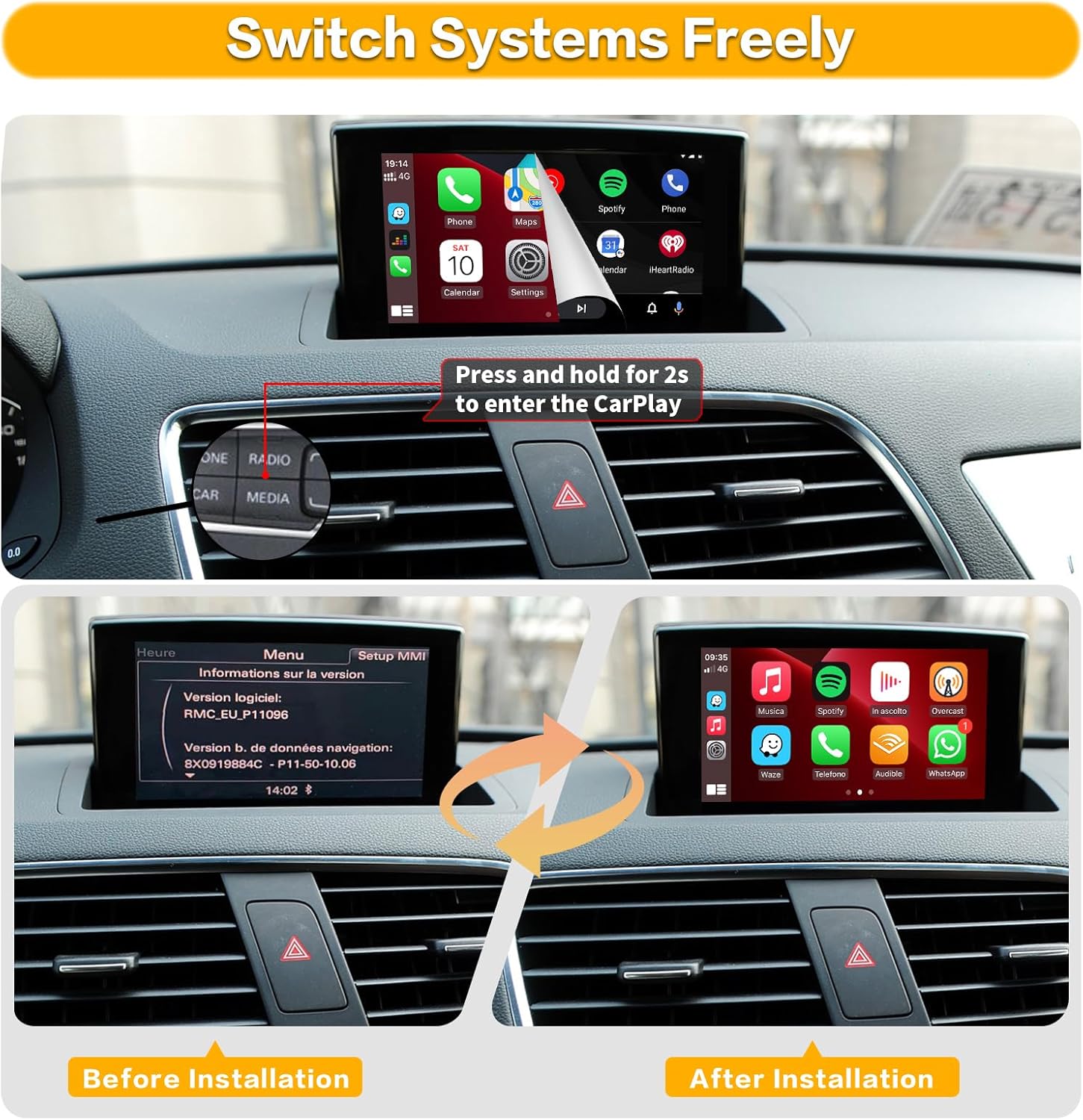
Image: Comparison of the car's display before and after the retrofit kit installation, showing the transition from the original MMI menu to the CarPlay interface.

Image: Instructions for setting up audio via AUX input or Bluetooth, and wiring for original and aftermarket reverse cameras.
5.3. วิดีโอการติดตั้ง
Video: Detailed installation guide for the Road Top Wireless Carplay Module for Audi Car. This video demonstrates the physical installation process.
6. Initial Setup and Connection
6.1. การเชื่อมต่อ CarPlay แบบไร้สาย
- โปรดตรวจสอบให้แน่ใจว่าได้เปิดใช้งาน Bluetooth และ Wi-Fi บน iPhone ของคุณแล้ว
- On your car's screen, navigate to the CarPlay interface.
- On your iPhone, go to Bluetooth settings and search for the device named "ZTUZAUTO Box_FXX" (where FXX is a specific identifier).
- Pair your iPhone with the device. Confirm the pairing code on both your phone and the car screen.
- Once paired via Bluetooth, your iPhone will prompt you to enable CarPlay. Accept the prompt.
- CarPlay should now connect wirelessly.
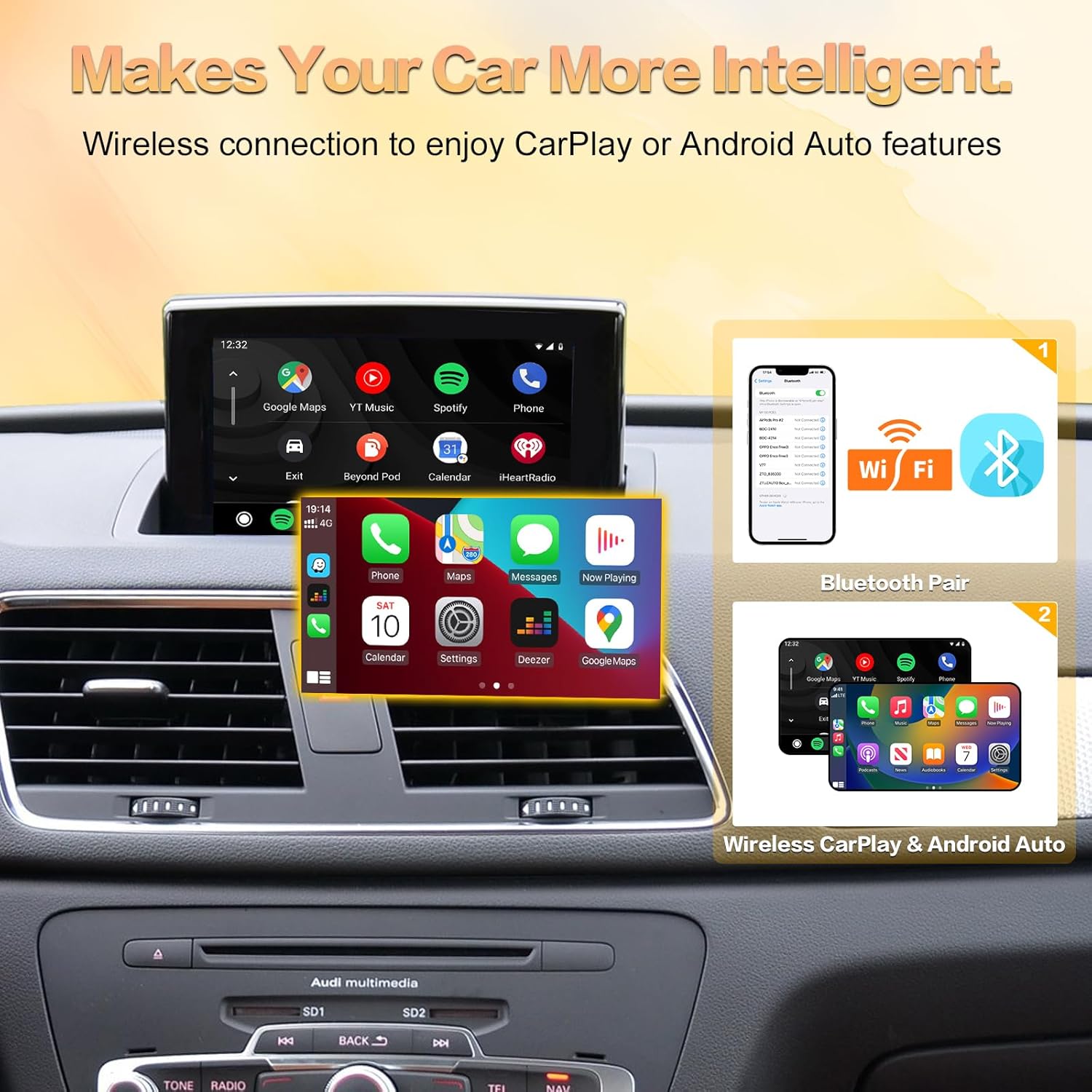
Image: Step-by-step visual guide for connecting your smartphone to the system via Bluetooth and Wi-Fi for wireless CarPlay or Android Auto.
6.2. การเชื่อมต่ออัตโนมัติของ Android แบบไร้สาย
- Ensure your Android phone's Bluetooth and Wi-Fi are enabled.
- On your car's screen, navigate to the Android Auto interface.
- On your Android phone, go to Bluetooth settings and search for the device named "ZTUZAUTO Box_FXX".
- Pair your Android phone with the device. Confirm the pairing code on both your phone and the car screen.
- Once paired via Bluetooth, Android Auto should connect wirelessly.
6.3. การตั้งค่าเสียง
To ensure audio from the CarPlay/Android Auto module plays through your car's speakers:
- Method 1 (AUX Input):
- Disconnect Bluetooth between your phone and your car's original system.
- Set your car's audio source to "AUX".
- Enter the "Media" interface and select "External audio input".
- Method 2 (Bluetooth):
- Access the Settings interface -> Factory Mode -> Phone Link setting -> Open the option "Disable phone link audio" -> Reboot.
- Then pair your smartphone with the original vehicle's Bluetooth.
- Select the original car Bluetooth for both the phone and music sound sources in the original car media settings.
6.4. Connection Video
Video: Demonstration of wireless CarPlay and Android Auto connection steps, showing phone pairing and interface display.
7. การดำเนินการ
7.1 การสลับระหว่างระบบ
To switch between the original MMI system and the CarPlay/Android Auto interface, press and hold the "NAV" or "MEDIA" button on your car's controls for approximately 2 seconds.
7.2. Using CarPlay/Android Auto
Once connected, your car's screen will display the CarPlay or Android Auto interface. You can interact with it using:
- Original MMI Controls: Use the central control panel (rotary knob and surrounding buttons) to navigate and select options.
- ปุ่มบนพวงมาลัย: Utilize the steering wheel controls for volume adjustment, track skipping, and activating voice commands.
- การควบคุมด้วยเสียง: Activate Siri (for CarPlay) or Google Assistant (for Android Auto) by pressing the voice command button on your steering wheel or saying "Hey Siri" / "Hey Google" (if enabled).

Image: Demonstration of how the original car's steering wheel buttons and central control panel can be used to operate the CarPlay interface.

Image: Visual guide to using the Intelligent Voice System with Siri for CarPlay and Google Assistant for Android Auto, including exampคำสั่ง
7.3. ลิงก์มิเรอร์
The Mirror Link function allows you to display your smartphone's screen directly on the car's display. This is useful for apps not natively supported by CarPlay or Android Auto, such as YouTube.
- For iOS devices, use Airplay.
- For Android devices, use AutoLink.
Video: Demonstration of the Road Top Wireless Carplay Android Auto Retrofit Kit in action, showcasing various features including mirror link.
8 การแก้ไขปัญหา
| ปัญหา | สาเหตุที่เป็นไปได้ | สารละลาย |
|---|---|---|
| ไม่มีภาพแสดงผลหลังการติดตั้ง | Incorrect wiring, loose connections, or incorrect MMI system selection. | Double-check all cable connections. Ensure the LVDS cables are correctly inserted. Verify your MMI system is 2G. |
| No sound from CarPlay/Android Auto. | Incorrect audio source selected in the car's MMI, or phone Bluetooth not properly configured. | Ensure your car's audio source is set to AUX. Follow the audio setup instructions in Section 6.3. |
| การเชื่อมต่อ Wireless CarPlay/Android Auto ล้มเหลว | Bluetooth or Wi-Fi issues on phone, incorrect pairing, or module not powered correctly. | Restart your phone and the car's MMI system. Forget the device in your phone's Bluetooth settings and re-pair. Ensure Wi-Fi is enabled on your phone. |
| Steering wheel controls not working with CarPlay/Android Auto. | Module not fully integrated or specific settings required. | Ensure all CANBUS connections are secure. Check module settings for steering wheel control configuration. |
| Voice commands (Siri/Google Assistant) not responding. | Microphone not connected, or system not configured to use the module's microphone. | Verify the microphone is securely connected to the module. Check module settings for microphone input. |
9. ข้อมูลจำเพาะ
- ขนาดสินค้า : 0.33 x 5.59 x 0.09 นิ้ว
- น้ำหนักสินค้า: 2.31 ปอนด์
- เทคโนโลยีการเชื่อมต่อ: บลูทู ธ Wi-Fi
- ประเภทตัวควบคุม: Android, Google Assistant, iOS
- คุณสมบัติพิเศษ: Amazon Music, Android Auto, Apple CarPlay, Built-In Bluetooth, Spotify
- อุปกรณ์ที่รองรับ: สมาร์ทโฟน ลำโพง
- พอร์ต HDMI ทั้งหมด: 1
- ประเภทตัวเชื่อมต่อ: USB, HDMI, RCA
- โหมดเอาต์พุตเสียง: ล้อมรอบ
- การกำหนดค่าช่องสัญญาณเสียงรอบทิศทาง: 4.0
- การเข้ารหัสวิดีโอ: H.264, H.265/HEVC, MPEG-4 เป็นต้น
10. การรับประกันและการสนับสนุน
This ZTUZAUTO Wireless CarPlay Android Auto Retrofit Kit comes with a รับประกัน 1 ปี ตั้งแต่วันที่ซื้อสินค้า
For technical support, installation assistance, or any questions regarding your product, please contact ZTUZAUTO customer service. We aim to provide after-sales technical support within 24 hours.
หากต้องการความช่วยเหลือเพิ่มเติม โปรดไปที่ ZTUZAUTO Store on Amazon.


