สินค้าเกินview
The MONODEAL MD08 Air Conduction Headphones are designed for comfort and clear communication, featuring an open-ear design, Bluetooth 5.1 connectivity, and a noise-canceling microphone with a mute function. These headphones transmit sound through air conduction, providing an alternative to traditional in-ear or bone conduction devices, aiming to reduce pressure and discomfort during extended use.

Image: MONODEAL MD08 Air Conduction Headphones, showcasing the open-ear design and boom microphone.
มีอะไรอยู่ในกล่อง
- Air Conduction Headphones (1 unit)
- สายชาร์จ USB-C (1 ชิ้น)
- คู่มือผู้ใช้ (1 หน่วย)
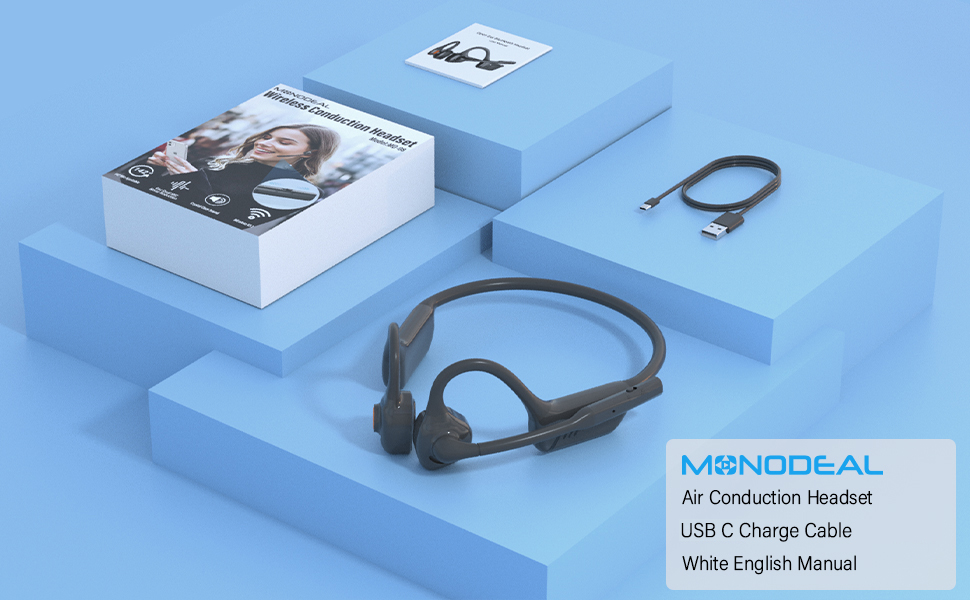
Image: The MONODEAL MD08 headphones, USB-C charging cable, and user manual laid out, representing the package contents.
การตั้งค่า
1. การชาร์จหูฟัง
Before initial use, fully charge the headphones. Connect the provided USB-C charging cable to the charging port on the headphones and plug the other end into a compatible USB power source. A full charge typically takes approximately 2 hours.

Image: Diagram illustrating the charging process and battery life indicators: 8 hours usage, 36 hours standby, 2 hours charging time.
2. การจับคู่บลูทู ธ
To connect your MONODEAL MD08 headphones to a device:
- ตรวจสอบให้แน่ใจว่าหูฟังปิดอยู่
- Press and hold the multi-function button until the indicator light flashes red and blue, indicating pairing mode.
- บนอุปกรณ์ของคุณ (สมาร์ทโฟน แท็บเล็ต คอมพิวเตอร์) เปิดใช้งาน Bluetooth และค้นหาอุปกรณ์ที่มีอยู่
- Select "MD08" from the list of found devices to connect. A voice prompt will confirm successful pairing.
3. Multi-Point Connection (Connecting to Two Devices Simultaneously)
The MD08 headphones support connecting to two Bluetooth devices at the same time. This allows you to seamlessly switch between audio sources, for example, listening to music on your tablet and answering calls on your phone.
- ขั้นตอนที่ 1: Pair the headphones with the first device (e.g., your phone) as described in the Bluetooth Pairing section.
- ขั้นตอนที่ 2: Once connected to the first device, turn off Bluetooth on the first device. This will put the headphones back into pairing mode.
- ขั้นตอนที่ 3: Pair the headphones with the second device (e.g., your tablet).
- ขั้นตอนที่ 4: Turn Bluetooth back on for the first device. The headphones should automatically reconnect to both devices.
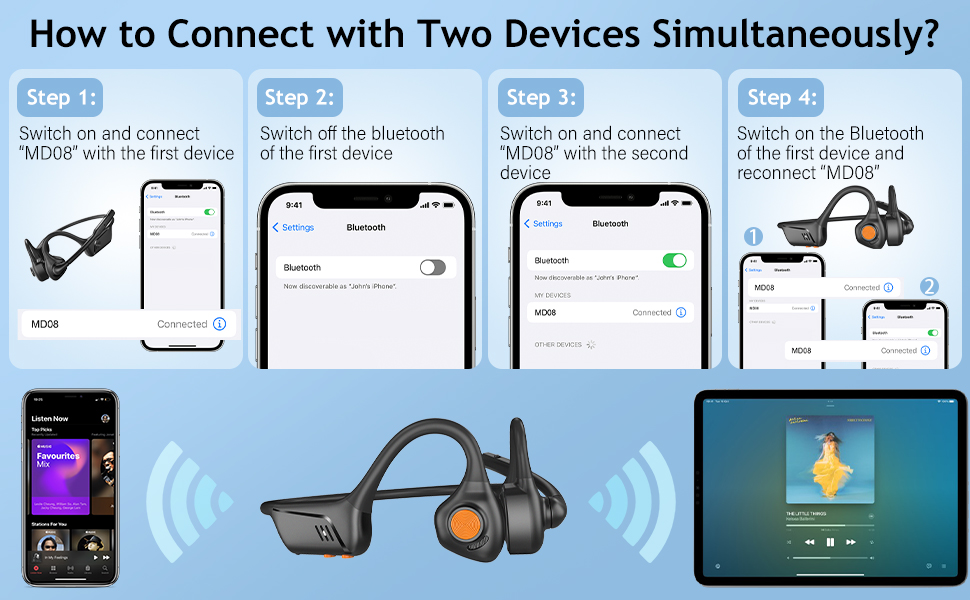
Image: Visual guide demonstrating the four steps to connect the MD08 headphones to two devices simultaneously, showing a phone and a tablet.
คำแนะนำการใช้งาน
1. การสวมหูฟัง
Position the headphones with the speakers resting gently in front of your ears, allowing the sound to be transmitted through air conduction. The flexible band should rest comfortably around the back of your head. The open-ear design ensures you remain aware of your surroundings.

Image: A man wearing the MD08 headphones, illustrating the open-ear design and comfortable fit, emphasizing its lightweight nature (40g) and stable design.
2. การควบคุมพื้นฐาน
The headphones feature a multi-functional button and volume controls for easy operation:
- เปิด/ปิดเครื่อง: กดปุ่มมัลติฟังก์ชันค้างไว้
- เล่น/หยุดชั่วคราว: กดปุ่มมัลติฟังก์ชั่นเพียงครั้งเดียว
- รับ/วางสาย: กดปุ่มมัลติฟังก์ชันเพียงครั้งเดียวขณะมีสายเรียกเข้าหรือกำลังสนทนาอยู่
- ปฏิเสธสาย: กดปุ่มมัลติฟังก์ชันค้างไว้ขณะมีสายเรียกเข้า
- เพิ่ม/ลดระดับเสียง: ใช้ปุ่มปรับระดับเสียงที่กำหนดไว้
- เพลงถัดไป: กดปุ่มมัลติฟังก์ชั่นสองครั้ง
- แทร็กก่อนหน้า: กดปุ่มมัลติฟังก์ชั่นสามครั้ง
- เปิดใช้งานผู้ช่วยเสียง (Siri/Google Assistant): กดปุ่มมัลติฟังก์ชั่นค้างไว้ 2 วินาที

Image: A user demonstrating the controls of the MD08 headphones, with icons indicating functions like Play/Pause, Skip Track, Control Calls, Volume+/-, and Voice Assistant.
3. ฟังก์ชันปิดเสียงไมโครโฟน
The MD08 headphones feature a dedicated mute button on the microphone boom. During a call, you can easily touch this button to mute or unmute your microphone, providing privacy when needed.

Image: A woman using the MD08 headphones, highlighting the microphone mute function and environmental noise reduction technology, showing 96% noise filtered during calls.
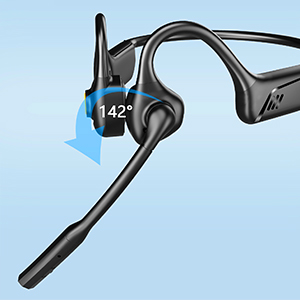
Image: Close-up of the MD08 microphone, showing its 142-degree rotation capability for optimal positioning.
การซ่อมบำรุง
- การทำความสะอาด: ใช้ผ้าแห้งนุ่มๆ เช็ดทำความสะอาดหูฟัง หลีกเลี่ยงการใช้สารเคมีรุนแรงหรือวัสดุที่มีฤทธิ์กัดกร่อน
- พื้นที่จัดเก็บ: เก็บหูฟังไว้ในที่แห้งและเย็น หลีกเลี่ยงแสงแดดโดยตรงและอุณหภูมิที่สูงหรือต่ำเกินไป
- การชาร์จ: เพื่อยืดอายุการใช้งานแบตเตอรี่ ควรหลีกเลี่ยงการใช้แบตเตอรี่จนหมดบ่อยๆ ควรชาร์จหูฟังเป็นประจำ แม้จะไม่ได้ใช้งานเป็นเวลานานก็ตาม
- ความต้านทานน้ำ: While designed for active use, avoid submerging the headphones in water.
การแก้ไขปัญหา
| ปัญหา | สารละลาย |
|---|---|
| หูฟังไม่สามารถเปิดเครื่องได้ | ตรวจสอบให้แน่ใจว่าหูฟังชาร์จเต็มแล้ว เสียบปลั๊กแล้วลองอีกครั้ง |
| ไม่สามารถจับคู่กับอุปกรณ์ได้ |
|
| ไม่มีเสียงหรือเสียงเบา |
|
| ไมโครโฟนไม่ทำงาน |
|
| การเชื่อมต่อไม่ต่อเนื่อง |
|
ข้อมูลจำเพาะ
| คุณสมบัติ | รายละเอียด |
|---|---|
| ชื่อรุ่น | MD08 |
| เทคโนโลยีการเชื่อมต่อ | ไร้สาย (Bluetooth) |
| เวอร์ชันบลูทูธ | 5.1 |
| ช่วงบลูทูธ | สูงถึง 10 เมตร (33 ฟุต) |
| ประเภทไดร์เวอร์เสียง | Air Conduction Driver |
| อายุการใช้งานแบตเตอรี่ (เวลาเล่นเพลง/สนทนา) | นานถึง 8 ชั่วโมง |
| เวลาสแตนด์บาย | นานถึง 36 ชั่วโมง |
| เวลาในการชาร์จ | ประมาณ 2 ชั่วโมง |
| พอร์ตชาร์จ | ยูเอสบี-ซี |
| น้ำหนัก | 1.41 ออนซ์ (ประมาณ 40 กรัม) |
| การวางตำแหน่งหู | หูเปิด |
| การควบคุมเสียงรบกวน | ระบบตัดเสียงรบกวนแบบแอคทีฟ (สำหรับไมโครโฟน) |
| คุณสมบัติพิเศษ | Microphone Included, Multipoint Pairing, Rechargeable Battery, Volume Control, Mute Function |
การรับประกันและการสนับสนุน
MONODEAL products are designed and manufactured to high-quality standards. For warranty information, technical support, or customer service inquiries, please refer to the contact information provided with your purchase or visit the official MONODEAL webเว็บไซต์.
Manufacturer: MONODEAL


