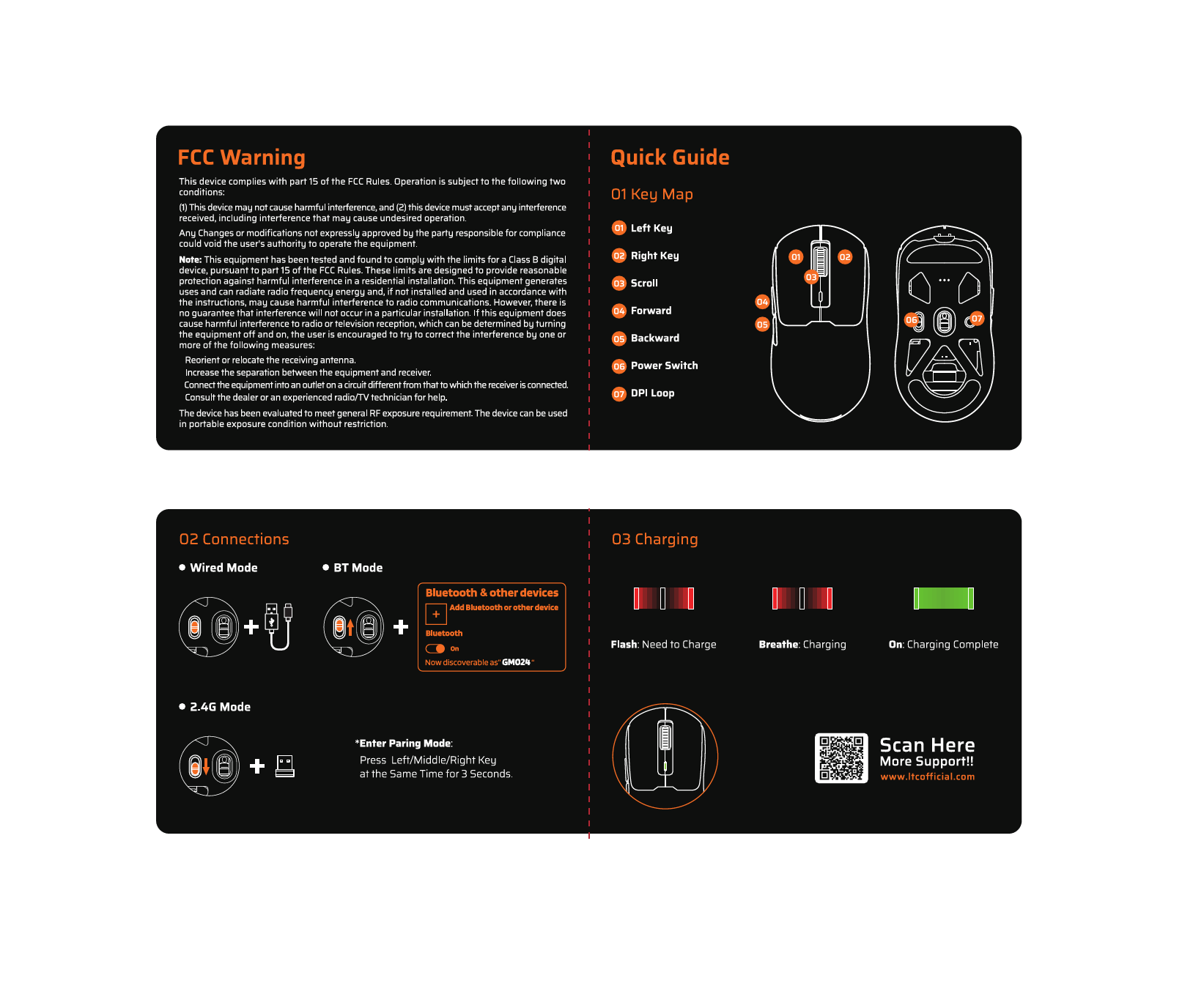
1. บทนำ
The LTC GM022 is an ultralight 3-mode wireless gaming mouse designed for precision and versatility. It features a high-performance PAW3395 sensor, multiple connectivity options, and a convenient RGB charging dock. This manual provides instructions for setting up, operating, maintaining, and troubleshooting your GM022 mouse.
เนื้อหาแพ็คเกจ
- LTC GM022 Gaming Mouse
- แท่นชาร์จ RGB
- สาย USB-C
- 2.4G USB Receiver (stored in mouse)

LTC GM022 Wireless Gaming Mouse with RGB Charging Dock and 2.4G USB Receiver.
2. การตั้งค่าและการเชื่อมต่อ
The LTC GM022 mouse offers three connectivity modes: 2.4GHz wireless, Bluetooth 5.0, and wired USB-C. Select the mode that best suits your needs.

Diagram illustrating the three connectivity modes: 2.4GHz wireless, Bluetooth 5.1, and USB-C wired connection.
2.1. โหมดไร้สาย 2.4GHz
- ค้นหาตัวรับสัญญาณ USB 2.4G ที่เก็บไว้ในช่องด้านล่างของเมาส์
- เสียบตัวรับสัญญาณ USB เข้ากับพอร์ต USB ที่พร้อมใช้งานบนคอมพิวเตอร์ของคุณ
- เลื่อนสวิตช์โหมดที่ด้านล่างของเมาส์ไปที่ตำแหน่ง "2.4G"
- เมาส์ควรเชื่อมต่อกับคอมพิวเตอร์ของคุณโดยอัตโนมัติ
2.2. โหมดบลูทูธ 5.0
- Slide the mode switch on the bottom of the mouse to the "BT" position.
- บนคอมพิวเตอร์หรืออุปกรณ์ของคุณ เปิดการตั้งค่าบลูทูธและค้นหาอุปกรณ์ใหม่
- Select "LTC GM022" from the list of available devices to pair.
2.3. โหมด USB-C แบบมีสาย
- เชื่อมต่อสาย USB-C ที่ให้มาเข้ากับพอร์ตด้านหน้าของเมาส์
- เชื่อมต่อปลายอีกด้านหนึ่งของสาย USB-C เข้ากับพอร์ต USB ที่ว่างอยู่บนคอมพิวเตอร์ของคุณ
- เมาส์จะทำงานในโหมดมีสายและชาร์จพร้อมกัน

Underside of the LTC GM022 mouse with labels for mode switch, dongle storage, PTFE feet, and DPI loop button.
3. คู่มือการใช้งาน
3.1. ปุ่มฟังก์ชัน
The LTC GM022 mouse features 5 programmable buttons:
- คลิกซ้าย: การดำเนินการหลัก
- คลิกขวา: เมนูการดำเนินการรอง/บริบท
- คลิกกลาง (ล้อเลื่อนของเมาส์): Scroll up/down, click for universal scroll or other assigned function.
- ปุ่มไปข้างหน้า: นำทางไปข้างหน้าใน web เบราว์เซอร์หรือ file นักสำรวจ
- ปุ่มย้อนกลับ: นำทางย้อนกลับใน web เบราว์เซอร์หรือ file นักสำรวจ

Illustration of the LTC GM022 mouse highlighting its five programmable buttons and their default assignments.
3.2. การปรับ DPI
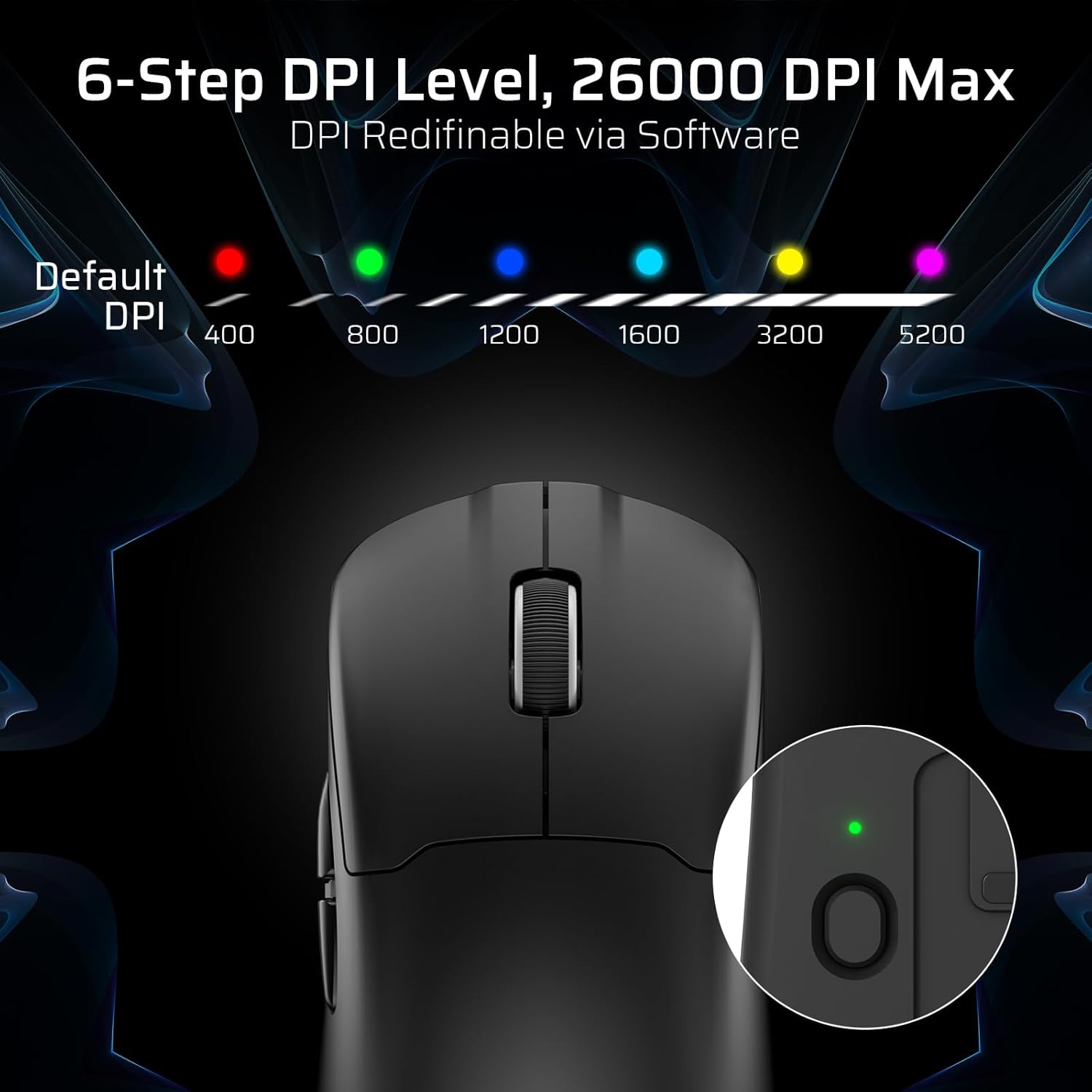
The mouse has a dedicated DPI button on its underside, allowing you to cycle through 6 preset DPI levels. Each level is indicated by a different LED color:
- 400 DPI (สีแดง)
- 800 DPI (สีเขียว)
- 1200 DPI (สีน้ำเงิน)
- 1600 DPI (สีฟ้า)
- 3200 DPI (สีเหลือง)
- 5200 DPI (Magenta)
These DPI levels can be further customized and redefined up to 26000 DPI using the LTC software.

Visual representation of the 6-step DPI levels (400, 800, 1200, 1600, 3200, 5200) and the corresponding LED indicator colors.
3.3. การปรับแต่งซอฟต์แวร์
Download and install the official LTC software from the manufacturer's website to unlock full customization options. The software allows you to:
- กำหนดมาโครให้กับปุ่มต่างๆ
- รีแมปฟังก์ชันคีย์
- Redefine 6-step DPI levels up to 26000 DPI.
- Adjust polling rate (up to 1000Hz).
- Modify click and scroll speed.
- ตรวจสอบสถานะแบตเตอรี่

Screenshot of the LTC software interface for customizing mouse settings, including key assignments, DPI, polling rate, and battery monitoring.
4. การชาร์จเมาส์
The LTC GM022 mouse is equipped with a 400mAh battery and can be charged using the included magnetic RGB charging dock or directly via the USB-C cable.
4.1. Using the Magnetic Charging Dock
- เชื่อมต่อสาย USB-C เข้ากับแท่นชาร์จ จากนั้นเชื่อมต่อกับแหล่งจ่ายไฟ (เช่น พอร์ต USB ของคอมพิวเตอร์ อะแดปเตอร์ USB ติดผนัง)
- Place the mouse onto the charging dock. The magnetic connection will secure it in place, and charging will begin automatically.
- The RGB lighting on the dock will indicate charging status.
4.2. Direct USB-C Charging
- Connect the USB-C cable directly to the mouse's front port.
- เชื่อมต่อปลายอีกด้านของสาย USB-C เข้ากับแหล่งจ่ายไฟ
- สามารถใช้งานเมาส์แบบมีสายขณะชาร์จไฟได้

The LTC GM022 mouse magnetically charging on its RGB illuminated dock, indicating a 400mAh battery.
5. การบำรุงรักษาและการดูแล
To ensure the longevity and optimal performance of your LTC GM022 mouse, follow these maintenance guidelines:
- การทำความสะอาด: ใช้ผ้านุ่มและแห้งเช็ดพื้นผิวของเมาส์ สำหรับคราบสกปรกฝังแน่น ให้เช็ดเบาๆampชุบผ้าด้วยน้ำหรือน้ำยาทำความสะอาดอ่อนๆ หลีกเลี่ยงสารเคมีรุนแรงหรือสารกัดกร่อน
- การดูแลเซ็นเซอร์: รักษาเซ็นเซอร์ออปติคัลที่อยู่ใต้เมาส์ให้สะอาดและปราศจากฝุ่นหรือเศษต่างๆ เพื่อรักษาความแม่นยำในการติดตาม
- ฟุตเทฟล่อน: The mouse comes with durable PTFE feet for smooth gliding. If they show significant wear, replacement feet may be available from the manufacturer.
- พื้นที่จัดเก็บ: เมื่อไม่ได้ใช้งานเป็นเวลานาน ควรเก็บเมาส์ไว้ในสภาพแวดล้อมที่สะอาดและแห้ง
Close-up of the mouse's underside, detailing the PTFE feet for smooth gliding and the inclusion of backup feet.
6 การแก้ไขปัญหา
If you encounter issues with your LTC GM022 mouse, refer to the following common problems and solutions:
| ปัญหา | วิธีแก้ปัญหาที่เป็นไปได้ |
|---|---|
| Mouse not responding in 2.4G wireless mode | Ensure the USB receiver is securely plugged in. Check if the mouse mode switch is set to "2.4G". Try a different USB port. Ensure the mouse battery is charged. |
| Mouse not connecting via Bluetooth | Ensure the mouse mode switch is set to "BT". Make sure Bluetooth is enabled on your device. Remove previous pairings and re-pair the mouse. Ensure the mouse battery is charged. |
| เมาส์ไม่ชาร์จ | Ensure the USB-C cable is properly connected to both the dock/mouse and the power source. Verify the power source is active. Clean the charging contacts on the mouse and dock. |
| การติดตามที่ไม่ถูกต้องหรือความล่าช้าของเคอร์เซอร์ | Clean the optical sensor on the underside of the mouse. Ensure you are using the mouse on a suitable surface (e.g., a mouse pad). Check for interference in wireless modes. Adjust DPI settings. |
| ปุ่มไม่ตอบสนอง | Ensure the mouse is powered on and connected. If using software, check button assignments. Try restarting your computer. |
If the issue persists after trying these solutions, please contact LTC customer support for further assistance.
7. ข้อมูลจำเพาะ
Key technical specifications for the LTC GM022 Ultralight 3-Mode Wireless Gaming Mouse:
- แบบอย่าง: จีเอ็ม022
- การเชื่อมต่อ: 2.4GHz ไร้สาย, บลูทูธ 5.0, USB-C แบบมีสาย
- เซ็นเซอร์: เซ็นเซอร์ออปติคัล PixArt PAW3395
- DPI สูงสุด: 26000 DPI (6-step re-definable via software)
- อัตราการสำรวจความคิดเห็น: 1000เฮิรตซ์
- ติดตามความเร็ว: 650 IPS
- ความเร่ง: 50จี
- ปุ่ม: 5 ปุ่มตั้งโปรแกรมได้
- อายุการใช้งานของสวิตช์: 80 ล้านคลิก
- แบตเตอรี่: 400mAh ลิเธียมโพลิเมอร์
- น้ำหนัก: ประมาณ 55 กรัม (2.01 ออนซ์)
- ขนาด : 4.7 x 2.44 x 0.04 นิ้ว
- คุณสมบัติพิเศษ: RGB Charging Dock, Ultralight Design, PTFE Feet

รายละเอียด view of the PixArt PAW3395 sensor specifications including 26K DPI Max, 1000Hz Polling Rate, 650 IPS Tracking Speed, and 50G Acceleration.

Illustration highlighting the durable switches with an 80 million click lifespan.
8. การรับประกันและการสนับสนุน
LTC products are designed and manufactured to the highest quality standards. For information regarding warranty coverage, technical support, or to download the latest software and drivers, please visit the official LTC webเว็บไซต์หรือติดต่อฝ่ายบริการลูกค้าของพวกเขา
เก็บใบเสร็จรับเงินของคุณไว้เป็นหลักฐานการซื้อสำหรับการเรียกร้องการรับประกัน