การแนะนำ
Welcome to the Smart Tech 32HG01VC LED HD Smart TV user manual. This guide provides comprehensive instructions for setting up, operating, and maintaining your new television. The Smart Tech 32HG01VC offers an immersive visual experience with its 32-inch high-definition LED screen, vibrant colors, and smart connectivity powered by Google TV. Enjoy seamless access to streaming applications, integrated internet browsing, and high-fidelity audio. Its elegant and minimalist design integrates perfectly into any living space.
ข้อมูลด้านความปลอดภัย
โปรดอ่านคำแนะนำด้านความปลอดภัยทั้งหมดอย่างละเอียดก่อนใช้งานทีวี เก็บคู่มือนี้ไว้เพื่อใช้อ้างอิงในอนาคต
- แหล่งพลังงาน: ตรวจสอบให้แน่ใจว่าทีวีเชื่อมต่อกับแหล่งจ่ายไฟที่ตรงกับระดับเสียงtage specified on the rating label. Use only the provided 12-volt charger or a compatible power adapter.
- การระบายอากาศ : อย่าปิดกั้นช่องระบายอากาศ เว้นระยะห่างรอบทีวีให้เพียงพอเพื่อให้อากาศถ่ายเทได้สะดวก ป้องกันความร้อนสูงเกินไป
- น้ำและความชื้น: อย่าให้ทีวีโดนฝนหรือความชื้น อย่าวางสิ่งของที่บรรจุของเหลว เช่น แจกัน บนทีวี
- การทำความสะอาด: ถอดปลั๊กทีวีก่อนทำความสะอาด ใช้ผ้านุ่มและแห้ง ห้ามใช้น้ำยาทำความสะอาดชนิดน้ำหรือสเปรย์ทำความสะอาด
- การจัดวาง: Place the TV on a stable, flat surface or mount it securely to a wall using a compatible VESA mount (100x100mm). Avoid placing it in direct sunlight or near heat sources.
- ฟ้าผ่า: เพื่อความปลอดภัยยิ่งขึ้นในระหว่างเกิดพายุฝนฟ้าคะนองหรือเมื่อปล่อยทิ้งไว้โดยไม่มีคนดูแลเป็นเวลานาน ให้ถอดปลั๊กทีวีออกจากเต้ารับและถอดสายอากาศหรือสายเคเบิลออกด้วย
- แบตเตอรี่: The remote control requires 2 AAA batteries. Ensure correct polarity when inserting. Do not mix old and new batteries or different types of batteries.
เนื้อหาแพ็คเกจ
ตรวจสอบว่ามีรายการทั้งหมดรวมอยู่ในแพ็คเกจ:
- Smart Tech 32HG01VC LED HD Smart TV
- รีโมทคอนโทรล
- ชั้นวางทีวี (2 ชิ้น)
- สกรูสำหรับขาตั้งทีวี
- 12-Volt Car Charger
- คู่มือการใช้งาน (เอกสารนี้)
- แบตเตอรี่ AAA (2 ก้อน) สำหรับรีโมทคอนโทรล

Figure 1: Smart Tech 32HG01VC LED HD Smart TV. This image displays the front of the television, highlighting its Google TV capabilities and various streaming service logos.

Figure 2: Included 12-Volt Car Charger. This image shows the power adapter designed for use in vehicles, featuring a cigarette lighter plug.
การตั้งค่า
1. การติดตั้งขาตั้งทีวี
- วางทีวีคว่ำหน้าลงบนพื้นผิวที่นุ่มและสะอาดอย่างระมัดระวังเพื่อป้องกันไม่ให้หน้าจอเสียหาย
- จัดวางขาตั้งให้ตรงกับช่องที่ด้านล่างของทีวี
- ยึดขาตั้งโดยใช้สกรูที่ให้มา
2. การติดตั้งบนผนัง (ทางเลือก)
If you choose to wall mount your TV, ensure you use a VESA compatible mount (100x100mm). Refer to your wall mount's instructions for proper installation. Remove the TV stand before mounting.

Figure 3: TV Dimensions. This image shows the front and side views of the TV with measurements for width, height, and depth, including the stand.

Figure 4: Rear Panel Connections. This image illustrates the back of the TV, detailing the location of USB, DVB-T/T2, DVB-S/S2, HDMI, AV IN, Optical, and RJ45 ports, along with the CI Slot and VESA 100x100mm mounting points.
3. อุปกรณ์เชื่อมต่อ
- พอร์ต HDMI (3): เชื่อมต่อเครื่องเล่น Blu-ray, คอนโซลเกม หรือกล่องรับสัญญาณทีวี
- พอร์ต USB (2): เชื่อมต่อไดรฟ์ USB สำหรับการเล่นสื่อ
- Optical Port (1): เชื่อมต่อกับซาวด์บาร์หรือระบบโฮมเธียเตอร์เพื่อเอาต์พุตเสียงดิจิทัล
- พอร์ต RJ45 (1): เชื่อมต่อสายอีเธอร์เน็ตเพื่อเข้าถึงอินเทอร์เน็ตแบบใช้สาย
- AV ใน: เชื่อมต่ออุปกรณ์รุ่นเก่าโดยใช้สายวิดีโอและสายเสียงแบบคอมโพสิต
- เสาอากาศ/สายเคเบิล: เชื่อมต่อเสาอากาศหรืออินพุตเคเบิลทีวีของคุณ
- 12-Volt Power: Use the provided 12-volt charger for mobile use (e.g., in a caravan or RV) or a standard AC adapter for home use.
4. Initial Power-On and Google TV Setup
- เสียบปลั๊กทีวีเข้ากับเต้ารับไฟฟ้า
- กดปุ่มเปิด/ปิดบนรีโมทคอนโทรลหรือทีวี
- ปฏิบัติตามคำแนะนำบนหน้าจอเพื่อทำการตั้งค่าเบื้องต้นให้เสร็จสมบูรณ์ รวมถึงการเลือกภาษา การเชื่อมต่อเครือข่าย (Wi-Fi หรืออีเทอร์เน็ต) และการลงชื่อเข้าใช้บัญชี Google
- The TV will guide you through installing essential apps and setting up Google Assistant.
การดำเนินงาน
ฟังก์ชั่นทีวีพื้นฐาน
- พลัง: กดปุ่ม พลัง button on the remote to turn the TV on/off or enter/exit standby mode.
- ปริมาณ: ใช้ ฉบับ +/- ปุ่มปรับระดับเสียง
- ช่องทางการรับชม: ใช้ ช +/- buttons to change channels or input numbers directly using the numeric keypad.
- แหล่งสัญญาณเข้า: กดปุ่ม แหล่งที่มา button to select input sources (HDMI 1/2/3, AV, DTV, ATV, Media).
การนำทางอินเทอร์เฟซ Google TV
The Google TV interface organizes your content from various streaming services and live TV into one personalized home screen.
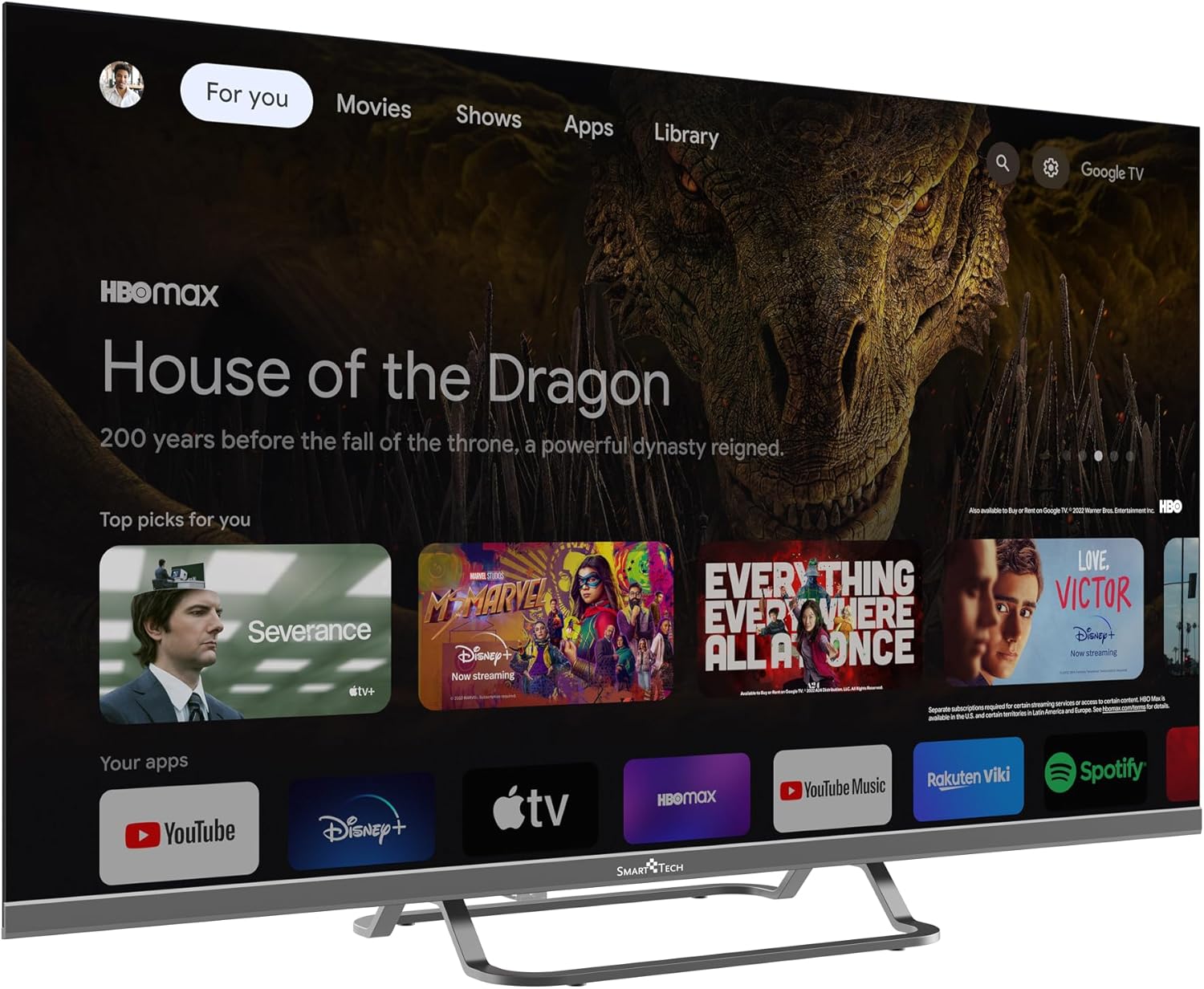
Figure 5: Google TV Home Screen. This image displays the main Google TV interface with personalized recommendations and quick access to various streaming applications.
- ใช้ การนำทาง (ขึ้น/ลง/ซ้าย/ขวา) buttons to move through menus and content.
- กด ตกลง/ป้อน เพื่อเลือกรายการ
- กด กลับ เพื่อกลับไปยังหน้าจอที่แล้ว
- กด บ้าน to go back to the Google TV home screen.
- ใช้ ผู้ช่วย Google button (microphone icon) to activate voice commands.
Streaming Applications and Chromecast
Your Smart Tech TV comes with popular streaming apps pre-installed or easily downloadable from the Google Play Store. It also features built-in Chromecast for casting content from your mobile devices.

Figure 6: Google TV Apps Section. This image shows a broader view of the Google TV interface, highlighting the array of available streaming and entertainment applications.
- การเข้าถึงแอป: Navigate to the "Apps" tab on the home screen or use the dedicated app buttons on your remote (e.g., Netflix, YouTube).
- โครมโค้ท: To cast content, ensure your mobile device and TV are on the same Wi-Fi network. Open a compatible app on your phone/tablet and tap the Cast icon (โดยปกติจะเป็นรูปสี่เหลี่ยมผืนผ้าที่มีสัญลักษณ์ Wi-Fi อยู่ข้างใน) to select your TV.
การซ่อมบำรุง
ทำความสะอาดทีวีของคุณ
- ควรถอดปลั๊กทีวีออกจากเต้ารับไฟฟ้าทุกครั้งก่อนทำความสะอาด
- ใช้ผ้านุ่มที่ไม่เป็นขุยเช็ดหน้าจอและตู้เบาๆ
- สำหรับรอยฝังแน่น ให้เช็ดเบาๆampเทน้ำหรือน้ำยาทำความสะอาดหน้าจอชนิดพิเศษลงบนผ้า (อย่าฉีดลงบนหน้าจอโดยตรง)
- หลีกเลี่ยงการใช้สารทำความสะอาดที่มีฤทธิ์กัดกร่อน ขี้ผึ้งหรือตัวทำละลาย
การอัพเดตซอฟต์แวร์
Your Smart Tech TV may receive software updates to improve performance and add new features. Ensure your TV is connected to the internet for automatic updates. You can also check for updates manually in the TV's settings menu.
การแก้ไขปัญหา
หากคุณประสบปัญหาเกี่ยวกับทีวี โปรดดูปัญหาทั่วไปและวิธีแก้ไขต่อไปนี้:
| ปัญหา | สาเหตุที่เป็นไปได้ / วิธีแก้ไข |
|---|---|
| ไม่มีไฟฟ้า | Check if the power cord is securely plugged into the TV and the outlet. Try a different outlet. Ensure the 12V charger is properly connected if using. |
| ไม่มีภาพ แต่มีเสียง | ตรวจสอบแหล่งสัญญาณเข้า ตรวจสอบให้แน่ใจว่าอุปกรณ์ที่เชื่อมต่อเปิดอยู่และทำงานได้อย่างถูกต้อง ลองใช้สาย HDMI เส้นอื่น |
| ไม่มีเสียง แต่มีภาพ | Check the volume level. Ensure Mute is not activated. Check audio output settings (e.g., if connected to an external sound system). |
| รีโมตคอนโทรลไม่ทำงาน | Check and replace batteries (2x AAA). Ensure there are no obstructions between the remote and the TV's IR sensor. |
| ไม่สามารถเชื่อมต่อ Wi-Fi ได้ | ตรวจสอบให้แน่ใจว่าเราเตอร์ Wi-Fi ของคุณเปิดอยู่และใช้งานได้ ป้อนรหัสผ่าน Wi-Fi อีกครั้ง ลองรีสตาร์ททีวีและเราเตอร์ |
| แอปไม่โหลด / ทำงานช้า | Check your internet connection speed. Close unused apps. Clear app cache in settings. Restart the TV. |
ข้อมูลจำเพาะ
| คุณสมบัติ | รายละเอียด |
|---|---|
| ยี่ห้อ | สมาร์ทเทค |
| ชื่อรุ่น | 32HG01VC |
| หมายเลขรุ่น | 32ha29v1 |
| ขนาดหน้าจอ | 32 นิ้ว (80 ซม.) |
| เทคโนโลยีการแสดงผล | นำ |
| ปณิธาน | ความคมชัดสูง (1366 x 768) |
| อัตราการรีเฟรช | 60 เฮิรตซ์ |
| ระบบปฏิบัติการ | แอนดรอยด์ (กูเกิลทีวี) |
| การเชื่อมต่อ | Wi-Fi, Bluetooth, Ethernet (RJ45) |
| พอร์ต HDMI | 3 |
| พอร์ต USB | 2 |
| พอร์ตออปติคอล | 1 |
| คุณสมบัติพิเศษ | Chromecast, Parental Control, Flat Screen |
| ส่วนประกอบที่รวมอยู่ | Remote control, stand, user manual, 12-volt charger |
| แหล่งพลังงาน | 12 Volts (DC) / AC (via adapter, not specified if included) |
| ขนาด (รวมขาตั้ง) | 72 ซม. (ก) x 47 ซม. (ส) x 20 ซม. (ล) |
| ความเข้ากันได้ของเมาท์ VESA | 100 x 100 มม. |
| ระดับประสิทธิภาพพลังงาน (SDR) | E |

Figure 7: Product Information Sheet. This sheet provides detailed technical specifications and energy consumption data for the Smart Tech 32HG01VC television.
สำหรับข้อมูลด้านพลังงานโดยละเอียดเพิ่มเติม โปรดเยี่ยมชม [ลิงก์เว็บไซต์] ฐานข้อมูล EPREL.

Figure 8: Energy Efficiency Label. This label indicates the energy efficiency class (E) and power consumption (26 kWh/1000h) of the Smart Tech 32HG01VC TV.
การรับประกันและการสนับสนุน
Smart Tech is committed to providing high-quality products. This product comes with a manufacturer's warranty.
- ความพร้อมของอะไหล่: Spare parts are guaranteed to be available for 11 years.
- การอัปเดตซอฟต์แวร์: ไม่มีข้อมูลเกี่ยวกับการรับประกันการอัปเดตซอฟต์แวร์
- การสนับสนุนผลิตภัณฑ์: Minimum guaranteed product support is 8 years.
- การรับประกันทั่วไป: The duration of the general guarantee offered by the supplier is 1 year.
For technical support, warranty claims, or further assistance, please refer to the contact information provided on the Smart Tech official website or your purchase documentation. Please have your model number (32HG01VC) and purchase date ready when contacting support.


