1. บทนำ
The MASTECH MS8236 is a versatile 2-in-1 digital multimeter and network cable track tester designed for electrical and network diagnostics. This device combines the functions of a digital multimeter for measuring electrical parameters with a network cable tester for verifying cable integrity and a tone generator for tracing wires. It is suitable for professional and DIY use in various applications.
2. ข้อมูลด้านความปลอดภัย
Always adhere to basic safety precautions when using this device to prevent personal injury or damage to the meter or equipment under test. Read all instructions carefully before use.
- ห้ามป้อนค่าเกินค่าสูงสุดที่กำหนดไว้สำหรับแต่ละฟังก์ชัน
- ควรใช้ความระมัดระวังเป็นพิเศษเมื่อทำงานกับวงจรที่มีไฟฟ้าอยู่
- ตรวจสอบให้แน่ใจว่าสวิตช์ฟังก์ชันอยู่ในตำแหน่งที่ถูกต้องก่อนทำการวัด
- ห้ามใช้มิเตอร์หากพบว่าชำรุด หรือสายวัดชำรุด
- เปลี่ยนแบตเตอรี่ทันทีเมื่อไฟแสดงสถานะแบตเตอรี่อ่อนปรากฏขึ้นเพื่อให้แน่ใจว่าการอ่านค่าแม่นยำ
- Avoid using the device in environments with high humidity, extreme temperatures, or explosive gases.
- Always disconnect power to the circuit before testing continuity or resistance.
3. สินค้าหมดview
The MASTECH MS8236 integrates a digital multimeter with a detachable cable tracker/tone generator. The main unit features a clear digital display, function selector dial, and input jacks. The cable tracker assists in identifying and tracing network and telephone lines.
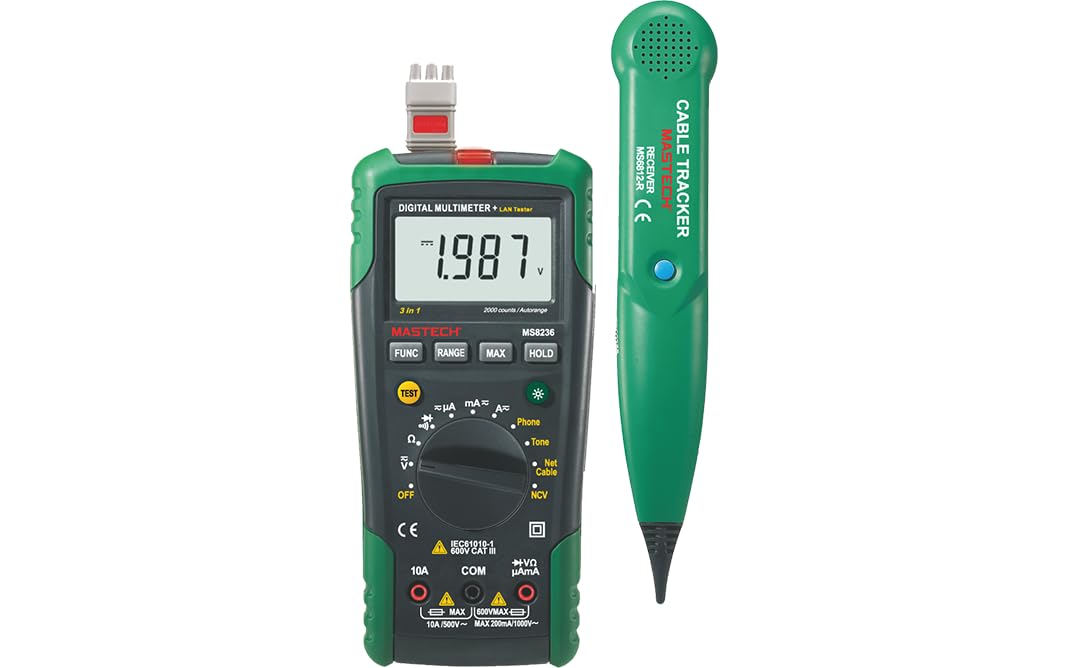
Figure 3.1: MASTECH MS8236 Digital Multimeter and Cable Tracker. The image shows the main multimeter unit on the left and the separate cable tracker unit on the right. Both are green and black.
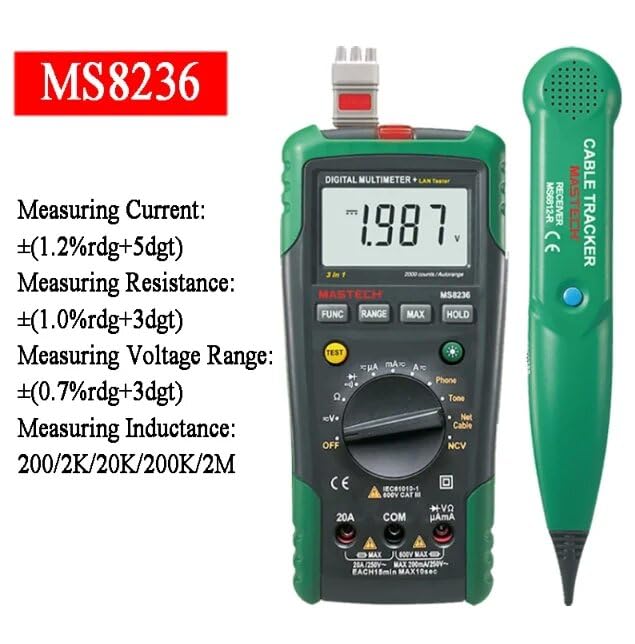
Figure 3.2: Close-up of the MASTECH MS8236 Multimeter Display and Controls. The display shows '1.987 V' and the function dial indicates various measurement modes including V, A, Ohm, Diode, Continuity, Phone, Net Cable, and NCV.
คุณสมบัติหลัก:
- จอแสดงผล: นับ 2000
- Ranging: Auto & Manual
- แบบไม่สัมผัส Voltage (NCV) อุปกรณ์ตรวจจับ
- ไดโอดเปิดโวลต์tagอี: 1.7V
- สัญญาณเตือนความต่อเนื่อง: ทำงานเมื่อความต้านทานต่ำกว่า 70 โอห์ม
- ฟังก์ชั่น Data Hold
- จอแสดงผลแบตเตอรี่ต่ำ
- ไฟแบ็คไลท์หน้าจอ
- ปิดเครื่องอัตโนมัติ
- Network Cable Check: Tests for open circuits, shorts, miss-wires, reversals, split pairs, and shield detection. Supports T568A, T568B, 10Base-T.
- Telephone Line Check: Identifies line states (Busy, Ringing, Clear) and continuity.
- Tone Function: For tracking cables and diagnosing break points.
4. การตั้งค่า
4.1. การเปิดออกและการตรวจสอบ
Carefully unpack the MS8236 and all accessories. Inspect the device for any signs of damage. If any damage is found, contact your supplier immediately.
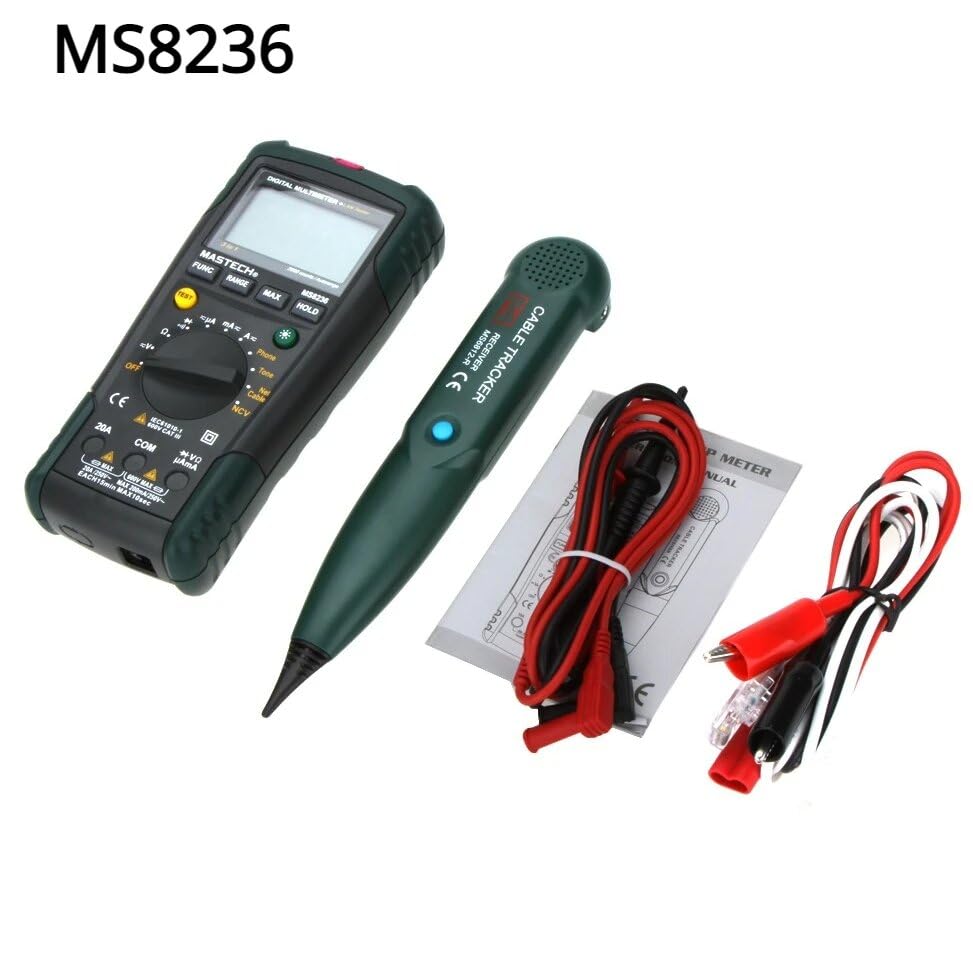
Figure 4.1: MASTECH MS8236 Kit Contents. The image displays the multimeter, cable tracker, red and black test leads, a network cable adapter, and a small instruction manual.
4.2. การติดตั้งแบตเตอรี่
The MS8236 requires 2 LR44 batteries, which are included. To install or replace batteries:
- Locate the battery compartment cover on the back of the multimeter unit.
- ใช้ไขควงเปิดช่องใส่แบตเตอรี่
- Insert the 2 LR44 batteries, observing the correct polarity (+/-).
- ปิดฝาช่องใส่แบตเตอรี่ให้แน่น
5. คู่มือการใช้งาน
5.1. Basic Multimeter Functions
Connect the test leads to the appropriate input jacks (COM for black lead, VΩmA for red lead for most measurements, or 20A for high current). Select the desired function using the rotary switch.
- เล่มที่tage Measurement (DCV/ACV): Turn the rotary switch to the 'V' position. Select DC or AC voltage if applicable. Connect test leads in parallel to the circuit.
- Current Measurement (DCA/ACA): Turn the rotary switch to the 'A' position. Select DC or AC current. Connect test leads in series with the circuit. Ensure the correct input jack (mA or 20A) is used.
- การวัดค่าความต้านทาน (โอห์ม): Turn the rotary switch to the 'Ω' position. Ensure the circuit is de-energized. Connect test leads across the component.
- การทดสอบไดโอด (|): Turn the rotary switch to the diode symbol. Connect the red lead to the anode and the black lead to the cathode of the diode.
- การทดสอบความต่อเนื่อง (-): Turn the rotary switch to the continuity symbol. The buzzer will sound if the resistance is below approximately 70Ω.
5.2. Network Cable Check
This function tests the integrity of network cables (RJ45). It can detect open circuits, shorts, miss-wires, reversals, split pairs, and shield detection for T568A, T568B, and 10Base-T standards.
- Turn the rotary switch to the 'Net Cable' position.
- Connect one end of the network cable to the RJ45 port on the main multimeter unit.
- Connect the other end of the network cable to the RJ45 port on the remote cable tracker unit.
- Observe the display for test results, which will indicate the cable status. The device also features a debug mode for detailed fault identification.
5.3. Telephone Line Check
This function allows for checking the state of a working telephone line and its continuity.
- Turn the rotary switch to the 'Phone' position.
- Connect the telephone line to the appropriate port on the main unit.
- The device will identify the state of the line as Busy, Ringing, or Clear. It can also judge the continuity of the telephone cables or wires.
5.4. Tone Function
The tone function is used with the cable tracker to trace cables and wires and diagnose break points.
- Turn the rotary switch to the 'Tone' position.
- Connect the test leads or RJ11/RJ45 plug to the cable you wish to trace.
- Use the remote cable tracker unit to follow the cable. The tracker will emit an audible tone when it detects the signal from the main unit, helping to locate the cable and identify breaks.
5.5. ไม่สัมผัส Voltagการตรวจจับ e (NCV)
ฟังก์ชัน NCV ช่วยให้ตรวจจับปริมาณไฟฟ้ากระแสสลับได้tagโดยไม่สัมผัสกับตัวนำโดยตรง
- Turn the rotary switch to the 'NCV' position.
- เลื่อนส่วนบนของมัลติมิเตอร์ไปใกล้กับโวลต์มิเตอร์ AC ที่มีกระแสไฟอยู่tagแหล่งที่มา
- อุปกรณ์จะแสดงสถานะการมีอยู่ของแรงดันไฟฟ้ากระแสสลับtage through an audible alarm and/or visual indicator.
5.6. ฟังก์ชั่นเพิ่มเติม
- การเก็บข้อมูล: กดปุ่ม 'HOLD' เพื่อหยุดการแสดงค่าปัจจุบันบนหน้าจอ กดอีกครั้งเพื่อปล่อย
- แสงไฟด้านหลัง: Press the backlight button (often labeled with a light bulb symbol) to illuminate the display for better visibility in low-light conditions.
- ปิดเครื่องอัตโนมัติ: อุปกรณ์จะปิดเครื่องโดยอัตโนมัติหลังจากไม่มีการใช้งานเป็นระยะเวลาหนึ่ง เพื่อประหยัดพลังงานแบตเตอรี่
6. การบำรุงรักษา
6.1. การทำความสะอาด
เช็ดเคสด้วยโฆษณาamp ใช้ผ้าและผงซักฟอกอ่อนๆ เช็ดทำความสะอาด ห้ามใช้สารขัดถูหรือตัวทำละลาย ตรวจสอบให้แน่ใจว่าอุปกรณ์แห้งสนิทก่อนใช้งาน
6.2. การเปลี่ยนแบตเตอรี่
เมื่อไฟแสดงสถานะแบตเตอรี่ต่ำปรากฏขึ้นบนหน้าจอ ให้เปลี่ยนแบตเตอรี่ตามที่อธิบายไว้ในหัวข้อ 4.2 ถอดแบตเตอรี่ออกหากไม่ได้ใช้งานอุปกรณ์เป็นเวลานาน
7 การแก้ไขปัญหา
- ไม่มีจอแสดงผลหรือจอแสดงผลจางๆ: ตรวจสอบการติดตั้งแบตเตอรี่และระดับประจุ เปลี่ยนแบตเตอรี่หากจำเป็น
- การอ่านค่าที่ไม่ถูกต้อง: Ensure test leads are properly connected and the correct function is selected. Verify the circuit is de-energized for resistance/continuity tests.
- Network cable test failure: Ensure both ends of the cable are securely connected to the main unit and remote. Check for physical damage to the cable or connectors.
- No tone from cable tracker: Verify the main unit is in 'Tone' mode and properly connected to the cable. Check the cable tracker's battery.
8. ข้อมูลจำเพาะ
The following table outlines the general and electrical specifications for the MASTECH MS8236.

Figure 8.1: MASTECH MS8236 Features and Specifications Table. This image provides detailed electrical specifications for DC Voltage, AC ฉบับที่tage, DC Current, AC Current, and Resistance, including ranges, resolutions, and accuracies.
| พารามิเตอร์ | พิสัย | ปณิธาน | ความแม่นยำ |
|---|---|---|---|
| DC ฉบับที่tage | 200mV/2V/20V/200V/600V | 0.1mV/1mV/10mV/100mV/1V | ±(0.5%+5) |
| ฉบับ ACtage | 200mV/2V/20V/200V/600V | 0.1mV/1mV/10mV/100mV/1V | ±(0.8%+5) |
| กระแสไฟฟ้าตรง | 200µA/2000µA/20mA/200mA/2A/10A | 0.1µA/1µA/10µA/0.1mA/1mA/10mA | ±(1.2%+5) ±(2.0%+10) for 10A |
| กระแสไฟ AC | 200µA/2000µA/20mA/200mA/2A/10A | 0.1µA/1µA/10µA/0.1mA/1mA/10mA | ±(1.5%+5) ±(3.0%+10) for 10A |
| ความต้านทาน | 200Ω/2kΩ/20kΩ/200kΩ/2MΩ/20MΩ | 0.1Ω/1Ω/10Ω/100Ω/1kΩ/10kΩ | ±(1.0%+5) ±(1.5%+5) for 20MΩ |
| ไดโอดเปิดโวลต์tage | 1.7โวลต์ | ||
| Buzzer ต่อเนื่อง | <70Ω | ||
| แสดง | 2000 นับ | ||
| การกำหนดช่วง | อัตโนมัติและคู่มือ | ||
| แบบไม่สัมผัส Voltagอีเครื่องตรวจจับ | ใช่ | ||
| ปิดเครื่องอัตโนมัติ | ใช่ | ||
| การเก็บข้อมูล | ใช่ | ||
| จอแสดงผลแบตเตอรี่ต่ำ | ใช่ | ||
| ไฟแบ็คไลท์หน้าจอ | ใช่ | ||
| แหล่งพลังงาน | แบตเตอรี่ LR2 44 ก้อน (รวมอยู่ด้วย) | ||
| ขนาดสินค้า | 16 x 9 x 5 ซม. | ||
| น้ำหนักสินค้า | 500 กรัม | ||
| วัสดุ | อะคริโลไนไตรล์ บิวทาไดอีน สไตรีน (ABS) | ||
| การรับรอง | ซีอี, โรเอชเอส | ||
9. การรับประกันและการสนับสนุน
For warranty information and technical support, please refer to the documentation provided with your purchase or contact the seller or manufacturer directly. Specific warranty terms may vary by region and retailer.


