1. บทนำ
Welcome to the user manual for your VGN N75 Gaming Keyboard. This manual provides essential information on setting up, operating, maintaining, and troubleshooting your new keyboard. The VGN N75 is a compact, numeric keyless mechanical keyboard designed for an optimal gaming and typing experience.

Figure 1.1: VGN N75 Gaming Keyboard with RGB lighting enabled.

รูปที่ 1.2: มุม view of the VGN N75 keyboard, highlighting its compact form factor.
2. ข้อมูลด้านความปลอดภัย
Please read the following safety guidelines carefully before using your VGN N75 keyboard:
- เก็บแป้นพิมพ์ให้ห่างจากของเหลวและความชื้นมากเกินไปเพื่อป้องกันความเสียหาย
- ควรหลีกเลี่ยงการวางแป้นพิมพ์ไว้ในที่ที่มีอุณหภูมิสูงหรือต่ำเกินไป
- Do not attempt to disassemble or modify the keyboard. This may void your warranty and cause damage.
- Use only the provided USB-C cable for connection.
- Handle with care to prevent physical damage from drops or impacts.
3. คุณสมบัติของผลิตภัณฑ์
The VGN N75 keyboard is engineered with several features to enhance your typing and gaming experience:
- รูปแบบกะทัดรัด 75%: The US82 key numeric keyless design offers a space-saving solution compared to full-size keyboards, providing more desk space for mouse movement.
- Advanced Internal Construction: Features multiple buffer layers and specially tuned stabilizers for a smooth, quiet, and consistent typing experience.
- VGN "Dynamic Silver" Mechanical Switches: Equipped with VGN's original linear mechanical switches, offering a responsive feel and vibrant RGB illumination.
- การออกแบบที่โดดเด่น: The "Caribbean Blue" model features striking keycap colors, adding a unique aesthetic to your setup.
- Integrated Metal Volume Knob: A conveniently located metal rotary knob allows for quick and precise volume adjustments, useful for both work and gaming.
- ไฟ RGB ที่ปรับแต่งได้: Enjoy dynamic and customizable RGB backlight options to personalize your keyboard's appearance.

Figure 3.1: The compact 75% layout of the VGN N75, demonstrating its space-saving advantage over a traditional full-size keyboard.

Figure 3.2: Detail of the VGN N75's unique "Dynamic Silver" mechanical switches, known for their linear feel and RGB compatibility.

Figure 3.3: An exploded diagram illustrating the multiple buffer layers and components within the VGN N75 keyboard, contributing to its smooth and quiet operation.

Figure 3.4: Close-up of the metal volume knob, providing convenient audio control.
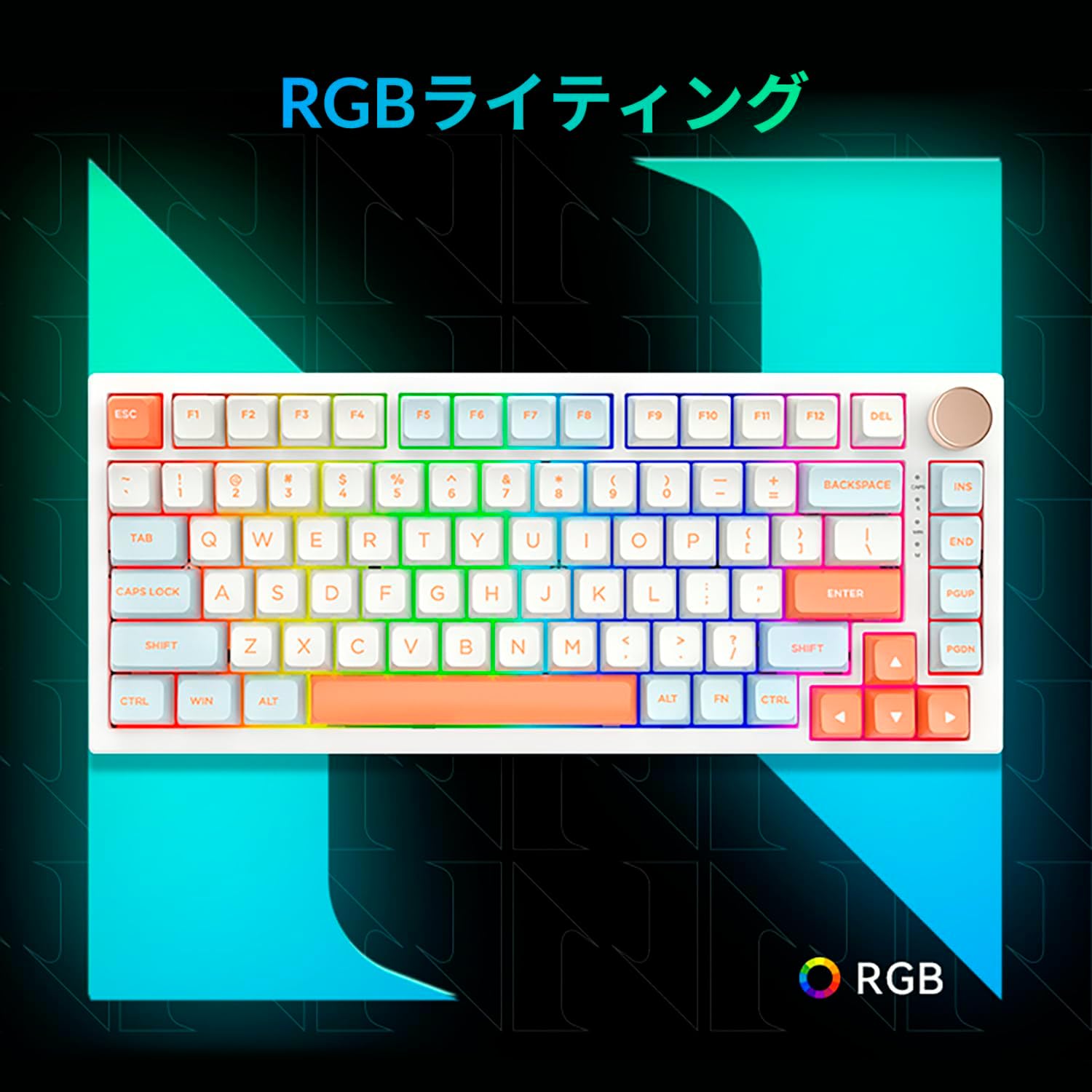
Figure 3.5: The VGN N75 keyboard displaying its customizable RGB lighting, enhancing the visual appeal.
4. คู่มือการติดตั้ง
Follow these steps to set up your VGN N75 keyboard:
- แกะคีย์บอร์ดออก: Carefully remove the keyboard and all included accessories (USB cable, keycap puller, replacement key) from the packaging.
- เชื่อมต่อสาย USB-C: Insert one end of the provided USB-C cable into the USB-C port on the keyboard.
- เชื่อมต่อกับอุปกรณ์ของคุณ: Plug the other end of the USB-C cable into an available USB port on your computer or laptop.
- การติดตั้งไดร์เวอร์ (อัตโนมัติ): แป้นพิมพ์เป็นแบบ plug-and-play ระบบปฏิบัติการของคุณควรตรวจจับและติดตั้งไดรเวอร์ที่จำเป็นโดยอัตโนมัติ โดยทั่วไปไม่จำเป็นต้องติดตั้งไดรเวอร์ด้วยตนเอง
- การทดสอบเบื้องต้น: Open a text editor or any application to test the keys and ensure all functions are working correctly.
5. คู่มือการใช้งาน
This section details the basic operation of your VGN N75 keyboard:
5.1. ฟังก์ชันหลักพื้นฐาน
The VGN N75 features a standard US82 key layout. All keys function as labeled. For specific key combinations or software-defined macros, refer to any accompanying software documentation (if applicable, not included in this manual).
5.2. Using the Rotary Knob
- การควบคุมระดับเสียง: หมุนปุ่มตามเข็มนาฬิกาเพื่อเพิ่มระดับเสียงและทวนเข็มนาฬิกาเพื่อลดระดับเสียง
- ปิดเสียง/เปิดเสียง: กดปุ่มเพื่อปิดเสียงหรือเปิดเสียง
5.3. การควบคุมแสง RGB
The VGN N75 supports RGB lighting. While specific key combinations for lighting modes are not provided in the product description, most RGB keyboards allow cycling through effects using function key combinations (e.g., Fn + F-keys or dedicated lighting keys). Experiment with the 'Fn' key in combination with other keys (like arrow keys or Ins/Del/Home/End/PgUp/PgDn) to discover lighting controls.
6. การบำรุงรักษา
Proper maintenance will extend the lifespan of your keyboard:
- การทำความสะอาด:
- ถอดแป้นพิมพ์ออกจากคอมพิวเตอร์ของคุณก่อนทำความสะอาด
- ใช้ผ้านุ่มไม่เป็นขุยเช็ดเล็กน้อยampล้างด้วยน้ำหรือน้ำยาทำความสะอาดอ่อนๆ เพื่อเช็ดปุ่มกดและตัวเครื่องให้สะอาด
- สำหรับฝุ่นละอองและเศษต่างๆ ระหว่างคีย์ ให้ใช้ลมอัด
- ห้ามฉีดของเหลวลงบนแป้นพิมพ์โดยตรง
- การเปลี่ยนคีย์แคปและสวิตช์:
- The keyboard comes with a keycap puller and a replacement key.
- To remove a keycap, gently use the keycap puller to grip the keycap and pull upwards.
- ในการเปลี่ยนปุ่มกด ให้จัดวางปุ่มกดให้ตรงกับแกนสวิตช์ แล้วกดลงไปให้แน่นจนกว่าจะมีเสียงคลิกเข้าที่
- บันทึก: The VGN N75 features hot-swappable switches, allowing for easy replacement without soldering. To remove a switch, use a switch puller (not explicitly listed as included, but implied by "hot-swappable") to gently pry it out. Align the new switch's pins with the sockets and press firmly until it seats correctly.
7 การแก้ไขปัญหา
If you encounter issues with your VGN N75 keyboard, try the following solutions:
- แป้นพิมพ์ไม่ตอบสนอง:
- ตรวจสอบให้แน่ใจว่าสาย USB-C เชื่อมต่อกับคีย์บอร์ดและคอมพิวเตอร์ของคุณอย่างแน่นหนา
- ลองเสียบคีย์บอร์ดเข้ากับพอร์ต USB อื่นบนคอมพิวเตอร์ของคุณ
- รีสตาร์ทเครื่องคอมพิวเตอร์ของคุณ
- ทดสอบแป้นพิมพ์บนคอมพิวเตอร์เครื่องอื่นเพื่อตัดปัญหาเฉพาะระบบออกไป
- กุญแจไม่ลงทะเบียน:
- ตรวจสอบว่ามีสิ่งกีดขวางทางกายภาพใด ๆ ที่อยู่ใต้ปุ่มคีย์แคปหรือไม่
- If a specific key is not working, consider replacing its switch if you have a switch puller and replacement switches.
- ปัญหาแสง RGB:
- ตรวจสอบให้แน่ใจว่าคีย์บอร์ดมีพลังงานเพียงพอ
- Try cycling through lighting modes using the keyboard's function key combinations.
- Rotary Knob Not Working:
- Check for any physical obstructions around the knob.
- ตรวจสอบให้แน่ใจว่าแป้นพิมพ์เชื่อมต่ออย่างถูกต้อง
8. ข้อมูลจำเพาะ
| คุณลักษณะ | รายละเอียด |
|---|---|
| ยี่ห้อ | วีจีเอ็น |
| หมายเลขรุ่น | N75BLUE |
| ชุด | N75 |
| สี | สีฟ้า |
| คำอธิบายแป้นพิมพ์ | เครื่องจักรกล |
| จำนวนคีย์ | 82 |
| เทคโนโลยีการเชื่อมต่อ | ยูเอสบี-ซี |
| ประเภทแหล่งพลังงาน | พลังงาน USB |
| อุปกรณ์ที่รองรับ | แล็ปท็อป |
| คำแนะนำการใช้งานผลิตภัณฑ์ | การเล่นเกม |
| Keyboard Backlight Colour Support | อาร์จีบี |
| วัสดุ | พลาสติก |
| ส่วนประกอบที่รวมอยู่ | Keycap Puller, Replacement Key, USB Cable |
| ขนาดแพ็คเกจ | 42.1 x 18.8 x 6.5 ซม. ; 1.1 กก. |
| วันที่พร้อมใช้งานครั้งแรก | 22 มีนาคม 2024 |
9. การรับประกันและการสนับสนุน
The VGN N75 Gaming Keyboard comes with a 1-year warranty from the date of purchase, as indicated in the product listing. This warranty covers manufacturing defects under normal use.
For warranty claims, technical support, or further inquiries, please contact your point of purchase or the official VGN support channels. Keep your proof of purchase for warranty validation.
บันทึก: การถอดประกอบหรือดัดแปลงผลิตภัณฑ์โดยไม่ได้รับอนุญาตอาจทำให้การรับประกันเป็นโมฆะ


