1. บทนำ
This manual provides detailed instructions for the setup, operation, and maintenance of your HYTOBP Y3 Projector. Please read this manual thoroughly before using the product to ensure proper functionality and to maximize your viewการสร้างประสบการณ์
The HYTOBP Y3 Projector features WiFi 6 and Bluetooth 5.2 connectivity, 800 ANSI lumens brightness, native 1080P resolution with 4K support, and automatic 6D keystone correction and autofocus for a clear and perfectly aligned image.

ภาพที่ 1.1: ด้านหน้า view of the HYTOBP Y3 Projector, showcasinด้วยเลนส์และดีไซน์ที่เรียบหรู
2. อะไรอยู่ในกล่อง
ตรวจสอบว่ามีรายการทั้งหมดอยู่ในแพ็คเกจ:
- HYTOBP Y3 Projector
- คู่มือการใช้งาน
- สายไฟ
- สาย HDMI
- รีโมทคอนโทรล
3. คุณสมบัติของผลิตภัณฑ์
The HYTOBP Y3 Projector is equipped with advanced features designed to enhance your viewing and user experience:
- Auto Focus & Auto 6D Keystone Correction: Automatically adjusts focus and corrects image distortion for a clear, rectangular picture without manual intervention.
- ความสว่างและความละเอียดสูง: 800 ANSI lumens with native 1920*1080P resolution, supporting 4K video decoding.
- อัตราส่วนความคมชัดสูง: 30000:1 contrast ratio for vivid colors and detailed images.
- Advanced WiFi 6: Compatible with 2.4GHz and 5GHz networks, offering faster speeds and lower latency.
- Bluetooth 5.2: Enables stable audio transmission to external Bluetooth devices like headphones and speakers.
- ลำโพงในตัว: Built-in 12W Hi-Fi speakers provide a 360-degree surround immersive audio experience.
- Fully-Sealed Optical Engine: Designed to prevent dust entry, reducing black spots and extending lifespan.
- Auto Obstacle Avoidance & Automatic Screen Insertion: Intelligent features for seamless setup.

Image 3.1: The projector automatically adjusting focus and correcting image geometry on a screen, illustrating its intelligent auto-correction capabilities.

Image 3.2: A split image demonstrating the projector's high brightness (800 ANSI) and 4K support, showing a vibrant landscape scene.
4. คู่มือการติดตั้ง
4.1 การจัดวาง
Choose a stable, flat surface for the projector. Ensure there is adequate ventilation around the unit. The projector can be placed on a table, mounted on a tripod, or ceiling-mounted. For optimal viewวางโปรเจ็กเตอร์ไว้ตรงหน้าพื้นผิวที่จะฉายภาพ

Image 4.1: The projector displaying various screen sizes (50, 100, 300 inches) at different distances, illustrating its adjustable projection capabilities.
4.2 การเชื่อมต่อสายไฟ
- เชื่อมต่อสายไฟที่ให้มากับพอร์ตรับไฟของโปรเจ็กเตอร์
- เสียบปลายสายไฟอีกด้านหนึ่งเข้ากับเต้ารับไฟฟ้าที่เหมาะสม
4.3 การเปิดเครื่องครั้งแรก
Press the power button on the projector or the remote control to turn on the device. The projector will perform an automatic focus and keystone correction upon startup.
5. คู่มือการใช้งาน
5.1 การทำงานพื้นฐาน
- เปิด/ปิดเครื่อง: กดปุ่มเปิด/ปิดบนโปรเจคเตอร์หรือรีโมทคอนโทรล
- การนำทาง: Use the arrow keys on the remote to navigate through menus.
- การเลือก: Press the 'OK' or 'Enter' button to confirm selections.
- กลับ: Use the 'Back' button to return to the previous menu.
5.2 การเลือกแหล่งที่มา
To select an input source (HDMI, USB, AV, Network), navigate to the 'Input Source' menu using the remote control and choose the desired option.
5.3 เอาต์พุตเสียง
The projector has built-in 12W Hi-Fi speakers. For external audio, connect Bluetooth speakers or headphones via Bluetooth 5.2, or use the 3.5mm audio jack.

Image 5.1: Individuals experiencing immersive home theater surround sound from the projector, highlighting its audio capabilities.
6. การเชื่อมต่อ
The HYTOBP Y3 Projector offers versatile connectivity options:
6.1 การเชื่อมต่อแบบไร้สาย
- ไวไฟ 6: Supports 2.4GHz and 5GHz networks for high-speed wireless screen mirroring and streaming.
- Bluetooth 5.2: For connecting external audio devices such as Bluetooth speakers and headphones.

Image 6.1: The projector connected via WiFi 6, illustrating faster speeds and lower latency compared to older WiFi standards.
6.2 การเชื่อมต่อแบบมีสาย
The projector includes the following physical ports:
- ช่องต่อ HDMI: Connect devices like laptops, gaming consoles (Xbox, PS4/5, Switch), and TV sticks.
- ยูเอสบี: สำหรับการเล่นสื่อโดยตรงจากไดรฟ์ USB
- เอวี: สำหรับเชื่อมต่ออุปกรณ์รุ่นเก่าที่มีเอาท์พุตวิดีโอคอมโพสิต
- เครือข่าย (อีเธอร์เน็ต): เพื่อการเชื่อมต่ออินเตอร์เน็ตแบบมีสายที่เสถียร
- Audio (3.5mm Headphone Jack): สำหรับเชื่อมต่อหูฟังแบบมีสายหรือลำโพงภายนอก
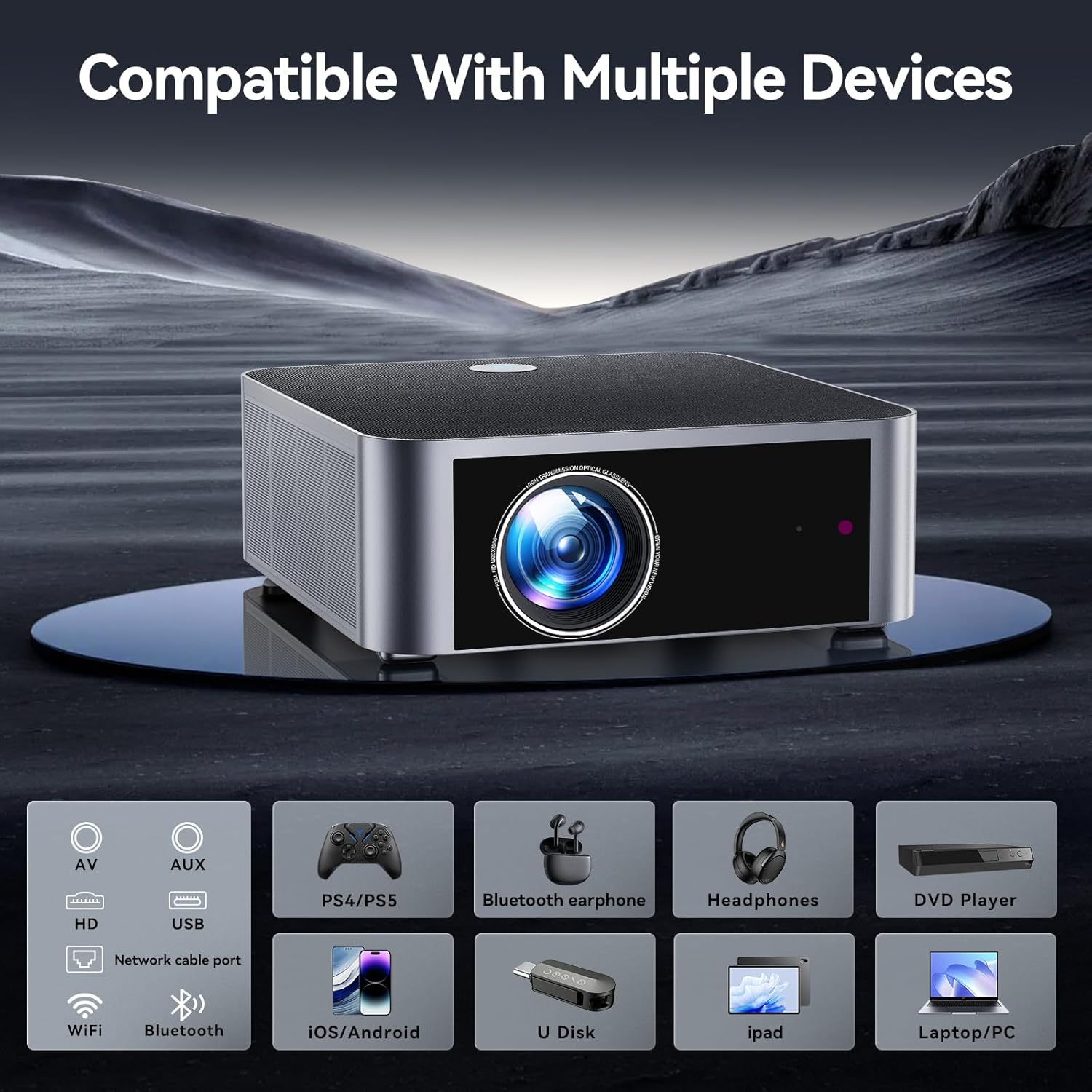
Image 6.2: The projector's various input/output ports and compatible devices, including AV, USB, HDMI, Network, Bluetooth, WiFi, iOS/Android phones, U Disk, iPad, and Laptop/PC.

Image 6.3: The projector displaying content from a TV Stick, demonstrating its compatibility with external streaming devices.
7. การบำรุงรักษา
การบำรุงรักษาอย่างถูกต้องจะช่วยให้โปรเจ็กเตอร์ของคุณมีอายุการใช้งานยาวนานและมีประสิทธิภาพเหมาะสมที่สุด
- การทำความสะอาดเลนส์: Gently clean the projector lens with a soft, lint-free cloth or lens cleaning paper. Avoid abrasive materials.
- การป้องกันฝุ่น: The HYTOBP Y3 features a fully-sealed optical core to prevent dust entry. However, regularly clean the exterior of the projector with a dry cloth to prevent dust buildup on vents.
- พื้นที่จัดเก็บ: เมื่อไม่ได้ใช้งานเป็นเวลานาน ควรเก็บโปรเจคเตอร์ไว้ในที่แห้งและเย็น ป้องกันจากฝุ่นละอองและอุณหภูมิที่สูงหรือต่ำเกินไป

ภาพที่ 7.1: ระเบิด view of the projector's high-transparency lens system, highlighting its durable design and 25,000-hour lamp ชีวิต.
8 การแก้ไขปัญหา
If you encounter issues with your HYTOBP Y3 Projector, refer to the following common troubleshooting steps:
- ไม่มีไฟฟ้า: Ensure the power cord is securely connected to both the projector and the power outlet. Try a different outlet.
- ไม่มีรูป: Verify the input source is correctly selected. Check HDMI/USB cable connections. Ensure the lens cap is removed.
- ภาพเบลอ: The projector features autofocus. If the image remains blurry, ensure the projector is on a stable surface and not obstructed. Manual focus adjustment might be available via the remote if needed.
- ภาพบิดเบี้ยว: The projector has auto 6D keystone correction. If distortion persists, ensure the projector is positioned as straight as possible relative to the screen.
- ไม่มีเสียง: Check volume levels on both the projector and the connected source device. Ensure external audio devices are properly connected via Bluetooth or 3.5mm jack. Note that the projector does not support sound devices with Dolby, DTS, 5.1 channel, HDMI CEC, or ARC.
- ปัญหาเกี่ยวกับการเชื่อมต่อ WiFi/บลูทูธ: Ensure the projector is within range of the router/Bluetooth device. Restart both devices.
9. ข้อมูลจำเพาะ
| คุณสมบัติ | ข้อมูลจำเพาะ |
|---|---|
| ยี่ห้อ | ไฮโตบีพี |
| หมายเลขรุ่น | Y3 |
| ความละเอียดการแสดงผล | Native 1920 x 1080P (4K Support) |
| ความสว่าง | 800 ANSI Lumens |
| อัตราส่วนคอนทราสต์ | 30000:1 น. |
| เทคโนโลยีการเชื่อมต่อ | Bluetooth 5.2, Ethernet, AV/3.5mm Headphone Jack, HDMI, USB, Wi-Fi 6 (5G/2.4G) |
| คุณสมบัติพิเศษ | Auto Focus, Digital Keystone Correction, Auto Obstacle Avoidance, Automatic Screen Insertion, Fully-Sealed Engine |
| น้ำหนักสินค้า | 5.72 ปอนด์ |
| ขนาดสินค้า | 11.25 x 10.47 x 3.81 นิ้ว |
| สี | สีดำ |
| การใช้ที่แนะนำ | Business, Education, Gaming, Home Cinema, Indoor/Outdoor |
10. การรับประกันและการสนับสนุน
HYTOBP is committed to providing excellent customer service and support for your Y3 Projector:
- บริการลูกค้า: 24-hour service for quick responses to inquiries.
- นโยบายการคืนสินค้า: 3-Month return period for exchange or refund.
- บริการซ่อม: 3-Year repair service for product defects.
- การสนับสนุนด้านเทคนิค: มีบริการสนับสนุนทางเทคนิคตลอดอายุการใช้งาน
For any problems or assistance, please contact HYTOBP customer support.


