1. บทนำ
Thank you for choosing the Nulea M504 Wired Vertical Mouse. This manual provides detailed instructions on how to set up, operate, and maintain your new ergonomic mouse. Designed with a 57-degree natural grip, the M504 aims to reduce arm discomfort and wrist pain, offering a more comfortable computing experience. Please read this manual thoroughly before using the product to ensure optimal performance and longevity.

Figure 1: Nulea M504 Wired Vertical Mouse. This image shows the overall design of the mouse, highlighting its vertical orientation and vibrant RGB lighting along the base.
2. ข้อมูลด้านความปลอดภัย
To ensure safe and proper operation of your Nulea M504 mouse, please observe the following safety guidelines:
- อย่าให้เมาส์โดนน้ำหรือความชื้นมากเกินไป
- หลีกเลี่ยงการทำตกหรือให้เมาส์ได้รับแรงกระแทกรุนแรง
- Do not attempt to disassemble or repair the mouse yourself. Refer all servicing to qualified personnel.
- ควรเก็บเมาส์ให้ห่างจากอุณหภูมิที่สูงจัดและแสงแดดโดยตรง
- Use the mouse on a clean, flat surface for optimal performance.
3. การตั้งค่า
The Nulea M504 is a plug-and-play wired mouse, requiring no additional drivers for most operating systems. Follow these simple steps to set up your mouse:
- Locate an available USB port on your computer (desktop, laptop, or Mac).
- Insert the USB 2.0 connector of the Nulea M504 mouse into the USB port.
- Your operating system will automatically detect and install the necessary drivers. This process usually takes a few seconds.
- เมื่อติดตั้งเสร็จแล้ว เมาส์ก็พร้อมใช้งานได้ทันที

Figure 2: Connecting the Nulea M504 mouse. This image illustrates the mouse connected to a laptop, demonstrating its plug-and-play simplicity.
4. คู่มือการใช้งาน
4.1 ฟังก์ชันปุ่ม
The Nulea M504 mouse features several buttons designed for intuitive control and enhanced productivity. Refer to the diagram below for button identification:

Figure 3: Nulea M504 Button Layout. This diagram labels the Left Button, Right Button, DPI Button, Backlit Button, Forward Button, Backward Button, and the 1.8m USB Cable.
- ปุ่มซ้าย: ฟังก์ชั่นคลิกซ้ายมาตรฐาน
- ปุ่มขวา: ฟังก์ชั่นคลิกขวามาตรฐาน
- ล้อเลื่อน: Used for scrolling up and down documents or web หน้ากระดาษ ล้อเลื่อนโลหะกันลื่นให้คุณภาพที่ทนทาน
- ปุ่ม DPI: ปรับความไวของเมาส์ (DPI)
- ปุ่มย้อนแสง: ควบคุมโหมดแสงไฟ RGB
- ปุ่มไปข้างหน้า: นำทางไปข้างหน้าใน web เบราว์เซอร์หรือ file นักสำรวจ Note: Not compatible with MAC OS.
- ปุ่มย้อนกลับ: นำทางย้อนกลับใน web เบราว์เซอร์หรือ file นักสำรวจ Note: Not compatible with MAC OS.
Important Note: All buttons on the Nulea M504 mouse are non-programmable.
4.2 การปรับ DPI (ความไว)
The Nulea M504 offers 4 adjustable DPI levels, allowing you to customize the mouse's responsiveness to suit your tasks, whether it's precise graphic design or fast-paced browsing.
- กดปุ่ม ปุ่ม DPI (located near the scroll wheel) to cycle through the available DPI settings.
- The DPI levels are: 800, 1200, 2400, and 3200.
- Each press will switch to the next DPI level, indicated by a change in cursor speed.

Figure 4: DPI Adjustment. This image illustrates the four adjustable DPI levels (800, 1200, 2400, 3200) available on the Nulea M504 mouse, allowing users to customize sensitivity.
โหมดแสง RGB 4.3 โหมด
Enhance your workspace with the Nulea M504's 11 vibrant RGB backlight modes. You can easily switch between different lighting effects to match your mood or setup.
- กดปุ่ม ปุ่มมีไฟแบ็คไลท์ (located on the top of the mouse, near the left click button) to cycle through the 11 different RGB lighting modes.
- Continue pressing the button until you find your preferred lighting effect.

Figure 5: RGB Underglow. This image showcases the Nulea M504 mouse with its colorful RGB underglow, illustrating the aesthetic customization options.
4.4 Ergonomic Design and Usage
The Nulea M504 is designed with a 57-degree natural grip angle to promote a more natural hand position, reducing wrist strain and muscle fatigue during extended use. It may take a few days to adapt to the vertical design if you are accustomed to traditional mice.
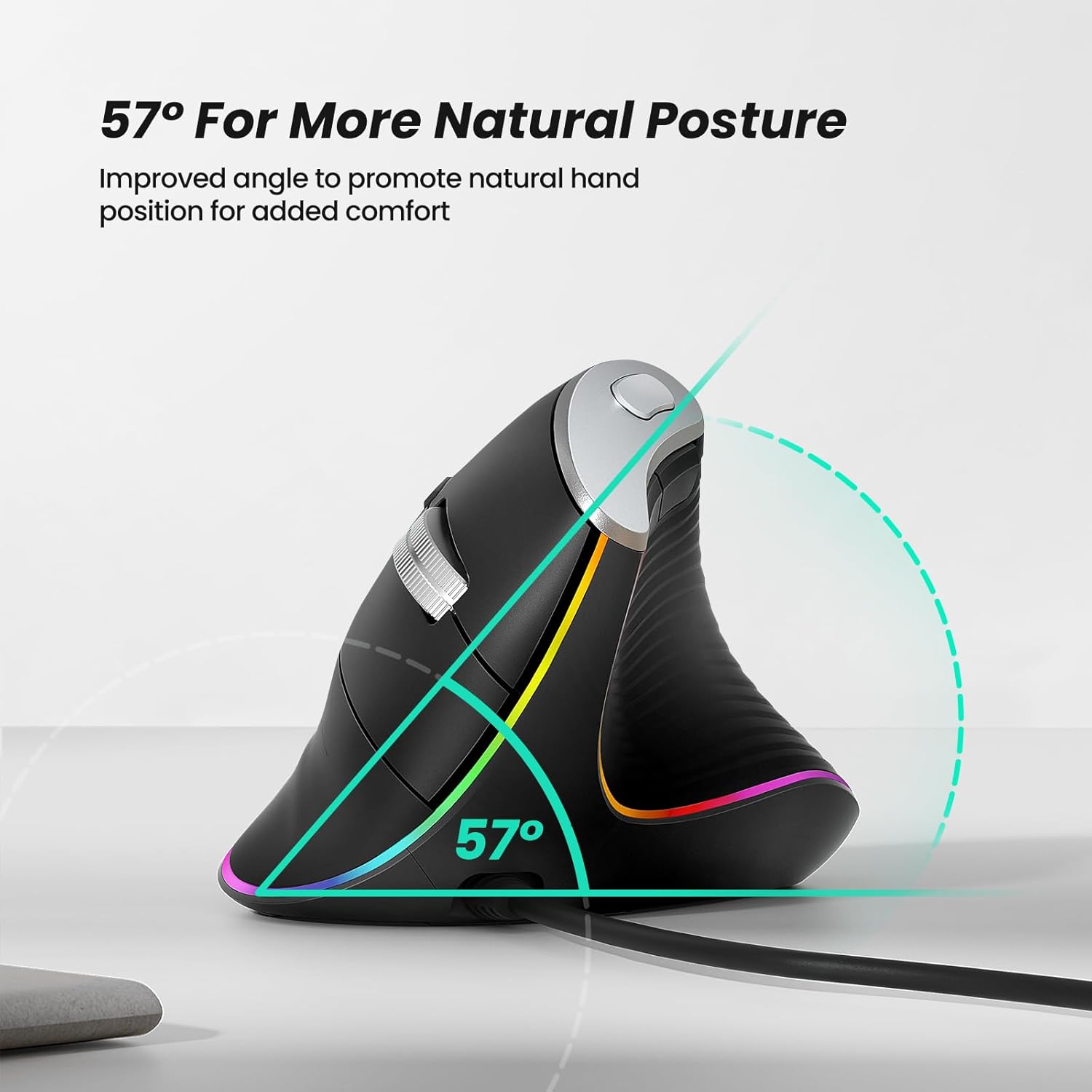
Figure 6: 57° Natural Posture. This diagram highlights the 57-degree angle of the mouse, designed to promote a more natural and comfortable hand position, reducing strain.

Figure 7: Palm Size Recommendation. This chart provides a reference for hand length and palm width, suggesting recommended mouse sizes (S-M) for optimal ergonomic fit.
5. การบำรุงรักษา
To ensure the longevity and optimal performance of your Nulea M504 mouse, follow these simple maintenance tips:
- การทำความสะอาด: ใช้ผ้านุ่มและแห้งเช็ดพื้นผิวของเมาส์ สำหรับสิ่งสกปรกฝังแน่น ให้เช็ดเบาๆampชุบผ้าด้วยน้ำหรือน้ำยาทำความสะอาดอ่อนๆ หลีกเลี่ยงการใช้สารเคมีรุนแรงหรือวัสดุที่มีฤทธิ์กัดกร่อน
- การดูแลเซ็นเซอร์: Periodically clean the optical sensor on the bottom of the mouse with a cotton swab to ensure accurate tracking.
- การจัดการสายเคเบิล: หลีกเลี่ยงการโค้งงออย่างแรงหรือการดึงสาย USB มากเกินไปเพื่อป้องกันความเสียหาย
- พื้นที่จัดเก็บ: When not in use for extended periods, store the mouse in a clean, dry environment away from direct sunlight.
6 การแก้ไขปัญหา
หากคุณพบปัญหาใดๆ กับเมาส์ Nulea M504 โปรดดูขั้นตอนการแก้ไขปัญหาทั่วไปต่อไปนี้:
| ปัญหา | สาเหตุที่เป็นไปได้ | สารละลาย |
|---|---|---|
| เมาส์ไม่ตอบสนอง | การเชื่อมต่อ USB หลวม; พอร์ต USB มีปัญหา; ปัญหาไดรเวอร์ | ตรวจสอบให้แน่ใจว่าเสียบสาย USB แน่นดีแล้ว ลองเปลี่ยนพอร์ต USB รีสตาร์ทคอมพิวเตอร์ |
| การเคลื่อนไหวของเคอร์เซอร์ไม่แน่นอนหรือกระตุก | เซ็นเซอร์แสงสกปรก; พื้นผิวไม่เหมาะสม | Clean the optical sensor on the bottom of the mouse. Use the mouse on a clean, non-reflective mouse pad or surface. |
| การปรับ DPI ไม่ทำงาน | ปุ่มปรับ DPI ทำงานผิดปกติ | Ensure you are pressing the correct button. If the issue persists, contact customer support. |
| Forward/Backward buttons not working on Mac | Incompatibility with macOS. | This is a known limitation. These buttons are not compatible with MAC OS. |
If the problem persists after trying these solutions, please contact Nulea customer support for further assistance.
7. ข้อมูลจำเพาะ
Below are the technical specifications for the Nulea M504 Wired Vertical Mouse:
- ยี่ห้อ: นูเลีย
- แบบอย่าง: M504
- สี: B-Black
- เทคโนโลยีการเชื่อมต่อ: ต่อสาย (USB 2.0)
- ความยาวสายเคเบิล: 1.8 เมตร
- เทคโนโลยีการตรวจจับการเคลื่อนไหว: ออฟติคอล
- ระดับ DPI: 800, 1200, 2400, 3200 (ปรับได้)
- คุณสมบัติพิเศษ: Ergonomic Design (57° vertical angle), 11 RGB Backlight Modes, Lightweight
- ความเข้ากันได้: Laptop, PC, Desktop (Windows, Linux); Note: Forward/Backward buttons not compatible with MAC OS.
8. การรับประกันและการสนับสนุน
For warranty information and customer support, please refer to the documentation included with your purchase or visit the official Nulea webเว็บไซต์. คุณยังสามารถเยี่ยมชม Nulea Store on Amazon สำหรับรายละเอียดผลิตภัณฑ์เพิ่มเติมและตัวเลือกการสนับสนุน
Nulea is committed to providing high-quality products and excellent customer service. If you have any questions or require assistance, please do not hesitate to reach out to their support team.


