1. สูงกว่าview
The Simrad GO9 XSE is a versatile 9-inch multi-functional display designed to enhance your boating experience. It integrates advanced navigation, fish-finding, and radar capabilities into a single, easy-to-use touchscreen unit. This manual provides essential information for setting up, operating, and maintaining your Simrad GO9 XSE to ensure optimal performance on the water.

Figure 1.1: Simrad GO9 XSE Chartplotter and Fish Finder displaying its intuitive multi-touch main menu.
2. คุณสมบัติหลัก
- Easy to Use Multi-Touch Display: Intuitive touchscreen controls familiar to smartphone and tablet users.
- Chartplotter Navigation & Waypoint Management: Supports a wide range of cartography options including C-MAP MAX-N, Navionics, Insight, Insight Genesis, and NV Digital Charts.
- Integrated Radar Solution: Plug-and-play connectivity to Simrad Broadband 3G, Broadband 4G, and Halo Pulse Compression radar systems.
- Fully Customizable Interface: Personalize home screen, shortcuts, wallpaper, and split-screen views.
- TripIntel Technology: Tracks key information for planning safe and enjoyable trips, including fuel range, tide levels, and trip history.
- Automatic Routing: Simplifies route plotting (Note: Not available in the USA).
- Built-in 10 Hz GPS Receiver: Provides high-speed, accurate position updates for fast-moving vessels.
- Cruise Charting View: Dedicated page for crucial navigation data and charts.
- NMEA 2000 Engine Monitoring & Instrumentation: Connects to NMEA 2000-capable equipment for custom digital instrument displays.
- Built-in Sonar: Accurate, real-time depth tracking with scrollable depth history.
- ForwardScan Sonar: (Requires optional ForwardScan transducer) Provides a clear two-dimensional image of the bottom in front of your vessel, enhancing safety in shallow or poorly-charted waters.
- CHIRP & StructureScan HD Sidescan Imaging: Powerful fishfinder capabilities for clear detection of fish and structure (requires suitable transducer).
- Wi-Fi ในตัว: For mobile device mirroring and internet downloads of charting and software.
3. การตั้งค่าและการติดตั้ง
The Simrad GO9 XSE comes with essential components for a comprehensive marine electronics setup. Proper installation is crucial for optimal performance.
3.1 ส่วนประกอบที่รวมอยู่
แพ็คเกจของคุณประกอบด้วย:
- Simrad GO9 XSE 9" Multi-Functional Display (MFD)
- เรดาร์ Halo20
- ทรานสดิวเซอร์แบบติดตั้งท้ายเรือ 83/200 kHz
- ผ้าคลุมกันแดด GO9 XSE
- C-MAP Discover Card (US and Bahamas coastal, and inland coverage)
- ขาตั้งกันสั่น + ปุ่มปรับ
- สายไฟ
3.2 การเชื่อมต่อ
The rear panel of the GO9 XSE features various ports for connecting transducers, radar, power, and NMEA 2000 devices. Ensure all connections are secure and waterproof.

Figure 3.1: Rear connectors of the Simrad GO9 XSE. Key connections include NMEA2000, Radar Port, Sonar 9 Pin, 4 Pin Power, and Dual Micro SD card slots.
3.3 Transducer and Radar Installation
The included 83/200 kHz transom mount transducer should be installed according to the separate transducer installation guide for optimal sonar performance. The Halo20 radar dome requires careful mounting in a clear, elevated position to ensure unobstructed radar sweeps. Refer to the specific installation manuals for the transducer and radar for detailed instructions.
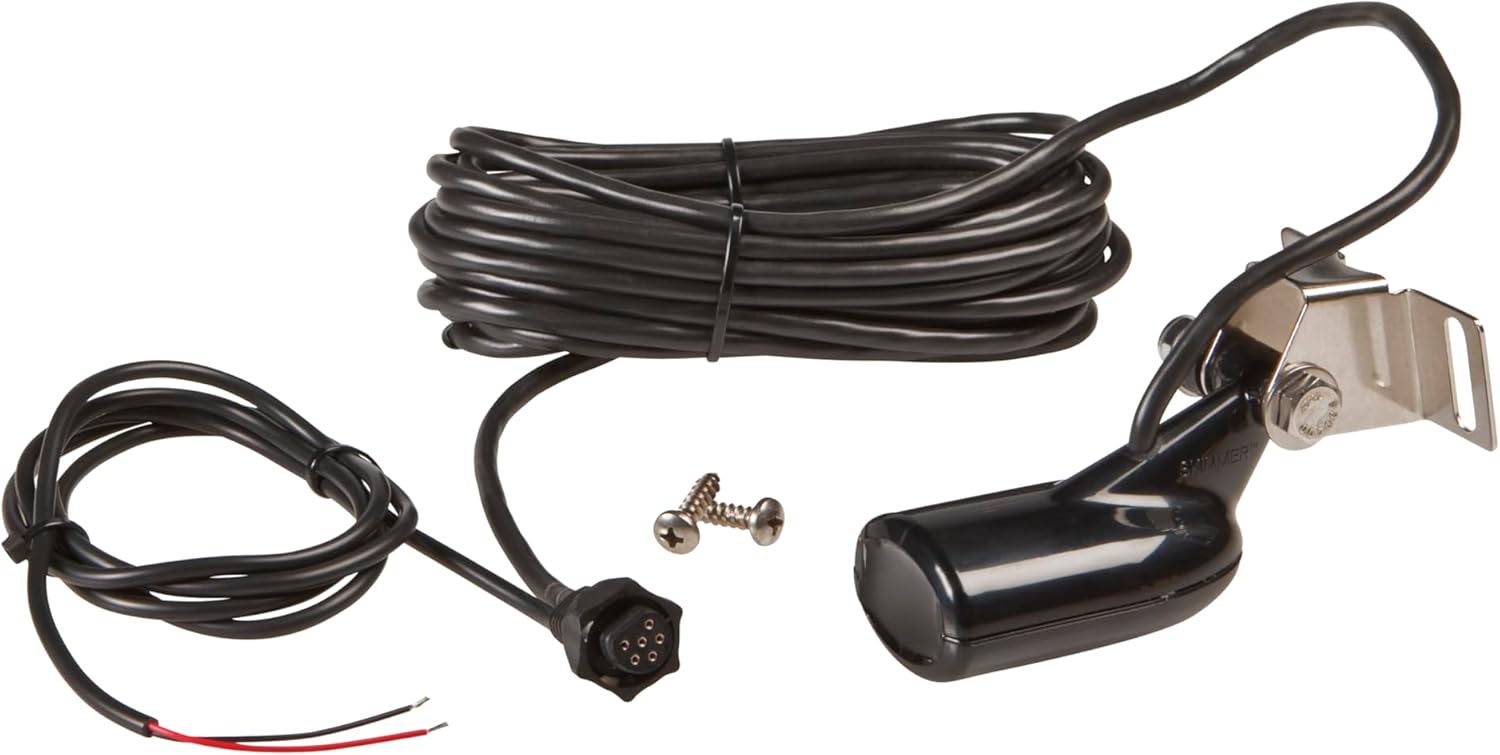
Figure 3.2: The included 83/200 kHz transom mount transducer.

Figure 3.3: The Simrad Halo20 Radar Dome, part of the comprehensive package.
4. การใช้งาน Simrad GO9 XSE
The Simrad GO9 XSE is designed for intuitive operation. This section covers the primary functions and how to utilize them.
4.1 Multi-Touch Display and Interface
The GO9 XSE features a responsive multi-touch display. You can tap to select, pinch to zoom, and drag to pan. The home screen provides quick access to all functions via large, clearly-captioned icons. Customize your home screen with shortcuts to frequently used features and personalize it with your choice of wallpaper. Adjustable split-screen views allow you to see multiple data types simultaneously.

Figure 4.1: Simrad GO9 XSE integrated into a boat's dashboard, demonstrating its clear display and ease of use.
4.2 การนำทางด้วยแผนที่เดินเรือ
Navigate confidently with the full-featured chartplotter. The device supports a wide range of cartography options, including the preloaded C-MAP Discover Chart Card for US and Bahamas coastal and inland waters. Easily create and manage waypoints by tapping on the screen, assigning meaningful names for quick retrieval. The unique Cruise Charting page brings together crucial navigation data and charts in one easily readable display, customizable to your cruising style.

Figure 4.2: The Simrad GO9 XSE showing a detailed chart view with navigation data.
TripIntel Technology: Designed for power boaters, TripIntel tracks and displays key information for planning safe and enjoyable days on the water. This includes fuel range overlaid on charts, current and future tide levels, and a detailed history of your previous trips.
Automatic Routing: For simplified navigation, the GO XSE can suggest the shortest, safest route based on your vessel's draught and dimensions. This feature is available with Navionics+ or Navionics Platinum charts (Navionics Autorouting) and Jeppesen CMAP MAX-N+ charts (Jeppesen Easy Routing). Please note: Automatic Routing is not available in the USA.
4.3 การทำงานของเรดาร์
The Simrad GO9 XSE functions as a full-featured radar display, connecting seamlessly to the included Halo20 Pulse Compression radar system. Use the radar to cruise confidently through crowded harbors, navigate safely in poor visibility, monitor distant weather cells, and locate bird flocks indicating fishing spots. Automatic tuning ensures a clear radar picture in various conditions, and radar overlay combines radar data with navigational charts for an easy-to-interpret view ของสภาพแวดล้อมของคุณ
4.4 Sonar Capabilities
The built-in echosounder provides accurate, real-time depth tracking. A scrollable depth history view allows you to track back and set waypoints for promising anchorages. The GO9 XSE supports various sonar technologies:
- CHIRP Sonar: For clear detection of fish throughout the water column.
- StructureScan Imaging (DownScan and SideScan): Offers a picture-like view of the bottom beneath and around your vessel, ideal for identifying fish-holding structures.
- ForwardScan Sonar: (Requires optional ForwardScan transducer) Provides a clear two-dimensional image of the bottom up to eight times your current depth in front of your vessel, enhancing safety in shallow or poorly-charted waters.

Figure 4.3: Simrad GO9 XSE showing advanced sonar views, including traditional and StructureScan imaging.
4.5 การตรวจสอบเครื่องยนต์ NMEA 2000
Connect your Simrad GO9 XSE to any NMEA 2000-capable equipment on your vessel, including outboard and inboard engines, fuel level and flow meters, speed, heading, and water temperature sensors. This allows you to create custom digital instrument displays, bringing a wealth of information to your dash while maintaining a clean, uncluttered look.
4.6 การเชื่อมต่อ Wi-Fi
Utilize the built-in Wi-Fi for mobile device mirroring, allowing you to view and control your GO9 XSE from a compatible smartphone or tablet. Wi-Fi also enables internet downloads for charting updates and software improvements, ensuring your device is always up-to-date.
5. การบำรุงรักษา
การบำรุงรักษาอย่างสม่ำเสมอจะช่วยให้ Simrad GO9 XSE ของคุณมีอายุการใช้งานยาวนานและทำงานได้อย่างมีประสิทธิภาพสูงสุด
- การทำความสะอาด: ทำความสะอาดภายนอกจอแสดงผลและตัวเครื่องด้วยผ้านุ่มๆamp cloth. Avoid abrasive cleaners or solvents. For stubborn marks, use a mild soap solution. Ensure all port covers are securely closed when not in use to prevent water ingress.
- การอัปเดตซอฟต์แวร์: Periodically check for software updates via the built-in Wi-Fi or Simrad's official website. Keeping your software updated ensures you have the latest features, performance enhancements, and bug fixes.
- การดูแลรักษาเครื่องแปลงสัญญาณ: Regularly inspect the transducer for marine growth or damage. Clean it gently with a soft brush to maintain clear sonar signals.
- การตรวจสอบสายเคเบิล: Check all cables and connections for signs of wear, corrosion, or damage. Replace any compromised cables immediately.
6 การแก้ไขปัญหา
This section provides solutions to common issues you might encounter. For more detailed troubleshooting, refer to the comprehensive Simrad GO9 XSE support documentation available online.
| ปัญหา | สาเหตุที่เป็นไปได้ | สารละลาย |
|---|---|---|
| เครื่องไม่เปิด | ไม่มีไฟเลี้ยง; ฟิวส์ขาด; การเชื่อมต่อหลวม | Check power cable connection; Inspect fuse in power cable; Ensure battery is charged. |
| ไม่มีสัญญาณ GPS | ถูกขัดขวาง view of sky; GPS antenna issue | Relocate unit/antenna to clear view; Check antenna connection. |
| No sonar readings | Transducer not connected; Air bubbles under transducer; Dirty transducer face | Verify transducer connection; Check transducer mounting for air pockets; Clean transducer face. |
| Radar not displaying targets | Radar not powered; Obstruction; Incorrect settings | Check radar power and connection; Ensure clear line of sight for radar dome; Adjust radar gain/range settings. |
| หน้าจอสัมผัสไม่ตอบสนอง | Software glitch; Screen dirty; Extreme temperatures | Restart the unit; Clean the screen; Allow unit to return to normal operating temperature. |
7. ข้อมูลจำเพาะทางเทคนิค
| คุณสมบัติ | รายละเอียด |
|---|---|
| ชื่อรุ่น | 9" MFD + 83/200 XDCR + HALO20 |
| หมายเลขชิ้นส่วน | 000-16294-001 |
| ขนาดหน้าจอ | 9 นิ้ว |
| ขนาดรายการ (LxWxH) | 10.35 x 3.54 x 7.24 นิ้ว |
| น้ำหนักสินค้า | 3 ปอนด์ |
| เทคโนโลยีการเชื่อมต่อ | บลูทูธ, อีเทอร์เน็ต, Wi-Fi |
| คุณสมบัติพิเศษ | บลูทูธ, ระบบเตือนภัยเรดาร์, หน้าจอสัมผัส, กันน้ำ |
| ประเภทแผนที่ | อเมริกาเหนือ (รวมบัตร C-MAP Discover แล้ว) |
| ประเภทการติดตั้ง | ติดตั้งบนแผงควบคุม ติดตั้งบนแดชบอร์ด |
| ส่วนประกอบที่รวมอยู่ | 9" MFD, Halo20 radar, 83/200 kHz transducer, Suncover, C-MAP Discover card, gimbal bracket + knobs, power cable |
8. การรับประกันและการสนับสนุน
The Simrad GO9 XSE comes with a รับประกัน 2 ปี from the manufacturer. For warranty claims, technical support, or additional product information, please visit the official Simrad website or contact their customer service. You can also find more information and products from Simrad at their ร้านค้าอเมซอน.


