การแนะนำ
Thank you for choosing the MARVO Monka Contra PS4 Wireless Game Controller. This manual provides detailed instructions for setting up, operating, and maintaining your new controller. Please read this manual carefully before use to ensure optimal performance and longevity of your device. Keep this manual for future reference.
เนื้อหาแพ็คเกจ
- MARVO Monka Contra PS4 Wireless Game Controller
- สายชาร์จ USB
- คู่มือการใช้งาน (เอกสารนี้)
สินค้าเกินview
The MARVO Monka Contra controller is designed for an immersive gaming experience on your PlayStation 4. It features a wireless connection, ergonomic design for comfortable extended play, and responsive controls for precise input.

รูปที่ 1 : ด้านหน้า view of the MARVO Monka Contra PS4 Wireless Game Controller. This image displays the layout of the dual analog sticks, directional pad, action buttons (Triangle, Circle, Cross, Square), Share, Options, Home, and Turbo buttons, as well as the central touch pad and light bar.
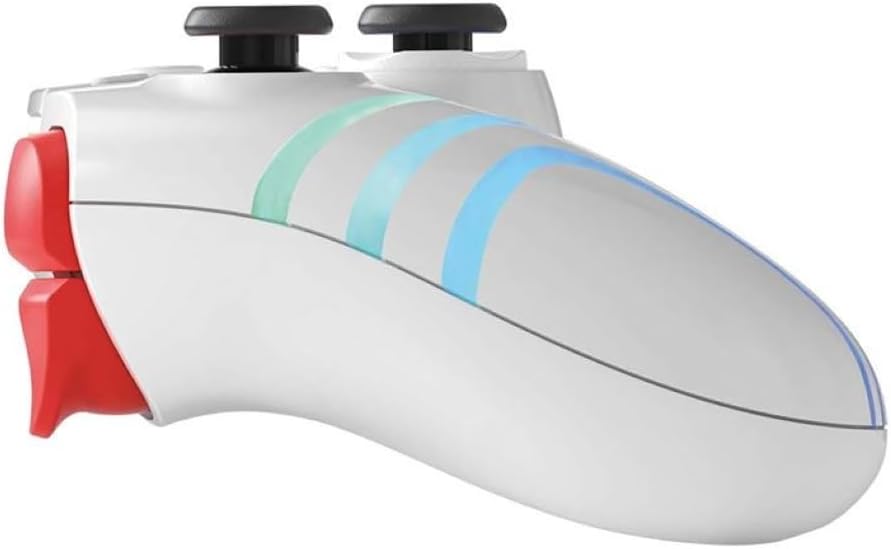
รูปที่ 2: ด้านข้าง view of the MARVO Monka Contra PS4 Wireless Game Controller. This image illustrates the ergonomic curvature of the controller's handles and the placement of the L1, L2, R1, and R2 shoulder/trigger buttons.
เค้าโครงของตัวควบคุม:
- แท่งอนาล็อกซ้าย: การเคลื่อนไหวและการควบคุมกล้อง
- อนาล็อกสติ๊กขวา: การควบคุมและการเล็งกล้อง
- แผงทิศทาง (D-Pad): Menu navigation and specific game actions.
- ปุ่มควบคุมการทำงาน (สามเหลี่ยม วงกลม กากบาท สี่เหลี่ยม): การกระทำต่างๆ ในเกม
- ปุ่มแชร์: Share gameplay moments.
- ปุ่มตัวเลือก: Access in-game menus or pause.
- PS Button (HOME): Access the PS4 system menu.
- ปุ่มเทอร์โบ: เปิดใช้งานฟังก์ชันเทอร์โบสำหรับปุ่มที่กำหนดไว้
- ทัชแพด: Interactive input for compatible games.
- ปุ่ม L1/R1: ปุ่มด้านข้างไหล่ใช้สำหรับการกระทำต่างๆ
- ปุ่ม L2/R2: ทริกเกอร์แบบอนาล็อกสำหรับการป้อนข้อมูลที่แม่นยำ
- ผู้บรรยาย: In-game audio output.
- แจ็คหูฟัง: Connect a compatible headset.
- พอร์ต USB: Charging and wired connection.
การตั้งค่า
การชาร์จครั้งแรก:
Before first use, fully charge the controller. Connect the supplied USB charging cable to the controller's USB port and the other end to a powered USB port on your PS4 console or a USB wall adapter (not included). The light bar on the controller will slowly flash orange while charging and turn off when fully charged.
การจับคู่กับ PS4:
- โปรดตรวจสอบให้แน่ใจว่าเครื่อง PS4 ของคุณเปิดอยู่
- เชื่อมต่อคอนโทรลเลอร์เข้ากับเครื่อง PS4 โดยใช้สายชาร์จ USB ที่ให้มาในชุด
- กดปุ่ม PS Button (HOME) on the controller. The controller will power on and automatically pair with the console.
- Once paired, you can disconnect the USB cable to use the controller wirelessly. The light bar will glow a solid color (e.g., blue for Player 1) indicating a successful connection.
- To pair additional controllers, repeat steps 2-4 for each controller.
Note: If the controller does not pair, ensure the PS4 system software is up to date.
คำแนะนำการใช้งาน
การเปิด/ปิดเครื่อง:
- การเปิดเครื่อง: กดปุ่ม PS Button (HOME).
- วิธีปิดเครื่อง: ถือไว้ PS Button (HOME) for approximately 10 seconds until the light bar turns off, or select "Power Off Controller" from the PS4 Quick Menu.
ฟังก์ชั่นเทอร์โบ:
The Turbo function allows a button to be repeatedly pressed automatically as long as it is held down, which can be useful in certain games.
- กดปุ่มค้างไว้ ปุ่มเทอร์โบ.
- ขณะถืออยู่ เทอร์โบ, press the action button (e.g., Cross, Circle, Square, Triangle, L1, R1, L2, R2) you wish to assign the turbo function to.
- Release both buttons. The assigned button will now activate the turbo function when pressed.
- To disable turbo for a specific button, repeat steps 1-2.
- To clear all turbo settings, hold the ปุ่มเทอร์โบ และกดปุ่ม ปุ่มแชร์ พร้อมกัน
การเชื่อมต่อชุดหูฟัง:
Connect a compatible 3.5mm headset to the headset jack on the bottom of the controller for in-game audio and voice chat.
การชาร์จไฟ
The controller contains a built-in rechargeable battery. When the battery level is low, the light bar may flash or change color to indicate low power.
- Connect the controller to your PS4 console or a USB wall adapter using the provided USB cable.
- The light bar will slowly flash orange during charging.
- The light bar will turn off when the controller is fully charged.
- Charging time may vary depending on the power source and remaining battery level.
การซ่อมบำรุง
- การทำความสะอาด: ใช้ผ้านุ่มและแห้งทำความสะอาดคอนโทรลเลอร์ ห้ามใช้สารเคมีรุนแรงหรือวัสดุที่มีฤทธิ์กัดกร่อน
- พื้นที่จัดเก็บ: เก็บตัวควบคุมไว้ในที่แห้งและเย็น ห่างจากแสงแดดโดยตรงและอุณหภูมิที่สูงหรือต่ำมาก
- การดูแลแบตเตอรี่ เพื่อยืดอายุการใช้งานแบตเตอรี่ ควรหลีกเลี่ยงการปล่อยประจุแบตเตอรี่จนหมดบ่อยๆ ควรชาร์จเป็นประจำ แม้จะไม่ได้ใช้งานเป็นเวลานานก็ตาม
- หลีกเลี่ยงการหยด: ปกป้องตัวควบคุมจากการตกหล่นและแรงกระแทกซึ่งอาจทำให้ส่วนประกอบภายในเสียหายได้
การแก้ไขปัญหา
| ปัญหา | สารละลาย |
|---|---|
| ตัวควบคุมไม่เปิดใช้งาน | Ensure the controller is charged. Connect it to the PS4 with the USB cable and press the PS Button. |
| Controller does not connect to PS4 wirelessly. |
|
| ปุ่มหรือแท่งอนาล็อกไม่ตอบสนอง |
|
| ตัวควบคุมตัดการเชื่อมต่อบ่อยครั้ง |
|
ข้อมูลจำเพาะ
- แบบอย่าง: Monka Contra
- การเชื่อมต่อ: ไร้สาย (บลูทูธ), แบบมีสาย (USB)
- ความเข้ากันได้: เพลย์สเตชั่น 4
- แบตเตอรี่: ลิเธียมไอออนแบบชาร์จไฟได้ในตัว
- ขนาด : ขนาดประมาณ 17.4 x 17.2 x 7.6 ซม
- น้ำหนัก: ประมาณ 460 กรัม
การรับประกันและการสนับสนุน
MARVO products are designed for reliability and performance. For warranty information or technical support, please refer to the warranty card included with your product or visit the official MARVO webไซต์ โปรดเก็บหลักฐานการซื้อไว้เพื่อใช้ในการเรียกร้องการรับประกัน
For further assistance, contact MARVO customer support through their official channels.


