1. สูงกว่าview
1.1 คำอธิบายผลิตภัณฑ์
The PNI GreenHouse SC1800C PRO Solar Inverter is a central component for small off-grid solar systems, suitable for areas with or without grid electricity. It provides a continuous output of 3000W with a pure sine wave, making it suitable for various household lighting installations and other small electronic motors, including refrigerators, pumps, tools, and charging devices for phones, laptops, and TVs.
1.2 คุณสมบัติหลัก
- Maximum photovoltaic panel input power: 2000 W.
- อินพุต DC สูงสุด voltage from photovoltaic panels: 30 - 120 VDC (Vmp).
- Maximum solar charge current: 30 A input from panels, 60 A output to batteries.
- Solar charging efficiency: 98%.
- MPPT solar charger type.
- จัดอันดับเอาท์พุทvoltagอี: 230 โวลต์
- Rated output power: 3000 W (under ideal conditions with proportional battery count and 100% charged batteries).
- Maximum apparent power: 6000 VA (peak, 0.5 seconds under ideal conditions).
- ปริมาณการส่งออกtage waveform: Pure sine wave.
- Output signal frequency: 50, 60 Hz.
- ปริมาณอินพุตtagอี: 230 โวลต์ AC.
- Grid connection for backup.
- Compatible with 24V batteries: AGM, lead-acid, gel, flooded lithium-ion.
- Minimum battery start voltage: 23 V (cold start voltagจ).
- Integrated high-frequency inverter type (switching).
- Inverter efficiency: 90% ~ 93% (100% charged battery).
- Typical transfer time: 10 ms (UPS, VDE) 20 ms (APL).
- Line mode efficiency: > 95% (rated R load, fully charged battery).
- Hybrid operating modes: SBU – Solar/Battery/Utility, Solar Utility (UPS).
- AC charge voltagอี: 230 โวลต์
- Maximum AC charge current: 30 A.
- Automatic switching: Solar - Batteries - Grid.
- ฟังก์ชั่นประหยัดพลังงาน
- Multiple protections.
- จอแสดงผลมัลติฟังก์ชั่น
- Dedicated menu for advanced settings.
- Monitoring with PC software (USB cable included).
- Remote monitoring from mobile/PC (with optional WiFi USB dongle).
1.3 เนื้อหาบรรจุภัณฑ์
- PNI GreenHouse SC1800C PRO Solar Inverter
- สาย USB
- คู่มือการใช้งาน
- PNI Smart Dongle-WLAN (for WiFi monitoring)
2. ข้อมูลด้านความปลอดภัย
โปรดอ่านคำแนะนำและคำเตือนทั้งหมดอย่างละเอียดก่อนการติดตั้งและการใช้งาน การไม่ปฏิบัติตามคำแนะนำเหล่านี้อาจทำให้เกิดไฟฟ้าช็อต ไฟไหม้ หรือการบาดเจ็บร้ายแรงได้
- บุคลากรที่ผ่านการรับรอง: การติดตั้งและบำรุงรักษาจะต้องดำเนินการโดยบุคลากรที่มีคุณสมบัติเหมาะสม
- อันตรายจากไฟฟ้าช็อต: อุปกรณ์นี้ทำงานด้วยแรงดันไฟฟ้าสูงtagอย่าเปิด casing unless specifically instructed.
- ความปลอดภัยของแบตเตอรี่: Batteries can produce explosive gases. Ensure proper ventilation. Do not smoke or allow sparks or flames near batteries. Wear eye protection.
- การระบายอากาศที่เหมาะสม: ติดตั้งอินเวอร์เตอร์ในบริเวณที่มีการระบายอากาศดี เพื่อป้องกันความร้อนสูงเกินไป
- สภาพแวดล้อม : Avoid exposure to rain, snow, spray, or any liquids. Operate within the specified temperature range (-26 °C to 80 °C).
- การต่อลงดิน: ตรวจสอบให้แน่ใจว่าอินเวอร์เตอร์ต่อสายดินอย่างถูกต้องตามข้อกำหนดด้านไฟฟ้าของท้องถิ่น
- ตัดการเชื่อมต่อไฟฟ้า: Always disconnect all power sources (solar, battery, AC grid) before performing any wiring or maintenance.
3. ส่วนประกอบผลิตภัณฑ์
3.1 PNI GreenHouse SC1800C PRO Solar Inverter

รูปที่ 3.1 : ด้านหน้า view of the PNI GreenHouse SC1800C PRO Solar Inverter, showing the display and control buttons.

รูปที่ 3.2: ด้านหลัง view of the PNI GreenHouse SC1800C PRO Solar Inverter, illustrating the various connection ports for solar panels, batteries, AC input, and AC output.
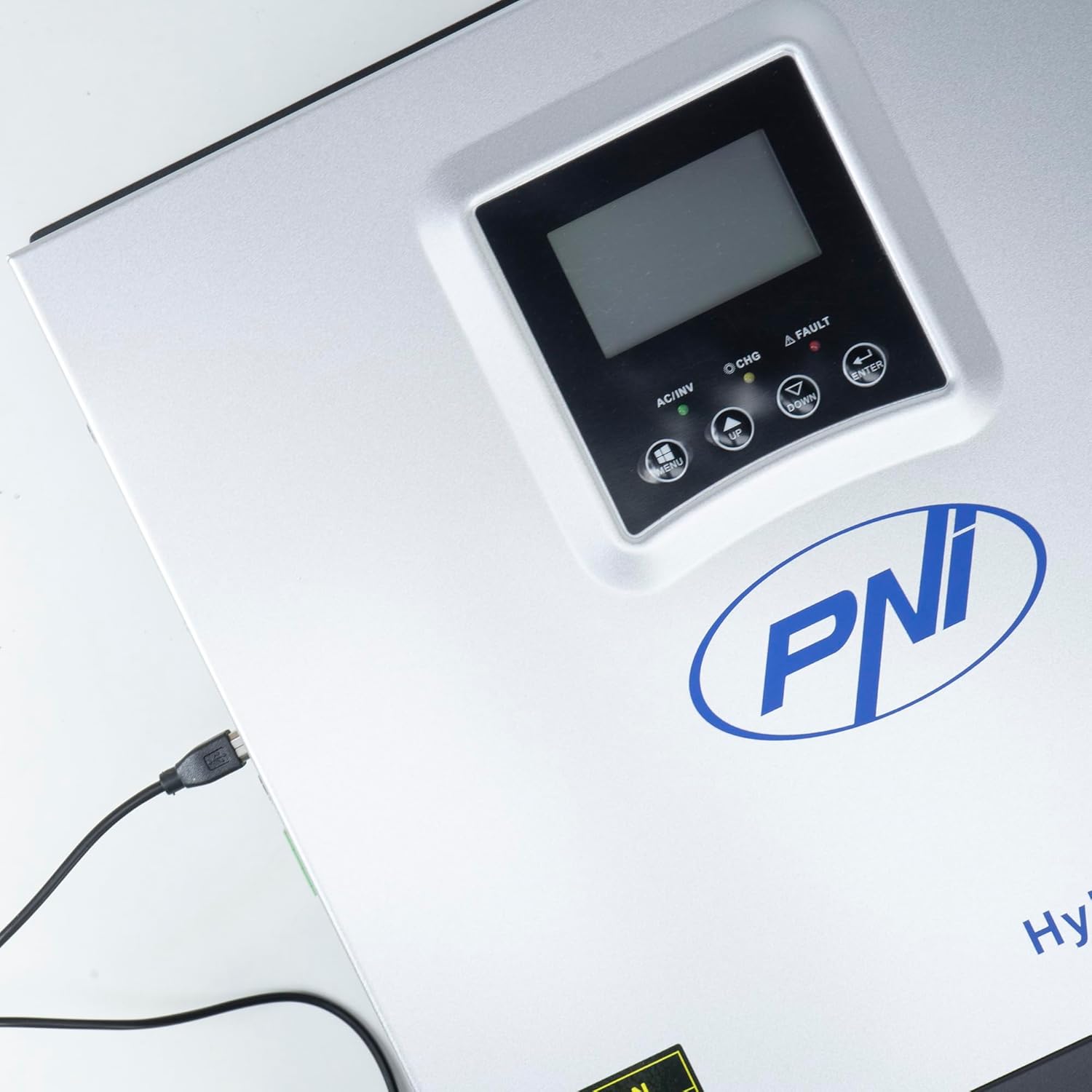
Figure 3.3: Close-up of the USB connection port on the inverter, used for PC monitoring.
3.2 PNI Smart Dongle-WLAN (Optional)

Figure 3.4: The PNI Smart Dongle-WLAN, an optional accessory for remote WiFi monitoring of the inverter.

Figure 3.5: The PNI Smart Dongle-WLAN connected to the inverter's dedicated port for WiFi communication.
4. การติดตั้งและการตั้งค่า
4.1 การติดตั้งบนผนัง
The inverter is designed for wall mounting. Choose a location that is dry, well-ventilated, and protected from direct sunlight and moisture. Ensure sufficient clearance around the unit for proper airflow and heat dissipation. Use appropriate mounting hardware for your wall type.
4.2 ไดอะแกรมการเชื่อมต่อระบบ

Figure 4.1: Basic application diagram showing the connections between solar panels, utility grid, generator, inverter, battery, and home loads. Note: Generator, PV modules, WiFi module, and battery are not included with the inverter unless specified.
4.3 การเชื่อมต่อสายไฟ
Follow the diagram above and the labels on the inverter for correct wiring. Ensure all connections are secure and properly insulated. It is highly recommended that a qualified electrician performs all wiring.
- การเชื่อมต่อแผงโซลาร์เซลล์: Connect your solar panels to the designated PV input terminals. Observe correct polarity (positive to positive, negative to negative). The maximum DC input voltage คือ 120 VDC
- การเชื่อมต่อแบตเตอรี่: Connect the 24V battery bank to the battery terminals. Ensure correct polarity. The inverter supports AGM, lead-acid, gel, and flooded lithium-ion batteries.
- อินพุต AC (จากโครงข่ายไฟฟ้า/เครื่องกำเนิดไฟฟ้า): Connect the AC utility grid or a generator to the AC input terminals. This provides backup power and can charge batteries.
- เอาต์พุต AC (โหลด): เชื่อมต่ออุปกรณ์ไฟฟ้าในบ้านของคุณเข้ากับขั้วต่อเอาต์พุต AC
4.4 การเพิ่มพลังเริ่มต้น
After all connections are made and verified:
- เปิดสวิตช์ตัดไฟแบตเตอรี่
- Turn on the solar panel breaker (if applicable).
- เปิดสวิตช์ตัดไฟกระแสสลับ (หากเชื่อมต่อกับระบบไฟฟ้าหลัก/เครื่องกำเนิดไฟฟ้า)
- เปิดสวิตช์ไฟของอินเวอร์เตอร์
- Observe the display for status indicators and initial readings.
5. โหมดการทำงาน
The PNI GreenHouse SC1800C PRO offers intelligent energy management with several configurable operating modes:
- Solar Priority Mode (SBU): In this mode, the inverter prioritizes power consumption from solar energy. If solar power is insufficient, it will draw from batteries. The utility grid acts as a backup.
- โหมดลำดับความสำคัญของแบตเตอรี่: The inverter prioritizes drawing power from the batteries. Solar energy will charge the batteries. The utility grid is used only when battery voltage drops below a set threshold.
- Utility Priority Mode (UPS): This mode prioritizes power from the utility grid. Solar energy will charge the batteries. The inverter switches to battery power only when the grid is unavailable, functioning as an Uninterruptible Power Supply (UPS).
These modes can be configured via the inverter's multifunction display and dedicated menu for advanced settings.
5.1 การติดตาม
The inverter supports monitoring through:
- PC Software (USB): Connect the inverter to a PC using the provided USB cable and dedicated software for detailed monitoring and analysis of parameters.
- Remote Monitoring (WiFi - Optional): With the optional PNI Smart Dongle-WLAN, you can monitor the inverter remotely via a mobile application or web อินเทอร์เฟซ
6. การบำรุงรักษา
การบำรุงรักษาอย่างสม่ำเสมอจะช่วยให้เครื่องแปลงกระแสไฟฟ้าทำงานได้อย่างมีประสิทธิภาพสูงสุดและมีอายุการใช้งานยาวนาน ควรตัดการเชื่อมต่อแหล่งจ่ายไฟทั้งหมดก่อนทำการบำรุงรักษาทุกครั้ง
- การทำความสะอาด: ควรเช็ดทำความสะอาดภายนอกของอินเวอร์เตอร์ด้วยผ้าแห้งเป็นระยะ ตรวจสอบให้แน่ใจว่าช่องระบายอากาศปราศจากฝุ่นและสิ่งสกปรก ห้ามใช้น้ำยาทำความสะอาด
- การตรวจสอบการเชื่อมต่อ: Annually inspect all wiring connections (solar, battery, AC input/output) for tightness and signs of corrosion. Tighten any loose connections.
- การตรวจสอบแบตเตอรี่: If using lead-acid batteries, check electrolyte levels and terminal condition as per battery manufacturer guidelines.
- การตรวจสอบสิ่งแวดล้อม: ตรวจสอบให้แน่ใจว่าสภาพแวดล้อมในการติดตั้งคงอยู่ในช่วงอุณหภูมิและความชื้นที่กำหนดไว้
7 การแก้ไขปัญหา
ส่วนนี้ให้คำแนะนำเกี่ยวกับปัญหาทั่วไป สำหรับปัญหาที่ซับซ้อน โปรดติดต่อเจ้าหน้าที่บริการผู้เชี่ยวชาญ
| ปัญหา/สัญญาณเตือน | สาเหตุที่เป็นไปได้ | สารละลาย |
|---|---|---|
| สัญญาณเตือนแบตเตอรี่ต่ำ | ปริมาณแบตเตอรี่tage อยู่ต่ำกว่าระดับต่ำtage warning threshold. | Check battery charge level. Ensure solar panels are producing power or AC input is connected for charging. Reduce load. |
| Battery Disconnected Alarm | Battery cables are loose or disconnected. | Safely disconnect all power sources and check battery connections. Reconnect securely. |
| โอเวอร์โวลtagอี ปลุก | ปริมาณอินพุตtage (PV or AC) exceeds safe limits. | Verify solar panel array voltage or AC input voltage. Ensure it is within the inverter's specifications. |
| การป้องกันการโอเวอร์โหลด AC | Connected loads exceed the inverter's output capacity. | Reduce the total load connected to the inverter. Check individual appliance power consumption. |
| ไม่มีกำลังขับ | Inverter off, low battery, overload, or fault. | Check if the inverter is powered on. Verify battery voltage. Check for overload or fault codes on the display. |
8. ข้อมูลจำเพาะ
| คุณสมบัติ | ข้อมูลจำเพาะ |
|---|---|
| ยี่ห้อ | PNI |
| หมายเลขรุ่น | PNI-SC1800P-DG |
| กำลังไฟที่กำหนด | 3000 วัตต์ |
| พลังสูงสุด | 6000 VA (0.5 seconds) |
| ปริมาณแบตเตอรี่tage | 24 โวลต์ |
| กำลังไฟฟ้าเข้า PV สูงสุด | 2000 วัตต์ |
| แม็กซ์ PV อินพุต Voltagอี (วีเอ็มพี) | 30 - 120 โวลต์ดีซี |
| MPPT Solar Charge Current | 60 A (output to batteries) |
| อินพุต AC Voltage | 230 โวลต์ |
| กระแสไฟขาออกVoltage | 230 โวลต์ |
| รูปคลื่นเอาท์พุต | เพียวไซน์เวฟ |
| ความถี่เอาต์พุต | 50/60 เฮิรตซ์ |
| กระแสไฟชาร์จ AC สูงสุด | 30 ก |
| ประสิทธิภาพของอินเวอร์เตอร์ | 90% ~ 93% |
| อุณหภูมิในการทำงาน | -26°C ถึง 80°C |
| ขนาด (กว้าง x ยาว x สูง) | 29 x 12 x 35 ซม. |
| น้ำหนัก | 6.9 กก. |
| การบริโภคสแตนด์บาย | ≈ 25 W (Energy saving mode ≈ 12.5 W) |
| การสื่อสาร | USB, Optional WiFi Dongle |
9. การรับประกันและการสนับสนุน
สำหรับข้อมูลการรับประกันและการสนับสนุนทางเทคนิค โปรดดูเอกสารที่แนบมากับสินค้าที่ซื้อ หรือติดต่อผู้ค้าปลีกของคุณ โปรดเก็บหลักฐานการซื้อไว้เพื่อใช้ในการเรียกร้องการรับประกัน