1. บทนำ
ขอบคุณสำหรับการซื้อasing the MUSE M307BT Portable Bluetooth Speaker. This compact and versatile speaker is designed to provide high-quality audio from your laptop, tablet, or smartphone. It features Bluetooth connectivity, a 5W output, a built-in rechargeable battery, and support for USB and Micro SD card playback. This manual provides essential information for setting up, operating, and maintaining your device.
2. ข้อมูลด้านความปลอดภัย
- อย่าให้เครื่องสัมผัสกับอุณหภูมิที่สูงหรือต่ำเกินไป แสงแดดโดยตรง หรือความชื้นสูง
- หลีกเลี่ยงการทำตกหรือให้ลำโพงได้รับแรงกระแทกรุนแรง
- ห้ามถอดประกอบหรือพยายามซ่อมแซมอุปกรณ์ด้วยตนเอง แนะนำให้ส่งช่างผู้ชำนาญเข้ารับบริการทั้งหมด
- Keep the speaker away from water and other liquids. This device is not waterproof.
- ใช้เฉพาะสายชาร์จ USB ที่ให้มาหรือเทียบเท่าที่ได้รับการรับรองเท่านั้น
- Dispose of the battery and device responsibly according to local regulations.
3. เนื้อหาบรรจุภัณฑ์
ตรวจสอบให้แน่ใจว่ามีรายการทั้งหมดอยู่ในบรรจุภัณฑ์:
- MUSE M307BT Portable Bluetooth Speaker
- สายชาร์จ USB
4. สินค้าหมดview
ทำความคุ้นเคยกับส่วนประกอบและการควบคุมของลำโพง


การควบคุมและพอร์ต:
- ปุ่มเปิด/ปิด: เปิด/ปิดลำโพง
- ปุ่มโหมด (M): Switches between Bluetooth, USB, and Micro SD modes.
- ลดเสียง / เพลงก่อนหน้า (-): กดสั้นเพื่อลดระดับเสียง กดยาวเพื่อเล่นเพลงก่อนหน้า
- Play/Pause / Call Button (>): Plays/pauses music, answers/ends calls.
- เพิ่มเสียง / เพลงถัดไป (+): กดสั้นเพื่อเพิ่มระดับเสียง กดยาวเพื่อเล่นเพลงถัดไป
- พอร์ตไมโครยูเอสบี: สำหรับชาร์จลำโพง
- พอร์ต USB: สำหรับเล่นเพลงจากแฟลชไดรฟ์ USB
- Micro SD (TF) Slot: สำหรับเล่นเพลงจาก Micro SD การ์ด
- ไฟแสดงสถานะ LED: Shows charging status and Bluetooth pairing status.
5. การตั้งค่า
5.1 การชาร์จลำโพง
- Connect the Micro-USB end of the charging cable to the speaker's Micro-USB port.
- เชื่อมต่อปลาย USB-A ของสายชาร์จเข้ากับอะแดปเตอร์ไฟ USB (ไม่รวมอยู่ด้วย) หรือพอร์ต USB ของคอมพิวเตอร์
- The LED indicator will illuminate to show charging status. It will typically turn off or change color once fully charged.
- การชาร์จเต็มจะใช้เวลาประมาณ 2-3 ชั่วโมง
5.2 การเปิด/ปิดเครื่อง
- การเปิดเครื่อง: Press and hold the Power button for a few seconds until you hear an audible prompt and the LED indicator flashes.
- วิธีปิดเครื่อง: กดปุ่มเปิด/ปิดค้างไว้สองสามวินาทีจนกว่าคุณจะได้ยินเสียงแจ้งเตือนและไฟแสดงสถานะ LED ดับลง
6. คู่มือการใช้งาน
6.1 การจับคู่บลูทูธ
Pair your speaker with a Bluetooth-enabled device (smartphone, tablet, laptop).

- Ensure the speaker is powered on and in Bluetooth mode. The LED indicator will flash rapidly, indicating it's ready for pairing.
- บนอุปกรณ์ของคุณ เปิดใช้งานบลูทูธและค้นหาอุปกรณ์ที่มีอยู่
- Select "MUSE M307BT" from the list of devices.
- เมื่อจับคู่สำเร็จแล้ว ไฟ LED จะหยุดกะพริบและติดสว่างคงที่ และคุณจะได้ยินเสียงยืนยัน
- ตอนนี้คุณสามารถเล่นเสียงจากอุปกรณ์ของคุณผ่านลำโพงได้
6.2 การเล่น USB
- ใส่แฟลชไดรฟ์ USB ที่มีไฟล์เสียง MP3 fileลงในพอร์ต USB
- กดปุ่ม โหมด (M) button to switch to USB mode. The speaker will automatically begin playing music from the USB drive.
- ใช้ + และ - ปุ่มสำหรับเลื่อนดูเพลงและควบคุมระดับเสียง
6.3 Micro SD (TF) Card Playback
- Insert a Micro SD (TF) card containing MP3 audio files into the Micro SD slot.
- กดปุ่ม โหมด (M) button to switch to Micro SD mode. The speaker will automatically begin playing music from the Micro SD card.
- ใช้ + และ - ปุ่มสำหรับเลื่อนดูเพลงและควบคุมระดับเสียง
6.4 การจับคู่สเตอริโอ (ฟังก์ชัน TWS)
To achieve a more immersive stereo sound experience, you can pair two MUSE M307BT speakers together.
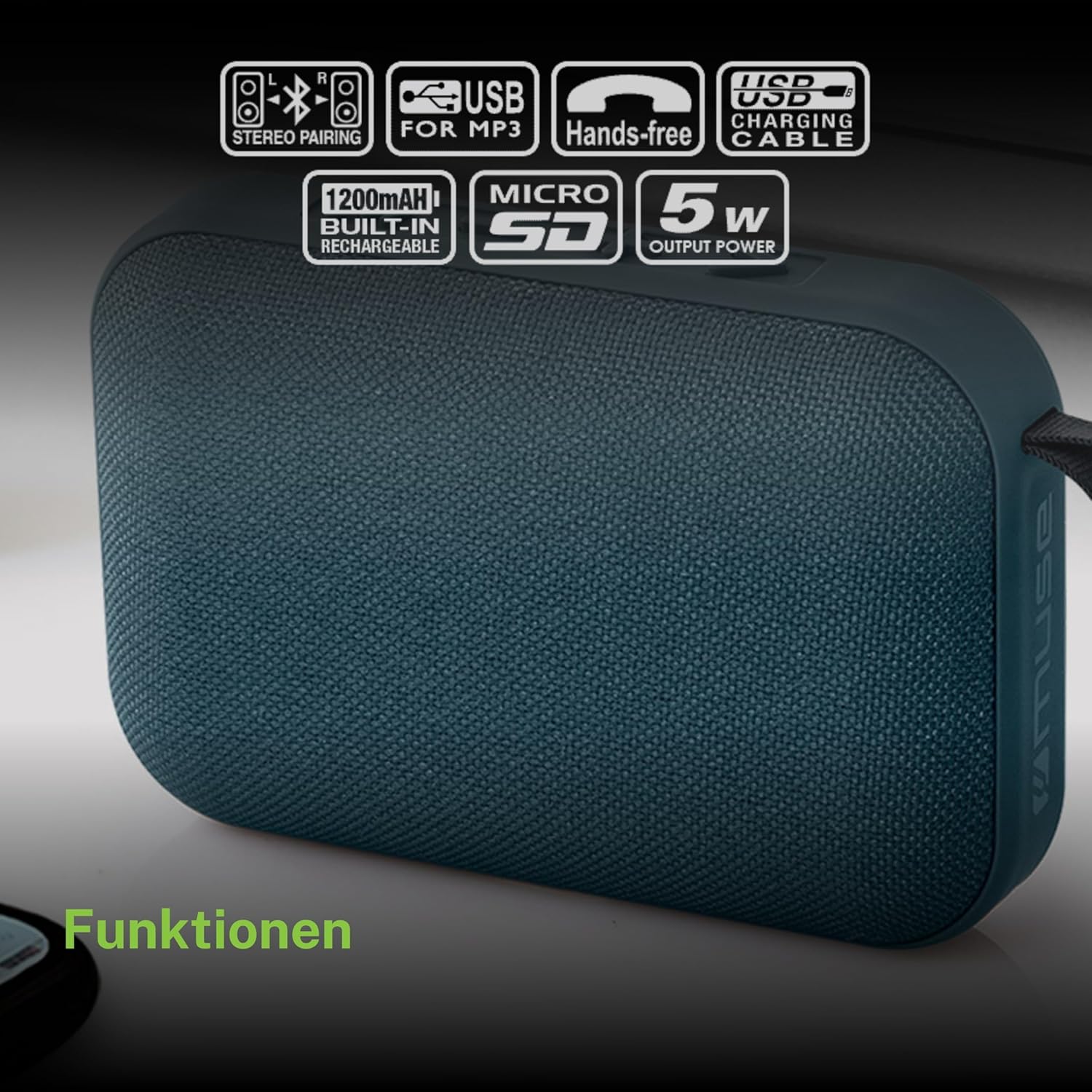
- Ensure both MUSE M307BT speakers are powered on and in Bluetooth pairing mode (LED flashing).
- On one of the speakers (this will be your primary speaker), press and hold the โหมด (M) button for a few seconds. You will hear a sound indicating that the speakers are attempting to pair with each other.
- Once successfully paired, you will hear a confirmation sound, and the LED indicator on the primary speaker will flash slowly, while the secondary speaker's LED will remain solid.
- ตอนนี้ เชื่อมต่ออุปกรณ์บลูทูธของคุณเข้ากับลำโพงหลักตามที่อธิบายไว้ในหัวข้อ 6.1 เสียงจะเล่นในระบบสเตอริโอผ่านลำโพงทั้งสองตัว
6.5 การโทรแบบแฮนด์ฟรี
When connected via Bluetooth to your smartphone, the speaker can be used for hands-free calls.
- รับสาย: กดปุ่ม Play/Pause (>) ปุ่มหนึ่งครั้ง
- วางสาย: กดปุ่ม Play/Pause (>) กดปุ่มหนึ่งครั้งระหว่างการโทร
- ปฏิเสธสาย: กดปุ่มค้างไว้ Play/Pause (>) กดปุ่มนี้เป็นเวลา 2 วินาที
7. การบำรุงรักษา
- ทำความสะอาดลำโพงด้วยผ้านุ่มและแห้ง ห้ามใช้น้ำยาทำความสะอาดหรือสารละลายที่มีฤทธิ์กัดกร่อน
- เก็บลำโพงไว้ในที่แห้งและเย็นเมื่อไม่ได้ใช้งานเป็นเวลานาน
- Avoid blocking the speaker grille to ensure optimal sound quality.
8 การแก้ไขปัญหา
| ปัญหา | สาเหตุที่เป็นไปได้ | สารละลาย |
|---|---|---|
| ลำโพงไม่เปิดเครื่อง | แบตเตอรี่อ่อน | ชาร์จลำโพงให้เต็ม |
| ไม่สามารถจับคู่ผ่านบลูทูธได้ | Speaker not in pairing mode; Bluetooth disabled on device; device too far. | Ensure speaker LED is flashing; enable Bluetooth on your device; move device closer to speaker (within 10 meters). |
| ไม่มีเสียง. | ระดับเสียงต่ำเกินไป; โหมดไม่ถูกต้อง; อุปกรณ์ไม่เล่น | Increase speaker and device volume; press Mode button to select correct input; ensure audio is playing on your device. |
| การเล่นไฟล์ผ่าน USB/Micro SD ไม่ทำงาน | ไม่ถูกต้อง file รูปแบบไฟล์; การ์ด/ไดรฟ์ไม่ได้เสียบอย่างถูกต้อง; ไฟล์เสียหาย files. | ทำให้มั่นใจ files are MP3 format; reinsert card/drive; try different fileหรืออุปกรณ์จัดเก็บข้อมูล |
| การจับคู่สเตอริโอล้มเหลว | ลำโพงอยู่ห่างกันเกินไป หรือลำโพงตัวหนึ่งเชื่อมต่อกับอุปกรณ์อื่นอยู่แล้ว | Ensure speakers are close; disconnect any existing Bluetooth connections before attempting stereo pairing. |
9. ข้อมูลจำเพาะ

| คุณสมบัติ | ข้อมูลจำเพาะ |
|---|---|
| ชื่อรุ่น | เอ็ม307บีที |
| ยี่ห้อ | มิวส์ |
| กำลังขับ | 5 วัตต์ |
| แบตเตอรี่ | 1200 mAh / 3.7V Lithium-ion (Rechargeable) |
| การเชื่อมต่อ | Bluetooth, USB, Micro SD (TF) |
| โหมดเอาต์พุตเสียง | Stereo (with TWS pairing) |
| ขนาด (กว้าง x ยาว x สูง) | 118 x 30 x 76 มม. |
| น้ำหนัก | 200 กรัม |
| สี | สีฟ้า |
| ส่วนประกอบที่รวมอยู่ | สายชาร์จ USB |
| กันน้ำ | เลขที่ |
| การใช้ที่แนะนำ | For computer, smartphone, or tablet |
| อุปกรณ์ที่รองรับ | แล็ปท็อป แท็บเล็ต สมาร์ทโฟน |
10. การรับประกันและการสนับสนุน
10.1 การรับประกันของผู้ผลิต
This MUSE M307BT Portable Bluetooth Speaker comes with a การรับประกันจากผู้ผลิต 2 ปี นับจากวันที่ซื้อสินค้า การรับประกันนี้ครอบคลุมถึงข้อบกพร่องจากการผลิตและฝีมือการผลิตภายใต้การใช้งานปกติ ไม่ครอบคลุมถึงความเสียหายที่เกิดจากการใช้งานผิดวิธี อุบัติเหตุ การดัดแปลงโดยไม่ได้รับอนุญาต หรือการสึกหรอตามปกติ
10.2 การสนับสนุนลูกค้า
For technical assistance, warranty claims, or further inquiries, please contact your retailer or the official MUSE customer support channel. Please have your proof of purchase and product model number (M307BT) ready when contacting support.


