1. บทนำ
Thank you for choosing the iDance Beatmix 303 BT Wireless Speaker and DJ Mixer. This device combines a portable Bluetooth speaker with a modular DJ mixer, offering a versatile audio experience with built-in beats, drum pads, and disco lights. This manual provides essential information for safe and optimal use of your product. Please read it thoroughly before operation and retain it for future reference.
2. สินค้าหมดview
2.1 คุณสมบัติหลัก
- Portable and Wireless Bluetooth Speaker
- Integrated Modular DJ Mixer (S9XC) with 45 beats across 5 banks (Electro/House, Reggaeton/Latin, Hip Hop/Rock, Dubstep/Techno, Funky/Disco)
- 5 Drum Pads (E. Drums, Vocoder, Rock Session, Super FX, A.Drums)
- 50W Peak Music Power with Super Bass
- Built-in LED Disco Lights
- Wireless Bluetooth Streaming and MP3 Player via USB / TF Card
- Wireless Audio Sharing Mode with other Beatmix 303 units
- Karaoke Ready with 1 Microphone Input and Echo Effect
- Voice Changer Effect with 5 options: Echo, Male, Child, Female, Robot
- AUX IN 3.5 mm for external audio sources
- Includes 1 Wired Dynamic Vocal Microphone (CLM9)
2.2 ส่วนประกอบ
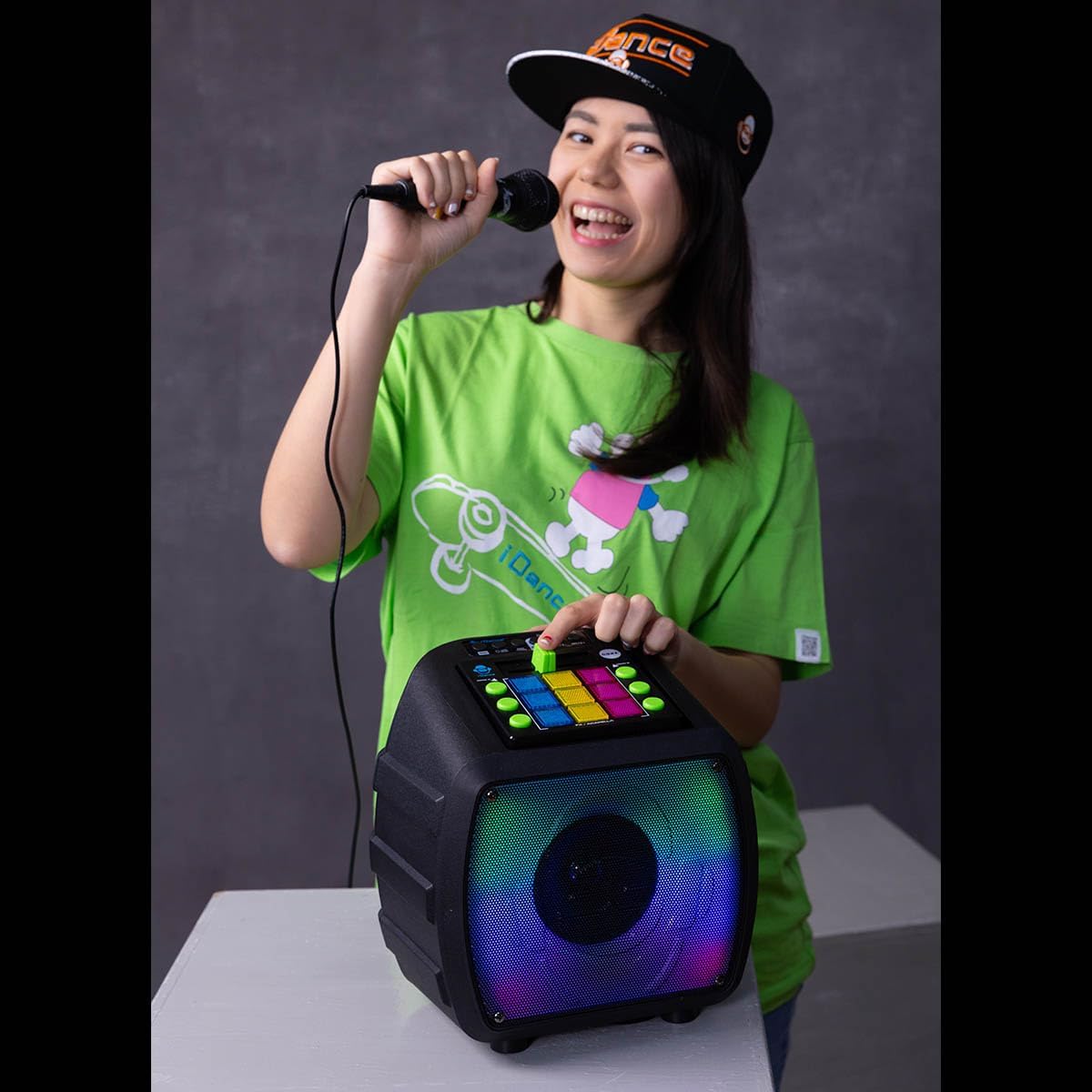
The iDance Beatmix 303 package includes the main speaker unit with integrated DJ mixer and a wired dynamic vocal microphone.

รูปที่ 1: The iDance Beatmix 303 BT Wireless Speaker and DJ Mixer, shown with the included wired microphone. The speaker features a colorful LED grille and a top-mounted DJ mixer panel.
รูปที่ 2: ภาพระยะใกล้ view of the DJ mixer panel on the iDance Beatmix 303. It features various buttons for beat selection (Electro, Reggaeton, Hip Hop, Dubstep, Funky), drum pads, and controls for volume and effects.
3. การตั้งค่า
3.1 การชาร์จอุปกรณ์
Before first use, fully charge the Beatmix 303. Connect the provided charging cable to the DC 5V/1A input port on the unit and to a suitable USB power adapter (not included). The charging indicator light will illuminate during charging and turn off or change color when fully charged. Charging typically takes 5-8 hours.
3.2 การเปิด/ปิดเครื่อง
To power on the device, locate the power button, usually marked 'ON/OFF', and press it. To power off, press the button again. A sound prompt may indicate power status.
3.3 การเชื่อมต่อไมโครโฟน
Plug the wired dynamic vocal microphone (CLM9) into the designated microphone input jack on the Beatmix 303. Ensure it is securely connected.
4. คู่มือการใช้งาน
4.1 การจับคู่บลูทูธ
- Turn on the Beatmix 303. The unit will automatically enter Bluetooth pairing mode, indicated by a flashing LED.
- บนอุปกรณ์พกพาของคุณ (สมาร์ทโฟน แท็บเล็ต แล็ปท็อป) เปิดใช้งานบลูทูธและค้นหาอุปกรณ์ที่ใช้งานได้
- Select "BEATMIX 303" from the list of devices.
- Once paired, the LED indicator will stop flashing, and a confirmation sound may be heard. You can now stream audio wirelessly.
4.2 DJ Mixer Functions
The integrated S9XC DJ Mixer allows for creative audio manipulation:
- Beat Banks: Use the dedicated buttons (Electro, Reggaeton, Hip Hop, Dubstep, Funky) to select from 45 pre-loaded beats across 5 different musical styles.
- แผ่นกลอง: Activate the 5 drum pads (E. Drums, Vocoder, Rock Session, Super FX, A.Drums) to add percussive elements and sound effects to your mix.
- การผสม: Adjust the fader and other controls on the mixer panel to blend beats, music, and microphone input.
4.3 การเล่นไฟล์ผ่าน USB / การ์ด TF
เสียบแฟลชไดรฟ์ USB หรือการ์ด TF (microSD) ที่มีไฟล์เสียง MP3 files into the respective port. The device will automatically detect and begin playing the audio files. Use the playback controls (play/pause, next/previous track) on the unit to manage your music.
4.4 Wireless Audio Sharing Mode
To share audio wirelessly with another Beatmix 303 unit:
- Ensure both Beatmix 303 units are powered on.
- Follow the instructions in the manual for the specific audio sharing mode activation (refer to the device's on-screen prompts or dedicated button if available).
- Once connected, audio played on the primary unit will be synchronized with the secondary unit.
4.5 Microphone and Karaoke Functions
- การใช้ไมโครโฟน: Once the microphone is connected, speak or sing into it. Adjust the microphone volume control on the unit.
- เอฟเฟกต์เสียงสะท้อน: Activate the Echo effect to add reverberation to your vocals.
- โปรแกรมเปลี่ยนเสียง: Use the Voice Changer effect to alter your voice. Select from 5 different effects: Echo, Male, Child, Female, Robot.
อินพุต AUX 4.6 ช่อง
Connect an external audio source (e.g., an MP3 player, computer, or other audio device) to the 3.5 mm AUX IN port using a standard 3.5 mm audio cable. The device will automatically switch to AUX input mode, or you may need to select it manually using the mode button.
4.7 Disco Lights
The Beatmix 303 features built-in LED disco lights. These lights typically activate automatically with music playback or can be controlled via a dedicated 'LEDs ON/OFF' button on the unit.
5. การบำรุงรักษา
- การทำความสะอาด: เช็ดตัวเครื่องด้วยผ้านุ่มและแห้ง ห้ามใช้น้ำยาทำความสะอาดที่มีฤทธิ์กัดกร่อนหรือตัวทำละลาย
- พื้นที่จัดเก็บ: เก็บอุปกรณ์ไว้ในที่แห้งและเย็น หลีกเลี่ยงแสงแดดโดยตรงและอุณหภูมิที่สูงหรือต่ำเกินไป
- การดูแลแบตเตอรี่ To prolong battery life, avoid fully discharging the battery frequently. Recharge the unit regularly, even if not in use for extended periods.
- การดูแลไมโครโฟน: Handle the microphone cable carefully to prevent damage. Avoid sharp bends or excessive pulling.
6 การแก้ไขปัญหา
| ปัญหา | สาเหตุที่เป็นไปได้ | สารละลาย |
|---|---|---|
| ไม่มีไฟฟ้า | Battery is discharged; Power button not pressed. | Charge the unit fully; Press the power button firmly. |
| ไม่มีเสียง | Volume too low; Incorrect input mode; Device not paired (Bluetooth). | Increase volume; Select correct input mode (BT, AUX, USB/TF); Re-pair Bluetooth device. |
| บลูทูธไม่เชื่อมต่อ | Device too far; Bluetooth not enabled on source; Interference. | Move device closer; Ensure Bluetooth is on; Restart both devices. |
| ไมโครโฟนไม่ทำงาน | Microphone not connected properly; Microphone volume too low; Microphone damaged. | Ensure microphone is fully plugged in; Increase microphone volume; Test with another microphone if possible. |
| ไม่สามารถเล่น USB/TF การ์ดได้ | ไม่ถูกต้อง file format; Card not inserted correctly; Corrupted files. | ทำให้มั่นใจ files are MP3 format; Re-insert card; Try a different card or files. |
7. ข้อมูลจำเพาะ
| คุณสมบัติ | ข้อมูลจำเพาะ |
|---|---|
| ชื่อรุ่น | Beatmix 303 |
| ขนาดลำโพง | 13.32 ซม. |
| มิวสิคัล แม็กซ์ พาวเวอร์ | 50 วัตต์ |
| กำลัง RMS | 5 วัตต์ |
| การใช้พลังงาน | 3.7 โวลต์ 5 วัตต์ |
| กำลังขับ | 3.7 โวลต์ 1 แอมป์ |
| ความต้านทานของลำโพง | 3 โอห์ม |
| อัตราส่วนสัญญาณต่อเสียงรบกวน (S/N) | 80 เดซิเบล |
| การตอบสนองความถี่ | 120 เฮิร์ต ~ 16 กิโลเฮิร์ตซ์ |
| เวลาในการชาร์จ | 5-8 ชั่วโมง |
| เวลาการเล่น | 4-8 ชั่วโมง |
| เวอร์ชันบลูทูธ | 5.0 |
| Bluetooth Wireless Frequency | 2.4 กิกะเฮิรตซ์ |
| ป้อนข้อมูล | 5 โวลต์ / 1 แอมป์ |
| ประเภทแบตเตอรี่ | ลิเธียม 18650 |
| ความจุของแบตเตอรี่ | 3.7 โวลต์ 2400 มิลลิแอมป์ |
| ขนาด (กว้าง x ลึก x สูง) | 26 ซม. x 19 ซม. x 26 ซม. |
| น้ำหนัก | 1.8 kg (including S9XC and CLM9) |
| วัสดุ | พลาสติก, โลหะ |
| เทคโนโลยีการเชื่อมต่อ | ไร้สาย (บลูทูธ), แบบมีสาย (AUX) |
| อินพุตเสียง | XLR Microphone Input (Note: Product description states 1x microphone input, not specifically XLR) |
| การใช้ที่แนะนำ | Party music playback, DJ performances, Karaoke |
8. ข้อมูลด้านความปลอดภัย
- อย่าให้เครื่องโดนน้ำ ความชื้น หรืออุณหภูมิที่สูงหรือต่ำเกินไป
- หลีกเลี่ยงการทำตกหรือให้เครื่องได้รับแรงกระแทกรุนแรง
- อย่าพยายามถอดประกอบหรือซ่อมแซมเครื่องด้วยตัวเอง แนะนำให้ส่งช่างผู้ชำนาญการไปรับบริการทั้งหมด
- เก็บให้พ้นจากมือเด็ก
- ใช้เฉพาะปริมาณการชาร์จที่ระบุเท่านั้นtagอีและปัจจุบัน
- การฟังเสียงดังเป็นเวลานานอาจทำให้เกิดความเสียหายต่อการได้ยิน
9. การรับประกันและการสนับสนุน
สำหรับข้อมูลการรับประกันและการสนับสนุนทางเทคนิค โปรดดูเอกสารประกอบที่ให้มา ณ เวลาที่ซื้อ หรือติดต่อตัวแทนจำหน่ายของคุณ โปรดเก็บหลักฐานการซื้อไว้เพื่อใช้ในกรณีที่ต้องการเคลมประกัน


