การแนะนำ
Thank you for choosing the Reobiux Security Camera Outdoor with Dual Lens. This advanced security system is designed to provide comprehensive surveillance for your home or business, featuring 2.5K/6MP resolution, auto-tracking, human detection, color night vision, and two-way audio. This manual will guide you through the setup, operation, and maintenance of your new security cameras.

Image: Two Reobiux outdoor security cameras, showcasing their design and the accompanying mobile application interface.
มีอะไรอยู่ในกล่อง
โปรดตรวจสอบสิ่งของภายในบรรจุภัณฑ์อย่างละเอียด หากมีสินค้าใดสูญหายหรือเสียหาย โปรดติดต่อฝ่ายสนับสนุนลูกค้า
- Reobiux Security Cameras (2 units)
- คู่มือการใช้งาน
- การติดตั้งถุงสกรู
- Power Cables (10-foot)

ภาพ: ภาพแสดงสิ่งของทั้งหมดที่บรรจุอยู่ในบรรจุภัณฑ์ของผลิตภัณฑ์
สินค้าเกินview
The Reobiux security camera features a unique dual-lens design for comprehensive coverage and advanced monitoring capabilities.

Image: Detailed diagram illustrating the fixed and rotating lenses, along with the 355° pan and 90° tilt functionality of the camera.
ส่วนประกอบหลัก:
- เลนส์คงที่: Provides a stable view ของพื้นที่หลัก
- Rotating Lens: Offers broader coverage with 355° pan and 90° tilt capabilities.
- ไฟ LED อินฟราเรด: For clear night vision in low light.
- สปอตไลท์: For full-color night vision and alarm illumination.
- ไมโครโฟน: สำหรับรับสัญญาณเสียงและการสื่อสารสองทาง
- ผู้บรรยาย: สำหรับส่งสัญญาณเสียงและการสื่อสารสองทาง
- เสาอากาศ: For stable Wi-Fi connectivity.
- ฐานยึด: เพื่อการติดตั้งที่ปลอดภัย
คู่มือการติดตั้ง
1. การดาวน์โหลดแอปและการลงทะเบียนบัญชี
- Activate Permissions: Ensure Bluetooth and 2.4GHz Wi-Fi are enabled on your smartphone.
- ดาวน์โหลดแอป: Scan the QR code below or search for "iCSee" in the App Store (iOS) or Google Play Store (Android).
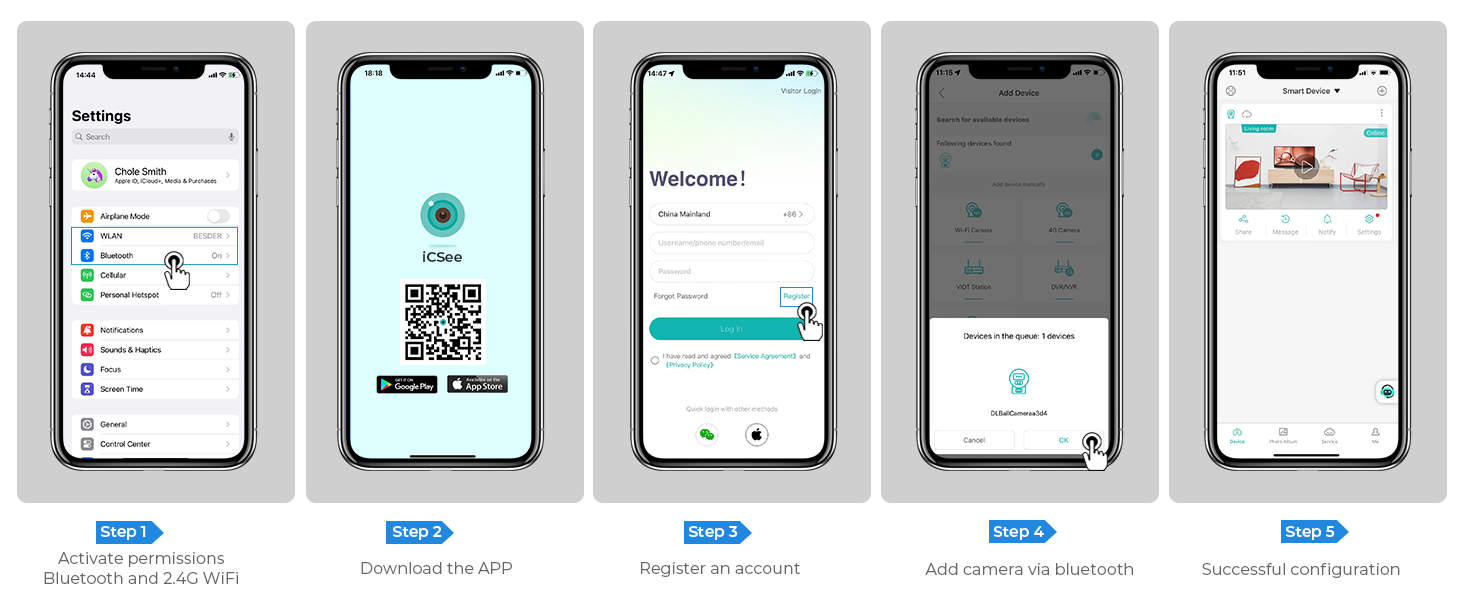
Image: Step-by-step guide for app download, account registration, and device configuration.
Alternatively, download the iCSee app directly from: http://d.xmeye.net/CSee
- ลงทะเบียนบัญชี: Open the iCSee app and follow the on-screen instructions to register a new account.
- Add Camera via Bluetooth: Once logged in, select "Add Device" and choose to add the camera via Bluetooth. The app will guide you through the pairing process.
- Successful Configuration: After successful pairing, your camera will be ready for use.
2. การจ่ายไฟให้กับกล้อง
Connect the provided power cable to the camera's power input port and then plug it into a standard electrical outlet. The camera will power on and initiate its startup sequence.
3. Network Connection Options
- การเชื่อมต่อ Wi-Fi: The camera supports 2.4GHz Wi-Fi networks only. During app setup, select your Wi-Fi network and enter the password.
- การเชื่อมต่อสายเคเบิลอีเธอร์เน็ต: For a more stable connection, you can connect the camera directly to your router using an Ethernet cable.
- Personal Hotspot: In situations where Wi-Fi is unavailable, the camera can also connect via a personal hotspot from your smartphone.
4. การติดตั้งกล้อง
The camera is designed for both indoor and outdoor use and can be ceiling-mounted. Choose a location that provides optimal viewing angles and is within range of your Wi-Fi network or Ethernet connection.
- ทำเครื่องหมายจุดเจาะ: Use the mounting template (if provided) or the camera base to mark the drilling points on the desired surface.
- เจาะรู: Drill holes at the marked points. Insert wall anchors if mounting on drywall or masonry.
- ยึดฐานให้แน่น: Attach the camera's mounting base to the surface using the provided screws.
- ติดกล้อง: Securely attach the camera unit to the mounted base.

Image: The camera installed outdoors, highlighting its robust IP66 waterproof design suitable for various weather conditions.
คำแนะนำการใช้งาน
1. สด View และการเล่น
Access the iCSee app to view อยู่ footage from your cameras. You can switch between the fixed and rotating lens views. The app also allows you to review บันทึกเสียงฟูtage stored on the SD card or cloud.

Image: The dual-screen feature in the iCSee app, displaying simultaneous views from the fixed and rotating lenses.
2. การหมุนแนวนอน การหมุนแนวตั้ง และการซูมดิจิทัล
Use the iCSee app to remotely control the rotating lens. You can pan the camera 355° horizontally and tilt it 90° vertically to cover a wide area. The camera also supports 5x digital zoom to view รายละเอียด.

ภาพ: เหนือศีรษะ view demonstrating the camera's extensive 355° pan and 90° tilt range, covering a large residential area.
3. Motion Tracking and Human Detection
The camera is equipped with advanced motion tracking. When human motion is detected, the rotating lens will automatically track the subject's movement. You will receive real-time alerts on your smartphone via the iCSee app, capturing images or video of the activity.

Image: The camera's alarm features, including real-time push notifications, siren, and light activation upon detecting suspicious activity.
4. เสียงสองทาง
With the built-in microphone and speaker, you can communicate with visitors or deter intruders directly through the iCSee app from anywhere.

Image: Illustration of the two-way audio function, allowing communication with individuals near the camera.
5. โหมดการมองเห็นตอนกลางคืน
The camera offers three night vision modes, selectable via the app, to ensure clear visibility up to 30 meters (98 feet) in various lighting conditions:
- การมองเห็นตอนกลางคืนแบบสีเต็มรูปแบบ: Utilizes built-in spotlights to provide vivid, full-color images even in complete darkness.
- อินฟราเรดคืนวิสัยทัศน์: Uses infrared LEDs for clear black-and-white images in low-light conditions.
- Smart Vision: สลับระหว่างโหมดอินฟราเรดและโหมดสีเต็มรูปแบบโดยอัตโนมัติตามการตรวจจับการเคลื่อนไหวหรือสภาพแสง

Image: Visual comparison of infrared night vision and full-color night vision capabilities at night.
6. ตัวเลือกการจัดเก็บ
- การ์ด Micro SD: Supports up to 128GB micro SD card for local storage of recordings. (Card not included)
- การเก็บข้อมูลบนคลาวด์: Optional cloud storage service available for secure, remote access to your video recordings.
7. การบูรณาการบ้านอัจฉริยะ
The Reobiux camera is compatible with NVR systems for continuous recording and can be integrated with Amazon Alexa for convenient voice control.

Image: The camera's compatibility with smart home devices like Amazon Alexa for voice-controlled viewการไอเอ็นจี
การซ่อมบำรุง
- การทำความสะอาด: เช็ดเลนส์กล้องและตัวกล้องด้วยผ้านุ่มๆ เป็นประจำamp ผ้าเช็ดทำความสะอาดฝุ่นและสิ่งสกปรก ห้ามใช้สารเคมีรุนแรงหรือน้ำยาทำความสะอาดที่มีฤทธิ์กัดกร่อน
- อัพเดตเฟิร์มแวร์: โปรดตรวจสอบแอป iCSee เป็นระยะเพื่ออัปเดตเฟิร์มแวร์ เพื่อให้มั่นใจได้ถึงประสิทธิภาพและความปลอดภัยสูงสุด
- แหล่งจ่ายไฟ: ตรวจสอบให้แน่ใจว่าสายไฟเชื่อมต่อแน่นหนาและไม่มีความเสียหาย
- สภาพแวดล้อม : While IP66 rated, avoid prolonged exposure to extreme temperatures outside the operating range (-20°C to 55°C) or direct high-pressure water jets.
การแก้ไขปัญหา
| ปัญหา | สาเหตุที่เป็นไปได้ | สารละลาย |
|---|---|---|
| กล้องออฟไลน์/ไม่สามารถเชื่อมต่อ Wi-Fi ได้ | Incorrect Wi-Fi password; Camera too far from router; 5GHz Wi-Fi network used; Network interference. |
|
| คุณภาพของภาพไม่ดี | เลนส์สกปรก; แสงสว่างไม่เพียงพอ; ปัญหาเกี่ยวกับแบนด์วิดท์เครือข่าย |
|
| การตรวจจับการเคลื่อนไหวไม่ทำงาน | Detection sensitivity too low; Detection zone not set correctly; Obstructions in view. |
|
| ปัญหาเสียงสองทาง | Microphone/speaker muted in app; Volume too low; Network latency. |
|
ข้อมูลจำเพาะ
| คุณสมบัติ | รายละเอียด |
|---|---|
| หมายเลขรุ่น | A9Q-2PCS |
| ความละเอียดวิดีโอ | 2.5K/6MP (2048p) |
| ความละเอียดของภาพนิ่งที่มีประสิทธิภาพ | 3 MP |
| เลนส์ | Dual Lens (Fixed and Rotating) |
| ช่วงแพน/เอียง | แพน 355° เอียง 90° |
| ซูมดิจิตอล | 5x |
| ช่วงการมองเห็นตอนกลางคืน | สูงถึง 30 เมตร (98 ฟุต) |
| โหมดการมองเห็นตอนกลางคืน | Full-color, Infrared, Smart Vision |
| การเชื่อมต่อ | 2.4GHz Wi-Fi, Ethernet, Bluetooth, ONVIF, RTSP |
| ตัวเลือกการจัดเก็บข้อมูล | การ์ด Micro SD (สูงสุด 128GB), พื้นที่จัดเก็บข้อมูลบนคลาวด์ |
| เสียง | เสียงสองทาง (ไมโครโฟนและลำโพงในตัว) |
| การตรวจจับ | Human Detection, Motion Tracking |
| การแจ้งเตือน | Real-time App Notifications, Siren, Light Alarm |
| ทนทานต่อสภาพอากาศ | กันน้ำระดับ IP66 |
| แหล่งพลังงาน | เครื่องใช้ไฟฟ้าแบบมีสาย (12 โวลต์, 3 วัตต์) |
| อุณหภูมิในการทำงาน | สูงถึง 55°C |
| ขนาด (กว้าง x ยาว x สูง) | 5.88 x 4.68 x 6.2 นิ้ว |
| น้ำหนัก | 2.75 ปอนด์ |
| อุปกรณ์ที่รองรับ | Smartphone, Tablet, Laptop, NVR Systems, Amazon Alexa |
| วิธีการควบคุม | แอพ iCSee |
การรับประกันและการสนับสนุน
Reobiux provides dedicated customer support for its products. For any technical assistance, warranty claims, or inquiries, please contact our 24/7 online customer support team. Refer to your purchase documentation for specific warranty terms and conditions.

Image: Reobiux customer support representative ready to assist.


