1. บทนำ
This manual provides detailed instructions for the installation, operation, and maintenance of your Hiseeu Wireless Security Cameras System. This system features 5MP PTZ and Bullet cameras, a 3TB HDD NVR, and is designed for reliable surveillance with easy setup and remote access capabilities.

รูปที่ 1: Hiseeu Wireless Security Camera System components including NVR and 8 cameras.
2. สินค้าหมดview และส่วนประกอบ
Your Hiseeu security system includes the following main components:
- Network Video Recorder (NVR) with pre-installed 3TB HDD
- 5MP PTZ Cameras (Quantity may vary based on package)
- 5MP Bullet Cameras (Quantity may vary based on package)
- อะแดปเตอร์แปลงไฟสำหรับ NVR และกล้องวงจรปิด
- USB Mouse
- สาย HDMI
- สายเคเบิลอีเทอร์เน็ต
- ชุดสกรูยึด
Refer to the diagram below for an identification of the various ports and components on your cameras and NVR.

รูปที่ 2: รายละเอียด view of camera and NVR ports and features.
3. การตั้งค่า
3.1 NVR Initial Setup
- เชื่อมต่อ NVR เข้ากับแหล่งจ่ายไฟ: Plug the NVR power adapter into the NVR and a power outlet.
- เชื่อมต่อกับจอภาพ: Use the provided HDMI or VGA cable to connect the NVR to a monitor or TV.
- เชื่อมต่อเมาส์: เสียบเมาส์ USB เข้ากับพอร์ต USB บนเครื่องบันทึกวิดีโอเครือข่าย (NVR) เพื่อใช้ในการนำทาง
- การเชื่อมต่อเครือข่าย: สำหรับรีโมท viewing and app functionality, connect the NVR to your router using the provided Ethernet cable.
- การจับคู่กล้อง: The cameras are pre-paired with the NVR for a plug-and-play experience.
3.2 การติดตั้งกล้อง
- ติดตั้งกล้อง: Securely mount the cameras in your desired outdoor or indoor locations using the provided screw kits. Ensure the cameras have a clear line of sight to the areas you wish to monitor.
- กล้องพลังงานสูง: Connect each camera to its respective power adapter and plug into a power outlet. The cameras will automatically connect to the NVR.

รูปที่ 3: Camera power connection for continuous operation.
The cameras are IP66 waterproof, making them suitable for outdoor use in various weather conditions.

รูปที่ 4: IP66 waterproof camera designed for year-round outdoor durability.
3.3 Mobile App Setup (Eseecloud App)
To access your cameras remotely, download and configure the Eseecloud mobile application.
- ดาวน์โหลดแอพ: ค้นหา "Eseecloud" in your device's app store (iOS/Android) and install it.
- ลงทะเบียนบัญชี: Open the app, click "Register," and follow the prompts to create an account using your phone number or email.
- เพิ่มอุปกรณ์: After logging in, click "Add smart camera" or scan the QR code located on your camera or NVR. For new cameras, reset the camera until you hear a beep sound, then proceed with scanning.
- เชื่อมต่อกับ Wi-Fi: Select your home 2.4GHz Wi-Fi network (5GHz is not supported) and enter the password. Ensure the Wi-Fi name and password do not contain special characters and the password is not over 12 characters.
1 วิดีโอ: Eseecloud App Manual - Video Version. This video demonstrates the process of setting up the Eseecloud app, registering an account, adding devices, and connecting to Wi-Fi for your Hiseeu security camera system.
4. คู่มือการใช้งาน
4.1 Eseecloud Main Interface
From the main app interface, you can manage various camera functions:
- กดปลุก: Enable to receive phone notifications for motion alerts.
- การตั้งค่า: Access camera settings directly.
- การเก็บข้อมูลบนคลาวด์: Purchase cloud storage services if desired. Mobile video stores suspicious object detections, while 24-hour video stores continuous footage.
- การแบ่งปัน: Share device access with family or friends via QR code.
- Real-time Video Recording: Switch between SD and HD quality, enable sound, take screenshots, and record video. Recorded content can be found in the "Photo album."
- บ่อย Viewed Location: Set and recall specific camera positions.
4.2 การควบคุม PTZ
For PTZ cameras, you can control movement and zoom:
- การควบคุมทิศทาง: Drag the direction key to move the camera lens up, down, left, or right.
- PTZ Speed: Adjust the rotation speed of the camera (High, Medium, Low).
- โหมดล่องเรือ: Choose between panoramic cruise or preset position cruise. For preset cruise, set positions first.
- PTZ Control Direction Flip: If the camera direction is reversed after installation, use this option to correct it.
- ซูมและโฟกัส: Use the "Pro" button on the PTZ interface for zoom in/out options. Optical zoom is for specific camera models; digital zoom can be achieved by swiping the screen.
4.3 Motion Detection Alert
Configure motion detection settings to enhance security:
- ความไวในการตรวจจับการเคลื่อนไหว: Adjust sensitivity to reduce false alarms.
- Motion Detection Period: Set specific times for motion detection (all day, daytime, night, or custom).
- Motion Detection Area Setting: Define specific areas for motion detection to trigger alarms.
- การตั้งค่าไซเรน: Enable or disable the siren to prompt an alarm sound when motion is detected.

รูปที่ 5: Smart person detection tracking with app notifications.
4.4 การตั้งค่าการบันทึก
Manage how your system records footage:
- โหมดบันทึก: Choose between "Event recording" (records when changes are detected) or "Keep recording" (continuous recording).
- Record Sound Switch: Enable to hear sound during playback or live view.
- Time Record: Customize recording schedules for specific days and times.

รูปที่ 6: The NVR supports 24/7 recording with its built-in 3TB HDD.
4.5 Screen and Sound Settings
Adjust visual and audio preferences:
- โหมดการมองเห็นตอนกลางคืน: Select between Smart, Full Color, or Infrared night vision. Full color night vision uses floodlights for bright, clear images in low light.
- Device Call Volume: Adjust the volume for two-way audio communication.
- พื้นที่ส่วนตัว: Set specific areas to be covered for privacy.
- Humanoid Detection Frame: Enable to highlight detected people with a frame.
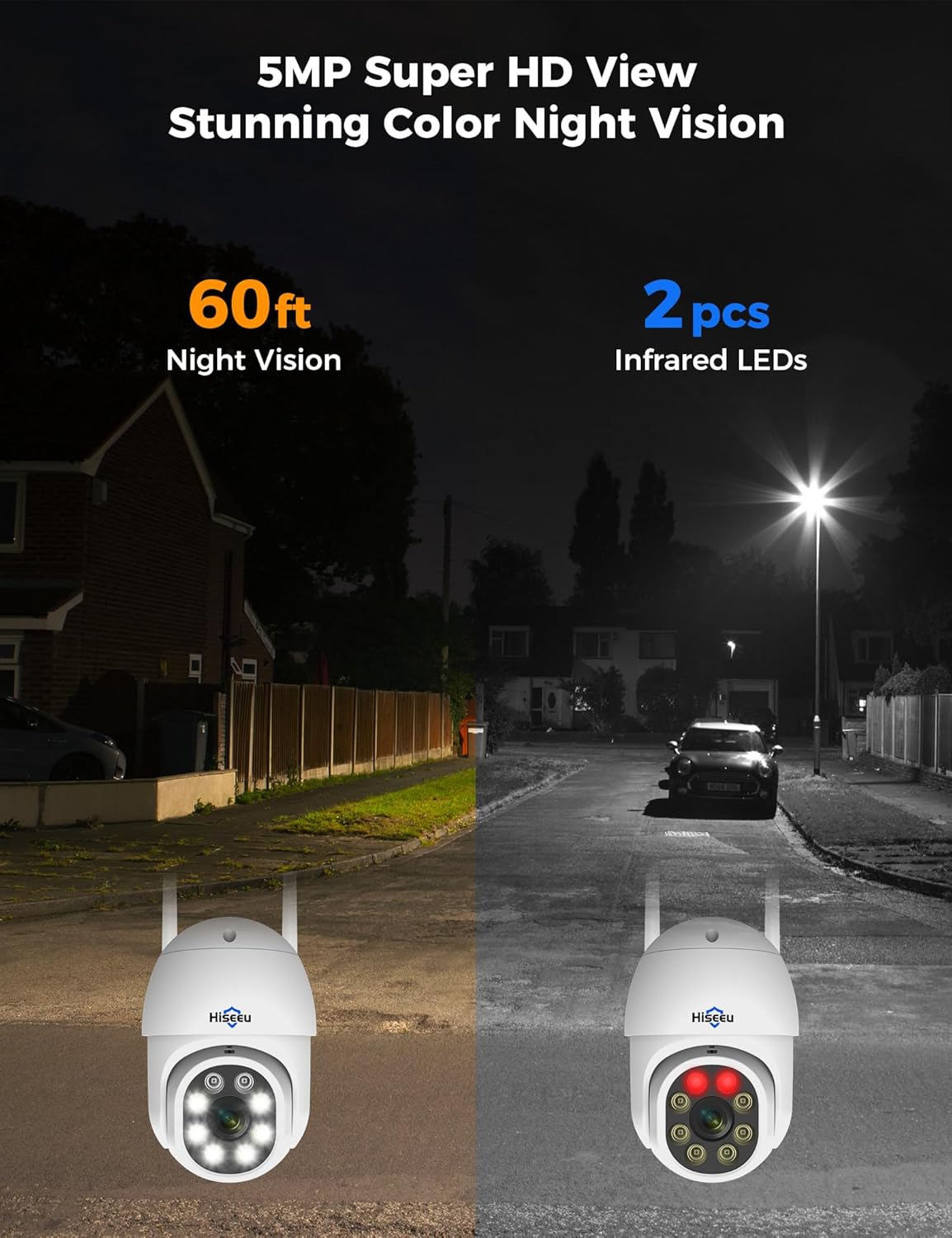
รูปที่ 7: Comparison of night vision capabilities, including 5MP Super HD and Color Night Vision up to 60ft.
4.6 การรวม Alexa
Integrate your Hiseeu system with Alexa for voice control and viewการลง:
- Enable Alexa Service Authorization: In the Eseecloud app's advanced settings, enable Alexa service authorization.
- Search Eseecloud Skill: Open the Alexa app, go to "Skills & Games," and search for "Eseecloud."
- Enable to Use: Input your Eseecloud account and password, then select "Discover Devices."
- View on Echo Show: After discovery, you can view your cameras on compatible Alexa devices like Echo Show.
บันทึก: You must name the device in the Eseecloud app, otherwise Alexa may not find it.

รูปที่ 8: Hiseeu system integration with Alexa for convenient voice control and viewการไอเอ็นจี
5. การบำรุงรักษา
- การทำความสะอาดปกติ: ทำความสะอาดเลนส์กล้องและตัวเรือนเป็นระยะด้วยผ้านุ่มๆamp ผ้าเช็ดทำความสะอาดเพื่อให้ได้ภาพที่คมชัด หลีกเลี่ยงน้ำยาทำความสะอาดที่มีฤทธิ์กัดกร่อน
- ตรวจสอบการเชื่อมต่อ: ตรวจสอบให้แน่ใจว่าสายไฟและสายเครือข่ายทั้งหมดเชื่อมต่อแน่นหนาและไม่มีความเสียหาย
- อัพเดตเฟิร์มแวร์: Check the Eseecloud app regularly for firmware updates to ensure optimal performance and security.
- หมวกกันน้ำ: For outdoor installations, ensure the waterproof cap is correctly installed on the Ethernet port to prevent water ingress.
2 วิดีโอ: How to use a waterproof cap. This video demonstrates the correct installation of the waterproof cap for the camera's Ethernet port, crucial for outdoor durability.
6 การแก้ไขปัญหา
- ไม่มีภาพ/สัญญาณ: Check power connections for both NVR and cameras. Ensure cameras are within range of the NVR's wireless signal. Verify NVR is connected to the monitor correctly.
- สัญญาณ Wi-Fi ไม่เสถียร: Ensure the NVR is connected to your router via Ethernet. Check that cameras are connected to a 2.4GHz Wi-Fi network. Reduce distance between cameras and NVR/router if possible.
- ปัญหาการตรวจจับการเคลื่อนไหว: Adjust motion detection sensitivity and ensure detection areas are correctly configured in the app.
- ปัญหาการเชื่อมต่อแอพ: Verify your phone has a stable internet connection. Ensure the Eseecloud app is updated to the latest version. Restart the app or your phone if necessary.
7. ข้อมูลจำเพาะ
| คุณสมบัติ | ข้อมูลจำเพาะ |
|---|---|
| ยี่ห้อ | ฮิซิอู |
| เทคโนโลยีการเชื่อมต่อ | Wired, Wireless (2.4GHz) |
| ความละเอียดในการจับภาพวิดีโอ | 5MP (2640 pixels) |
| จำนวนช่องสัญญาณ | สูงถึง 16 |
| ความจุของหน่วยความจำ | 3 TB HDD (built-in) |
| แหล่งพลังงาน | สายไฟ |
| ขนาดรายการ (ยาว x กว้าง x สูง) | 8 x 10 x 10 นิ้ว |
| ความเข้ากันได้ของระบบปฏิบัติการ | แอนดรอยด์, ไอโอเอส |
| การใช้ที่แนะนำ | การเฝ้าระวัง |
| อุปกรณ์ที่รองรับ | สมาร์ทโฟน |
| ช่วงการมองเห็นตอนกลางคืน | 65 ฟุต |
| อัตราเฟรม | 15 เฟรมต่อวินาที, 24 เฟรมต่อวินาที, 30 เฟรมต่อวินาที |
| โหมดการบันทึก | การตรวจจับการเคลื่อนไหวอย่างต่อเนื่อง |
| ฮาร์ดแวร์อินเตอร์เฟซ | 802.11 เอซี/บี/กรัม/n |
| ประเภทเลนส์ | ที่ตายตัว |
| อินพุตวิดีโอ | ซีวีบีเอส |
| น้ำหนักสินค้า | 15.37 ปอนด์ |
8. การรับประกันและการสนับสนุน
Your Hiseeu Wireless Security Cameras System comes with a รับประกันจำกัด 12 เดือน. The actual warranty period shall be implemented according to the requirements of local laws and regulations.
For any questions or support needs, the Eseecloud app provides one-on-one 7/24 online support. Please contact customer service directly through the app to resolve any issues.


