การแนะนำ
ขอบคุณสำหรับการซื้อasing the BlitzWolf BW-S25 75W Wall Charger. This manual provides important information regarding the setup, operation, maintenance, and troubleshooting of your device. Please read this manual thoroughly before using the product to ensure safe and optimal performance.
ข้อมูลด้านความปลอดภัย
- อย่าให้เครื่องชาร์จโดนน้ำ ความชื้น หรืออุณหภูมิที่สูงหรือต่ำเกินไป
- หลีกเลี่ยงการทำที่ชาร์จตกหรือได้รับแรงกระแทกรุนแรง
- Do not disassemble, modify, or attempt to repair the charger yourself. This will void the warranty and may cause electric shock or fire.
- เก็บให้พ้นจากมือเด็ก
- ตรวจสอบให้แน่ใจว่าเต้ารับไฟฟ้ามีระดับเสียงtage is compatible with the charger's input specifications (100-240V AC).
- ถอดปลั๊กเครื่องชาร์จในระหว่างที่มีพายุฝนฟ้าคะนองหรือเมื่อไม่ได้ใช้งานเป็นเวลานาน
- ใช้กับอุปกรณ์และสายเคเบิลที่เข้ากันได้เท่านั้น
สินค้าเกินview
The BlitzWolf BW-S25 is a powerful 75W wall charger designed to efficiently charge multiple devices simultaneously. It features a versatile port configuration to accommodate various modern electronics.
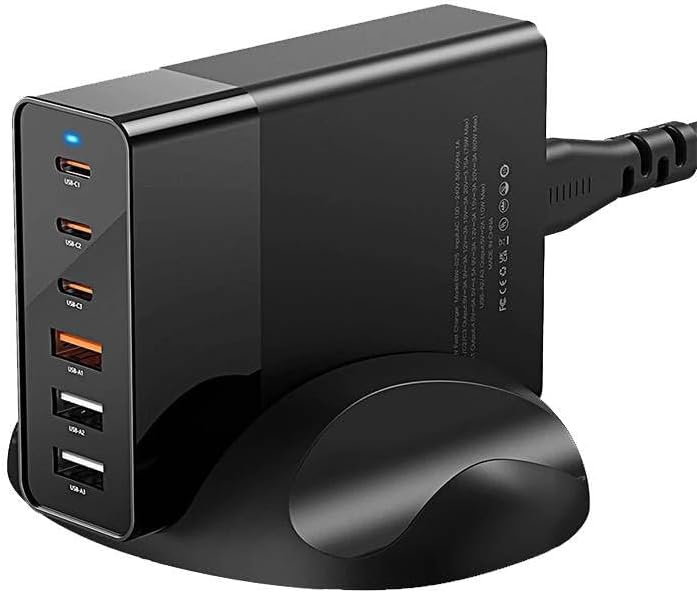
ภาพ: ด้านหน้า view of the BlitzWolf BW-S25 wall charger, clearly showing its three USB-C ports and three standard USB-A ports, along with a blue LED indicator light.
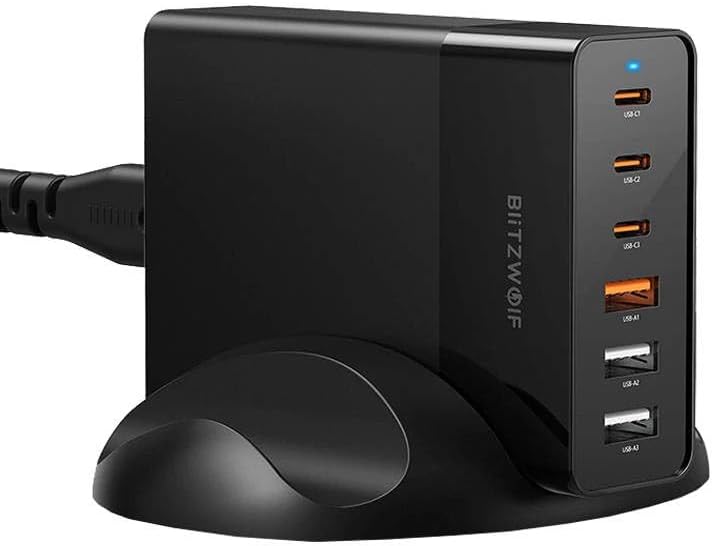
ภาพ: ด้านข้าง view of the BlitzWolf BW-S25 wall charger, highlighting the "BlitzWolf" brand logo vertically printed on its side, confirming its authenticity.
การกำหนดค่าพอร์ต:
- พอร์ต USB-C 3 พอร์ต: สำหรับอุปกรณ์ที่รองรับการชาร์จเร็ว เช่น แล็ปท็อป แท็บเล็ต และสมาร์ทโฟน
- พอร์ต USB-A 3 พอร์ต: For charging a wide range of standard USB devices.
การตั้งค่า
- แกะ: Carefully remove the BlitzWolf BW-S25 charger from its packaging.
- เชื่อมต่อกับพลังงาน: Plug the charger's integrated power cord into a standard AC wall outlet (100-240V).
- ไฟแสดงสถานะ: A blue LED indicator light on the charger will illuminate, indicating that the charger is powered on and ready for use.
คำแนะนำการใช้งาน
- เชื่อมต่ออุปกรณ์: ใช้สายชาร์จที่เหมาะสมเพื่อเชื่อมต่ออุปกรณ์ของคุณกับพอร์ต USB-C หรือ USB-A ที่มีอยู่บนเครื่องชาร์จ
- การชาร์จ: The charger will automatically detect your device and deliver the optimal charging current up to its maximum output. The total output power is 75W shared across all active ports.
- อุปกรณ์หลายเครื่อง: When charging multiple devices, the 75W power output will be intelligently distributed among the connected devices. For optimal fast charging, consider the power requirements of each device.
- การตัดการเชื่อมต่อ: Once your devices are fully charged, disconnect them from the charger.
บันทึก: For best performance and safety, always use certified charging cables that are compatible with your devices and the charger.
การซ่อมบำรุง
- การทำความสะอาด: ถอดปลั๊กเครื่องชาร์จออกจากเต้ารับก่อนทำความสะอาด ใช้ผ้าแห้งนุ่มเช็ดทำความสะอาดพื้นผิว ห้ามใช้น้ำยาทำความสะอาดหรือสเปรย์กระป๋อง
- พื้นที่จัดเก็บ: เก็บเครื่องชาร์จไว้ในที่แห้งและเย็น หลีกเลี่ยงแสงแดดโดยตรงและอุณหภูมิที่สูงหรือต่ำมากเมื่อไม่ได้ใช้งาน
- การดูแลสายเคเบิล: หลีกเลี่ยงการงอหรือบิดสายไฟมากเกินไป
การแก้ไขปัญหา
| ปัญหา | สาเหตุที่เป็นไปได้ | สารละลาย |
|---|---|---|
| Charger not powering on (no LED light) | ไม่มีไฟจากปลั๊กไฟ; การเชื่อมต่อหลวม; ที่ชาร์จเสีย | Check if the outlet is working by plugging in another device. Ensure the charger is firmly plugged in. If the issue persists, contact support. |
| อุปกรณ์ไม่ชาร์จหรือชาร์จช้า | Faulty cable; incompatible device; device's charging port issue; charger overloaded. | Try a different charging cable. Ensure your device is compatible. Try charging fewer devices simultaneously to reduce load. Clean device's charging port. |
| เครื่องชาร์จให้ความรู้สึกอุ่นขณะใช้งาน | การทำงานปกติภายใต้ภาระงาน | It is normal for chargers to generate some heat during operation, especially when charging multiple devices or high-power devices. If it becomes excessively hot or emits smoke/smell, unplug immediately and contact support. |
ข้อมูลจำเพาะ
| ยี่ห้อ | บลิทซ์วูล์ฟ |
| แบบอย่าง | BW-S25 |
| กำลังขับทั้งหมด | 75 วัตต์ |
| พอร์ต USB-C | 3 |
| พอร์ต USB-A | 3 |
| สี | สีดำ |
| อินพุต Voltage | 100-240V น |
การรับประกันและการสนับสนุน
The BlitzWolf BW-S25 charger comes with a standard manufacturer's warranty. Please refer to the warranty card included in your product packaging for specific terms and conditions. For technical support, troubleshooting assistance, or warranty claims, please contact the retailer or BlitzWolf customer service through their official webเว็บไซต์.
โปรดเก็บหลักฐานการซื้อไว้เพื่อวัตถุประสงค์การรับประกัน


