1. Introduction to Pawfit 3
The Pawfit 3 is an advanced GPS pet tracker designed to provide comprehensive monitoring for your beloved companion. Utilizing fast and reliable 4G technology, it offers real-time location tracking with unlimited range, ensuring you always know your pet's whereabouts. Beyond location, the Pawfit 3 includes smart alerts for safety zones, temperature extremes, and device removal, enhancing your pet's safety. Its unique voice recall feature allows you to call your dog back even when out of sight, combining training with tracking. Additionally, it functions as an activity monitor, tracking steps, calories, distance, and active time to help you support your pet's fitness journey.
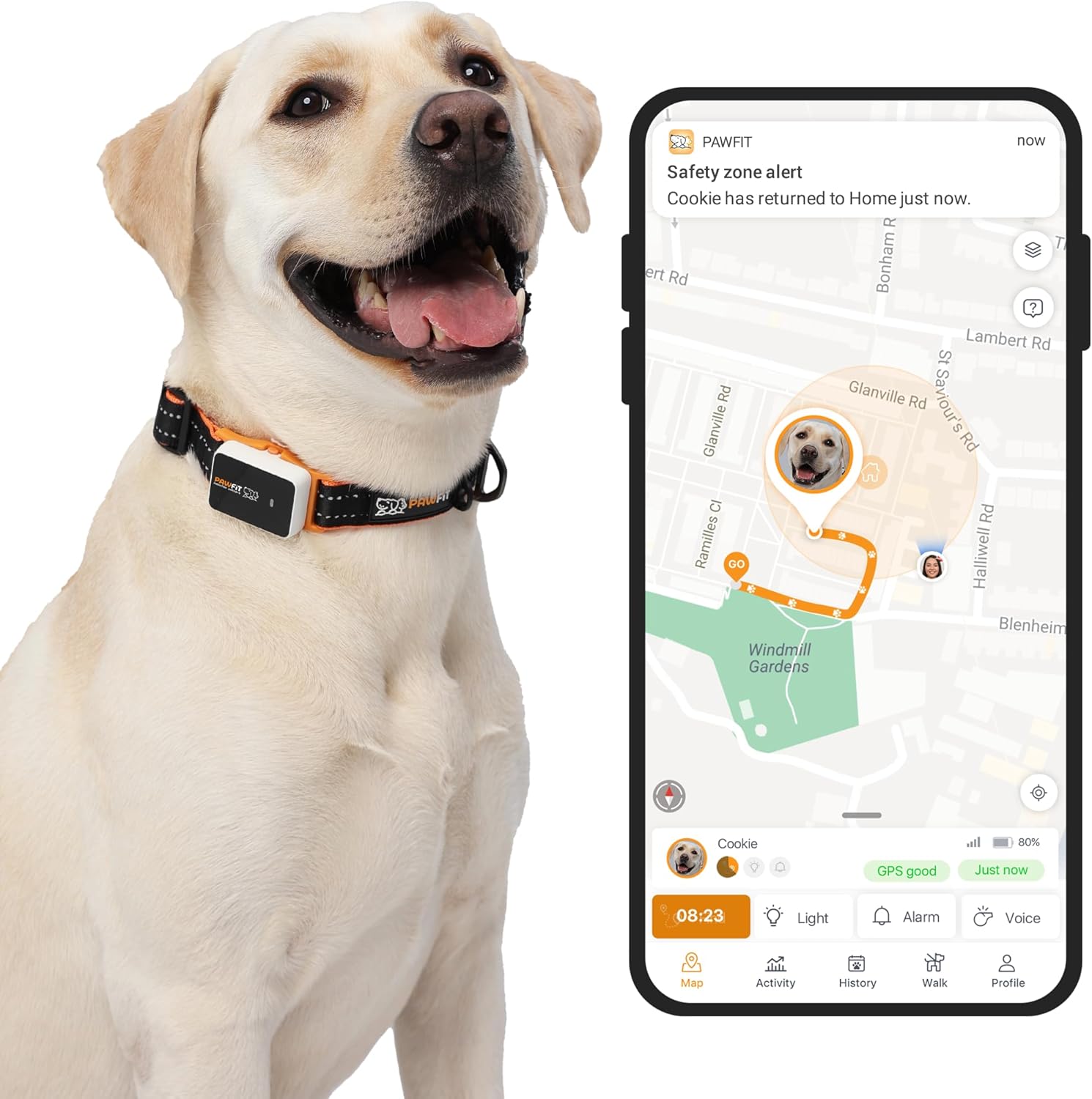
The Pawfit 3 tracker provides real-time location and activity monitoring for your pet.

Key features of the Pawfit 3, including live tracking, voice recall, 4G connectivity, and waterproof design.
2. คู่มือการติดตั้ง
2.1 อะไรอยู่ในกล่อง
Your Pawfit 3 package includes the following components:
- Pawfit 3 tracker
- Collar attachment
- สายคล้องคอ
- Charging dock & USB cable

All components included with your Pawfit 3 tracker.
2.2 การชาร์จอุปกรณ์
Before first use, fully charge your Pawfit 3 tracker using the provided charging dock and USB cable. Connect the USB cable to a power source (e.g., computer USB port or wall adapter). Place the tracker onto the charging dock, ensuring the contact points align. The indicator light on the tracker will show charging status.

The Pawfit 3 charges fully in 2.5 hours and lasts up to 8 days. You will receive alerts when it's time to recharge.
2.3 App Download and Activation
To use your Pawfit 3, download the official Pawfit app from the Apple App Store or Google Play. Scan the QR code on the packaging or search for "Pawfit" in your app store. Follow the in-app instructions to create an account, add your pet's profile, and activate your tracker. A subscription plan is required to activate your Pawfit 3 device and enable its features.

Simple steps to get started with your Pawfit 3 tracker.
2.4 Attaching to Collar
Securely attach the Pawfit 3 tracker to your pet's collar using the provided collar attachment. Ensure the tracker is snug but comfortable for your pet, allowing for free movement without risk of detachment.
Watch this video for a detailed unboxing and guide on how to attach the Pawfit 3 tracker to your pet's collar.
3. Operating Your Pawfit 3
3.1 Real-Time GPS Tracking
The Pawfit 3 provides live tracking of your pet's location using fast 4G technology. Open the Pawfit app to view your pet's current location on a map with updates as frequent as every 5 seconds. This feature offers unlimited range, providing peace of mind wherever your pet roams.

Real-time GPS location tracking helps you find your pet faster with 5-second updates.
3.2 Smart Voice Recall
Utilize the unique voice command feature within the app to call your dog back. This can be particularly useful when your pet is out of sight, combining recall training with advanced tracking capabilities for enhanced safety.

Set virtual safety zones and use voice commands to manage your pet's movements.
3.3 Advanced Safety Alerts
Receive instant alerts directly to your smartphone if your pet leaves a designated safe zone (geofence), is exposed to extreme temperatures, or if the tracker is removed from their collar. The built-in LED light and audio ID features assist in quickly locating your pet in low light conditions or when they are hidden.

Track your pet in real-time and receive alerts if they leave any of the 10 virtual safety zones you create.
This video demonstrates the real-time tracking capabilities of the Pawfit 3, allowing you to monitor your pet's every step.
3.4 Activity Monitoring
Monitor your pet's daily activity levels, including steps taken, calories burned, distance traveled, and active time. Set daily goals within the app and earn badges to encourage your pet's fitness journey and maintain their optimal health.

Easily monitor your pet's activity, set goals, and track their daily movements.

Every step matters: set personalized daily activity goals and track your pet's progress.
4. การบำรุงรักษา
4.1 การออกแบบกันน้ำ
The Pawfit 3 is fully waterproof with an IP68 rating, making it suitable for use in various conditions, including fresh and sea water. This ensures durability and reliability during your pet's adventures.
4.2 การทำความสะอาดและการดูแล
To maintain the longevity and performance of your Pawfit 3, regularly clean the device and its charging contacts. Use a soft, damp cloth to wipe down the tracker. Ensure the charging contacts are dry and free of debris before charging. Avoid using harsh chemicals or abrasive materials.
4.3 อายุการใช้งานแบตเตอรี่
The Pawfit 3 offers an impressive battery life of up to 8 days on a single charge. It takes approximately 2.5 hours to fully charge the device. The app will notify you when the battery level is low, prompting you to recharge.

Size guide and battery life information for the Pawfit 3 tracker.
5 การแก้ไขปัญหา
If you encounter any issues with your Pawfit 3, please consider the following general troubleshooting steps:
- ไม่มีสัญญาณ GPS: Ensure your pet is in an open area with clear sky view. Check app settings for location permissions.
- แบตเตอรี่หมดเร็ว: Verify the tracker is fully charged. Reduce the frequency of location updates in the app settings if possible.
- ปัญหาการเชื่อมต่อแอพ: ตรวจสอบให้แน่ใจว่าสมาร์ทโฟนของคุณมีการเชื่อมต่ออินเทอร์เน็ตที่เสถียร รีสตาร์ทแอปหรือโทรศัพท์ของคุณ
- ตัวติดตามไม่ตอบสนอง: Try charging the device. If unresponsive, contact customer support for further assistance.
6. ข้อมูลจำเพาะ
| คุณสมบัติ | รายละเอียด |
|---|---|
| ชื่อรุ่น | Pawfit 3 |
| น้ำหนักสินค้า | 0.96 ออนซ์ |
| ผู้ผลิต | Pawfit |
| แบตเตอรี่ | ต้องใช้แบตเตอรี่ลิเธียมโพลิเมอร์ 1 ก้อน (รวมอยู่ด้วย) |
| วัสดุ | พลาสติก |
| เทคโนโลยีการเชื่อมต่อ | บลูทูธ 4G |
| คุณสมบัติพิเศษ | GPS, Activity Monitoring, Voice Recall, Smart Alerts, Waterproof |
7. การรับประกันและการสนับสนุน
7.1 ข้อมูลการรับประกัน
The Pawfit 3 comes with an 18-month warranty from the date of purchase. Please retain your proof of purchase for any warranty claims. The warranty covers manufacturing defects and malfunctions under normal use conditions.
7.2 Subscription Requirement
Please note that a subscription plan is required to enable the full functionality of your Pawfit 3 tracker, including location tracking and smart alerts. Various flexible subscription options are available to suit your needs.

เกินview of the subscription plans required for Pawfit 3 functionality.

Flexible subscription plans are available to provide unlimited, reliable tracking.
7.3 การสนับสนุนลูกค้า
For any questions, technical assistance, or warranty claims, please contact Pawfit customer support. You can find contact information on the official Pawfit website or through the Pawfit app.


