การแนะนำ
Welcome to the VTech Genius XL Interactive Video Binoculars. This device is designed for children aged 5 and above to explore the world around them through observation, interactive videos, images, and educational games. This manual provides essential information for setup, operation, and maintenance to ensure optimal use and longevity of your product.

Image: The VTech Genius XL Interactive Video Binoculars, showing the main unit with its flip-up color screen and binocular lenses.
ข้อมูลด้านความปลอดภัยที่สำคัญ
WARNING: Not suitable for children under 36 months due to small parts.
- ดูแลเด็กตลอดการใช้งาน
- Do not look directly at the sun through the binoculars, as this can cause serious eye damage.
- ตรวจสอบให้แน่ใจว่าใส่แบตเตอรี่อย่างถูกต้อง
- ห้ามใช้แบตเตอรี่เก่ากับใหม่รวมกันหรือแบตเตอรี่ต่างประเภทกัน
- ถอดแบตเตอรี่ที่หมดแล้วออกทันที
- ทิ้งแบตเตอรี่ด้วยความรับผิดชอบ
มีอะไรอยู่ในกล่อง
- 1 Pair of VTech Genius XL Interactive Video Binoculars
- Batteries (4 x LR6-AA)
- สายคล้องคอ
การตั้งค่า
1. การติดตั้งแบตเตอรี่
- ค้นหาช่องใส่แบตเตอรี่บนอุปกรณ์
- ใช้ไขควงเปิดฝาครอบช่องใส่แบตเตอรี่
- Insert 4 new LR6-AA batteries, ensuring correct polarity (+/-).
- เปลี่ยนฝาครอบและขันสกรูให้แน่น
2. การติดสายคล้องคอ
Thread the provided neck strap through the designated loops on the binoculars. Adjust the strap length for comfortable and secure wearing.

Image: A child wearing the VTech Genius XL Interactive Video Binoculars with the neck strap, demonstrating how it can be worn for outdoor exploration.
คำแนะนำการใช้งาน
1. เปิด/ปิดเครื่อง
Press and hold the power button to turn the device on or off. The device features an automatic shut-off function to preserve battery life.
2. Viewโหมด ing
The binoculars offer two primary viewing methods:
- Through the Binoculars: Look directly through the eyepieces (binocular lenses) for traditional observation. The interpupillary distance is adjustable for optimal comfort.
- On the LCD Screen: Flip up the 2.4-inch color LCD screen to view observations digitally.

Image: A child looking through the VTech Genius XL Interactive Video Binoculars, demonstrating the traditional viewวิธีการไอเอ็นจี
3. Magnification and Focus
- The binoculars provide up to กำลังขยาย 10x.
- Use the focus wheel to adjust the image clarity for both binocular and screen viewการไอเอ็นจี
4. โหมดการมองเห็นตอนกลางคืน
Activate the integrated infrared system for night vision. This mode is exclusively available on the LCD screen, allowing observation in low-light or dark conditions.

Image: The VTech Genius XL Interactive Video Binoculars displaying a night vision image of a hedgehog on its screen, highlighting the night vision feature.
5. Photo and Video Capture
The integrated camera allows you to capture images of flora and fauna. The internal memory can store up to 50 photos. A micro-SD card slot (card not included) is available to expand storage capacity and save photos for printing.

Image: The VTech Genius XL Interactive Video Binoculars with multiple captured images of animals and nature displayed around it, illustrating the photo capture function.
6. Interactive Content (BBC Videos & Images)
Explore over 340 official videos and images from the BBC, providing more than 700 educational facts categorized into 9 groups:
- Ampฮิเบียน
- สัตว์ขาปล้อง
- Terrestrial Birds
- Flying Birds
- Terrestrial Mammals
- Marine Mammals
- สัตว์เลื้อยคลาน
- ต้นไม้มีดอก
- Other Plants and Fungi

Image: The VTech Genius XL Interactive Video Binoculars displaying an image of a mushroom on its screen, with a speech bubble indicating educational information, showcasing the BBC content.
7. Games and Quizzes
- Adventure Game: Navigate through 5 natural environments, encountering over 100 animals and exploring 25 levels.
- Educational Quiz: Test scientific knowledge through a 3-stage quiz (Training, Time Challenge, Clue Game).
- Use the joystick and 12 buttons to navigate through games and features.
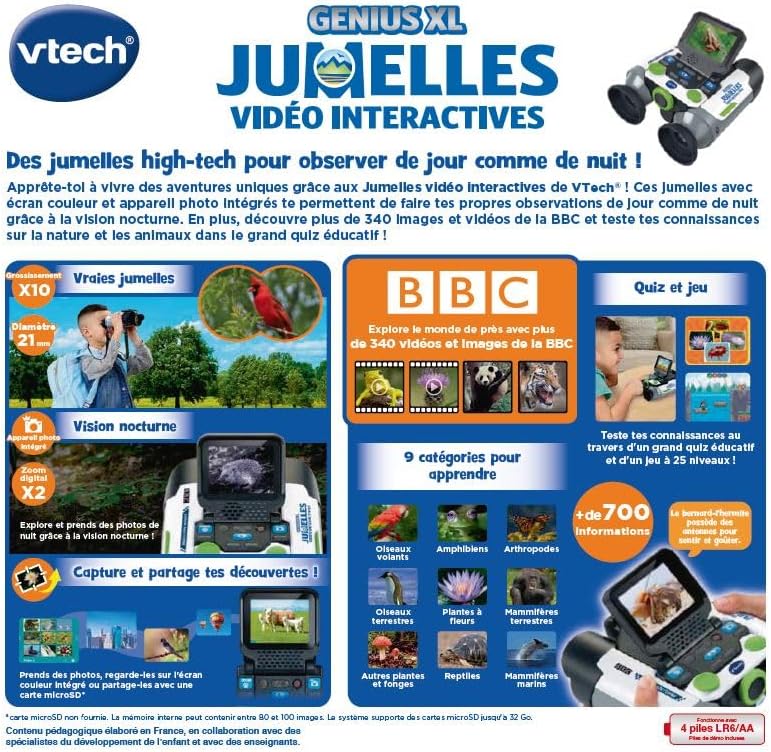
Image: A child holding the VTech Genius XL Interactive Video Binoculars, playing an adventure game on its screen, demonstrating the interactive game feature.
8. การควบคุมระดับเสียง
Adjust the sound volume using the dedicated controls on the device.
การบูรณาการสื่อ
วิดีโอผลิตภัณฑ์อย่างเป็นทางการ
The following video demonstrates the key features and interactive capabilities of the VTech Genius XL Interactive Video Binoculars.
วิดีโอ: บทนำสั้น ๆview วิดีโอโชว์asing children using the VTech Genius XL Interactive Video Binoculars to observe nature, take photos, play games, and utilize the night vision mode. It highlights the educational BBC content and interactive features.
This video provides a broader overview of the Genius XL range, including the Interactive Video Binoculars and the Interactive Video Globe.
Video: A preview video demonstrating both the VTech Genius XL Interactive Video Binoculars and the Interactive Video Globe. It shows children engaging with both products, highlighting their educational and interactive aspects, including exploring animals and geography.
การซ่อมบำรุง
การทำความสะอาด
เช็ดอุปกรณ์ด้วยd .เล็กน้อยamp ใช้ผ้าเช็ดทำความสะอาด อย่าใช้สารเคมีรุนแรงหรือน้ำยาทำความสะอาดที่มีฤทธิ์กัดกร่อน ตรวจสอบให้แน่ใจว่าอุปกรณ์แห้งสนิทก่อนจัดเก็บ
พื้นที่จัดเก็บ
Store the binoculars in a cool, dry place away from direct sunlight. Remove batteries if the device will not be used for an extended period.
การแก้ไขปัญหา
- อุปกรณ์ไม่เปิด: Check battery installation and ensure batteries are not depleted. Replace with new batteries if necessary.
- หน้าจอว่างเปล่าหรือค้าง: Try turning the device off and on again. If the issue persists, remove and reinsert the batteries.
- Sound not working: Check the volume settings. If the issue persists after checking volume and restarting, contact customer support.
- Photos lost or unable to access gallery: Ensure a micro-SD card is properly inserted if you are relying on external storage. If using internal storage and experiencing issues, a factory reset might be necessary, but this will erase all stored photos. It is recommended to regularly transfer important photos to an external micro-SD card.
- Image blurry: ปรับวงล้อโฟกัสจนกว่าภาพจะคมชัด
ข้อมูลจำเพาะ
| คุณสมบัติ | รายละเอียด |
|---|---|
| ขนาดสินค้า | 12.1 x 6.9 x 16.2 ซม. |
| น้ำหนัก | 170 กรัม |
| อายุที่แนะนำ | 5 ปีขึ้นไป |
| คุณค่าทางการศึกษา | Learning, Creativity, Animal Discoveries, Interaction |
| ภาษา | French (Note: Product content is in French as per specifications) |
| การอ้างอิงผู้ผลิต | 618605 |
| จำนวนชิ้น | 1 |
| แบตเตอรี่ที่จำเป็น | Yes (4 x LR6-AA) |
| รวมแบตเตอรี่ | ใช่ |
| วัสดุหลัก | พลาสติก |
| สี | สีเทา |
| คุณสมบัติพิเศษ | การมองเห็นตอนกลางคืน |
| เส้นผ่านศูนย์กลางเลนส์วัตถุ | 21 มิลลิเมตร |
| กำลังขยายสูงสุด | 10 เท่า |
| ประเภทการติดตั้ง | Collar (Neck Strap) |
| ชื่อรุ่น | เอ็กซ์ 21 |
| Binocular Prism Description | ปริซึม Porro |
การรับประกันและการสนับสนุน
For warranty information and customer support, please refer to the documentation included with your purchase or visit the official VTech webไซต์ เก็บหลักฐานการซื้อของคุณไว้เพื่อใช้ในกรณีเรียกร้องการรับประกัน
Product support and spare parts availability may vary by region. The manufacturer states that spare parts are unavailable for this product.


