1. บทนำ
This manual provides detailed instructions for the installation, operation, and maintenance of your OOYCYOO MPPT Solar Charge Controller. Please read this manual thoroughly before using the product to ensure proper function and safety.
คุณสมบัติหลัก:
- Automatic detection of 12V or 24V DC system voltagใช่
- Compatible with various deep cycle battery options: sealed, gel, flooded, and lithium.
- Innovative MPPT technology with high tracking efficiency up to 99% and maximum conversion efficiency of 98%.
- Electronic protection against reverse polarity, overcharge, over-discharge, short circuits, and reverse current.
- LCD screen and multiple LED indicators for displaying system operation information.
- User parameters can be reset.
- One key function to open and close the load.
- One key function to restore factory settings.
- Easy to use and program interface.

รูปที่ 1.1 : ด้านหน้า view of the OOYCYOO MPPT Solar Charge Controller, showing the LCD display and control buttons.
2. เนื้อหาบรรจุภัณฑ์
กรุณาตรวจสอบสิ่งของภายในบรรจุภัณฑ์เมื่อแกะกล่อง หากมีสินค้าใดสูญหายหรือเสียหาย โปรดติดต่อผู้ค้าปลีกของคุณ
- 1 x OOYCYOO MPPT Solar Charge Controller
- เซ็นเซอร์อุณหภูมิ 1 x
- 1 x คู่มือผู้ใช้ภาษาอังกฤษ
3. ข้อมูลด้านความปลอดภัย
โปรดปฏิบัติตามข้อควรระวังด้านความปลอดภัยต่อไปนี้ในระหว่างการติดตั้งและการใช้งาน:
- ตรวจสอบให้แน่ใจว่าสายไฟทั้งหมดต่อขั้วถูกต้องและแน่นหนา เพื่อป้องกันความเสียหายต่อตัวควบคุมหรือส่วนประกอบอื่นๆ
- ไม่เกินปริมาณอินพุตสูงสุด voltagหรือพิกัดกระแสของตัวควบคุม
- ติดตั้งตัวควบคุมในบริเวณที่มีอากาศถ่ายเทสะดวก ห่างจากวัสดุไวไฟและแสงแดดโดยตรง
- หลีกเลี่ยงการสัมผัสกับน้ำหรือของเหลวอื่น ๆ
- อย่าพยายามถอดประกอบหรือซ่อมแซมตัวควบคุมด้วยตนเอง โปรดติดต่อช่างผู้ชำนาญการเพื่อขอรับบริการ
- Always disconnect power from the solar panel and battery before performing any maintenance or wiring.
- สวมอุปกรณ์ป้องกันส่วนบุคคล (PPE) ที่เหมาะสม เช่น ถุงมือและอุปกรณ์ป้องกันดวงตาในระหว่างการติดตั้ง
4. สินค้าหมดview
The OOYCYOO MPPT Solar Charge Controller features a clear LCD display and various terminals for connecting your solar power system components. Refer to the diagram below for an overview of the controller's parts.

Figure 4.1: Labeled components of the OOYCYOO MPPT Solar Charge Controller.
คำอธิบายส่วนประกอบ:
- จอแสดงผล LCD: Shows real-time system data, operating status, and settings.
- 5S Reset Button: Used to restore factory settings by long-pressing for 5 seconds.
- ขั้วแผงโซลาร์เซลล์: Connects to the positive and negative terminals of your solar panel array.
- ขั้วแบตเตอรี่: Connects to the positive and negative terminals of your battery bank.
- โหลดเทอร์มินัล: Connects to the positive and negative terminals of your DC load.
- 2*USB 5V 2.4A Ports: Provides 5V DC power for charging USB devices.
- Remote Temp Sensor Port: Connects the included temperature sensor for accurate battery temperature compensation.
- ปุ่มเลือก: Used to navigate through menu options and confirm selections.
- พอร์ตการสื่อสาร RS485: For advanced communication and monitoring (requires additional purchase of compatible display/module).
- รูยึด: Five holes for secure installation of the controller.
5. การตั้งค่าและการติดตั้ง
Follow these steps for proper installation of your MPPT solar charge controller. Adhering to the connection order is critical to prevent damage.
แผนผังการเชื่อมต่อ:
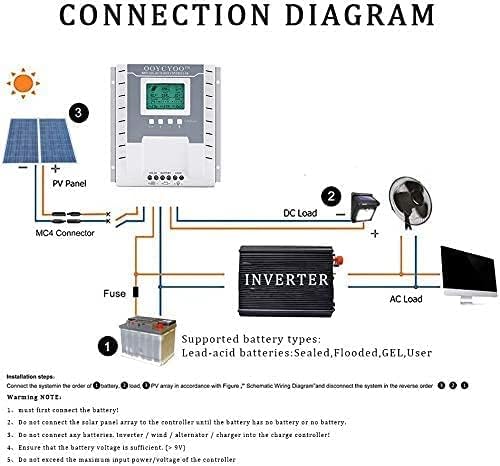
Figure 5.1: Schematic wiring diagram for the solar charge controller system.
ขั้นตอนการติดตั้ง:
- การติดตั้ง: Securely mount the controller to a flat, vertical surface using the five mounting holes. Ensure adequate ventilation around the unit.
- เชื่อมต่อแบตเตอรี่: First, connect the battery to the controller's Battery Terminal (positive to positive, negative to negative). Ensure the battery voltage is sufficient (greater than 9V). The controller will automatically detect 12V or 24V system voltage.
- Connect DC Load: Next, connect your DC load to the controller's Load Terminal (positive to positive, negative to negative).
- เชื่อมต่อแผงโซล่าเซลล์: Finally, connect the solar panel array to the controller's Solar Panel Terminal (positive to positive, negative to negative). Do not connect the solar panel array until the battery is properly connected.
- เชื่อมต่อเซ็นเซอร์วัดอุณหภูมิ: Plug the included temperature sensor into its dedicated port. This ensures accurate battery charging based on ambient temperature.
- ตรวจสอบการเชื่อมต่อ: Double-check all connections for polarity and tightness before powering on the system.
หมายเหตุสำคัญ:
- Always connect the battery first and disconnect the solar panel first when disassembling the system.
- Do not connect any other charging sources (e.g., inverters, wind alternators, or other chargers) directly to the charge controller's terminals.
- Ensure that the maximum input power and voltage from the solar panels do not exceed the controller's specifications.
ประเภทแบตเตอรี่ที่รองรับ:
The controller is compatible with the following lead-acid battery types:
- ปิดผนึก
- น้ำท่วม
- เจล
- กำหนดเองโดยผู้ใช้ (สำหรับการตั้งค่าแบบกำหนดเอง)
6. คู่มือการใช้งาน
The OOYCYOO MPPT Solar Charge Controller features an intuitive LCD display for monitoring system status and adjusting settings.
จอ LCD เกินview:

รูปที่ 6.1: รายละเอียด view of the LCD display and button functions.
The LCD display provides real-time data on a single screen, allowing for convenient monitoring of your system. Key indicators include:
- PV (Solar Panel) Voltagอีและ Ampอายุ: Current output from your solar panels.
- ปริมาณแบตเตอรี่tagอีและ Ampอายุ: Current battery charge status and current flow.
- โหลด Voltagอีและ Ampอายุ: Power consumption of your connected DC load.
- ความจุแบตเตอรี่: เปอร์เซ็นtage ของการชาร์จแบตเตอรี่
- Charging/Discharging Fault Indicators: การแจ้งเตือนเมื่อระบบมีปัญหา
- Evening/Dawn Status: Indicates day/night cycle for load control.
- Load Stop Working Hours: Configured hours for load operation.
- การชาร์จแบบลอยตัว Voltage: เล่มที่tage at which the battery is maintained after full charge.
- ปริมาณต่ำtage Disconnect/Reconnect Voltage: Thresholds for battery protection.
ปุ่มฟังก์ชั่น:
- Toggle Key (Left Arrow): Used to cycle through different display screens or menu options.
- ปุ่ม "+": Increases values or moves forward in menu settings.
- "-" ปุ่ม: Decreases values or moves backward in menu settings.
- Light Bulb / Manual Load Switch Button: This button can be used to manually open or close the DC load.
- 5S Reset Button: Long press and hold this button for 5 seconds to restore the controller to its factory default settings.
- Troubleshooting/Eliminate 'X' Button: If an 'X' error or system failure is displayed, click this button to attempt troubleshooting or clear the error.
Network Line Interface (RS485) Indicator:
- ไฟเขียว: Represents the battery status.
- Green Light Flashes: Indicates that the load is working properly.
- ไฟสีเหลือง: Indicates solar energy availability.
- Yellow Light Flashes: Indicates active solar charging.
- อินเทอร์เฟซเครือข่ายสงวนไว้สำหรับอินเทอร์เฟซและสามารถเชื่อมต่อกับจอแสดงผลเฉพาะได้ (ซื้อเพิ่มเติม)
7. การบำรุงรักษา
การบำรุงรักษาอย่างสม่ำเสมอจะช่วยให้ตัวควบคุมการชาร์จพลังงานแสงอาทิตย์ของคุณมีอายุการใช้งานยาวนานและทำงานได้อย่างมีประสิทธิภาพสูงสุด
- การทำความสะอาด: Periodically clean the controller's exterior with a dry, soft cloth. Do not use abrasive cleaners or solvents. Ensure ventilation openings are free from dust and debris.
- การตรวจสอบการเชื่อมต่อ: Annually inspect all wiring connections for tightness and corrosion. Loose connections can lead to power loss or overheating.
- สภาพแวดล้อม : Ensure the controller remains within its specified operating temperature and humidity ranges. Protect it from direct sunlight, rain, and excessive dust.
- สุขภาพแบตเตอรี่: ตรวจสอบสถานะและปริมาณแบตเตอรี่ของคุณtage regularly. Ensure it is not overcharged or deeply discharged, as this can shorten its lifespan.
8 การแก้ไขปัญหา
If you encounter issues with your OOYCYOO MPPT Solar Charge Controller, refer to the following common problems and solutions:
| ปัญหา | สาเหตุที่เป็นไปได้ | สารละลาย |
|---|---|---|
| Controller not powering on / LCD blank | ไม่มีแบตเตอรี่เชื่อมต่อหรือไม่มีแรงดันไฟฟ้าของแบตเตอรี่tage too low. Reverse polarity connection. Loose battery connection. | Ensure battery is connected first and has sufficient voltage (>9V). Check battery polarity. Tighten battery terminal connections. |
| No charging current from solar panels | Solar panel not connected. Reverse polarity of solar panel. Insufficient sunlight. PV input voltage ต่ำ/สูงเกินไป | Connect solar panels. Check PV polarity. Ensure adequate sunlight. Verify PV voltage is within specifications (18-96V for 12V system, 36-96V for 24V system). |
| โหลดไม่ทำงาน | Load not connected. Load switch off. Battery voltage ต่ำเกินไป (ปริมาตรต่ำ)tage disconnect). Overload/short circuit on load. | Connect load. Press the manual load switch button. Charge battery. Reduce load or check for short circuits. |
| Error 'X' displayed on LCD | System fault or specific error code. | Press the 'X' button to attempt troubleshooting or clear the error. Refer to the manual for specific error code meanings if available. If persistent, contact support. |
| การอ่านอุณหภูมิไม่ถูกต้อง | เซ็นเซอร์อุณหภูมิไม่ได้เชื่อมต่อหรือมีข้อบกพร่อง | Ensure the temperature sensor is securely plugged in. Replace if faulty. |
9. ข้อมูลจำเพาะทางเทคนิค
The following table outlines the technical specifications of the OOYCYOO MPPT Solar Charge Controller (Model K):
| พารามิเตอร์ | ค่า |
|---|---|
| แบบอย่าง | เอ็มพีพีที 40เอ |
| เล่มระบบtage | 12V / 24V Auto-detection |
| กระแสไฟสูงสุด | 40เอ |
| อินพุต PV สูงสุด Voltagอี (Voc) | 18V ~ 96V (12V system) 36V ~ 96V (24V system) Overall Max: ≤ 96V |
| Max Solar Panel Power (Wp) | 520W (12V system) 1040W (24V system) |
| Battery Capacity Configuration | สูงสุดถึง 300 Ah |
| แบตเตอรี Float Voltage | 13.8V (ระบบ 12V) 27.6V (ระบบ 24V) |
| Battery Protection (Undervoltage) | 10.6V (ระบบ 12V) 21.2V (ระบบ 24V) |
| Battery Recovery Voltage (อันเดอร์โวลtage) | 12.6V (ระบบ 12V) 25.2V (ระบบ 24V) |
| System No-Load Loss | ≤ 13 มิลลิแอมป์ |
| Buck Loop Drop | ≤ 100 มิลลิโวลต์ |
| อุณหภูมิในการทำงาน | -10 องศาเซลเซียส ~ 60 องศาเซลเซียส |
| อุณหภูมิในการจัดเก็บ | -30 องศาเซลเซียส ~ -70 องศาเซลเซียส |
| ความชื้นในการทำงาน | ≤ 90% ไม่ควบแน่น |
| การชดเชยอุณหภูมิ | -4 mV/cell/°C |
| ประเภทจอภาพ | จอแอลซีดี |
| Installation Wire Size (mm²) | 12 ตร.มม. |
| Installation Wire Size (AWG) | 8 # (AWG) |
| ขนาด (กว้าง x ยาว x สูง) | 21 x 20.9 x 8.4 ซม. |
| น้ำหนัก | 1.24 กิโลกรัม |
| วัสดุ | พลาสติก |
| สี | สีขาว |
| ยูพีซี | 768561407224 |
| ASIN | B0CW6468P2 |
10. การรับประกันและการสนับสนุน
สำหรับข้อมูลการรับประกันและการสนับสนุนทางเทคนิค โปรดดูเอกสารที่แนบมากับสินค้าที่ซื้อ หรือติดต่อผู้ค้าปลีกของคุณ โปรดเก็บหลักฐานการซื้อไว้เพื่อใช้ในการเรียกร้องการรับประกัน
If you require further assistance or have questions not covered in this manual, please reach out to OOYCYOO customer support through the contact information provided on the product packaging or the official OOYCYOO webเว็บไซต์.


