1. บทนำ
Thank you for choosing the BESTEK XNUMXW Car Power Inverter. This device converts your vehicle's DC XNUMXV power into standard AC XNUMXV-XNUMXV household power, along with providing fast-charging USB ports. It is designed for convenient power access on the go, ideal for charging laptops, phones, tablets, and other small electronic devices during driving, road trips, or campการไอเอ็นจี
2. ข้อมูลด้านความปลอดภัย
Please read all safety warnings and instructions carefully before using this product to prevent injury or damage.
- Do not expose the inverter to water, rain, or snow.
- Do not operate the inverter if it has received a sharp blow, been dropped, or otherwise damaged.
- Do not disassemble the inverter. Incorrect reassembly may result in a risk of electric shock or fire.
- To reduce the risk of electric shock, unplug the inverter from the outlet before attempting any maintenance or cleaning.
- Ensure the device you are powering does not exceed the inverter's XNUMXW continuous power rating.
- Keep the inverter away from flammable materials, gases, or liquids.
- Ensure adequate ventilation around the inverter to prevent overheating.
- This device is equipped with built-in advanced MCU intelligent chips for protection against overheating, undervoltage, overcurrent, overvoltage, overload, and short circuits.
3. คุณสมบัติของผลิตภัณฑ์
- XNUMXW Continuous Power: Provides XNUMXW continuous DC to AC power and XNUMXW peak power.
- Multiple Charging Ports: Features XNUMX AC outlet, XNUMX USB-C PDXNUMXW port, and XNUMX USB-A QCXNUMXW port.
- Safety & Durability: Rugged aircraft aluminum housing for drop and crash protection, effective heat dissipation. Built-in intelligent chips prevent overheating, undervoltage, overcurrent, overvoltage, overload, and short circuits.
- Ultra Compact & Portable Design: Lightweight and compact (XNUMX*XNUMX*XNUMX inches) for easy portability and storage.
- Smart Cooling Fan: Built-in intelligent cooling fan with temperature sensor automatically adjusts speed to maintain optimal operating conditions and quiet operation.
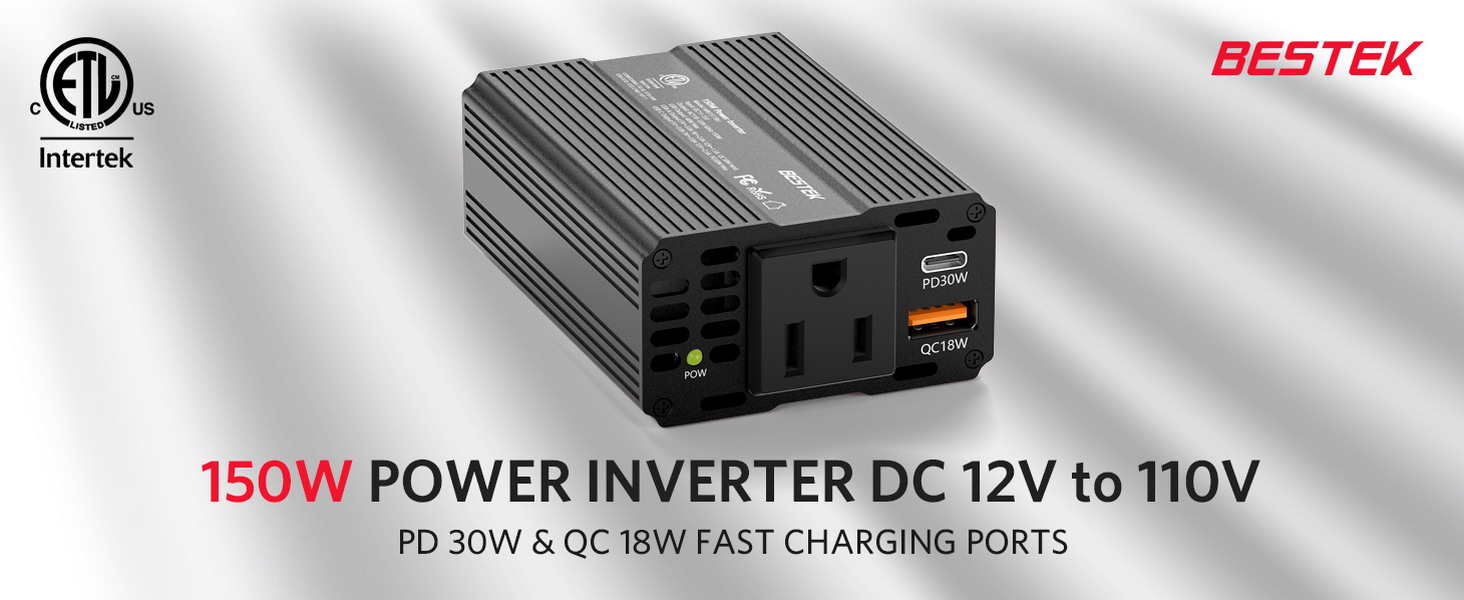
Image: BESTEK XNUMXW Power Inverter showing its AC outlet, USB-C PDXNUMXW, and USB-A QCXNUMXW fast charging ports.
4. เนื้อหาบรรจุภัณฑ์
- BESTEK XNUMXW Power Inverter
- คู่มือการใช้งาน
5. การตั้งค่า
- Locate your vehicle's XNUMXV DC cigarette lighter socket.
- Ensure the inverter's power switch is in the OFF position.
- Insert the inverter's cigarette lighter plug firmly into your vehicle's XNUMXV DC socket.
- Turn on the inverter by flipping the power switch. The LED indicator will illuminate green, indicating it is ready for use.

Image: Close-up of the BESTEK XNUMXW Power Inverter highlighting its aluminum body, built-in fuse, power switch, and the attached cigarette lighter cable.
6. คู่มือการใช้งาน
Once the inverter is powered on (green LED indicator), you can connect your devices:
- AC Outlet: Plug your AC-powered device (e.g., laptop charger) into the XNUMXV-XNUMXV AC outlet. Ensure the device's wattage does not exceed XNUMXW.
- USB-C PDXNUMXW Port: Connect your USB-C compatible device for fast charging. This port supports Power Delivery up to XNUMXW.
- USB-A QCXNUMXW Port: Connect your USB-A compatible device for Quick Charge up to XNUMXW.
บันทึก:
- Always turn off the inverter when not in use to conserve vehicle battery power.
- If the red LED illuminates, it indicates a fault (e.g., overload, overheating). Disconnect devices and troubleshoot before restarting.
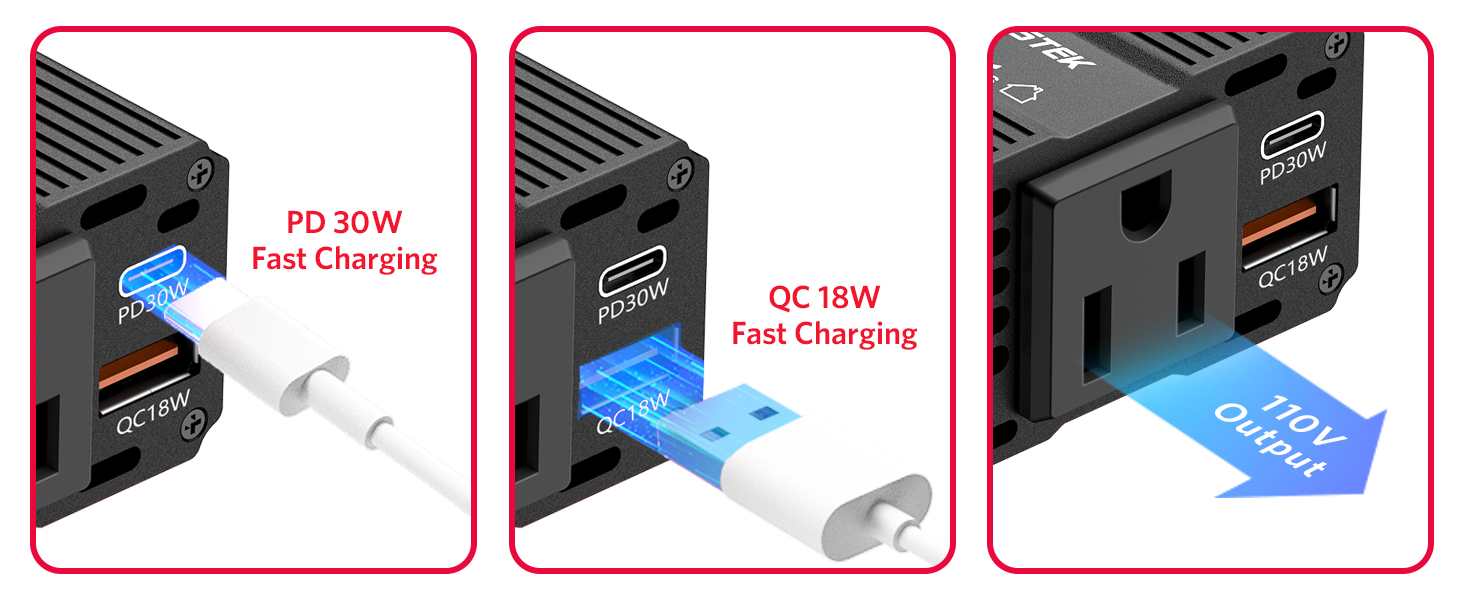
Image: Demonstrates connecting devices to the PDXNUMXW USB-C, QCXNUMXW USB-A, and XNUMXV AC ports for fast charging.
XNUMX. Universal Compatibility
The BESTEK XNUMXW Car Power Inverter is designed to power a wide range of devices, making it versatile for various needs.
- For Laptops: Compatible with MacBook Pro/Air Series, HP Spectre Series, Dell XPS Series, Surface Pro, and other laptops.
- For Phones & Pads: Charges various smartphones and tablets.
- For Gaming Devices: Supports devices like Nintendo Switch, Steam Deck, PSP, and Xbox.
- For Car Accessories: Can power air compressors, Bluetooth speakers, small fans, and wireless headphones.

Image: Illustrates the broad compatibility of the inverter with different electronic devices and car accessories.
XNUMX. Smart Cooling Fan
The inverter features a built-in intelligent cooling fan and temperature sensor. This system automatically adjusts the fan speed based on the inverter's working state and ambient temperature. This ensures the device maintains optimal performance and a comfortable, quiet operating environment, preventing equipment overheating.

ภาพ: ระเบิด view demonstrating the internal smart cooling fan and heat dissipation design of the inverter.
XNUMX. Advanced Protection Features
The BESTEK XNUMXW Power Inverter incorporates multiple safety features to protect both the device and your connected electronics:
- เกินVoltagการป้องกันอี
- ต่ำกว่าเล่มtagการป้องกันอี
- Over-Load Protection
- การป้องกันไฟฟ้าลัดวงจร
- Over-Temperature Protection
- Cooling Fans (for thermal management)
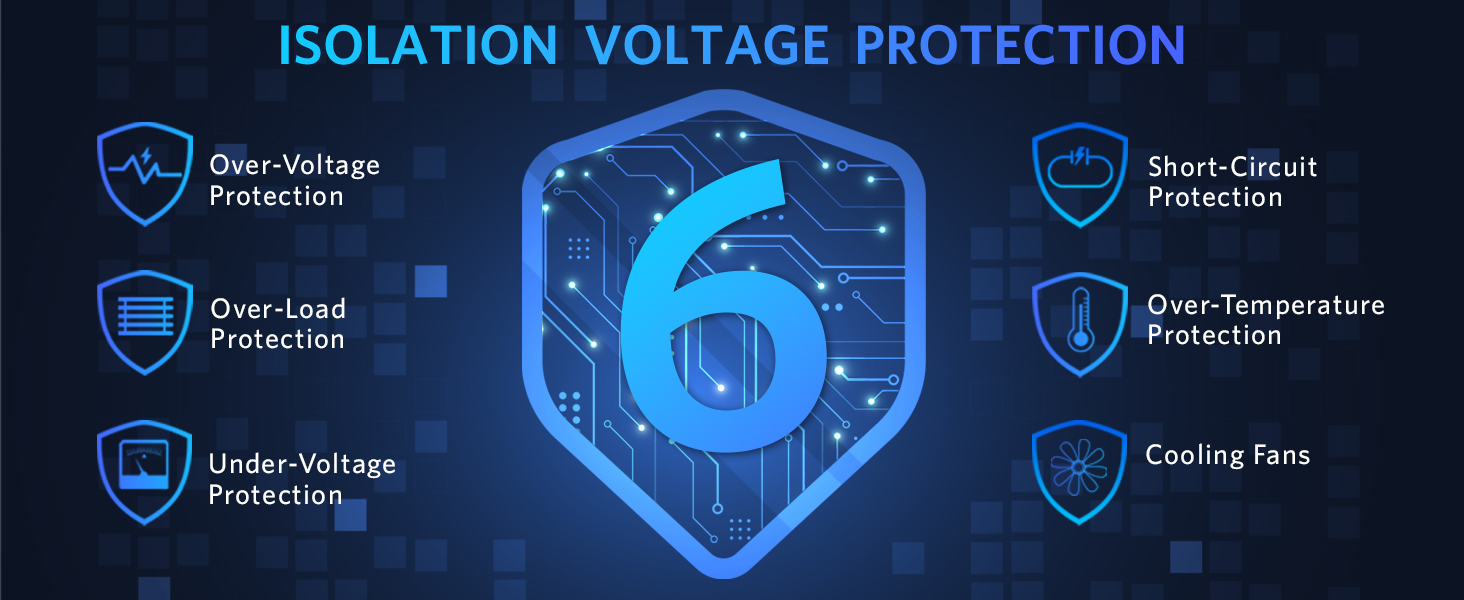
Image: An infographic illustrating the six key protection features of the inverter, including over-voltage, ต่ำกว่า voltage, overload, short-circuit, over-temperature protection, and cooling fans.
10. การบำรุงรักษา
- Keep the inverter clean and free from dust and debris. Use a dry cloth for cleaning.
- Ensure the cooling fan vents are not obstructed to allow for proper airflow.
- Store the inverter in a cool, dry place when not in use.
- Regularly check the cigarette lighter plug and cable for any signs of damage.
11 การแก้ไขปัญหา
- No Power / Red LED: Check if the inverter is securely plugged into the XNUMXV DC socket. Ensure the vehicle engine is running for optimal power. Verify that the connected device's power consumption does not exceed XNUMXW. Disconnect and reconnect the inverter.
- ความร้อนสูงเกินไป: If the inverter feels excessively hot, disconnect devices and allow it to cool down. Ensure the cooling fan vents are clear and the inverter is in a well-ventilated area.
- อุปกรณ์ไม่ชาร์จ: Ensure the device is properly connected to the correct port (AC, USB-C, or USB-A). Check the device's charging cable for damage.
12. ข้อมูลจำเพาะ
| ข้อมูลจำเพาะ | ค่า |
|---|---|
| หมายเลขรุ่น | MRIXNUMXBU |
| อินพุต Voltage | DC XNUMXV (XNUMX-XNUMXV) |
| AC Output Voltage | ไฟฟ้ากระแสสลับ 110-120 โวลต์ |
| AC Output Frequency | 60เฮิรตซ์ |
| พลังงานต่อเนื่อง | 150วัตต์ |
| พลังสูงสุด | 250วัตต์ |
| เอาต์พุต USB-A | QCXNUMXW Max (XNUMXV-XNUMXA, XNUMXV-XNUMXA, XNUMXV-XNUMXA) |
| เอาท์พุต USB-C | PDXNUMXW Max (XNUMXV-XNUMXA, XNUMXV-XNUMXA, XNUMXV-XNUMXA) |
| ขนาดสินค้า | 3.74 x 2.56 x 0.98 นิ้ว |
| น้ำหนักสินค้า | 6.8 ออนซ์ |
13. การรับประกันและการสนับสนุน
BESTEK provides the following for your product:
- XNUMX-Month Free Replacement Warranty: Covers manufacturing defects and ensures product reliability.
- XNUMX*XNUMXH Customer Service: Dedicated support team available around the clock to assist with any inquiries or issues.
For any questions or assistance, please feel free to contact BESTEK customer service. We are committed to solving your concerns promptly.
Image: BESTEK Service Plan outlining warranty, return policy, and customer support channels.
14. วิดีโอผลิตภัณฑ์
Unboxing XNUMXW Power Inverter DC XNUMXV to XNUMXV
Video: An unboxing video demonstrating the BESTEK XNUMXW Power Inverter, showcasing its compact size and features. This video is provided by a seller.
Why you need this awesome adapter for your car!
Video: A demonstration highlighting the benefits and practical uses of the BESTEK XNUMXW Power Inverter in a car setting. This video is provided by a seller.


