1. บทนำ
ขอบคุณสำหรับการซื้อasing the LONPOO LP-42S Powered Bookshelf Speaker. This manual provides detailed instructions for setting up, operating, and maintaining your new speakers. Designed for both the minimalist and the audiophile, these compact desktop speakers integrate seamlessly into your workspace, transforming even the simplest setup into a rich sound experience. Please read this manual thoroughly before use to ensure proper operation and to maximize the performance of your speakers.

Figure 1.1: LONPOO LP-42S Powered Bookshelf Speakers with included remote control.
2. ข้อมูลด้านความปลอดภัย
เพื่อให้มั่นใจถึงการทำงานที่ปลอดภัยและป้องกันความเสียหาย โปรดปฏิบัติตามข้อควรระวังด้านความปลอดภัยต่อไปนี้:
- Do not expose the speakers to rain, moisture, or extreme temperatures.
- Do not block any ventilation openings. Ensure adequate airflow around the speakers.
- Do not place the speakers near heat sources such as radiators, heat registers, stoves, or other apparatus (including ampเครื่องให้ความร้อน) ที่ผลิตความร้อน
- ใช้เฉพาะอุปกรณ์เสริม/สิ่งที่แนบที่ผู้ผลิตกำหนดเท่านั้น
- ถอดปลั๊กลำโพงขณะเกิดพายุฝนฟ้าคะนองหรือเมื่อไม่ได้ใช้งานเป็นเวลานาน
- แจ้งบริการทั้งหมดให้ช่างที่ผ่านการรับรองทราบ จำเป็นต้องให้บริการเมื่ออุปกรณ์ได้รับความเสียหายในลักษณะใดก็ตาม เช่น สายไฟหรือปลั๊กชำรุด ของเหลวหกหรือมีวัตถุตกลงไปในอุปกรณ์ อุปกรณ์โดนฝนหรือความชื้น ไม่สามารถทำงานได้ตามปกติ หรือตกหล่น
- ห้ามเปิดฝาครอบลำโพง เนื่องจากไม่มีชิ้นส่วนใดภายในที่ผู้ใช้สามารถซ่อมแซมได้
3. เนื้อหาบรรจุภัณฑ์
กรุณาตรวจสอบเนื้อหาในแพ็คเกจเพื่อให้แน่ใจว่ามีสินค้าครบทั้งหมด:
- LONPOO Bookshelf Speaker Pair (1 Active, 1 Passive)
- สายลำโพง
- สายใยแก้วนำแสง
- HDMI Cable (eARC compatible)
- 2-Prong US AC Power Cord
- รีโมทคอนโทรล
- คู่มือการใช้งาน (เอกสารนี้)

Figure 3.1: All included accessories and components in the LONPOO LP-42S package.
4. สินค้าหมดview
4.1 ส่วนประกอบของลำโพง
The LONPOO LP-42S features a two-way speaker design for balanced audio reproduction.
- 1-inch Silk Dome Tweeter: Delivers crisp and clear high frequencies.
- ลำโพงวูฟเฟอร์คาร์บอนไฟเบอร์ขนาด 4 นิ้ว: Provides rich and powerful bass response.

รูปที่ 4.1: รายละเอียด view of the tweeter and woofer components.
4.2 การเชื่อมต่อแผงด้านหลัง
The active speaker features various input and output ports on its rear panel:
- HDMI/eARC: For connecting to TVs or devices supporting Audio Return Channel.
- Auxiliary (RCA): Standard analog audio input.
- ออปติคอล: อินพุตเสียงดิจิทัลเพื่อคุณภาพเสียงที่ดีเยี่ยม
- โคแอกเซียล: Another digital audio input.
- ยูเอสบี 2.0: For audio playback from USB devices.
- L/R Speaker Out: เชื่อมต่อกับลำโพงแบบพาสซีฟ
- AC 110V-240V: กำลังไฟเข้า
- สวิตช์ไฟ: เพื่อเปิดหรือปิดลำโพง

Figure 4.2: Rear panel connections of the active speaker.
4.3 ไฟแสดงสถานะ LED
The LED indicator on the active speaker changes color to denote the current operating mode:
- สีแดง: โหมดสแตนด์บาย
- สีฟ้า: โหมดบลูทู ธ
- สีเขียว: Optical mode.
- สีขาว: HDMI/Coaxial/AUX/USB mode.

Figure 4.3: LED indicator and its corresponding mode colors.
5. การตั้งค่า
5.1 การจัดวางลำโพง
Place the active speaker (the one with controls and inputs) on the side closest to your power supply and audio sources. Position the passive speaker on the other side. For optimal stereo imaging, place the speakers at an equal distance from your listening position, forming an equilateral triangle.

รูปที่ 5.1: อดีตample of speaker placement on a desktop.
5.2 การเชื่อมต่อลำโพง
Use the included speaker wire to connect the active speaker to the passive speaker:
- Locate the L/R Speaker Out terminals on the rear of the active speaker and the input terminals on the passive speaker.
- Unscrew the red and black knobs on both speakers.
- Insert the red wire into the red terminal and the black wire into the black terminal on both speakers.
- Tighten the knobs to secure the wires. Ensure a firm connection to prevent audio issues.
5.3 การเชื่อมต่อแหล่งเสียง
Connect your audio source (TV, computer, smartphone, etc.) to the active speaker using the appropriate cable:
- HDMI/eARC: Connect the included HDMI cable from your TV's eARC/ARC port to the speaker's HDMI/eARC port.
- ออปติคอล: Connect the included optical cable from your device's optical output to the speaker's Optical input.
- โคแอกเซียล: Connect a coaxial cable (not included) from your device's coaxial output to the speaker's Coaxial input.
- ยูเอสบี: ใส่แฟลชไดรฟ์ USB พร้อมเสียง files into the USB 2.0 port for direct playback.
5.4 การเชื่อมต่อสายไฟ
Connect the 2-Prong US AC Power Cord to the AC input on the active speaker, then plug the other end into a wall outlet.
6. การดำเนินการ
6.1 การเปิด/ปิดเครื่อง
Flip the power switch on the rear panel of the active speaker to the \"ON\" position to power on the speakers. Flip it to \"OFF\" to power them down.
6.2 การเลือกอินพุต
Press the \"MODE\" button on the remote control or the physical mode button on the side of the active speaker to cycle through the available input sources (Bluetooth, Optical, Coaxial, HDMI, Aux, USB). The LED indicator will change color to reflect the selected mode.

Figure 6.1: USB and Bluetooth input options.
6.3 การควบคุมระดับเสียง เบส และเสียงแหลม
You can adjust audio levels using either the remote control or the physical knobs on the side of the active speaker:
- ปริมาณ: Use VOL+/- buttons on the remote or the main volume knob.
- เบส: Use BASS+/- buttons on the remote or the bass knob.
- เสียงแหลม: Use TREB+/- buttons on the remote or the treble knob.
Note: The physical knobs for volume, bass, and treble are continuous rotation. There is no fixed 'zero' or 'max' position. Adjust to your preferred level.
6.4 การจับคู่บลูทูธ
ในการเชื่อมต่ออุปกรณ์บลูทูธ:
- Switch the speaker to Bluetooth mode (Blue LED). If not already in pairing mode, press the \"BT\" button on the remote.
- บนอุปกรณ์ของคุณ (สมาร์ทโฟน แท็บเล็ต คอมพิวเตอร์) เปิดใช้งาน Bluetooth และค้นหาอุปกรณ์ที่มีอยู่
- Select \"LONPOO LP-42S\" from the list.
- Once paired, the blue LED will remain solid, and you can play audio through the speakers.
Note: The speakers should automatically connect to the last paired device when in Bluetooth mode.
6.5 ฟังก์ชั่นการควบคุมระยะไกล
The included remote control provides convenient access to all speaker functions:
- พลัง: Turns the speakers on/off (to standby).
- เส้นทาง: วนรอบแหล่งข้อมูลขาเข้า
- ฉบับ+/-: ปรับระดับเสียงหลัก
- TREB+/-: ปรับระดับเสียงแหลม
- เบส+/-: ปรับระดับเสียงเบส
- ปิดเสียง: ปิดเสียง/เปิดเสียง
- บีที: Directly switches to Bluetooth mode.
- รีเซ็ต: Resets audio settings to default.
- Playback Controls (Play/Pause, Skip): For USB and Bluetooth modes.
- ปุ่มตัวเลข (0-9): For direct track selection in USB mode.
7. การบำรุงรักษา
7.1 การทำความสะอาด
To clean the speakers, gently wipe the surfaces with a soft, dry cloth. Do not use liquid cleaners, aerosols, or abrasive chemicals, as these may damage the finish or internal components.
7.2 พื้นที่จัดเก็บ
If storing the speakers for an extended period, ensure they are powered off and unplugged. Store them in a cool, dry place away from direct sunlight and extreme temperatures.
8 การแก้ไขปัญหา
If you encounter issues with your LONPOO LP-42S speakers, please refer to the following common problems and solutions:
| ปัญหา | สาเหตุที่เป็นไปได้ | สารละลาย |
|---|---|---|
| ไม่มีเสียง |
|
|
| เสียงเพี้ยน |
|
|
| ปัญหาการจับคู่บลูทูธ |
|
|
| Speakers go into standby and reset settings |
|
|
| รีโมตคอนโทรลไม่ทำงาน |
|
|
9. ข้อมูลจำเพาะ
| คุณสมบัติ | รายละเอียด |
|---|---|
| ชื่อรุ่น | LP-42S |
| ประเภทลำโพง | Bookshelf, Active Near Field Monitor |
| ไดร์เวอร์เสียง | 1-inch Silk Dome Tweeter, 4-inch Carbon Fiber Woofer |
| กำลังขับสูงสุดของลำโพง | 50 วัตต์ (ต่อลำโพง) |
| การจัดการพลังงาน | 100 - 150 วัตต์ |
| อิมพีแดนซ์ | 4 โอห์ม |
| ความไวต่อความรู้สึก | 80เดซิเบล |
| เทคโนโลยีการเชื่อมต่อ | Auxiliary (RCA), Bluetooth, Coaxial, HDMI (eARC), Optical, USB 2.0 |
| การกำหนดค่าช่องเสียงรอบทิศทาง | 2.0 |
| ขนาดผลิตภัณฑ์ (แต่ละลำโพง) | 7.08\"D x 5.7\"W x 9.84\"H |
| น้ำหนักสินค้า | 11.2 ปอนด์ (น้ำหนักรวมสำหรับทั้งคู่) |
| สี | สีดำ |
| ผู้ผลิต | longping |
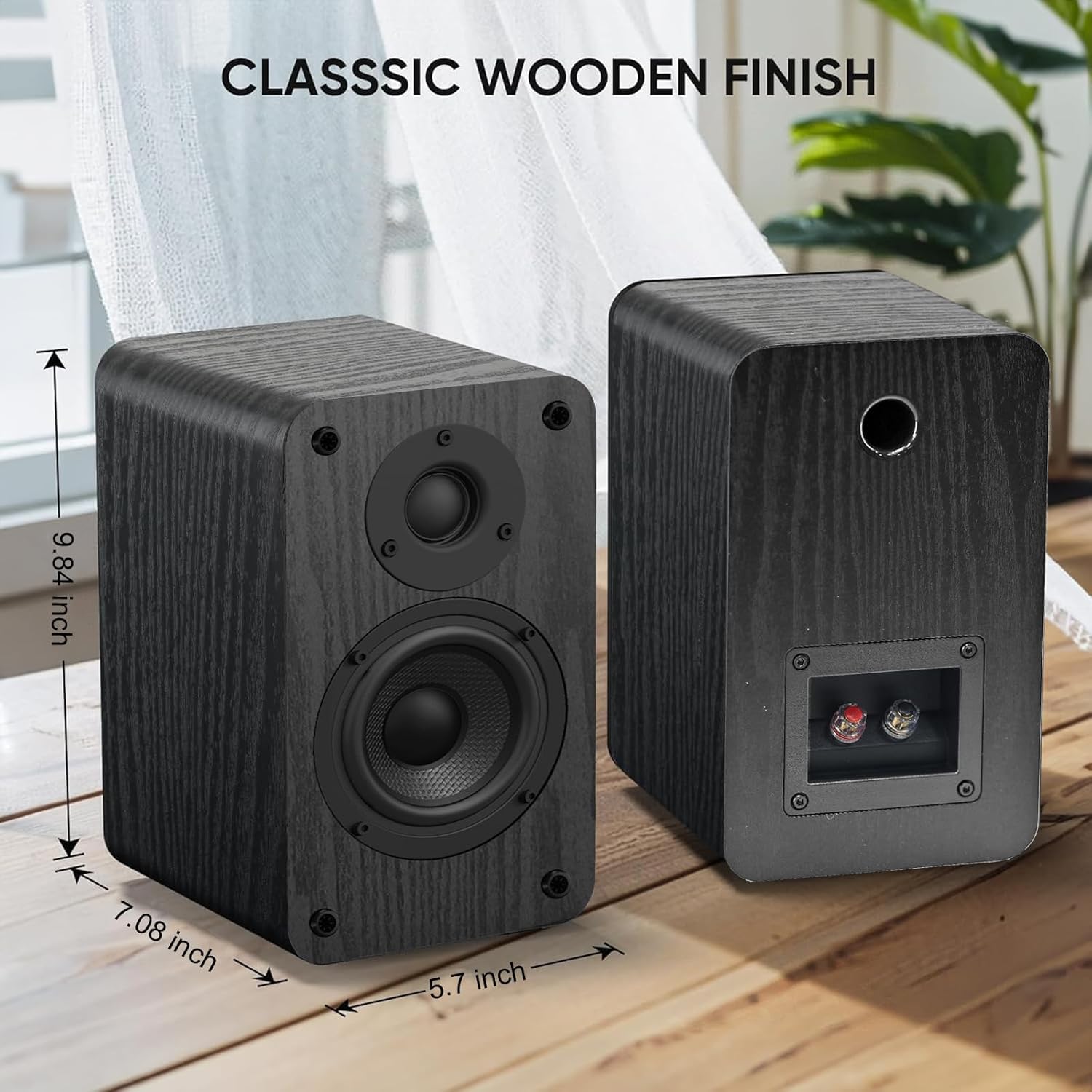
รูปที่ 9.1: ขนาดของลำโพง
10. การรับประกันและการสนับสนุน
LONPOO products are designed and manufactured to the highest quality standards. For information regarding warranty coverage, please refer to the warranty card included with your product or visit the official LONPOO webเว็บไซต์.
If you require technical support or have questions not covered in this manual, please contact LONPOO customer service. Contact information can typically be found on the official LONPOO webไซต์หรือบนเอกสารการซื้อของคุณ
แหล่งข้อมูลออนไลน์:
- Official LONPOO Store on Amazon: Visit LONPOO Store
- For the latest user manual (PDF): ดาวน์โหลดคู่มือ PDF


