1. ข้อมูลด้านความปลอดภัย
Please read this manual carefully before using the LEVENHUK Atom DNB200 Digital Night Vision Binoculars to ensure proper operation and to prevent damage. Keep this manual for future reference.
- Do not attempt to disassemble or repair the device yourself. Refer all servicing to qualified specialists.
- Avoid direct exposure to strong light sources, especially sunlight, as this can damage the internal components.
- Keep the device away from high temperatures, direct sunlight, and high humidity.
- Use only the specified battery type (18650 Li-ion) and charger. Improper use can lead to fire or explosion.
- เก็บให้พ้นจากมือเด็ก
2. เนื้อหาบรรจุภัณฑ์
ตรวจสอบว่ามีสินค้าทั้งหมดที่ระบุไว้ด้านล่างอยู่ในแพ็คเกจของคุณ:
- LEVENHUK Atom DNB200 Digital Night Vision Binoculars
- กระเป๋าใส่อุปกรณ์
- สายคล้องคอ
- สาย USB
- ผ้าเช็ดทำความสะอาด
- การ์ด MicroSD (ติดตั้งมาแล้วหรือซื้อแยกต่างหาก)
- คู่มือการใช้งาน

Image 2.1: All items included in the LEVENHUK Atom DNB200 package, including the binoculars, carrying case, neck strap, USB cable, cleaning cloth, and a microSD card.
3. ส่วนประกอบผลิตภัณฑ์
Familiarize yourself with the main parts and controls of your digital night vision binoculars.

ภาพที่ 3.1: ด้านบน view of the binoculars, highlighting the control panel with various buttons.
- ปุ่มเปิด/ปิด: เปิด/ปิดอุปกรณ์
- ปุ่มโหมด (M): สลับระหว่างโหมดถ่ายภาพ วิดีโอ และการเล่นภาพ
- IR Illuminator Button (Sun/Light icon): Adjusts the infrared illumination level.
- ปุ่มตกลง: Confirms selections in the menu or takes a photo/starts video recording.
- Zoom In/Up Button (Magnifying glass with +): Increases digital zoom or navigates up in menus.
- Zoom Out/Down Button (Magnifying glass with -): Decreases digital zoom or navigates down in menus.
- โฟกัสล้อ: Located on the side, adjusts optical focus for clear viewการไอเอ็นจี
- Eyepiece/Display: Viewfinder for observing images.
- เลนส์วัตถุ: Front lens for capturing light.
- ไฟ LED อินฟาเรด: Infrared light emitter for night vision.
- ช่องใส่แบตเตอรี่: Located at the rear.
- พอร์ต USB-C: สำหรับการชาร์จและถ่ายโอนข้อมูล
- ช่องเสียบการ์ด MicroSD: สำหรับการใส่การ์ดหน่วยความจำ

ภาพที่ 3.2: ด้านหน้า view of the binoculars, showcasing the display screen and objective lens.
4. การเริ่มต้น
4.1. การติดตั้งแบตเตอรี่
The device uses one 18650 Li-ion rechargeable battery.
- Locate the battery compartment cover on the rear of the binoculars.
- เปิดฝาครอบ
- Insert the 18650 battery according to the polarity markings (+/-) inside the compartment.
- ปิดฝาช่องใส่แบตเตอรี่ให้แน่น
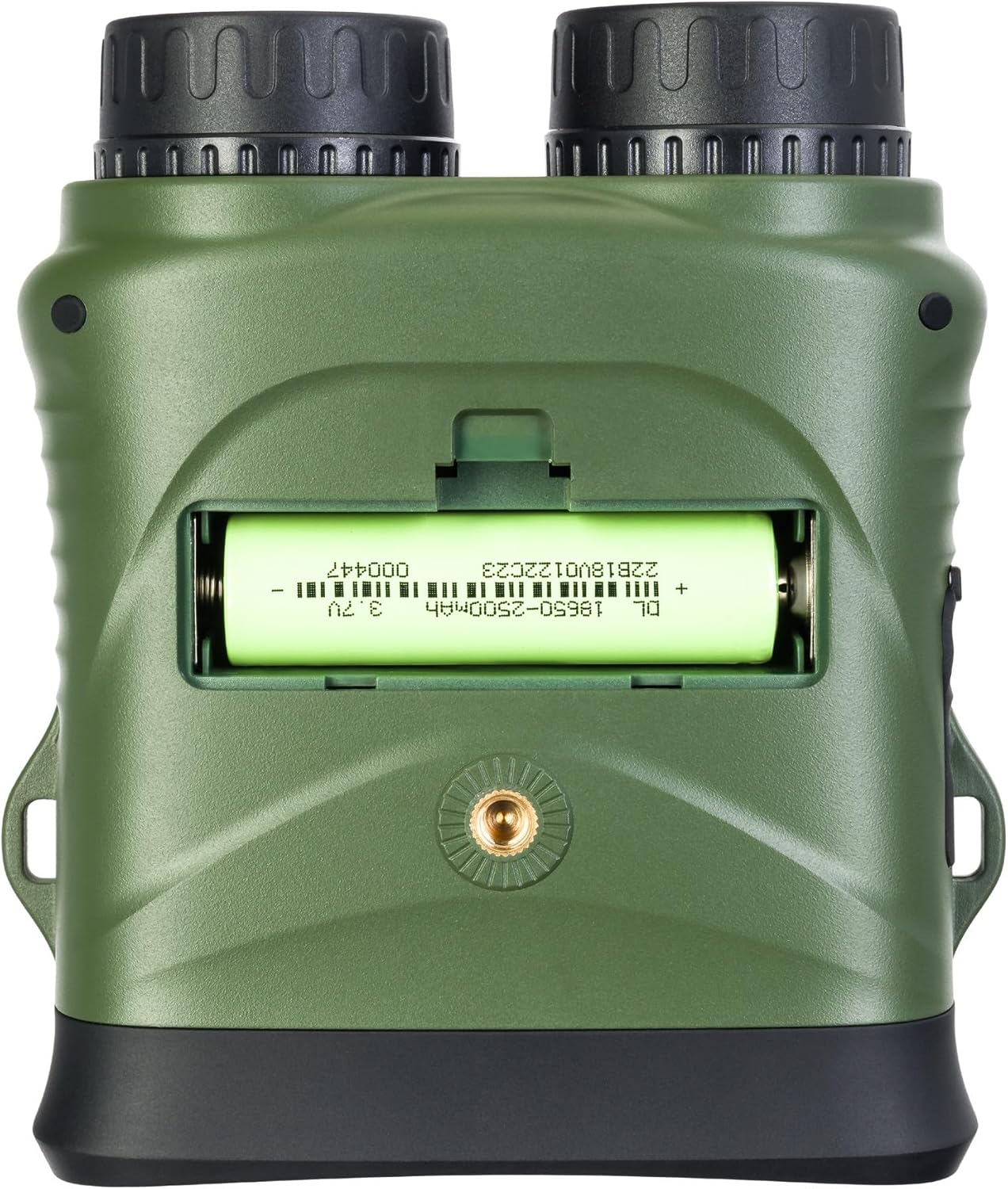
ภาพที่ 4.1: ด้านหลัง view of the binoculars with the battery compartment open, illustrating correct battery insertion.
4.2. การติดตั้งการ์ดหน่วยความจำ
A microSD card (up to 32GB, Class 10 recommended) is required to save photos and videos.
- Locate the microSD card slot on the side of the binoculars, usually protected by a rubber flap.
- ค่อยๆ เปิดแผ่นยางออก
- ใส่การ์ด microSD โดยให้ด้านที่มีหน้าสัมผัสสีทองคว่ำลงจนล็อคเข้าที่
- Close the rubber flap to protect the port from dust and moisture.

ภาพที่ 4.2: ด้านข้าง view of the binoculars, showing the USB-C port and the microSD card slot under a protective cover.
4.3. การเปิด/ปิดเครื่อง
- การเปิดเครื่อง: Press and hold the Power button (⑁) for a few seconds until the display illuminates.
- วิธีปิดเครื่อง: Press and hold the Power button (⑁) again until the display turns off.
5. คู่มือการใช้งาน
5.1. การปรับโฟกัส
To achieve a clear image, adjust the focus:
- มองผ่านช่องมองภาพ
- Rotate the focus wheel (located on the side of the binoculars) until the image appears sharp.
5.2. การเลือกโหมด
กดปุ่ม โหมด (M) ปุ่มสำหรับสลับโหมดที่มีให้เลือก:
- โหมดภาพถ่าย: สำหรับถ่ายภาพนิ่ง
- โหมดวิดีโอ: สำหรับการบันทึกวิดีโอ footage.
- โหมดการเล่น: สำหรับ reviewing captured photos and videos.
5.3. ระบบมองเห็นในเวลากลางคืนและไฟส่องสว่างอินฟราเรด
The device automatically switches to night vision mode in low light conditions. To enhance visibility in complete darkness:
- ในโหมดภาพถ่ายหรือวิดีโอ ให้กดปุ่ม IR Illuminator button (Sun/Light icon).
- Each press will cycle through different IR illumination levels (e.g., Off, Level 1, Level 2, Level 3). Higher levels provide more illumination but consume more battery.
5.4. ดิจิตอลซูม
ใช้ Zoom In (+) และ Zoom Out (-) buttons to adjust the digital magnification of the image on the display.
5.5. การถ่ายภาพและวิดีโอ
- การถ่ายภาพ: In Photo Mode, frame your subject and press the OK ปุ่ม.
- ในการบันทึกวิดีโอ: ในโหมดวิดีโอ ให้กดปุ่ม OK button once to start recording. Press it again to stop recording. A recording indicator will appear on the screen.
5.6. การตั้งค่าเมนู
วิธีเข้าถึงและปรับการตั้งค่าอุปกรณ์:
- กดปุ่มค้างไว้ โหมด (M) ปุ่มเพื่อเข้าสู่เมนู
- ใช้ Zoom In (+) และ Zoom Out (-) ปุ่มสำหรับเลื่อนดูตัวเลือกในเมนู
- กดปุ่ม OK ปุ่มสำหรับเลือกตัวเลือกหรือเข้าสู่เมนูย่อย
- กดปุ่ม โหมด (M) กดปุ่มอีกครั้งเพื่อออกจากเมนู
Common settings include: Video Resolution, Photo Resolution, Date Stamp, Language, Auto Power Off, Format SD Card.
6. การบำรุงรักษา
6.1. การทำความสะอาด
- เลนส์: Use the included cleaning cloth or a soft, lint-free cloth specifically designed for optical surfaces. Breathe lightly on the lens or use a small amount of lens cleaning fluid if necessary.
- ร่างกาย: Wipe the body of the device with a soft, dry cloth. Do not use abrasive cleaners or solvents.
6.2. การจัดเก็บ
- When not in use, store the binoculars in their carrying case in a cool, dry place.
- หากไม่ได้ใช้งานอุปกรณ์เป็นเวลานาน ควรถอดแบตเตอรี่ออกเพื่อป้องกันการรั่วไหล
7 การแก้ไขปัญหา
| ปัญหา | สาเหตุที่เป็นไปได้ | สารละลาย |
|---|---|---|
| อุปกรณ์ไม่เปิดเครื่อง | แบตเตอรี่หมดหรือใส่ไม่ถูกต้อง | Charge the battery or re-insert it with correct polarity. |
| ภาพเบลอ | ไม่ได้ปรับโฟกัส | Rotate the focus wheel until the image is sharp. |
| ไม่สามารถบันทึกรูปภาพ/วิดีโอได้ | No microSD card or card is full/corrupted. | Insert a microSD card, delete old fileหรือฟอร์แมตการ์ด (ซึ่งจะลบข้อมูลทั้งหมด) |
| ประสิทธิภาพการมองเห็นในเวลากลางคืนต่ำ | ไฟส่องสว่างอินฟราเรดปิดอยู่หรือตั้งค่าไว้ต่ำเกินไป | Increase the IR illumination level using the IR button. |
| อุปกรณ์ค้าง | ซอฟต์แวร์มีปัญหา | Press and hold the Power button for 10 seconds to force a shutdown, then restart. |
8. ข้อมูลจำเพาะทางเทคนิค
| คุณสมบัติ | ข้อมูลจำเพาะ |
|---|---|
| หมายเลขรุ่น | 81702 |
| ขนาดสินค้า | 3.94 x 1.97 x 0.5 นิ้ว |
| น้ำหนักสินค้า | 3.53 ออนซ์ |
| ยี่ห้อ | เลเวนฮุค |
| คุณสมบัติพิเศษ | การมองเห็นตอนกลางคืน |
| สี | สีดำ |
| โล่งอกตา | 5 มิลลิเมตร |
| คำอธิบายปริซึมสองตา | ปริซึมหลังคา |
| แหล่งพลังงาน | 18650 Li-ion Rechargeable Battery (included) |
| พื้นที่จัดเก็บ | MicroSD card (up to 32GB, Class 10 recommended) |
9. การรับประกันและการสนับสนุนลูกค้า
LEVENHUK products are covered by a manufacturer's warranty. For detailed warranty terms and conditions, please refer to the warranty card included with your product or visit the official Levenhuk webเว็บไซต์.
If you encounter any issues or have questions regarding your LEVENHUK Atom DNB200 Digital Night Vision Binoculars, please contact our customer support team:
- Webเว็บไซต์: www.levenhuk.com
- อีเมล: อ้างถึง website for support contact.
- โทรศัพท์: อ้างถึง website for support contact.
Please have your product model (DNB200) and serial number ready when contacting support.


