1. การติดตั้งและการตั้งค่าเริ่มต้น
Before operating your new Candy Smart Pro Inverter washing machine, it is crucial to follow these installation steps carefully to ensure proper function and safety.
การแกะกล่อง
- ถอดวัสดุบรรจุภัณฑ์ออกอย่างระมัดระวังทั้งหมด รวมถึงฐานโพลีสไตรีนและฟิล์มป้องกัน
- Remove the transit bolts located at the rear of the machine. These bolts secure the drum during transport and must be removed before use. Keep them for future transport if needed.
การวางตำแหน่ง
- วางเครื่องซักผ้าบนพื้นผิวที่มั่นคงและเรียบเสมอกัน ตรวจสอบให้แน่ใจว่ามีพื้นที่รอบเครื่องเพียงพอสำหรับการระบายอากาศและการเข้าถึง
- Adjust the leveling feet at the bottom of the machine to ensure it is perfectly stable and does not wobble. Use a spirit level for accuracy.
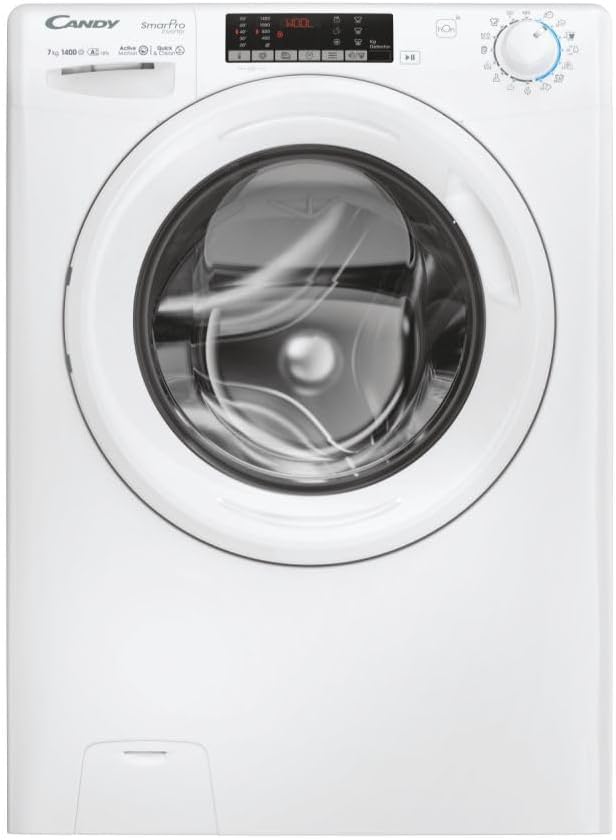
รูปที่ 1.1 : ด้านหน้า view of the Candy Smart Pro Inverter washing machine. This image shows the overall design of the appliance, including the control panel, detergent drawer, and main door.
การต่อน้ำประปา
- ต่อท่อน้ำเข้าเข้ากับก๊อกน้ำเย็นที่มีเกลียว 3/4 นิ้ว ตรวจสอบให้แน่ใจว่าข้อต่อแน่นเพื่อป้องกันการรั่วซึม
- Position the drain hose into a suitable standpipe or sink, ensuring it is securely fixed to prevent displacement during operation.

Figure 1.2: The washing machine with its front-loading door open, revealing the stainless steel drum. This view is useful for checking the drum and ensuring no packing materials remain inside.
การเชื่อมต่อไฟฟ้า
- เสียบสายไฟเข้ากับเต้ารับไฟฟ้าที่มีสายดิน ตรวจสอบให้แน่ใจว่าระดับเสียงtagค่า e และความถี่ตรงกับข้อกำหนดที่ระบุไว้บนแผ่นป้ายข้อมูลของเครื่องจักร
- ห้ามใช้สายไฟต่อพ่วงหรือตัวแปลงไฟ
2. คู่มือการใช้งาน
This section provides a guide on how to use your Candy Smart Pro Inverter washing machine for optimal performance.
แผงควบคุมโอเวอร์view
The control panel allows you to select wash programs, adjust settings, and monitor the wash cycle.

รูปที่ 2.1: รายละเอียด view of the washing machine's control panel, showing the program selector dial, digital display, and various function buttons.
กำลังโหลดซักรีด
- เปิดประตูเครื่องซักผ้า
- Load laundry loosely into the drum, ensuring not to overload the machine. Refer to the maximum load capacity (7 kg) for different programs.
- ปิดประตูให้แน่นจนกว่าจะมีเสียงคลิก

รูปที่ 2.2: View of laundry placed inside the stainless steel drum of the washing machine, illustrating a typical load.
การเติมผงซักฟอกและสารเติมแต่ง
The detergent dispenser has compartments for pre-wash, main wash, and fabric softener.
- ดึงลิ้นชักผงซักฟอกออกมา
- Add the appropriate amount of detergent to the main wash compartment (II).
- If using, add fabric softener to the designated compartment (flower symbol).
- ดันช่องใส่ผงซักฟอกกลับเข้าไปให้สุด

Figure 2.3: The detergent dispenser drawer pulled out, showing the different compartments for detergent and fabric softener.
การเลือกโปรแกรม
- Turn the program selector dial to choose the desired wash program (e.g., Cotton, Synthetics, Delicates, Eco).
- หน้าจอจะแสดงอุณหภูมิและความเร็วในการหมุนเริ่มต้นสำหรับโปรแกรมที่เลือก
การปรับแต่งการตั้งค่า
- Use the temperature button to adjust the wash temperature.
- Use the spin speed button to modify the spin speed.
- Select any additional functions (e.g., pre-wash, extra rinse) using the corresponding buttons.
เริ่มรอบการซัก
- กดปุ่ม 'เริ่ม/หยุดชั่วคราว' เพื่อเริ่มรอบการซัก
- The machine will automatically lock the door and begin filling with water.
3. การบำรุงรักษาและการดูแล
การบำรุงรักษาตามปกติจะช่วยให้เครื่องซักผ้าของคุณมีอายุการใช้งานยาวนานและมีประสิทธิภาพ
การทำความสะอาดช่องจ่ายผงซักฟอก
- Remove the detergent drawer by pressing the release lever (if present) and pulling it out.
- ล้างลิ้นชักใต้น้ำไหลเพื่อขจัดคราบผงซักฟอกที่ตกค้างออก
- Clean the housing of the drawer with a brush to remove any build-up.
- ใส่ลิ้นชักกลับเข้าไปอีกครั้ง
การทำความสะอาดกลอง
- Periodically run a maintenance wash cycle (e.g., a hot wash with no laundry and a descaling agent or washing machine cleaner) to prevent odors and limescale build-up.
- Leave the door slightly ajar after each wash to allow the drum to air dry and prevent mildew.
การทำความสะอาดตัวกรอง
- ค้นหาตัวกรองปั๊มระบายน้ำ ซึ่งโดยปกติจะอยู่ที่บริเวณด้านหน้าล่างของเครื่อง
- วางภาชนะตื้นๆ ไว้ใต้ตัวกรองเพื่อรองรับน้ำที่อาจไหลออกมา
- Carefully unscrew and remove the filter. Clean any lint, debris, or foreign objects.
- ขันตัวกรองกลับเข้าไปให้แน่น
การทำความสะอาดภายนอก
- เช็ดทำความสะอาดพื้นผิวภายนอกของเครื่องด้วยผ้าเนื้อนุ่มและแห้งamp ผ้า.
- ห้ามใช้น้ำยาทำความสะอาดที่มีฤทธิ์กัดกร่อนหรือตัวทำละลาย
4. คำแนะนำการแก้ไขปัญหา
This section provides solutions to common issues you might encounter with your washing machine.
| ปัญหา | สาเหตุที่เป็นไปได้ | สารละลาย |
|---|---|---|
| เครื่องไม่เริ่มทำงาน | ไม่มีแหล่งจ่ายไฟ; ประตูไม่ปิดสนิท; ไม่ได้เลือกโปรแกรม | Check power plug and fuse; Ensure door is firmly closed; Select a wash program and press 'Start'. |
| น้ำไม่เติม | ก๊อกน้ำปิดอยู่; สายยางต่อท่อน้ำบิดงอหรืออุดตัน; แรงดันน้ำต่ำเกินไป | Open water tap; Straighten hose and check for blockages; Check household water pressure. |
| เครื่องไม่ระบายน้ำ | ท่อระบายน้ำหักงอหรืออุดตัน; ตัวกรองปั๊มน้ำระบายน้ำอุดตัน | Straighten drain hose and check for blockages; Clean the drain pump filter. |
| การสั่นสะเทือน/เสียงรบกวนมากเกินไป | Transit bolts not removed; Machine not level; Uneven laundry load. | ถอดสลักยึดสำหรับขนส่งออก ปรับขาปรับระดับ และจัดเรียงผ้าในถังซักใหม่ |
| คราบผงซักฟอกตกค้างในเครื่องจ่าย | Insufficient water pressure; Detergent drawer blocked. | Check water pressure; Clean the detergent drawer and its housing. |
5. ข้อมูลจำเพาะทางเทคนิค
Detailed specifications for the Candy Smart Pro Inverter CO 474TWM6/1-S washing machine.
| คุณสมบัติ | ข้อมูลจำเพาะ |
|---|---|
| ยี่ห้อ | ลูกอม |
| ชื่อรุ่น | CO 474TWM6/1-S |
| ความจุ | 7 กิโลกรัม |
| เข้าถึงตำแหน่ง | โหลดด้านหน้า |
| สี | สีดำ |
| โหมดการทำงาน | กึ่งอัตโนมัติ |
| ส่วนประกอบที่รวมอยู่ | 1 แพ็ค |
| ประเภทการติดตั้ง | อิสระ |
| วัสดุของกลอง | สแตนเลส |
| ผู้ผลิต | ลูกอม |
6. การรับประกันและการสนับสนุนลูกค้า
For warranty information, please refer to the warranty card included with your appliance or visit the official Candy webไซต์ เก็บหลักฐานการซื้อของคุณไว้เพื่อใช้ในกรณีเรียกร้องการรับประกัน
If you require technical assistance or have questions not covered in this manual, please contact Candy customer support. Contact details can typically be found on the manufacturer's webไซต์หรือในเอกสารผลิตภัณฑ์ของคุณ
หากต้องการความช่วยเหลือเพิ่มเติม โปรดไปที่ Official Candy Webเว็บไซต์.


