1. สินค้าหมดview
The Motorola Solutions T802 Talkabout FRS Two-Way Radios are designed for reliable communication in various outdoor and off-grid environments. These radios offer advanced features including Bluetooth connectivity for app integration, NOAA weather alerts, and a durable, weather-resistant design. They are ideal for staying connected with travel companions when cell service is unavailable.

ภาพ: ด้านหน้า view of two Motorola T802 radios, highlighting their compact design and digital display.
2. เนื้อหาบรรจุภัณฑ์
Your Motorola Solutions T802 package includes the following items:
- 2 วิทยุ
- 2 USB-C to USB-A cables
- 2 Battery Packs (rechargeable)
- คลิปหนีบเข็มขัด 2 อัน
- 16 สติ๊กเกอร์ส่วนบุคคล
3. คุณสมบัติหลัก
- 22 Channels & 121 Privacy Codes: Offers 2,662 combinations for finding available channels.
- การเชื่อมต่อบลูทูธ: Connects to the TALKABOUT app and compatible audio accessories.
- Weather Proof (IP54): ออกแบบมาให้ทนทานต่อการกระเด็นของน้ำและฝนตกปรอยๆ
- พลังคู่: Operates with rechargeable NiMH battery packs (included) or 3 AA alkaline batteries (not included).
- NOAA Weather Radio & Alerts: Provides real-time weather updates and alerts.
- Off-Grid Group Messaging/Broadcast: Utilize the TALKABOUT app for communication without cell service.
- ไฟฉายแบบบูรณาการ: Built-in LED flashlight for convenience in low-light conditions.
- โทรแจ้งเตือน: Notifies you of incoming transmissions.
- การแจ้งเตือนการสั่นสะเทือน: Provides discreet notification of incoming calls.
4. การเริ่มต้น
4.1 การติดตั้งและการชาร์จแบตเตอรี่
- ตรวจสอบให้แน่ใจว่าวิทยุปิดอยู่
- เปิดฝาช่องใส่แบตเตอรี่ที่ด้านหลังวิทยุ
- Insert the provided rechargeable NiMH battery pack, ensuring correct polarity. Alternatively, insert 3 AA alkaline batteries.
- ปิดฝาช่องใส่แบตเตอรี่ให้แน่น
- To charge, connect one of the provided USB-C to USB-A cables to the USB-C port on the radio and the other end to a compatible USB power source. Both radios can be charged simultaneously using the two cables.
4.2 การเปิด/ปิดเครื่อง
Rotate the On/Off/Volume knob clockwise to power on the radio. Rotate it counter-clockwise until a 'click' is heard to power off.
4.3 Attaching Belt Clip
Align the belt clip with the slots on the back of the radio and slide it down until it clicks into place. To remove, lift the tab on the belt clip and slide it upwards.
5. การทำงานพื้นฐาน
5.1 Channel and Privacy Code Selection
Use the Up/Down buttons to select one of the 22 available channels. To set a privacy code, enter the menu and navigate to the privacy code setting, then use the Up/Down buttons to select one of the 121 codes. Ensure all radios in your group are on the same channel and privacy code for communication.
5.2 ปุ่มกดเพื่อพูด (PTT)
Press and hold the large PTT button on the side of the radio to transmit your voice. Release the button to listen for incoming transmissions.
5.3 การแจ้งเตือนการโทร
Press the Call button to send an audible alert tone to other radios on the same channel and privacy code.
5.4 ไฟฉายในตัว

Image: The integrated flashlight on top of the Motorola T802 radio.
To activate the integrated flashlight, press the dedicated flashlight button (refer to your radio's button layout for exact location). Press again to turn off.
6. คุณสมบัติขั้นสูง
6.1 NOAA Weather Radio & Alerts
The T802 radios include NOAA Weather Radio and Alert functionality. This feature allows you to receive real-time weather broadcasts and emergency alerts, keeping you informed of changing conditions, especially useful in remote areas.
6.2 Bluetooth Connectivity & TALKABOUT App

Image: User interacting with the TALKABOUT app on a smartphone, connected to the radio via Bluetooth.
The TALKABOUT T802 radios can connect to your smartphone via Bluetooth. Download the TALKABOUT app to access advanced off-grid features:
- การติดตามตำแหน่ง: Locate friends' campsites, share your location, and track routes.
- Off-Grid Messaging: Send messages to other app users even without cell service.
- การควบคุมวิทยุ: Adjust radio settings directly from the app.
- What3words Addresses: Communicate exact locations to other FRS users without the app.
7. Range Information
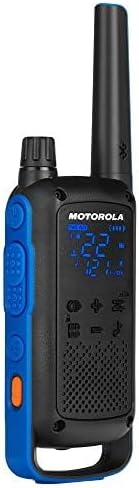
Image: Visual representation of radio range in various environments.
The communication range of the T802 radios is quoted as up to 35 miles. Actual range can vary significantly depending on terrain, weather conditions, electromagnetic interference, and obstructions. Optimal range is achieved in open, unobstructed areas. Typical ranges are:
- จากภูเขาสู่หุบเขา: สูงสุด 35 ไมล์
- Open Water: สูงสุด 6 ไมล์
- Neighborhood/Urban: สูงสุด 2 ไมล์
8. การดูแลรักษา
8.1 การทำความสะอาด
ทำความสะอาดวิทยุด้วยผ้านุ่มๆamp ใช้ผ้าเช็ดทำความสะอาด ห้ามใช้สารทำความสะอาดที่มีฤทธิ์กัดกร่อนหรือตัวทำละลาย ตรวจสอบให้แน่ใจว่าฝาปิดช่องต่างๆ ปิดสนิทก่อนทำความสะอาด
8.2 ความต้านทานต่อน้ำ
The T802 radios are rated IP54 weather-proof, meaning they are protected against dust and splashing water from any direction. They are not designed to be submerged in water. Always ensure the USB-C port cover and battery compartment are securely sealed to maintain water resistance.
8.3 การดูแลแบตเตอรี่
To maximize battery life, fully charge the NiMH battery packs before initial use and after extended storage. Store batteries in a cool, dry place. If using AA alkaline batteries, replace them when power is low.
9 การแก้ไขปัญหา
- ไม่มีไฟฟ้า: Check if the battery pack is correctly installed and charged. If using AA batteries, ensure they are fresh and correctly inserted.
- ไม่สามารถส่ง/รับ: Verify that both radios are on the same channel and privacy code. Check battery levels. Ensure you are within range.
- คุณภาพเสียงไม่ดี: Move closer to the other radio. Check for obstructions. Ensure the volume is adjusted appropriately.
- ปัญหาการเชื่อมต่อบลูทูธ: Ensure Bluetooth is enabled on both the radio and your smartphone. Try restarting both devices.
10. ข้อมูลจำเพาะทางเทคนิค
- หมายเลขรุ่น: T802
- ขนาดสินค้า : 1.28 x 2.2 x 7.52 นิ้ว
- น้ำหนักสินค้า: 7.2 ออนซ์
- จำนวนช่องสัญญาณ: 22
- รหัสความเป็นส่วนตัว: 121
- ช่วงความถี่: 400-470 เมกะเฮิรตซ์
- ระยะการพูดคุยสูงสุด: 35 Miles (terrain dependent)
- ระดับการต้านทานน้ำ: ทนต่อสภาพอากาศ IP54
- แหล่งพลังงาน: Rechargeable NiMH Battery Pack (included) or 3 AA batteries (not included)
- การชาร์จ: ยูเอสบี-ซี
- คุณสมบัติพิเศษ: Call Alert, Integrated Flashlight, Rechargeable, Weather Alert, Bluetooth Connectivity
11. การรับประกันและการสนับสนุน
Motorola Solutions typically offers a 2-year warranty on their two-way radios. For detailed warranty information, technical support, or service inquiries, please refer to the official Motorola Solutions webหรือติดต่อฝ่ายบริการลูกค้าโดยตรง โปรดเก็บหลักฐานการซื้อไว้เพื่อใช้ในการเคลมประกัน


