การแนะนำ
Welcome to the user manual for your Lamax Street2 Bluetooth Speaker. This guide provides essential information for setting up, operating, maintaining, and troubleshooting your device. Please read this manual carefully before using the speaker and keep it for future reference.
ข้อมูลด้านความปลอดภัย
To ensure safe and proper operation, please observe the following safety guidelines:
- อย่าให้เครื่องสัมผัสกับอุณหภูมิที่สูงหรือต่ำเกินไป แสงแดดโดยตรง หรือความชื้นสูง
- Do not immerse the device in water. It is designed to be splash-resistant, not waterproof.
- Keep the speaker out of reach of children and pets.
- Use only approved charging cables and adapters to prevent damage and ensure safety.
- อย่าพยายามถอดประกอบ ซ่อมแซม หรือดัดแปลงลำโพงด้วยตัวเอง โปรดติดต่อเจ้าหน้าที่บริการที่มีคุณสมบัติเหมาะสมเพื่อขอความช่วยเหลือ
สินค้าเกินview
The Lamax Street2 is a portable Bluetooth speaker designed to deliver powerful sound with convenience. Its compact size, splash resistance, and long battery life make it ideal for various environments.
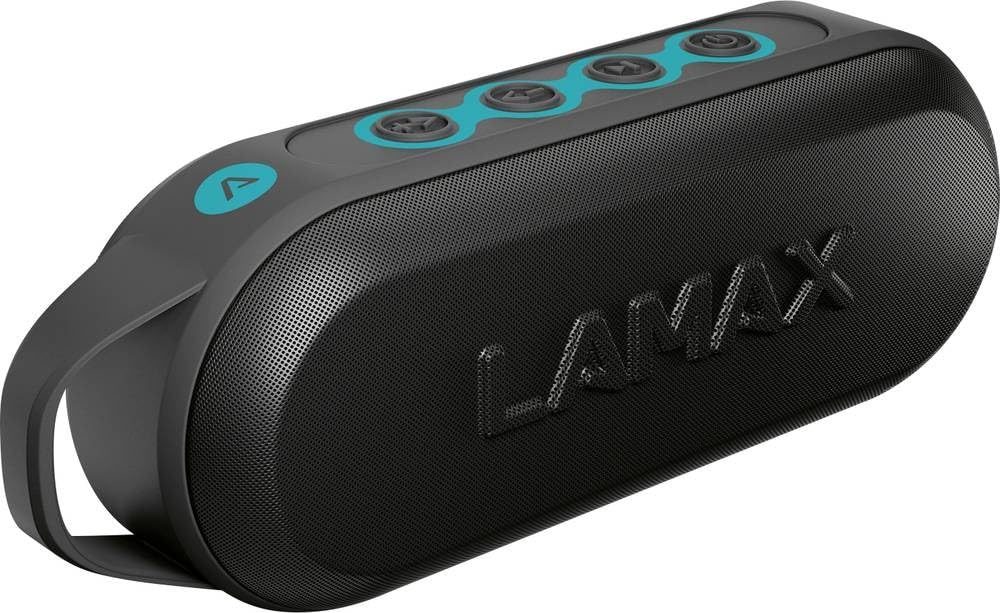
This image displays the front of the Lamax Street2 Bluetooth Speaker, showing its main body, control panel, and a sturdy carrying loop for portability.
Key features of your Lamax Street2 speaker include:
- เสียงสุดยอด: Enjoy clear and powerful audio output.
- กำลังไฟ 15 วัตต์: Delivers robust sound performance.
- Bluetooth 5.0: เพื่อการเชื่อมต่อไร้สายที่เสถียรและมีประสิทธิภาพ
- สเตอริโอไร้สายจริง (TWS): Pair two Street2 speakers for an immersive stereo experience.
- ความต้านทานต่อการกระเด็นของน้ำ: ออกแบบมาให้ทนทานต่อการกระเด็นของน้ำ จึงเหมาะสำหรับการใช้งานกลางแจ้ง
- อายุการใช้งานแบตเตอรี่ยาวนาน: Extended playtime for uninterrupted music.
- การออกแบบพกพา: Features a fixed eyelet and carabiner for easy transport.
การตั้งค่า
1. ชาร์จลำโพง
Before using your Lamax Street2 speaker for the first time, ensure it is fully charged.
- เชื่อมต่อสายชาร์จที่ให้มากับพอร์ตชาร์จของลำโพง
- เชื่อมต่อปลายสายอีกด้านหนึ่งเข้ากับอะแดปเตอร์ไฟ USB (ไม่รวมอยู่ด้วย) หรือพอร์ต USB ของคอมพิวเตอร์
- The charging indicator light will illuminate. It will typically turn off or change color once the speaker is fully charged.
2. การเปิด/ปิดเครื่อง
To turn the speaker on or off:
- เปิดเครื่อง: Press and hold the power button for approximately 3 seconds until you hear a power-on sound.
- หมดแรง: Press and hold the power button for approximately 3 seconds until you hear a power-off sound.
3. การจับคู่บลูทู ธ
To connect your Lamax Street2 to a Bluetooth-enabled device:
- Ensure the speaker is powered on and in pairing mode. The LED indicator will typically flash rapidly.
- บนสมาร์ทโฟน แท็บเล็ต หรืออุปกรณ์ Bluetooth อื่นๆ ของคุณ เปิดใช้งาน Bluetooth และค้นหาอุปกรณ์ที่มีอยู่
- Select "LAMAX Street2" from the list of found devices.
- Once connected, the speaker will emit a confirmation sound, and the LED indicator will stop flashing and remain solid.
4. การจับคู่ True Wireless Stereo (TWS)
To pair two Lamax Street2 speakers together for a stereo sound experience:
- Ensure both Lamax Street2 speakers are powered on and are not connected to any other Bluetooth device.
- On one of the speakers, press and hold the TWS button (often indicated by a chain-link icon) for 2-3 seconds.
- ลำโพงจะค้นหาและจับคู่กันโดยอัตโนมัติ จะมีเสียงยืนยันเมื่อการจับคู่ TWS สำเร็จ
- Now, connect your primary device (smartphone, etc.) to the primary speaker via Bluetooth as described in the "Bluetooth Pairing" section.
การใช้งานลำโพง
การควบคุมพื้นฐาน
- ปุ่มเปิด/ปิด: Press and hold for 3 seconds to turn the speaker on or off.
- ปุ่มเล่น/หยุดชั่วคราว: กดหนึ่งครั้งเพื่อเล่นหรือหยุดเล่นเสียงชั่วคราว
- เพิ่มระดับเสียง (+): กดหนึ่งครั้งเพื่อเพิ่มระดับเสียง กดค้างไว้เพื่อข้ามไปยังแทร็กถัดไป
- ลดเสียงลง (-): Press once to decrease the volume. Press and hold to skip to the previous track.
- Call Button (if available): Press once to answer an incoming call or end an ongoing call. Press and hold to reject an incoming call.
ตัวเลือกการเชื่อมต่อ
- บลูทูธ: The primary method for wireless audio streaming from your devices.
การซ่อมบำรุง
Proper care and maintenance will extend the life of your Lamax Street2 speaker.
- การทำความสะอาด: Gently wipe the speaker's surface with a soft, dry, lint-free cloth. Do not use abrasive cleaners, solvents, or chemical sprays.
- พื้นที่จัดเก็บ: เมื่อไม่ได้ใช้งานเป็นเวลานาน ควรเก็บลำโพงไว้ในที่แห้งและเย็น หลีกเลี่ยงแสงแดดโดยตรงและอุณหภูมิที่สูงหรือต่ำเกินไป
- การดูแลแบตเตอรี่ To maintain optimal battery performance, avoid fully discharging the battery frequently. Charge the speaker regularly, even if not in active use.
การแก้ไขปัญหา
If you encounter issues with your Lamax Street2 speaker, refer to the following table for common problems and solutions.
| ปัญหา | สารละลาย |
|---|---|
| ลําโพงไม่เปิดขึ้น | ตรวจสอบให้แน่ใจว่าแบตเตอรี่ชาร์จเต็มแล้ว เสียบลำโพงเข้ากับแหล่งจ่ายไฟแล้วลองอีกครั้ง |
| ไม่สามารถจับคู่ผ่านบลูทูธได้ | Ensure the speaker is in Bluetooth pairing mode (flashing LED). Turn off and on your device's Bluetooth. Move closer to the speaker and ensure no other devices are connected. |
| ไม่มีเสียงหรือเสียงเบา | Check volume levels on both the speaker and your connected device. Ensure the speaker is correctly paired and not muted. |
| คุณภาพเสียงไม่ดีหรือการเชื่อมต่อไม่เสถียร | Move your device closer to the speaker to minimize interference. Ensure there are no major obstacles between the devices. Disconnect and re-pair the Bluetooth connection. |
ข้อมูลจำเพาะ
Technical specifications for the Lamax Street2 Bluetooth Speaker:
- ชื่อรุ่น : ถนน 2
- การอ้างอิงผู้ผลิต: LMXST2
- ยี่ห้อ: ลาแม็กซ์
- เทคโนโลยีการเชื่อมต่อ: บลูทูธ 5.0
- กำลังขับ: 15 วัตต์
- โหมดเอาต์พุตเสียง: สเตอริโอ
- ประเภทการติดตั้ง: ติดตั้งบนโต๊ะ
- แหล่งพลังงาน: ใช้พลังงานจากแบตเตอรี่
- คุณสมบัติพิเศษ: Bluetooth, Splash Resistance
- ASIN: B0CV5TH488
การรับประกันและการสนับสนุน
The Lamax Street2 Bluetooth Speaker is covered by a limited warranty. For detailed information regarding warranty terms, conditions, and duration, please refer to the warranty card included with your product or visit the official Lamax webเว็บไซต์.
For technical assistance, troubleshooting, or to inquire about warranty claims, please contact Lamax customer support. You can typically find contact information on the official Lamax webเว็บไซต์หรือผ่านทางร้านค้าปลีกที่คุณซื้อผลิตภัณฑ์


