การแนะนำ
ขอบคุณสำหรับการซื้อasing the SHARP XL-B530 Micro Component System. This system is designed to provide high-quality audio playback from various sources, including Bluetooth wireless streaming, CD, USB, AM/FM radio, and auxiliary input. This manual provides detailed instructions for setting up, operating, and maintaining your new audio system to ensure optimal performance and longevity.
ข้อมูลด้านความปลอดภัยที่สำคัญ
- อ่านคำแนะนำทั้งหมดอย่างละเอียดก่อนใช้งาน
- เก็บคู่มือนี้ไว้เพื่อใช้อ้างอิงในอนาคต
- อย่าให้เครื่องโดนฝนหรือความชื้น
- ตรวจสอบให้แน่ใจว่ามีการระบายอากาศที่เหมาะสมรอบ ๆ เครื่อง อย่าปิดกั้นช่องระบายอากาศ
- ห้ามวางเครื่องไว้ใกล้แหล่งความร้อน เช่น หม้อน้ำ เครื่องทำความร้อน เตา หรืออุปกรณ์อื่นๆ (รวมถึง ampเครื่องให้ความร้อน) ที่ผลิตความร้อน
- ปกป้องสายไฟจากการถูกเหยียบหรือถูกหนีบ
- ใช้เฉพาะอุปกรณ์เสริม/สิ่งที่แนบตามที่ผู้ผลิตกำหนดเท่านั้น
- ถอดปลั๊กอุปกรณ์นี้ในระหว่างพายุฝนฟ้าคะนองหรือเมื่อไม่ได้ใช้งานเป็นเวลานาน
- ส่งต่อการบริการทั้งหมดไปยังบุคลากรบริการที่มีคุณสมบัติเหมาะสม
เนื้อหาแพ็คเกจ
กรุณาตรวจสอบว่ารายการทั้งหมดต่อไปนี้รวมอยู่ในแพ็คเกจของคุณ:
- หน่วยหลัก (ระบบไมโครคอมโพเนนต์)
- ชุดลำโพง (x2)
- รีโมทคอนโทรล
- สายไฟ
- เสาอากาศเอฟเอ็ม
- AM เสาอากาศแบบวนรอบ
- คู่มือการใช้งาน (เอกสารนี้)
สินค้าเกินview
Familiarize yourself with the components and controls of your SHARP XL-B530 system.
Main Unit and Speakers

โดยรวม view of the SHARP XL-B530 Micro Component System, including the main unit, two speakers, and the remote control.
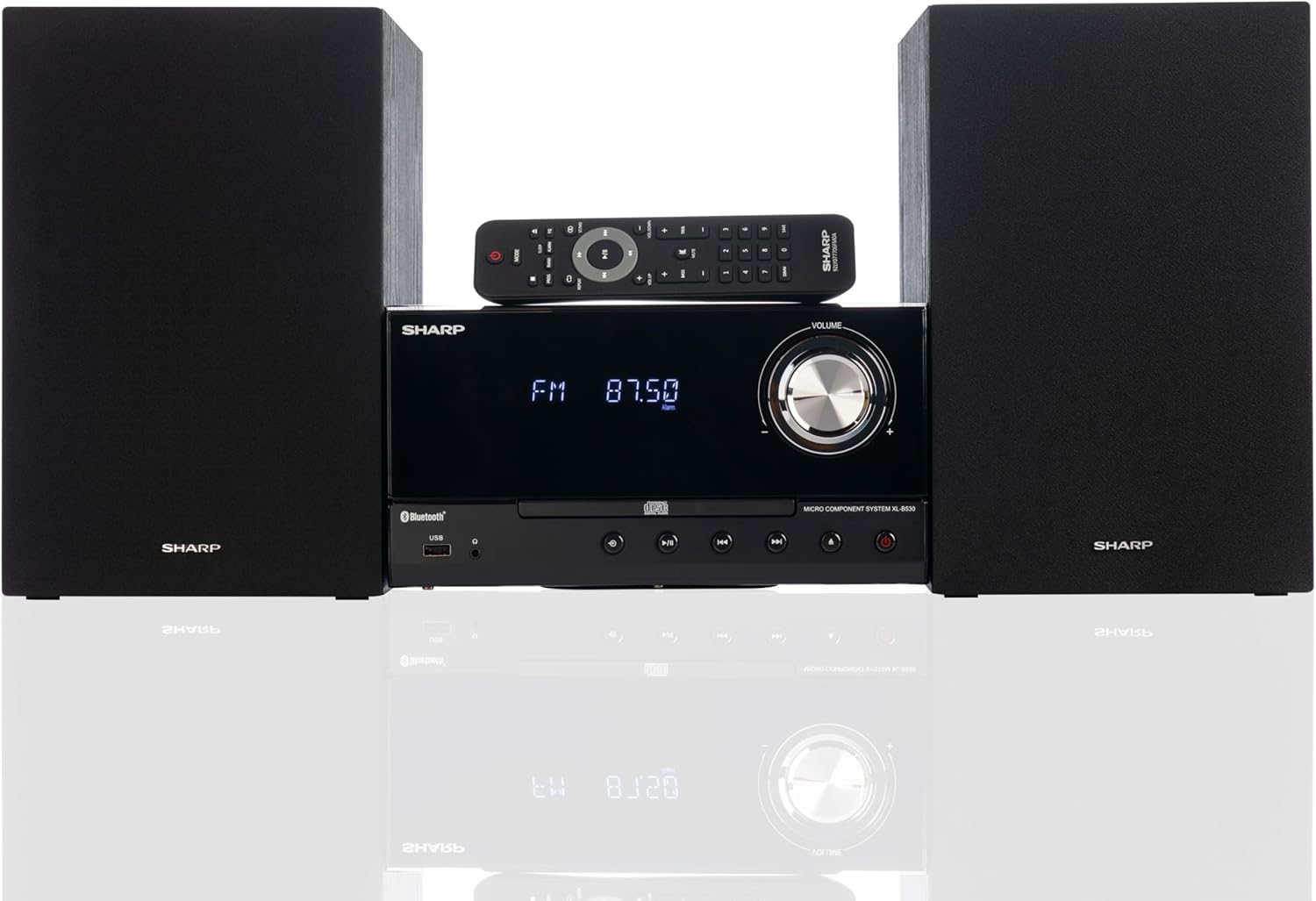
Front panel of the main unit, showing the LCD display, volume knob, CD tray, and control buttons.
การเชื่อมต่อแผงด้านหลัง

The rear panel of the main unit, featuring speaker terminals, FM antenna input, AM antenna input, and auxiliary input ports.
รีโมทคอนโทรล
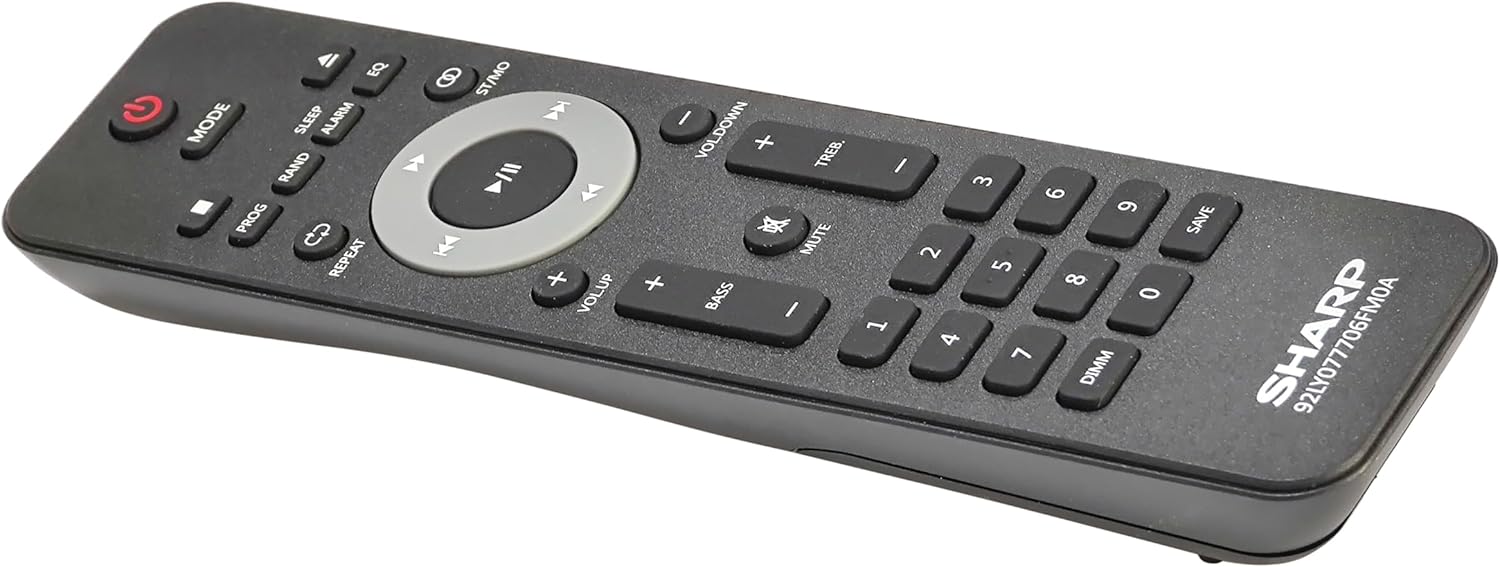
รายละเอียด view of the remote control, showing various function buttons for power, mode, playback, volume, and sound adjustments.
การตั้งค่า
Follow these steps to set up your micro component system.
1. การเชื่อมต่อลำโพง
- Identify the left and right speaker cables.
- Connect the red (+) wire from each speaker to the red (+) terminal on the main unit's rear panel.
- Connect the black (-) wire from each speaker to the black (-) terminal on the main unit's rear panel.
- Ensure a secure connection for both speakers.
2. การเชื่อมต่อเสาอากาศ
- เสาอากาศ FM: Connect the supplied FM wire antenna to the FM antenna jack on the rear panel. Extend the wire fully for best reception.
- เสาอากาศ AM: Assemble the AM loop antenna and connect its wires to the AM antenna terminals on the rear panel. Rotate the antenna for optimal AM reception.
3. การเชื่อมต่อไฟฟ้า
- Ensure all other connections are made.
- Plug the power cord into the AC IN jack on the rear of the main unit.
- เสียบปลายอีกด้านของสายไฟเข้ากับเต้ารับที่ผนัง
คำแนะนำการใช้งาน
This section details how to use the various functions of your SHARP XL-B530 system.
เปิด/ปิดเครื่อง
- กดปุ่ม พลัง ปุ่มบนตัวเครื่องหลักหรือรีโมทคอนโทรลเพื่อเปิดหรือปิดระบบ
การเลือกแหล่งที่มา
- กดปุ่ม โหมด button on the main unit or remote control repeatedly to cycle through available sources: CD, Bluetooth, USB, FM, AM, AUX.
การเล่นซีดี
- กดปุ่ม โหมด button to select 'CD' mode.
- กดปุ่ม เปิด/ปิด ปุ่มเพื่อเปิดถาดซีดี
- Place a CD (CD/MP3/WMA/CD-R/CD-RW) with the label side up into the tray.
- กดปุ่ม เปิด/ปิด กดปุ่มอีกครั้งเพื่อปิดถาด การเล่นจะเริ่มโดยอัตโนมัติ
- ใช้ เล่น/หยุดชั่วคราว, หยุด, ข้าม (forward/backward), and ค้นหา ปุ่มสำหรับควบคุม
จับคู่บลูทู ธ
- กดปุ่ม โหมด button to select 'Bluetooth' mode. The display will show 'BT' and flash, indicating it's ready for pairing.
- บนอุปกรณ์บลูทูธของคุณ (สมาร์ทโฟน แท็บเล็ต ฯลฯ) เปิดใช้งานบลูทูธและค้นหาอุปกรณ์ที่มีอยู่
- Select 'SHARP XL-B530' from the list.
- Once paired, the display will stop flashing and show 'BT CONNECTED'. You can now stream audio from your device.
การเล่นผ่าน USB
- เสียบแฟลชไดรฟ์ USB เข้ากับพอร์ต USB ที่แผงด้านหน้า
- กดปุ่ม โหมด button to select 'USB' mode.
- ระบบจะตรวจจับและเริ่มเล่นเสียงที่เข้ากันได้โดยอัตโนมัติ fileไฟล์เสียง (MP3/WMA)
- Use playback controls similar to CD mode.
วิทยุ AM/FM

The SHARP XL-B530 system displaying an FM radio frequency, highlighting its digital tuner capabilities.
- กดปุ่ม โหมด button to select 'FM' or 'AM' mode.
- สแกนอัตโนมัติ: กดปุ่มค้างไว้ เล่น/หยุดชั่วคราว button to automatically scan and save available stations.
- การปรับด้วยตนเอง: ใช้ ข้าม ปุ่มสำหรับปรับความถี่ด้วยตนเองตามต้องการ
- สถานีที่ตั้งไว้ล่วงหน้า: Use the number buttons on the remote to directly select saved preset stations.
Volume and Sound Adjustment

A close-up of one of the SHARP XL-B530 speakers, illustrating the adjustable bass and treble sound output.
- ปริมาณ: หมุน ปริมาณ ปุ่มหมุนบนตัวเครื่องหลักหรือใช้ VOL + / VOL- ปุ่มบนรีโมทคอนโทรล
- เบส/เสียงแหลม: ใช้ เบส+ / เบส- และ TREB+ / TREB- buttons on the remote control to adjust sound characteristics.
- ดัง: กดปุ่ม ความดัง button on the remote to enhance bass and treble at low volumes.
- EQ: กดปุ่ม EQ button on the remote to cycle through preset equalizer modes.
การซ่อมบำรุง
Proper care will ensure the longevity of your system.
- การทำความสะอาด: Use a soft, dry cloth to clean the exterior of the unit. For stubborn stains, dampen the cloth lightly with water. Do not use abrasive cleaners or solvents.
- การดูแลรักษาซีดี: จับแผ่นซีดีที่ขอบ ทำความสะอาดแผ่นซีดีที่สกปรกด้วยผ้าเนื้อนุ่มที่ไม่เป็นขุย โดยเช็ดจากตรงกลางออกไปด้านนอก
- การระบายอากาศ : Ensure the ventilation openings are not blocked by dust or debris.
- พื้นที่จัดเก็บ: หากจะเก็บเครื่องไว้เป็นเวลานาน ควรถอดปลั๊กออกจากเต้ารับไฟฟ้าและเก็บไว้ในที่แห้งและเย็น
การแก้ไขปัญหา
หากคุณพบปัญหาเกี่ยวกับระบบ โปรดดูปัญหาและวิธีแก้ไขที่พบบ่อยต่อไปนี้
| ปัญหา | สาเหตุที่เป็นไปได้ | สารละลาย |
|---|---|---|
| ไม่มีไฟฟ้า | ไม่ได้เสียบสายไฟ; ปลั๊กไฟไม่ทำงาน | ตรวจสอบให้แน่ใจว่าเสียบสายไฟแน่นหนา ลองใช้เต้ารับอื่น |
| ไม่มีเสียง | ระดับเสียงเบาเกินไป; ไม่ได้เชื่อมต่อลำโพง; เลือกแหล่งสัญญาณไม่ถูกต้อง | เพิ่มระดับเสียง ตรวจสอบการเชื่อมต่อลำโพง เลือกแหล่งสัญญาณเข้าที่ถูกต้อง |
| ซีดีไม่เล่น | CD inserted incorrectly; CD is dirty or scratched; Incorrect mode | Insert CD correctly (label side up); Clean or replace CD; Select CD mode |
| บลูทูธไม่จับคู่ | Bluetooth mode not selected; Device too far; Device already paired to another unit | Select Bluetooth mode; Move device closer; Disconnect from other devices and try again |
| การรับสัญญาณวิทยุไม่ดี | Antenna not connected or positioned poorly; Interference | เชื่อมต่อและปรับตำแหน่งเสาอากาศ ย้ายอุปกรณ์ออกจากอุปกรณ์อิเล็กทรอนิกส์อื่น |
| รีโมตคอนโทรลไม่ทำงาน | Batteries are dead or inserted incorrectly; Obstruction between remote and unit | Replace batteries, check polarity; Remove any obstructions; Ensure remote is pointed at the unit's sensor |
ข้อมูลจำเพาะ
| คุณสมบัติ | ข้อมูลจำเพาะ |
|---|---|
| หมายเลขรุ่น | XL-B530(BK) |
| กำลังขับ | สูงสุด 200W (100W RMS) |
| การเชื่อมต่อ | Bluetooth, USB, Aux Input |
| ความเข้ากันได้ของดิสก์ | ซีดี, ซีดี-อาร์/อาร์ดับเบิลยู, เอ็มพี3, ดับเบิลยูเอ็มเอ |
| จูนเนอร์ | AM/FM Stereo Digital Tuner (50 station presets) |
| ประเภทลำโพง | สเตอริโอ |
| ขนาดสินค้า (กว้าง x ยาว x สูง) | 25 x 11 x 9.6 นิ้ว |
| น้ำหนักสินค้า | 18 ปอนด์ |
| สี | ไม้โอ๊คสีดำ |
การรับประกันและการสนับสนุน
For warranty information and technical support, please refer to the warranty card included with your product or visit the official SHARP webไซต์ โปรดเก็บใบเสร็จรับเงินของคุณไว้เป็นหลักฐานการซื้อสำหรับการเรียกร้องการรับประกันใดๆ
For further assistance, you may contact SHARP customer service through their official channels.


