การแนะนำ
This user manual provides comprehensive instructions for the setup, operation, maintenance, and troubleshooting of your Nulea RT02 Ergonomic Keyboard. Please read this manual thoroughly before using the product to ensure optimal performance and longevity.
เนื้อหาแพ็คเกจ
- Nulea Ergonomic Keyboard x 1
- คู่มือการใช้งาน x 1
การตั้งค่า
Follow these steps to set up your Nulea Ergonomic Keyboard:
- แกะคีย์บอร์ดออก: ถอดคีย์บอร์ดและอุปกรณ์เสริมทั้งหมดออกจากบรรจุภัณฑ์อย่างระมัดระวัง
- เชื่อมต่อกับคอมพิวเตอร์: The Nulea RT02 keyboard uses a wired USB-C connection. Plug the USB-C cable from the keyboard into an available USB port on your computer (Laptop, Gaming Console, or PC).
- การติดตั้งไดร์เวอร์: The keyboard is plug-and-play and typically does not require additional driver installation for basic functionality on Windows and Mac operating systems. Your system should automatically recognize the device.
- Adjust Tilt Legs: The keyboard features 4 foldable tilt legs. You can adjust the keyboard's tilt angle by setting up the front, back, or both-side legs to achieve your preferred ergonomic position. This helps in maintaining a natural wrist posture.
- การวางตำแหน่ง: Place the keyboard on a flat, stable surface. The split and splayed design is intended to promote natural arm and hand positioning, keeping hands in line with shoulders.
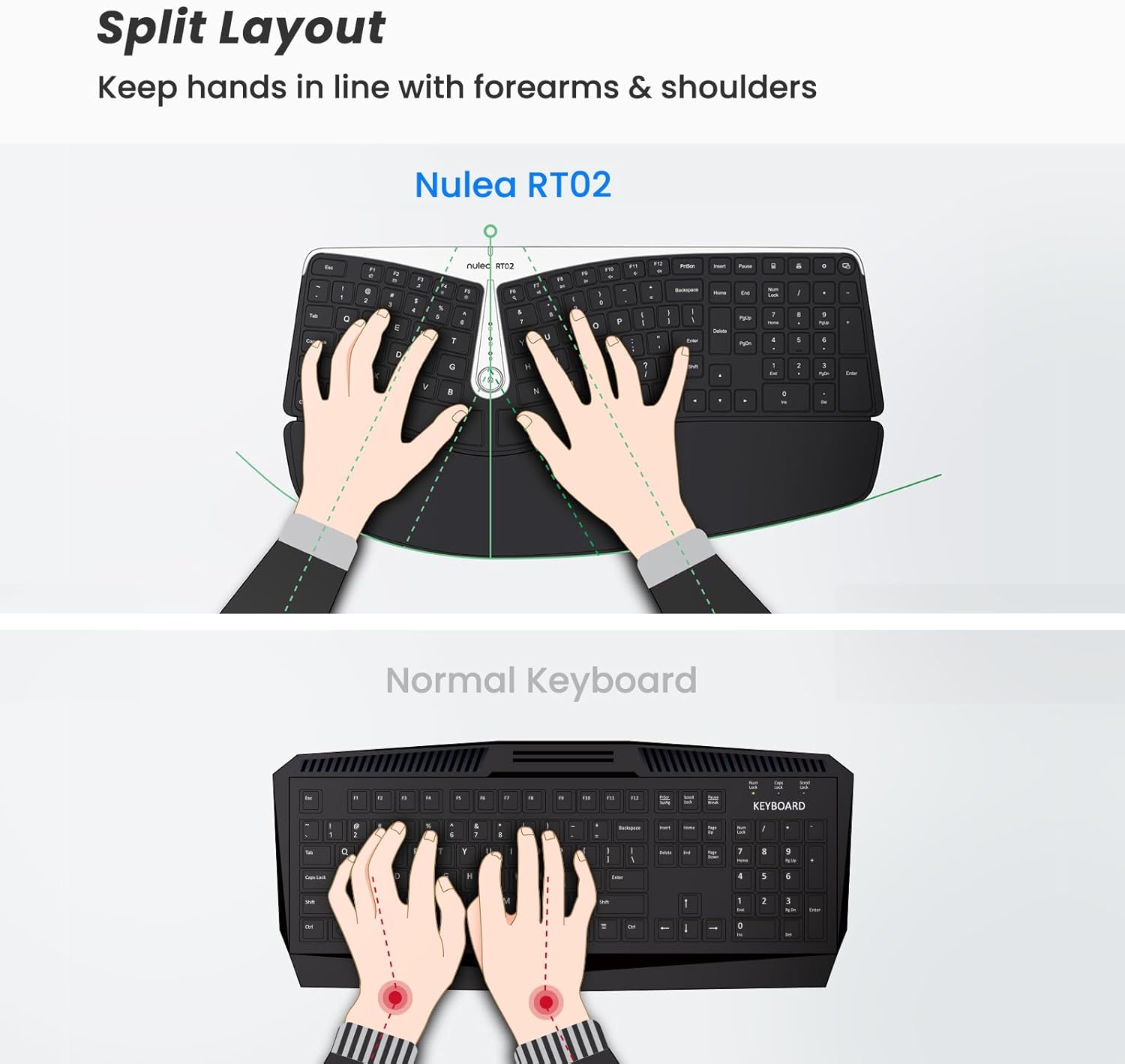
Figure 1: Split Layout for Natural Hand Positioning. This image illustrates how the split design of the Nulea RT02 keyboard helps maintain proper alignment of hands with forearms and shoulders, reducing strain compared to a traditional keyboard.
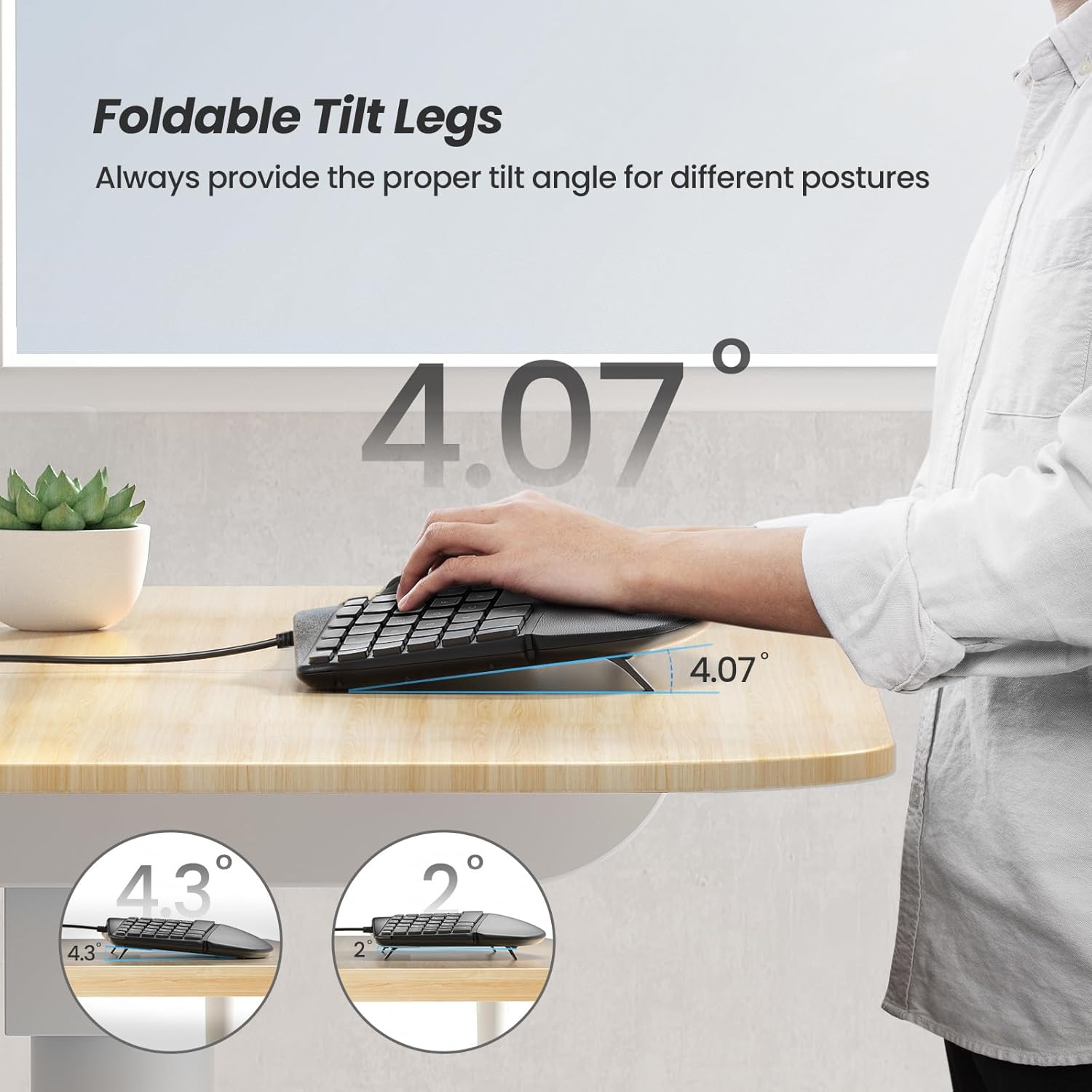
Figure 2: Adjustable Foldable Tilt Legs. This image demonstrates the four foldable tilt legs that allow users to customize the keyboard's angle for different postures, enhancing wrist support and comfort.
คำแนะนำการใช้งาน
The Nulea RT02 Ergonomic Keyboard is designed for comfortable and efficient typing. Here are key operational aspects:
การพิมพ์ขั้นพื้นฐาน
The keyboard features a standard 107-key layout. The split keyset and tented structure are designed to reduce forearm pronation and promote a natural typing posture. The keys are responsive for a tactile and comfortable typing experience.
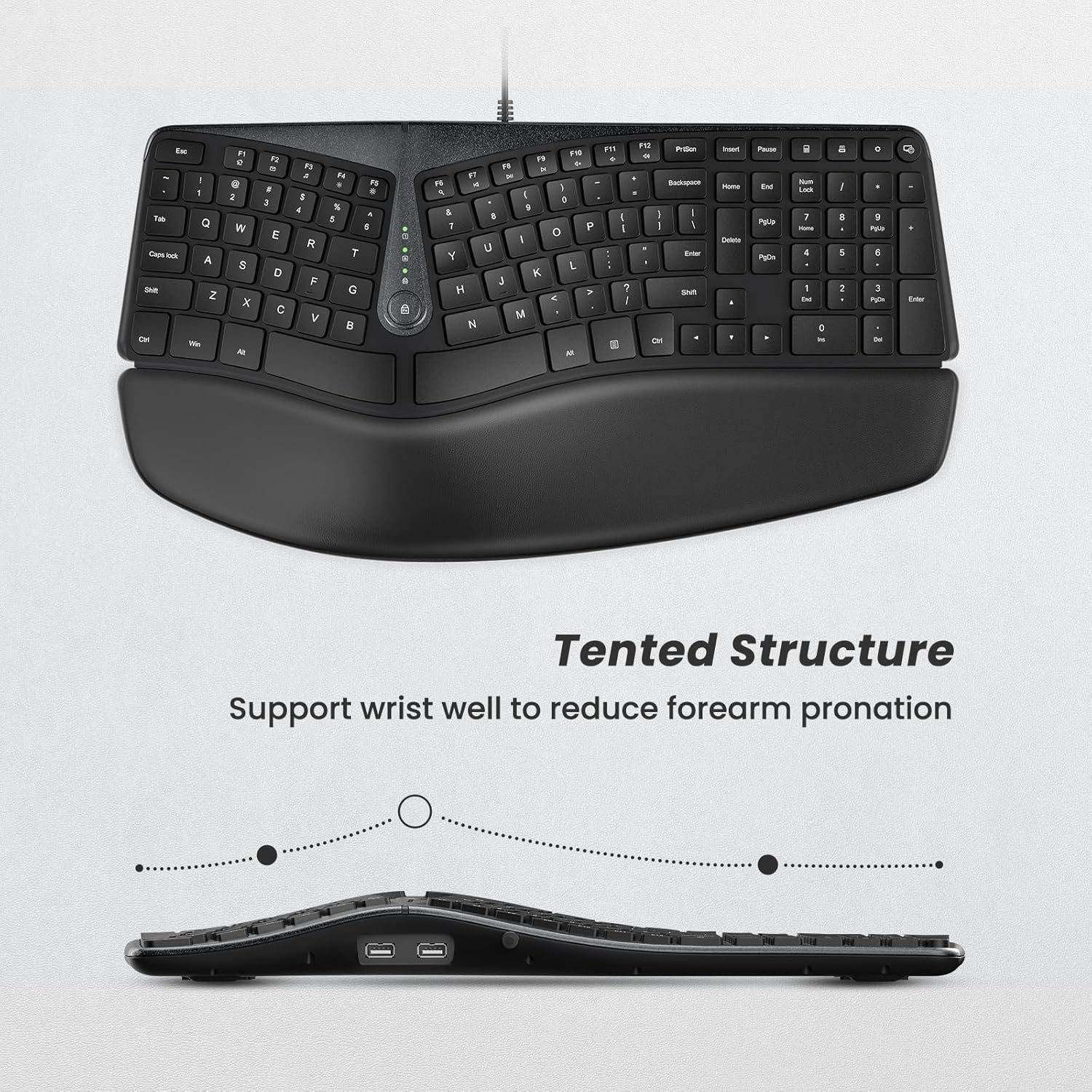
Figure 3: Tented Structure. This image provides a side view of the keyboard, highlighting its tented structure which supports the wrist and helps reduce forearm pronation during typing.
Pillowed Palm Rest
The integrated palm rest features a large surface with skin-touching PU leather and memory foam. This provides support for your palms and wrists, reducing pressure on the median nerve and minimizing tension during extended use.

Figure 4: Pillowed Palm Rest in Use. This image shows a user's hands comfortably resting on the soft, plush palm rest, demonstrating how it reduces wrist extension and provides support.
ปุ่มมัลติมีเดียและปุ่มลัด
The keyboard includes 17 multimedia shortcut keys for quick access to common functions. These keys enhance efficiency by allowing control over media playback, volume, and other system functions directly from the keyboard.
พอร์ต USB ในตัว
Two extra USB ports are integrated into the keyboard. These ports can be used for connecting or charging other devices such as a mouse, headphones, or USB dongles. They also support data transfer, making them suitable for portable external hard drives, eliminating the need for an external USB hub.

Figure 5: Dual USB Ports. This image clearly displays the two built-in USB ports on the keyboard, illustrating their use for connecting a mouse or other peripherals, enhancing connectivity options.
การซ่อมบำรุง
Proper maintenance ensures the longevity and optimal performance of your Nulea Ergonomic Keyboard:
- การทำความสะอาด: Use a soft, dry cloth to wipe down the keyboard surface regularly. For deeper cleaning, slightly dampชุบผ้าด้วยน้ำหรือน้ำยาทำความสะอาดอ่อนๆ ที่ไม่กัดกร่อน หลีกเลี่ยงความชื้นที่มากเกินไป
- การทำความสะอาดคีย์แคป: สำหรับการทำความสะอาดระหว่างคีย์ ให้ใช้ลมอัดเพื่อกำจัดฝุ่นและเศษต่างๆ
- การดูแลรักษาที่วางฝ่ามือ: The PU leather palm rest can be wiped with a damp ผ้า หลีกเลี่ยงสารเคมีรุนแรงที่อาจทำลายวัสดุได้
- พื้นที่จัดเก็บ: เมื่อไม่ได้ใช้งานเป็นเวลานาน ควรเก็บแป้นพิมพ์ไว้ในสภาพแวดล้อมที่สะอาดและแห้ง หลีกเลี่ยงแสงแดดโดยตรงและอุณหภูมิที่สูงหรือต่ำเกินไป
- หลีกเลี่ยงการหกเลอะ: Liquid spills can damage the internal components. In case of a spill, immediately disconnect the keyboard from your computer and allow it to dry completely before reconnecting.
การแก้ไขปัญหา
If you encounter issues with your Nulea Ergonomic Keyboard, refer to the following common troubleshooting steps:
| ปัญหา | สาเหตุที่เป็นไปได้ | สารละลาย |
|---|---|---|
| แป้นพิมพ์ไม่ตอบสนอง | การเชื่อมต่อ USB หลวม, พอร์ต USB ชำรุด, มีปัญหากับไดรเวอร์ | Ensure the USB-C cable is securely plugged into both the keyboard and the computer. Try a different USB port. Restart your computer. |
| Keys not working or typing incorrectly | Debris under keycap, software conflict, keyboard settings. | Clean around the affected keys with compressed air. Check your computer's keyboard settings. Test the keyboard on another computer if possible. |
| USB ports on keyboard not working | Insufficient power, device incompatibility, cable issue. | Ensure the connected device does not draw too much power. Try a different device. Verify the keyboard's main USB connection is stable. |
| Ergonomic discomfort persists | Incorrect posture, improper tilt angle, prolonged use. | Adjust the tilt legs to find a more comfortable angle. Ensure your chair and desk height are ergonomically set. Take regular breaks. |
If the problem persists after trying these steps, please contact Nulea customer support for further assistance.
ข้อมูลจำเพาะ
| คุณสมบัติ | รายละเอียด |
|---|---|
| หมายเลขรุ่น | RT02 |
| ขนาดสินค้า | 17 x 2.24 x 10.94 นิ้ว (43.18 x 5.69 x 27.79 ซม.) |
| น้ำหนักสินค้า | 2.77 ปอนด์ (1.26 กก.) |
| การเชื่อมต่อ | สาย USB-C |
| จำนวนคีย์ | 107 |
| คุณสมบัติพิเศษ | Split Keyset Design, Pillowed Wrist Rest, Hotkeys and Media Keys, Built-in 2 USB Ports, Adjustable Tilt Legs |
| อุปกรณ์ที่รองรับ | Laptop, Gaming Console, PC (Windows, Mac) |
| วัสดุ | Polyurethane (PU) for palm rest |
| สี | B-Black |
การรับประกันและการสนับสนุน
Nulea products are designed for reliability and performance. For warranty information and customer support, please refer to the warranty card included with your product or visit the official Nulea website. You can also find additional support resources and FAQs on their webเว็บไซต์.
For direct assistance, please contact Nulea customer service through the contact information provided on the product packaging or their official webเว็บไซต์.


