คู่มือผู้ใช้หูฟังเกมมิ่งไร้สาย Fachixy FC300
รุ่น : FC-300
การแนะนำ
Thank you for choosing the Fachixy FC300 Wireless Gaming Headset. This manual provides detailed instructions for setting up, operating, and maintaining your headset to ensure optimal performance and longevity. The FC300 offers a seamless gaming experience with its 2.4GHz lossless wireless and Bluetooth connectivity, long-lasting battery, and immersive audio.
ข้อมูลด้านความปลอดภัย
- อย่าให้ชุดหูฟังสัมผัสกับอุณหภูมิที่สูงจัด ความชื้นสูง หรือของเหลว
- หลีกเลี่ยงการทำหูฟังตกหรือได้รับแรงกระแทกรุนแรง
- ห้ามถอดประกอบหรือดัดแปลงชุดหูฟัง การกระทำดังกล่าวจะทำให้การรับประกันเป็นโมฆะ
- ฟังในระดับเสียงปานกลางเพื่อป้องกันความเสียหายต่อการได้ยิน
- เก็บให้พ้นจากมือเด็ก
เนื้อหาแพ็คเกจ
กรุณาตรวจสอบแพ็คเกจสำหรับรายการต่อไปนี้:
- Fachixy FC300 Wireless Gaming Headset
- ดองเกิล USB 2.4GHz
- สายชาร์จ USB-C
- คู่มือการใช้งาน (เอกสารนี้)

Image: The Fachixy FC300 Wireless Gaming Headset in white and purple, shown with its accompanying USB dongle.
สินค้าเกินview
Familiarize yourself with the various components and controls of your FC300 headset.

Image: A detailed diagram highlighting the control buttons on the left earcup of the Fachixy FC300 headset, including power, volume, mic, and RGB controls.
- ปุ่มเปิด/ปิด/มัลติฟังก์ชั่น: Turn on/off, play/pause, answer/reject calls.
- ลดระดับเสียง/เพลงก่อนหน้า: Decrease volume, skip to previous track.
- เพิ่มระดับเสียง/เพลงถัดไป: เพิ่มระดับเสียง แล้วข้ามไปยังเพลงถัดไป
- Microphone Mute/Bluetooth Pairing: Mute/unmute microphone, initiate Bluetooth pairing.
- การควบคุมแสง RGB: Turn RGB lights on/off.
การตั้งค่า
1. การชาร์จชุดหูฟัง
Before first use, fully charge the headset. Connect the USB-C charging cable to the headset's charging port and the other end to a USB power source (e.g., computer USB port, wall adapter). The LED indicator will show charging status.
- ความจุแบตเตอรี่: 1200mAh
- เวลาในการชาร์จเต็ม: ประมาณ 2.5 ชั่วโมง
- Playtime: Up to 50 hours (without RGB), 40 hours (with RGB)

Image: Visual representation of the headset's 1200mAh battery capacity and up to 50 hours of playtime on a 2.5-hour charge.
2. Connecting via 2.4GHz Wireless (for PC, PS5, PS4, Switch, Mac, Laptops)
- เสียบตัวรับสัญญาณ USB 2.4GHz เข้ากับพอร์ต USB ที่ว่างบนอุปกรณ์ของคุณ
- Power on the headset by long-pressing the Power button (1) for 3 seconds.
- The headset will automatically connect to the dongle. A stable connection is indicated by the LED light on the headset.
- ตรวจสอบให้แน่ใจว่าได้เลือกชุดหูฟังเป็นอุปกรณ์รับ/ส่งเสียงในตั้งค่าระบบแล้ว

Image: A user wearing the headset connected wirelessly to a gaming PC via the 2.4GHz USB dongle, illustrating low-latency connectivity.
3. Connecting via Bluetooth (for Mobile Phones, Tablets, iPad)
Note: Bluetooth mode is not compatible with PS4 or PS5.
- ตรวจสอบว่าชุดหูฟังเปิดอยู่
- Long-press the Microphone Mute/Bluetooth Pairing button (4) for 3 seconds to enter Bluetooth pairing mode. The LED indicator will flash rapidly.
- On your device, enable Bluetooth and search for "Fachixy FC300" in the list of available devices.
- Select "Fachixy FC300" to connect. The LED indicator will become solid once connected.
คำแนะนำการใช้งาน
เปิด/ปิดเครื่อง
- เปิดเครื่อง: Long-press the Power button (1) for 3 seconds.
- หมดแรง: Long-press the Power button (1) for 3 seconds.
การควบคุมระดับเสียง
- ปรับระดับเสียงขึ้น: Single click the Volume Up button (3).
- ลดเสียงลง: Single click the Volume Down button (2).
การควบคุมไมโครโฟน
- ปิดเสียง/เปิดเสียงไมโครโฟน: Single click the Microphone Mute button (4).
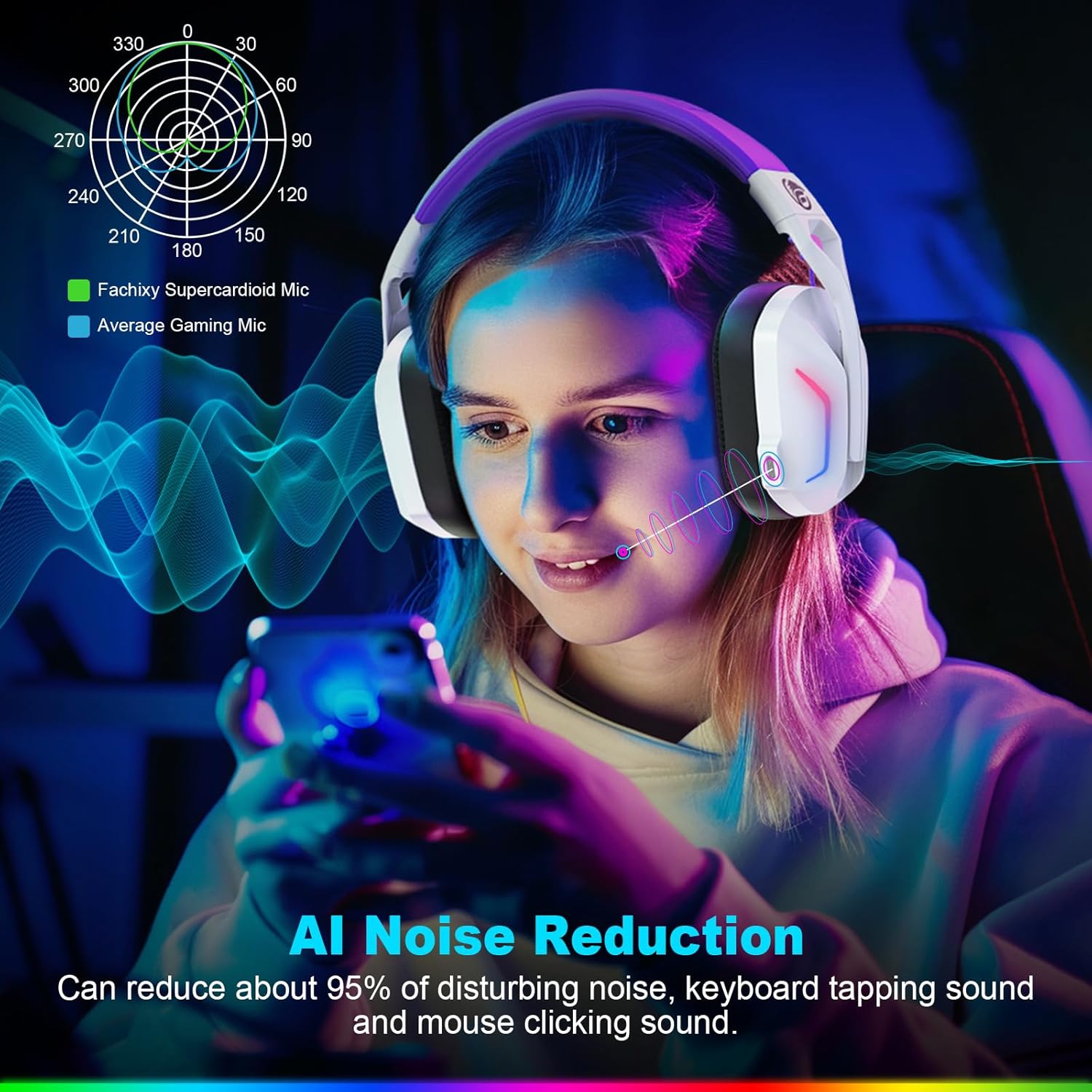
Image: A graphic illustrating the AI Noise Reduction capability of the Fachixy Supercardioid Mic, showing reduction of background noise like keyboard tapping and mouse clicking.
การควบคุมแสง RGB
- Turn RGB On/Off: Single click the RGB Light Control button (5).

Image: A person wearing the Fachixy FC300 headset, showcasing its vibrant RGB lighting effects on the earcups.
Call Management (in Bluetooth mode)
- รับสาย/วางสาย: Single click the Power button (1).
- ปฏิเสธสาย: Long-press the Power button (1) for 2 seconds.
Music Playback Control (in Bluetooth mode)
- เล่น/หยุดชั่วคราว: Single click the Power button (1).
- เพลงถัดไป: Long-press the Volume Up button (3) for 2 seconds.
- แทร็กก่อนหน้า: Long-press the Volume Down button (2) for 2 seconds.
- Traceback (Redial last number): Double click the Power button (1).

ภาพ: ระเบิด view diagram illustrating the 50mm Neodymium magnet driver and Titanium Coat Diaphragm responsible for the headset's immersive 3D surround sound quality.
การซ่อมบำรุง
- การทำความสะอาด: ใช้ผ้านุ่มและแห้งเช็ดทำความสะอาดชุดหูฟัง ห้ามใช้น้ำยาทำความสะอาดหรือสารละลายที่มีฤทธิ์กัดกร่อน
- พื้นที่จัดเก็บ: เก็บหูฟังไว้ในที่แห้งและเย็น หลีกเลี่ยงแสงแดดโดยตรงและอุณหภูมิที่สูงหรือต่ำเกินไป
- การดูแลแบตเตอรี่ เพื่อยืดอายุการใช้งานแบตเตอรี่ ควรหลีกเลี่ยงการปล่อยประจุแบตเตอรี่จนหมดบ่อยๆ ควรชาร์จแบตเตอรี่เป็นประจำ แม้จะไม่ได้ใช้งานเป็นเวลานานก็ตาม

Image: A close-up of the headset's earcup and headband, highlighting features like soft protein earmuffs, memory foam, foldable structure, and adjustable slider for all-day comfort.
การแก้ไขปัญหา
| ปัญหา | สาเหตุที่เป็นไปได้ | สารละลาย |
|---|---|---|
| หูฟังไม่สามารถเปิดเครื่องได้ | แบตเตอรี่อ่อน | ชาร์จหูฟังให้เต็ม |
| ไม่มีเสียงหรือคุณภาพเสียงไม่ดี | Incorrect audio output selected; headset not connected; volume too low. | Check system audio settings; ensure headset is properly connected (2.4GHz dongle or Bluetooth); increase volume. |
| ไมโครโฟนไม่ทำงาน | ไมโครโฟนปิดเสียง เลือกอุปกรณ์อินพุตไม่ถูกต้อง | Unmute microphone (single click button 4); check system audio input settings. |
| ไม่สามารถเชื่อมต่อผ่านระบบไร้สาย 2.4GHz ได้ | Dongle not properly inserted; interference. | Ensure dongle is fully inserted; try a different USB port; move closer to the dongle. |
| ไม่สามารถเชื่อมต่อผ่านบลูทูธได้ | Headset not in pairing mode; device Bluetooth off; incompatible device. | Long-press button 4 to enter pairing mode; enable Bluetooth on your device; note that Bluetooth is not compatible with PS4/PS5. |
| ไฟ RGB ไม่ทำงาน | RGB lights turned off. | Single click button 5 to turn RGB lights on. |
Clear All Devices (Reset Pairing): Press Volume Up (3) and Volume Down (2) buttons together for 6 seconds while in Bluetooth mode. The headset will auto turn off after this operation.
ข้อมูลจำเพาะ
| คุณสมบัติ | รายละเอียด |
|---|---|
| ยี่ห้อ | ฟาชิซี |
| หมายเลขรุ่น | เอฟซี-300 |
| สี | สีขาว / สีม่วง |
| ประเภทชุดหูฟัง | ครอบหู |
| การเชื่อมต่อ | ไร้สาย 2.4GHz, บลูทูธ |
| คุณสมบัติพิเศษ | Fast Charge, RGB Lighting, AI Noise Reduction Mic |
| องค์ประกอบของแบตเตอรี่ | ลิเธียมไอออน |
| ความจุของแบตเตอรี่ | 1200 มิลลิแอมป์ |
| เวลาในการชาร์จ | ประมาณ 2.5 ชั่วโมง |
| Playtime (without RGB) | นานถึง 50 ชั่วโมง |
| Playtime (with RGB) | นานถึง 40 ชั่วโมง |
| น้ำหนัก | ประมาณ 360กรัม |
| ขนาดไดร์เวอร์ | นีโอไดเมียม 50 มม |
| ความเข้ากันได้ | 2.4GHz: PS5, PC, PS4, Switch, Mac, Laptops. Bluetooth: Mobile phones, tablets, iPad. |
การรับประกันและการสนับสนุน
Fachixy products are designed and manufactured to the highest quality standards. For warranty information or technical support, please refer to the contact details provided on the product packaging or the official Fachixy webไซต์ โปรดเก็บหลักฐานการซื้อไว้เพื่อใช้ในการเรียกร้องการรับประกัน


