1. บทนำ
Thank you for choosing the VIMTAG Light Bulb Security Camera Model 847. This device is designed to provide reliable surveillance for your home, offering 2.5K/4MP high-definition video, pan/tilt functionality, night vision, two-way audio, and smart detection features. This manual will guide you through the setup, operation, and maintenance of your camera to ensure optimal performance.
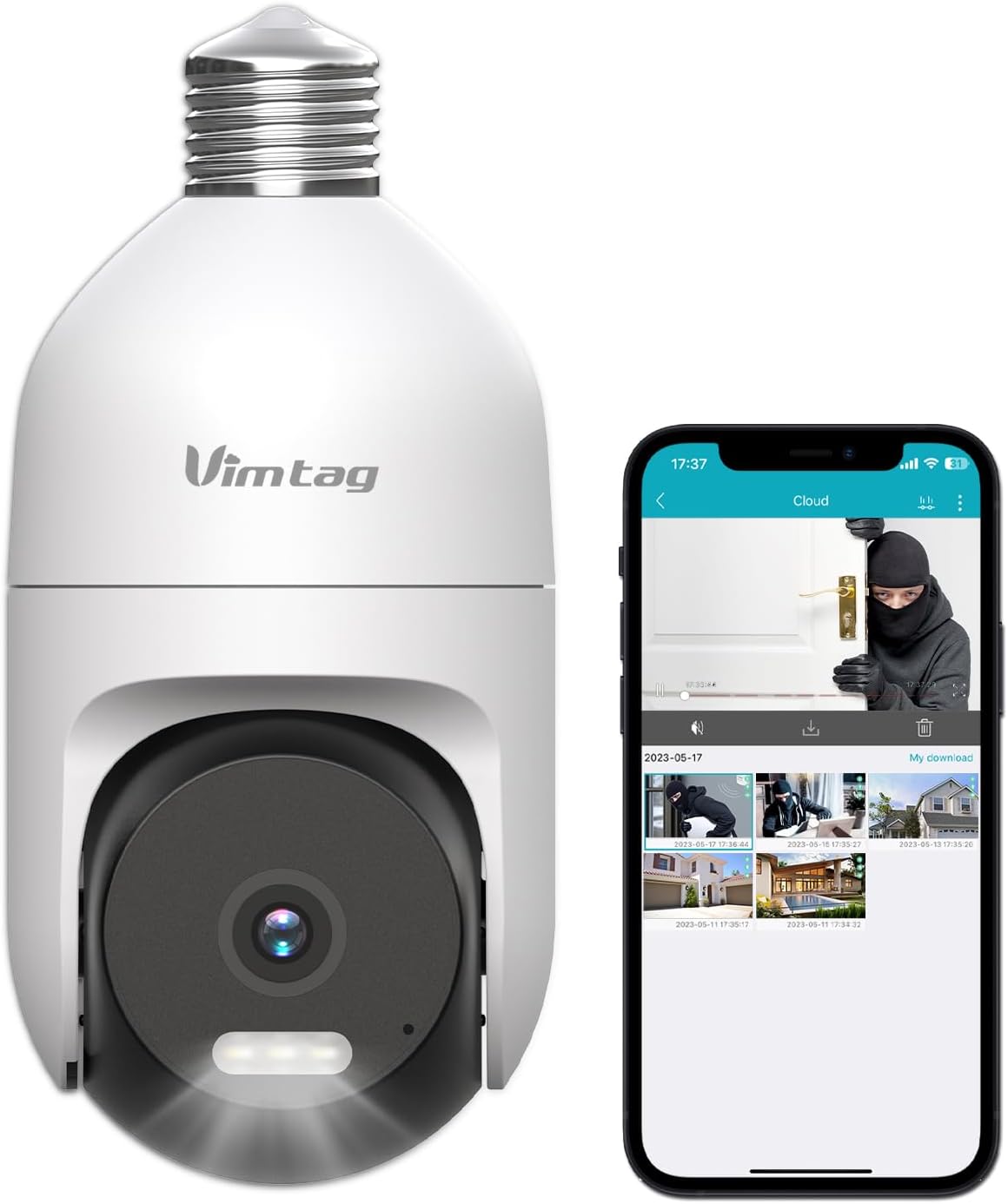
ภาพ: เดอะ วีเอ็มTAG Light Bulb Security Camera Model 847, shown alongside a smartphone displaying its live feed.
2. ข้อมูลด้านความปลอดภัย
- Ensure the power is off before installing or removing the camera from a light socket.
- Install the camera in a standard E27/E26 light bulb socket.
- อย่าให้กล้องอยู่ในที่ที่มีอุณหภูมิหรือความชื้นสูงเกินกว่าช่วงการทำงานที่กำหนด
- เก็บกล้องให้ห่างจากสนามแม่เหล็กแรงสูง
- อย่าพยายามถอดประกอบหรือซ่อมกล้องด้วยตนเอง โปรดติดต่อฝ่ายบริการลูกค้าเพื่อขอความช่วยเหลือ
- This camera is rated IP66 for weather resistance, suitable for outdoor use, but avoid submerging it in water.
3. เนื้อหาบรรจุภัณฑ์
วีไอเอ็มTAG Light Bulb Security Camera package includes:
- วิมTAG Light Bulb Security Camera (Model 847)
- คู่มือการใช้งาน (เอกสารนี้)
Note: An SD card for local storage is not included and must be purchased separately if desired.
4. สินค้าหมดview
วีไอเอ็มTAG Light Bulb Security Camera features a compact design that fits into a standard light bulb socket. Key components include:
- เลนส์กล้อง: Captures 2.5K/4MP video.
- Infrared (IR) LEDs: For black and white night vision.
- สปอตไลท์: Provides color night vision and acts as a deterrent.
- ไมโครโฟน: For audio input during two-way talk and sound detection.
- ผู้บรรยาย: For audio output during two-way talk and siren alarms.
- ช่องเสียบการ์ด Micro SD: สำหรับการจัดเก็บวิดีโอในเครื่อง (รองรับสูงสุด 512GB)
- ปุ่มรีเซ็ต: Used for factory reset (usually a small pinhole).
- E27/E26 Base: Standard light bulb screw-in base for power and mounting.
5. การตั้งค่า
5.1 การติดตั้งทางกายภาพ
- หมดแรง: Ensure the power to the light socket is turned off at the circuit breaker before installation.
- สกรูเข้า: Carefully screw the VIMTAG Light Bulb Camera into a standard E27/E26 light bulb socket. Ensure it is securely fastened.
- เปิดเครื่อง: Restore power to the light socket. The camera will power on and initiate its startup sequence.

Image: Illustration of screwing the camera into a light bulb socket.
5.2 การดาวน์โหลดแอปและสร้างบัญชี
- ดาวน์โหลดแอพ: ค้นหา "Vimtag" in your smartphone's app store (iOS App Store or Google Play Store) and download the official VIMTAG แอป.
- ลงทะเบียนบัญชี: Open the app and follow the on-screen instructions to register a new account using your email address or phone number.

Image: A smartphone screen showing the VIMTAG app icon, indicating the app download step.
5.3 Camera Pairing and Wi-Fi Connection
- เพิ่มอุปกรณ์: In the VIMTAG app, tap the "+" icon (usually in the top right or center) to add a new device.
- Select Camera Type: Choose "Light Bulb Camera" from the list of device types.
- ทำตามคำแนะนำในแอป: The app will guide you through connecting the camera to your 2.4GHz Wi-Fi network. This typically involves scanning a QR code generated by the app with the camera lens or listening for an audio prompt.
- การยืนยันการเชื่อมต่อ: Once connected, the camera will indicate successful pairing (e.g., a voice prompt or LED indicator change), and its live feed will appear in the app.

Image: A smartphone screen showing the process of adding a new device, specifically selecting the light bulb camera.

Image: A smartphone displaying the live video feed from the VIMTAG camera after successful setup.
6. การใช้งานกล้อง
6.1 สด View และการควบคุมแพน/เอียง
Once connected, open the VIMTAG app and select your camera to view the live feed. Use the on-screen controls to pan (horizontal 355°) and tilt (vertical 100°) the camera lens to adjust the viewing angle. The camera offers 8x digital zoom for closer inspection.

Image: Multiple devices (phone, tablet, laptop, desktop) displaying the live feed from the VIMTAG camera, illustrating multi-terminal viewการไอเอ็นจี
6.2 เสียงสองทาง
The camera features a built-in microphone and speaker. Tap the microphone icon in the app to speak through the camera, and listen to audio from the camera's location. This allows for real-time communication with visitors or to deter intruders.

Image: A person speaking into a phone to communicate with a delivery person at the door via the VIMTAG camera's two-way audio.
6.3 โหมดการมองเห็นตอนกลางคืน
The camera supports two night vision modes:
- IR ไนท์วิชั่น: Defaults to black and white infrared vision in low light conditions.
- Color Night Vision with Spotlight: When the spotlight mode is activated (manually or via motion detection settings), the camera will switch to full-color night vision.
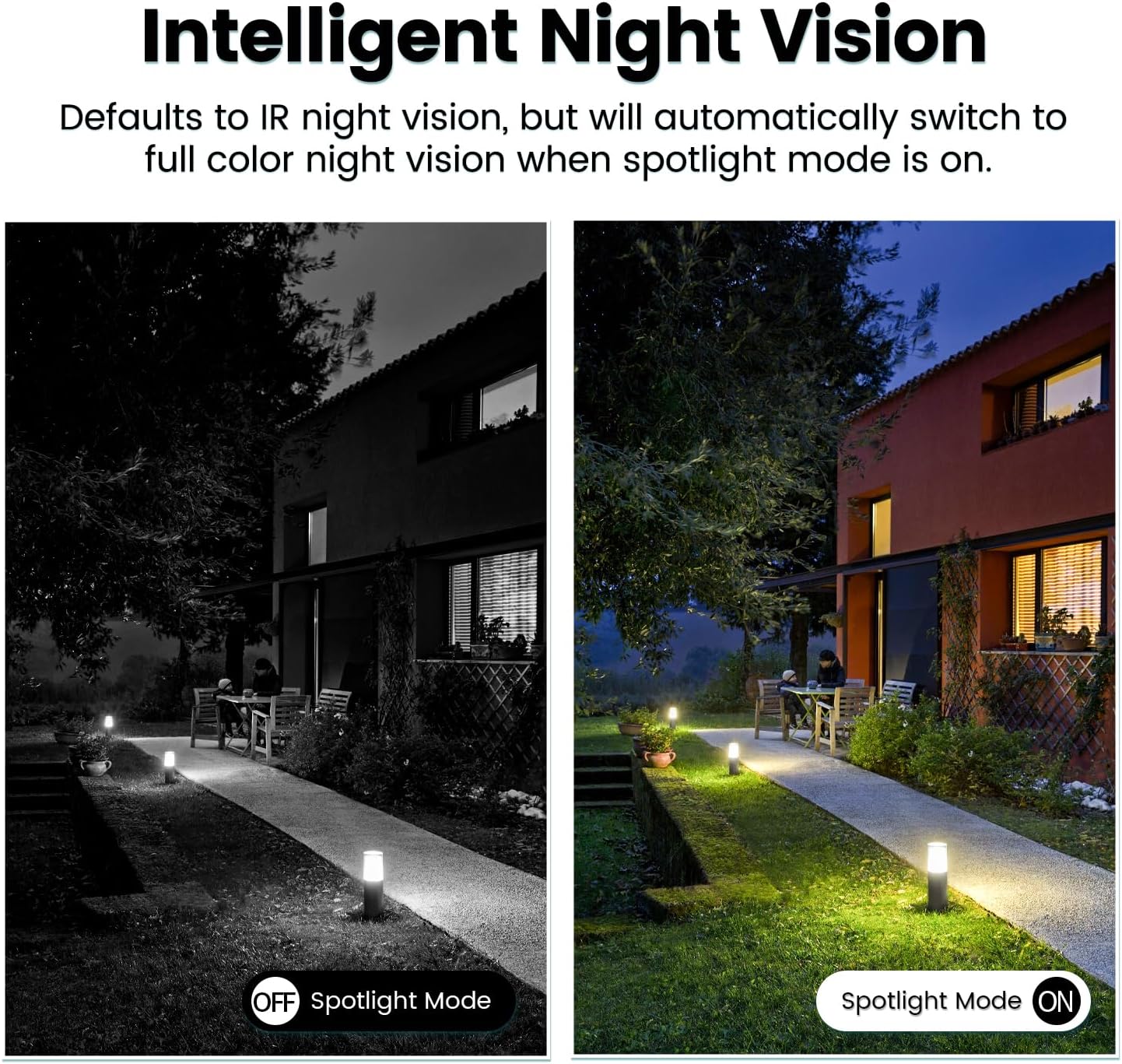
Image: Comparison of IR night vision (black and white, spotlight off) and color night vision (full color, spotlight on) from the VIMTAG กล้อง.
6.4 AI Human/Motion/Sound Detection and Alarms
Configure detection settings in the VIMTAG app. The camera can detect human shapes, general motion, and sounds. Upon detection, you will receive notifications on your phone, and the camera can trigger a siren alarm or activate its spotlight to deter unwanted activity.

Image: An illustration of the VIMTAG camera detecting an intruder, triggering a spotlight and sending an alert to a smartphone.

Image: A smartphone displaying a "Motion Detection Alert" notification from the VIMTAG แอป.
6.5 การบันทึกและบันทึกวิดีโอ
The camera supports two storage options:
- การจัดเก็บข้อมูลภายในเครื่อง: Insert a Micro SD card (up to 512GB, not included) into the camera's SD card slot for continuous 24/7 recording. Recorded footage can be accessed and managed through the VIMTAG แอป.
- การเก็บข้อมูลบนคลาวด์: An optional cloud storage service is available through the VIMTAG app for secure, encrypted video storage. Subscription details can be found within the app.
6.6 การรวม Alexa
วีไอเอ็มTAG camera is compatible with Amazon Alexa. To integrate:
- Enable the VIMTAG skill in the Alexa app.
- Link your VIMTAG บัญชี.
- ค้นพบอุปกรณ์
You can then use voice commands such as, "Alexa, show me the [camera name]" to view the live feed on compatible Alexa-enabled devices with screens (e.g., Echo Show).

Image: A person interacting with an Amazon Echo Show to view the VIMTAG camera feed using voice commands.
7. การบำรุงรักษา
- การทำความสะอาด: เช็ดเลนส์และตัวกล้องเบาๆ ด้วยผ้าแห้งเนื้อนุ่ม ห้ามใช้สารเคมีรุนแรงหรือน้ำยาทำความสะอาดที่มีฤทธิ์กัดกร่อน
- อัพเดตเฟิร์มแวร์: ตรวจสอบ VIM เป็นประจำTAG app for available firmware updates. Keeping your camera's firmware updated ensures optimal performance, security, and access to new features.
- การจัดการการ์ด SD: หากใช้การ์ด SD ควรตรวจสอบการ์ดเป็นระยะview และสำรองอาหารสำคัญtage. Format the SD card through the app if you experience recording issues or to clear old data.
8 การแก้ไขปัญหา
| ปัญหา | สาเหตุที่เป็นไปได้ | สารละลาย |
|---|---|---|
| กล้องไม่เปิดใช้งาน | No power to the light socket; camera not screwed in properly. | Check the light socket's power supply; ensure the camera is securely screwed in. |
| ไม่สามารถเชื่อมต่อ Wi-Fi ได้ | Incorrect Wi-Fi password; camera too far from router; 5GHz Wi-Fi network used. | Verify Wi-Fi password; move camera closer to router; ensure you are connecting to a 2.4GHz Wi-Fi network. |
| คุณภาพวิดีโอไม่ดี | Weak Wi-Fi signal; dirty lens. | Improve Wi-Fi signal strength; clean the camera lens. |
| การตรวจจับการเคลื่อนไหวไม่ทำงาน | Detection settings disabled or sensitivity too low; camera positioned incorrectly. | Check and adjust motion detection settings in the app; ensure camera has a clear view ของพื้นที่ |
| ไม่สามารถบันทึกข้อมูลลงการ์ด SD ได้ | การ์ด SD เต็มหรือเสียหาย; การตั้งค่าการบันทึกไม่ถูกต้อง | Format the SD card via the app; check recording schedule and settings. Replace SD card if necessary. |
9. ข้อมูลจำเพาะ
| คุณสมบัติ | รายละเอียด |
|---|---|
| ชื่อรุ่น | 847 |
| ความละเอียดวิดีโอ | 2.5K / 4MP (1440p) |
| ช่วงแพน/เอียง | แนวนอน 355 องศา แนวตั้ง 100 องศา |
| ซูมดิจิตอล | 8x |
| การมองเห็นตอนกลางคืน | IR Night Vision & Color Night Vision with LED Spotlight |
| ระบบเสียงสองทาง | Yes (Built-in Microphone & Speaker) |
| การตรวจจับ | AI Human, Motion, Sound Detection |
| การเชื่อมต่อ | Wi-Fi 2.4GHz (IEEE 802.11b/g/n) |
| ตัวเลือกการจัดเก็บข้อมูล | Micro SD Card (up to 512GB), Cloud Storage (optional subscription) |
| แหล่งพลังงาน | Corded Electric (E27/E26 Light Bulb Socket) |
| การใช้งานในร่ม/กลางแจ้ง | Yes (IP66 Weatherproof) |
| อุปกรณ์ที่รองรับ | iOS, Android, Mac, iPad, Windows, Amazon Alexa |
| ขนาด (กว้าง x ยาว x สูง) | 3.07 x 3.07 x 5.31 นิ้ว |
| น้ำหนักสินค้า | 9.1 ออนซ์ |
| อัตราเฟรม | 25 เฟรมต่อวินาที |
| การเข้ารหัสวิดีโอ | เอช.264/เอช.265 |
10. การรับประกันและการสนับสนุน
วิมTAG products come with a standard manufacturer's warranty. For specific warranty terms and conditions, please refer to the warranty card included with your product or visit the official VIMTAG website. For technical support, troubleshooting assistance, or any product-related inquiries, please contact VIMTAG customer service through the VIMTAG app or their official webเว็บไซต์.
แหล่งข้อมูลออนไลน์:
- วิมTAG เป็นทางการ Webเว็บไซต์: Visit the VIMTAG ร้านค้าบน Amazon
- In-App Support: Access support features directly within the VIMTAG แอปพลิเคชันมือถือ


