1. บทนำ
The FortiGate-120G is a robust network security appliance designed for comprehensive threat protection in diverse enterprise environments. This device integrates advanced security features with reliable support services to ensure network integrity and performance.
คุณสมบัติที่สำคัญ ได้แก่:
- Comprehensive Hardware and Service Package: Includes the FortiGate-120G appliance with 3 years of FortiCare Premium and FortiGuard Unified Threat Protection (UTP).
- Unified Threat Protection (UTP) Bundle: Provides defense against web and DNS-based threats through advanced filtering and security features such as ATP, DNS filtering, URL filtering, video filtering, and anti-botnet services.
- ปรับปรุงให้ดีขึ้น Web ความปลอดภัย: Offers high-level web security suitable for various enterprise environments requiring strong protective measures against online threats.
- Extended Support and Service: FortiCare Premium ensures dependable technical support for seamless operation and efficient issue resolution.
- Optimal for Diverse Deployment: Suitable for organizations with complex network environments seeking comprehensive security solutions.
2. อุปกรณ์โอเวอร์view
The FortiGate-120G appliance features multiple connectivity options and indicators for status monitoring.

รูปที่ 2.1: ด้านหน้าและด้านหลัง view of the FortiGate-120G appliance, highlighting multiple GE RJ45, GE SFP, and 10 GE SFP+ slots, along with Universal ZTNA, Unparalleled Performance, Secure SD-WAN, and Dynamic Segmentation capabilities.

รูปที่ 2.2: รายละเอียด view of the FortiGate-120G, illustrating the interfaces including RJ45 Console Port, HA and Management Ports, GE RJ45 Ports, 10GE SFP+ FortiLink Slots, and SFP Ports. Hardware features such as SP5, 1U form factor, AC Dual power, and 480GB storage are also depicted.
อินเทอร์เฟซ:
- พอร์ตคอนโซล RJ1 45x
- 2x RJ45 HA and Management Ports
- 16x GE RJ45 Ports
- 4x 10GE SFP+ FortiLink Slots
- 8x SFP Ports
3. คำแนะนำในการตั้งค่า
Follow these steps to set up your FortiGate-120G Network Security Appliance.
3.1. การลงทะเบียนอุปกรณ์
ลงทะเบียนอุปกรณ์ของคุณที่ fortinet.com/register to access cloud management, FortiGuard updates, firmware upgrades, technical support, and warranty coverage.
3.2. Initial Configuration Options
You can configure your FortiGate-120G using one of the following methods:
A. Local Setup
- Connect port 1 on the FortiGate to your computer.
- Ensure DHCP is enabled on your computer, or manually set your IP address to 192.168.1.1 with a subnet mask of 255.255.255.0.
- เปิด web เบราว์เซอร์และไปที่ 192.168.1.99
B. Cloud Setup
- เยี่ยม forticloud.com ใน web browser and log in using your FortiNetOne credentials.
- Click 'Add FortiGate' and enter the FortiCloud Key. The FortiCloud Key is typically found on a sticker on the device.
C. iOS Setup
- Download and launch the FortiExplorer iOS App from the App Store.
- Connect the USB port of your iOS device to the FortiGate's USB port.
- Tap the device when it appears in FortiExplorer.
Note: For detailed video instructions, refer to fortinet.net/fg-setup.

รูปที่ 3.1: ด้านหลัง view of the FortiGate-120G, showing the dual AC power inputs (100-240V AC, 50-60Hz, 1.5A Max) for redundant power supply.
4. การใช้งานอุปกรณ์
Once configured, the FortiGate-120G provides continuous network security and management. The included FortiGuard Unified Threat Protection (UTP) and FortiCare Premium services enhance its operational capabilities.
4.1. Unified Threat Protection (UTP)
The UTP bundle actively protects your network by:
- Advanced Threat Protection (ATP): Identifies and mitigates sophisticated threats.
- การกรอง DNS: Blocks access to malicious domains.
- URL การกรอง: ควบคุมการเข้าถึง webเว็บไซต์ต่างๆ แบ่งตามหมวดหมู่และชื่อเสียง
- การกรองวิดีโอ: Manages access to streaming video content.
- Anti-Botnet Services: Detects and prevents communication with botnet command and control servers.
4.2. ตัวบ่งชี้สถานะ
Monitor the LED indicators on the front panel for device status:
- PWR: บ่งชี้สถานะพลังงาน
- สถานะ: General device operational status.
- ฮา: High Availability status.
- ลิงก์/พระราชบัญญัติ: Link and activity status for each port.
- ความเร็ว: Connection speed for each port.
5. การบำรุงรักษา
Regular maintenance ensures optimal performance and security of your FortiGate-120G appliance.
5.1. การอัปเดตเฟิร์มแวร์
Periodically check for and apply the latest firmware updates from the Fortinet support portal. Firmware updates often include security patches and new features.
5.2 การตรวจสอบและบันทึกข้อมูล
Utilize the device's management interface to monitor network traffic, security events, and system logs. This helps in identifying potential issues and ensuring compliance.
5.3. การดูแลทางกายภาพ
- ตรวจสอบให้แน่ใจว่าวางอุปกรณ์ไว้ในพื้นที่ที่มีการระบายอากาศดีเพื่อป้องกันความร้อนสูงเกินไป
- รักษาอุปกรณ์ให้ปราศจากฝุ่นและเศษซาก
- ตรวจสอบให้แน่ใจว่าการเชื่อมต่อสายเคเบิลทั้งหมดแน่นหนาดีแล้ว
6 การแก้ไขปัญหา
This section provides basic troubleshooting steps for common issues. For advanced problems, refer to FortiCare Premium support.
6.1. ไม่มีอำนาจ
- Verify the power cables are securely connected to both the appliance and a working power outlet.
- Check the power LED indicator on the front panel. If it is off, try a different power outlet or power cable.
6.2 ปัญหาการเชื่อมต่อเครือข่าย
- Check the LINK/ACT LEDs for the connected ports. A solid green or amber light indicates a link, and a blinking light indicates activity.
- Ensure Ethernet cables are properly connected and not damaged.
- Verify network configuration settings (IP addresses, subnet masks, gateways) in the device's management interface.
6.3. ประสิทธิภาพช้า
- Monitor CPU and memory usage through the management interface. High utilization may indicate heavy traffic or a configuration issue.
- Check for any active security policies that might be impacting performance.
- ตรวจสอบให้แน่ใจว่าเฟิร์มแวร์ของอุปกรณ์เป็นเวอร์ชันล่าสุด
7. ข้อมูลจำเพาะ
Detailed technical specifications for the FortiGate-120G Network Security Appliance.
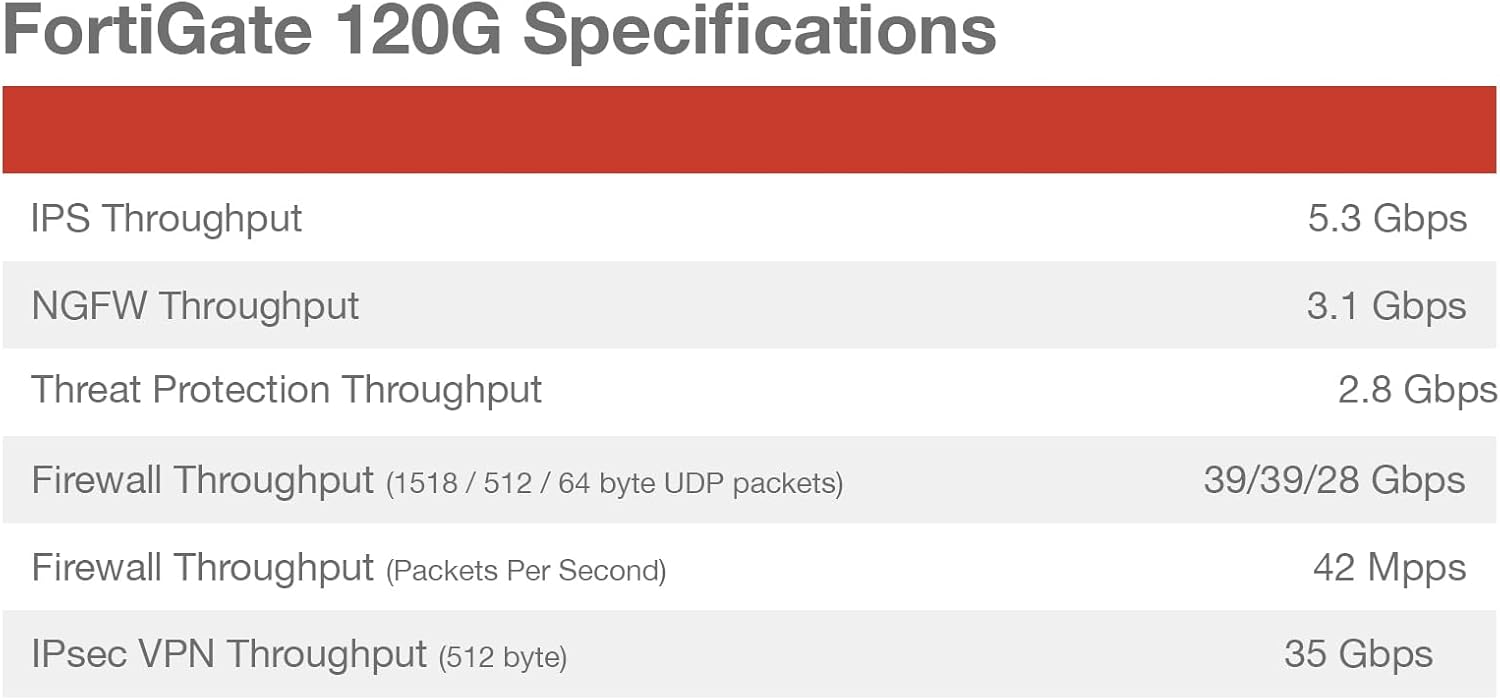
Figure 7.1: Performance specifications for the FortiGate 120G, including IPS Throughput, NGFW Throughput, Threat Protection Throughput, Firewall Throughput (1518 / 512 / 64 byte UDP packets), Firewall Throughput (Packets Per Second), and IPsec VPN Throughput (512 byte).
| คุณสมบัติ | ค่า |
|---|---|
| ขนาดสินค้า | 21.5 x 16.75 x 6 นิ้ว |
| น้ำหนักสินค้า | 12.5 ปอนด์ |
| หมายเลขรุ่นสินค้า | FG-120G-BDL-950-36 |
| ผู้ผลิต | ฟอร์ติเน็ต |
| ระดับย่านความถี่ | แบนด์เดียว |
| เทคโนโลยีการเชื่อมต่อ | อีเธอร์เน็ต |
| ประเภทเสาอากาศ | ภายใน |
| ส่วนประกอบที่รวมอยู่ | CD |

รูปที่ 7.2: ด้านข้าง view of the FortiGate-120G, indicating its physical dimensions: Height x Width x Length: 1.73 x 17 x 10 inches, and Weight: 12.17 pounds.
8. การรับประกันและการสนับสนุน
Your FortiGate-120G appliance includes comprehensive support and protection services.
8.1. FortiGuard Unified Threat Protection (UTP)
The purchase includes 3 years of FortiGuard UTP, providing continuous updates for threat intelligence, web filtering, and other security services to keep your network protected against evolving threats.
8.2. FortiCare Premium
The package also includes 3 years of FortiCare Premium, offering enhanced technical support. This service provides:
- 24x7 technical support from Fortinet experts.
- Advanced hardware replacement options.
- Access to firmware updates and patches.
- Online support resources and documentation.
For detailed information on your warranty and support services, please visit the official Fortinet support website or contact your Fortinet reseller.

Figure 8.1: Table outlining various FortiGuard Security Services, SD-WAN and SASE Services, NOC and SOC Services, and Hardware and Software Support options, indicating which are included in Enterprise Protection, Unified Threat Protection, and Advanced Threat Protection bundles.


