1. บทนำ
ขอบคุณสำหรับการซื้อasing the Salange HY350 Smart Projector. This manual provides essential information for setting up, operating, and maintaining your projector. Please read it thoroughly before use to ensure optimal performance and safety.

รูปที่ 1.1: ด้านหน้า view of the Salange HY350 Projector, showcasing การออกแบบที่กะทัดรัดและเลนส์
2. เนื้อหาบรรจุภัณฑ์
ตรวจสอบให้แน่ใจว่ามีรายการทั้งหมดอยู่ในบรรจุภัณฑ์:
- Salange HY350 Projector (without built-in battery)
- สาย HDMI
- Power Cable (US Plug)
- การควบคุมด้วยเสียงผ่าน Bluetooth
- คู่มือการใช้งาน
3. สินค้าหมดview
3.1. คุณสมบัติหลัก
- Integrated Android 11.0 System: 2GB RAM + 32GB ROM for app downloads and streaming.
- Native 1080P Resolution with 4K Decoding Support: High brightness (15000LM) and 10000:1 contrast ratio for clear images.
- Dual-band WiFi 6 & Bluetooth 5.2: Supports 5G/2.4G WiFi for smooth streaming and Bluetooth for external audio devices.
- Automatic Keystone Correction & Electronic Focus: Front projection auto-correction and 4-point keystone adjustment (±50°). Focus controlled via remote.
- ตัวเลือกการเชื่อมต่อที่หลากหลาย: HDMI, USB, 3.5mm audio port for various devices.
- Built-in HI-FI Stereo Speakers: 5W speakers for immersive audio.
3.2. ส่วนต่อประสานและการควบคุม
Familiarize yourself with the projector's ports and buttons.

รูปที่ 3.1: ด้านหลังและด้านข้าง view of the Salange HY350 Projector, showing HDMI, USB, and audio ports.
- พอร์ต HDMI: Connect to laptops, gaming consoles, TV sticks.
- พอร์ต USB: Connect USB flash drives for media playback or office documents.
- แจ็คเสียงขนาด 3.5 มม.: เชื่อมต่อหูฟังหรือลำโพงภายนอก
- กำลังไฟเข้า: เชื่อมต่อสายไฟ
4. คู่มือการติดตั้ง
4.1 การวาง
Choose a suitable location for your projector. The HY350 supports various mounting options:
- ขาตั้งกล้อง
- ติดผนัง
- ชั้นเมา
- การติดตั้งบนเพดาน
- การจัดวางบนโต๊ะ
For optimal image quality, ensure the projector is placed on a stable, flat surface or securely mounted.

รูปที่ 4.1: Illustration of different projection sizes (50", 100", 250") achievable with the Salange HY350 Projector, demonstrating its versatility in various room sizes.
4.2. การเชื่อมต่อไฟฟ้า
- เชื่อมต่อสายไฟเข้ากับพอร์ตอินพุตไฟของโปรเจ็กเตอร์
- เสียบปลายอีกด้านหนึ่งของสายไฟเข้ากับเต้ารับไฟฟ้า
- กดปุ่มเปิด/ปิดบนโปรเจ็กเตอร์หรือรีโมทคอนโทรลเพื่อเปิดเครื่อง
4.3. การตั้งค่าเริ่มต้น
Upon first power-on, the projector will guide you through initial setup steps, including language selection and network connection.
รูปที่ 4.2: The Android TV interface of the Salange HY350 Projector, showing various streaming app icons like Netflix, YouTube, Disney+, and Prime Video, indicating its smart capabilities.
- การเชื่อมต่อเครือข่าย: Navigate to Settings > Network & Internet to connect to your Wi-Fi network (supports 5G/2.4G WiFi 6).
- การจับคู่บลูทู ธ : To connect the Bluetooth voice remote control or external Bluetooth speakers/headphones, go to Settings > Connected Devices > Pair new device.
5. คู่มือการใช้งาน
5.1. การปรับแต่งภาพ
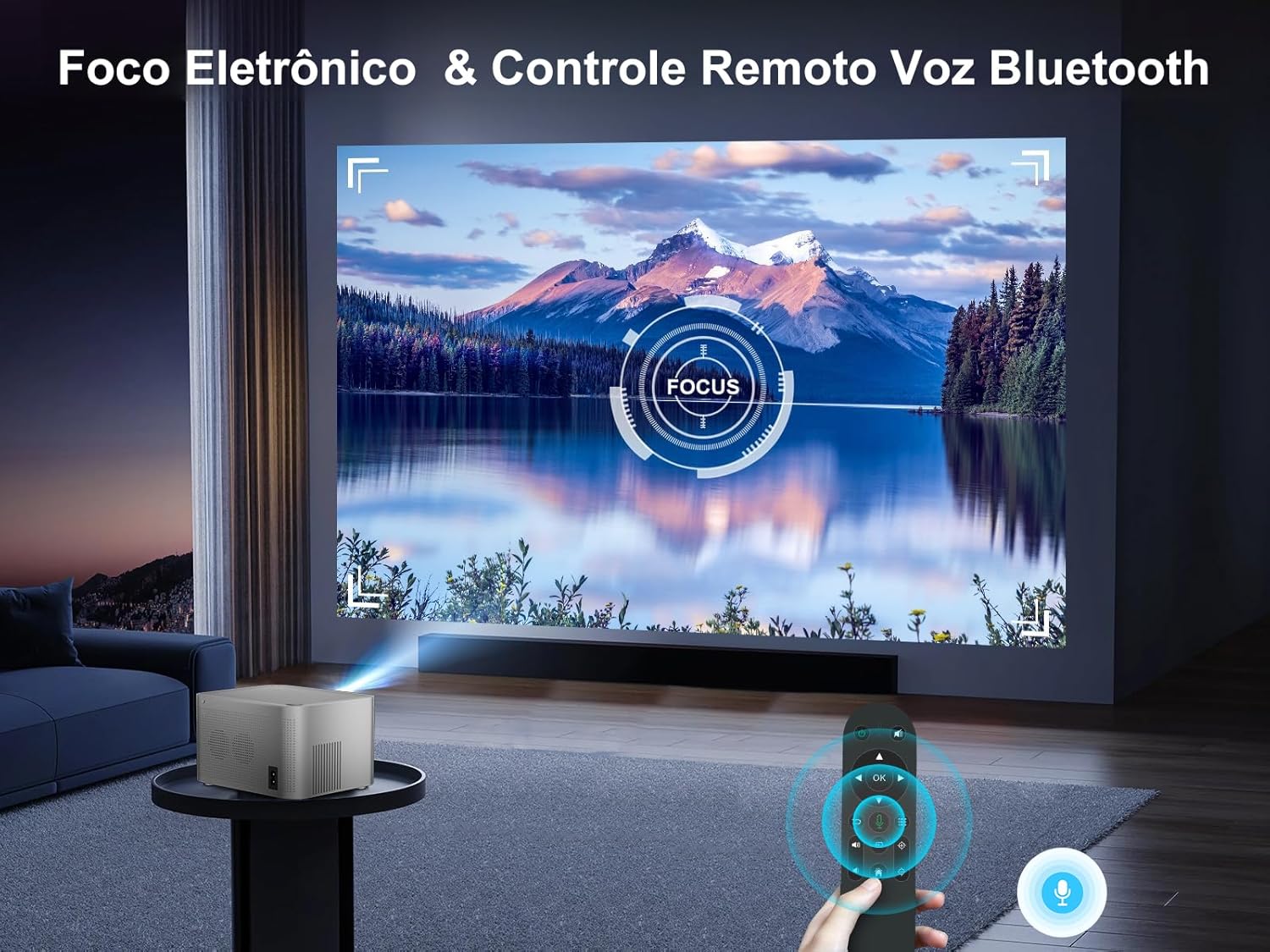
The HY350 features automatic keystone correction and electronic focus for a clear image.

รูปที่ 5.1: A hand holding the remote control, adjusting the electronic focus on the Salange HY350 Projector, with a clear image projected onto a screen.
- การแก้ไขภาพบิดเบี้ยวอัตโนมัติ: For front projection, the image will automatically correct its shape.
- Manual Keystone Adjustment (4-point): If needed, you can fine-tune the image corners by navigating to Settings > Projection Settings > Keystone Correction. This allows individual adjustment of the four corners up to ±50°.
- โฟกัสอิเล็กทรอนิกส์: ใช้รีโมทคอนโทรลเพื่อปรับโฟกัสเพื่อให้ได้ภาพที่คมชัด

รูปที่ 5.2: Visual representation of the Salange HY350 Projector's automatic keystone correction, showing how distorted images are automatically squared and corrected for optimal viewการไอเอ็นจี
5.2. การเชื่อมต่ออุปกรณ์ภายนอก
โปรเจ็กเตอร์รองรับแหล่งสัญญาณเข้าหลายประเภท:
- ช่องต่อ HDMI: Connect your laptop, game console (e.g., Switch), or TV stick to the HDMI port. Select the HDMI input source from the main menu.
- ยูเอสบี: Insert a USB flash drive into the USB port to play videos, view photos, or present office documents (Word, PPT, PDF, Excel).
- มิเรอร์หน้าจอไร้สาย: Supports iOS and Android wireless display. Navigate to the screen mirroring app on the projector and follow the on-screen instructions to connect your smartphone or tablet.

รูปที่ 5.3: An illustration highlighting the advanced WiFi 6 and Bluetooth 5.2 technology of the Salange HY350 Projector, showing seamless connectivity for gaming and audio.
5.3. Using Smart Features (Android 11.0)
The integrated Android 11.0 system allows you to access a wide range of applications.
- แอปสโตร์: Download over 8,000 applications from the integrated APP Store.
- บริการสตรีมมิ่ง: Access popular streaming platforms like Prime Video, Netflix, YouTube, Disney+, etc.
- การควบคุมด้วยเสียง: Use the Bluetooth voice remote control for convenient navigation and search.

รูปที่ 5.4: The Salange HY350 Projector's smart interface, showcasing a variety of pre-installed and downloadable streaming applications, emphasizing its entertainment capabilities.
6. การบำรุงรักษา
6.1. การทำความสะอาด
- เลนส์: ใช้ผ้านุ่มไม่เป็นขุยที่ออกแบบมาสำหรับเลนส์สายตาโดยเฉพาะ ห้ามใช้น้ำยาทำความสะอาดหรือตัวทำละลายที่มีฤทธิ์กัดกร่อน
- ภายนอก: เช็ดทำความสะอาดภายนอกโปรเจคเตอร์ด้วยผ้าแห้งนุ่มๆ สำหรับคราบฝังแน่น ให้ใช้ผ้าชุบน้ำหมาดๆ เช็ดอีกครั้งamp สามารถใช้ผ้าแล้วตามด้วยผ้าแห้ง
- ช่องระบายอากาศ: Ensure ventilation ports are clear of dust and debris to prevent overheating. Use a soft brush or compressed air to gently clean them.
6.2. การจัดเก็บ
เมื่อไม่ได้ใช้งานเป็นเวลานาน ควรเก็บโปรเจคเตอร์ไว้ในที่แห้งและเย็น หลีกเลี่ยงแสงแดดโดยตรงและอุณหภูมิที่สูงหรือต่ำเกินไป ควรใช้บรรจุภัณฑ์เดิมหรือกล่องป้องกันเพื่อป้องกันฝุ่นละอองและความเสียหาย
7 การแก้ไขปัญหา
| ปัญหา | สาเหตุที่เป็นไปได้ | สารละลาย |
|---|---|---|
| ไม่มีภาพที่ฉาย | ไม่ได้เสียบสายไฟ; โปรเจ็กเตอร์ไม่ได้เปิด; เลือกแหล่งสัญญาณเข้าไม่ถูกต้อง | ตรวจสอบการเชื่อมต่อไฟฟ้า กดปุ่มเปิด/ปิด เลือกอินพุต HDMI/USB ที่ถูกต้อง |
| ภาพเบลอ | Focus not adjusted; Projector too close/far from screen; Keystone not corrected. | Adjust electronic focus via remote; Adjust projection distance; Use auto or manual keystone correction. |
| ไม่มีเสียง | ระดับเสียงเบาเกินไป; ปิดเสียง; อุปกรณ์เสียงภายนอกไม่ได้เชื่อมต่ออย่างถูกต้อง; บลูทูธไม่ได้จับคู่ | เพิ่มระดับเสียง; เปิดเสียง; ตรวจสอบการเชื่อมต่อเสียงภายนอก; จับคู่บลูทูธอีกครั้ง |
| ปัญหาการเชื่อมต่อ Wi-Fi | รหัสผ่านไม่ถูกต้อง; เราท์เตอร์อยู่ไกลเกินไป; สัญญาณรบกวนเครือข่าย | Verify password; Move projector closer to router; Try connecting to 2.4Ghz band if 5Ghz is unstable. |
| รีโมตคอนโทรลไม่ทำงาน | Batteries low/dead; Not paired (for Bluetooth remote); Obstruction between remote and projector. | Replace batteries; Re-pair Bluetooth remote; Ensure clear line of sight. |
8. ข้อมูลจำเพาะ
| คุณสมบัติ | ข้อมูลจำเพาะ |
|---|---|
| แบบอย่าง | HY350-US |
| ระบบปฏิบัติการ | แอนดรอยด์ 11.0 |
| แรม+รอม | แรม 2GB + รอม 32GB |
| ความละเอียดดั้งเดิม | 1920x1080P ความละเอียด |
| ความละเอียดที่รองรับ | Up to 4K decoding |
| ความสว่าง | 15000 ลูเมน |
| อัตราส่วนคอนทราสต์ | 10000:1 น. |
| อัตราส่วนภาพ | 16:9 น. |
| ไวไฟ | Dual-band 5G / 2.4G WiFi 6 |
| บลูทูธ | BT 5.2 (bidirectional) |
| Keystone Correction | Automatic (front projection), 4-point (±50°) |
| จุดสนใจ | Electronic Focus (via remote) |
| ลำโพง | 5W HI-FI Stereo |
| อินเทอร์เฟซ | HDMI, USB, ช่องต่อเสียง 3.5 มม. |
| ขนาดสินค้า | 16 x 12 x 19 ซม. |
| น้ำหนักผลิตภัณฑ์ | 1.32 กก. |
| การใช้พลังงาน | 5 watts (speaker power) |
| อัตราการรีเฟรช | 60 เฮิรตซ์ |
9. การรับประกันและการสนับสนุน
Salange provides comprehensive support for your HY350 Projector:
- การรับประกัน: รับประกันจากผู้ผลิต 2 ปี
- การซ่อมบำรุง: 3 years of maintenance support.
- การสนับสนุนด้านเทคนิค: การสนับสนุนทางเทคนิคตลอดอายุการใช้งาน
- ติดต่อ: For any issues or inquiries, please feel free to contact Salange customer service.


รูปที่ 9.1: Salange customer support commitments, including 24-hour response, 7-day return, 24-month warranty, and lifetime technical support.


