การแนะนำ
The Vox amPlug 3 AC30 is a compact headphone guitar amplifier designed for convenient practice anywhere, anytime. It replicates the iconic VOX AC30 sound, offering both warm clean tones and bright top-boost drive. This device features built-in stereo effects and rhythm patterns, providing a comprehensive sonic experience for guitarists.

Image: The Vox AmPlug 3 AC30 amplifier, bundled with headphones, guitar picks, and a polishing cloth, showcasing แพ็กเกจที่สมบูรณ์แบบ
เนื้อหาแพ็คเกจ
ตรวจสอบให้แน่ใจว่ามีรายการทั้งหมดอยู่ในบรรจุภัณฑ์:
- วอกซ์ AmPlug 3 AC30 Headphone Guitar Ampชีวิต
- หูฟังแบบมีสาย
- ปิ๊กกีต้าร์
- ผ้าขัดเงา
- AAA Batteries x 2 (for operation check)
สินค้าเกินview
The Vox AmPlug 3 AC30 is a compact and portable device designed to plug directly into your guitar's output jack. It features a multi-position swivel jack for compatibility with various guitar body styles.

ภาพ: มุมเอียง view of the Vox AmPlug 3 AC30, highlighting its compact design.
การควบคุมและคุณสมบัติ
การ AmPlug 3 AC30 features intuitive controls for adjusting your sound:
- กำไรลูกบิด: Adjusts the input gain, controlling the amount of distortion or overdrive.
- ปุ่มปรับโทนเสียง: Shapes the overall tonal character, from darker to brighter sounds.
- ปุ่มปรับระดับเสียง: ควบคุมระดับเสียงโดยรวมที่ส่งออกไปยังหูฟังของคุณ
- FX/RHYTHM Knob: Selects and adjusts the built-in effects (Reverb, Chorus, Tremolo, Delay) and rhythm patterns.
- ปุ่มแตะ: Used to set the tempo for effects and rhythm patterns.
- สวิตช์ช่อง: Toggles between Channel 1 (cleaner, normal AC30 sound) and Channel 2 (bright Top-Boost sound with more drive).
- AUX Jack (3.5mm TRRS): Allows connection of external audio devices (e.g., smartphone, tablet) for jamming along, or for recording your playing.
- Phones Jack (3.5mm): สำหรับเชื่อมต่อหูฟัง.

ภาพ: ด้านข้าง view ของ AmPlug 3 AC30, detailing the control knobs for Gain, Tone, Volume, and FX/Rhythm, along with the AUX input.
การตั้งค่า
1. การติดตั้งแบตเตอรี่
การ AmPlug 3 AC30 requires two AAA batteries. To install:
- หาช่องใส่แบตเตอรี่ที่อยู่ด้านล่างของตัวเครื่อง
- เลื่อนเปิดฝาครอบแบตเตอรี่
- ใส่แบตเตอรี่ AAA สองก้อน โดยตรวจสอบให้แน่ใจว่าขั้วถูกต้อง (+/-)
- ปิดฝาครอบแบตเตอรี่ให้แน่น
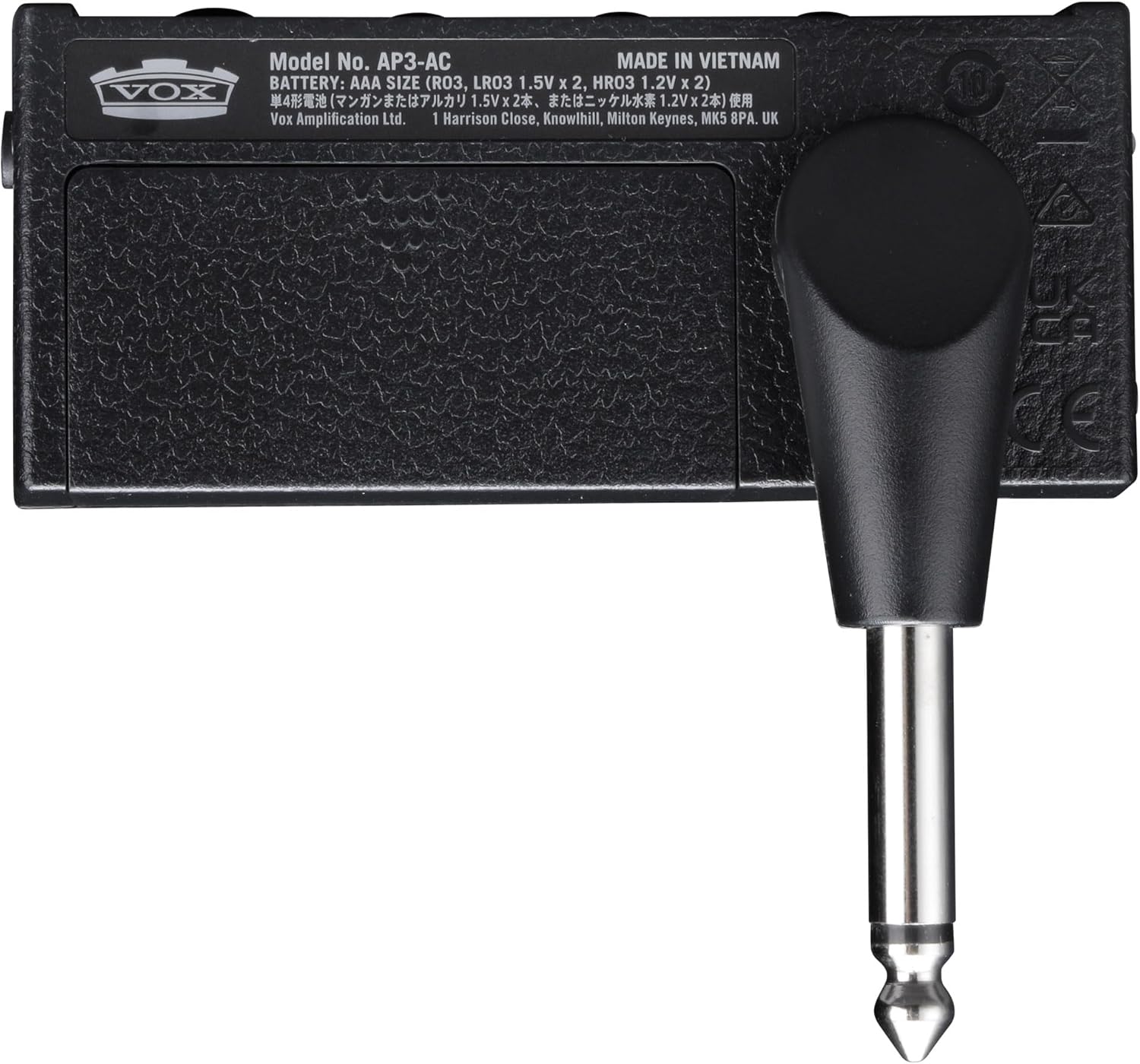
Image: Underside of the AmPlug 3 AC30, showing the battery compartment and model information.
2. Connecting Your Guitar and Headphones
- เสียบปลั๊ก AmPlug 3 AC30 directly into your guitar's output jack. Adjust the swivel jack to fit comfortably.
- Connect your headphones to the 3.5mm Phones jack on the AmPlug 3 AC30.
3. Connecting External Audio (Optional)
To play along with music or backing tracks:
- Connect your smartphone, tablet, or other audio device to the AUX jack (CTIA-compliant 3.5mm TRRS mini phone jack) on the AmPlug 3 AC30 using an appropriate audio cable.
- You can also record your playing by connecting the AUX jack to a smartphone or laptop with an optional TRRS cable.
คำแนะนำการใช้งาน
เปิด/ปิดเครื่อง
Press and hold the power button (located near the jack) to turn the unit on or off. An LED indicator will illuminate when the unit is powered on.
การปรับโทนเสียงของคุณ
- การเลือกช่อง: Use the channel switch button to toggle between Channel 1 (Normal) for clean tones and Channel 2 (Top-Boost) for driven tones. The LED indicator will change color to show the selected channel (e.g., green for Channel 1, red for Channel 2).
- ได้รับ: Rotate the GAIN knob to increase or decrease the amount of distortion.
- โทนสี : Adjust the TONE knob to brighten or darken your sound.
- ปริมาณ: Control the overall headphone volume with the VOLUME knob.
Using Effects and Rhythms
การ AmPlug 3 AC30 includes built-in stereo effects and rhythm patterns:
- การเลือกเอฟเฟกต์: Turn the FX/RHYTHM knob to select different effects (Tremolo, Chorus, Delay, Reverb) or rhythm patterns (Rock1, Blues, Surf, Pop1, Pop2, Funk1, Metal1, Jazz, Metronome).
- Effect Intensity/Tempo: The intensity of the selected effect or the tempo of the rhythm pattern can be adjusted. For effects, rotate the FX/RHYTHM knob. For rhythms, the tempo can be adjusted from 40 to 240 BPM.
- แตะจังหวะ: Press the TAP button multiple times in rhythm to set the desired tempo for delay effects or rhythm patterns.
Video: A demonstration of the Vox AmPlug 3 AC30 Headphone Guitar Ampเครื่องแสดงasing its features, sound capabilities, and ease of use.
การซ่อมบำรุง
- การทำความสะอาด: Use the included polishing cloth or a soft, dry cloth to clean the unit. Do not use abrasive cleaners or solvents.
- การดูแลแบตเตอรี่ ถอดแบตเตอรี่ออกหากจะไม่ได้ใช้งานเครื่องเป็นเวลานานเพื่อป้องกันการรั่วไหล
- พื้นที่จัดเก็บ: จัดเก็บ AmPlug 3 AC30 in a cool, dry place away from direct sunlight and extreme temperatures.
- การจัดการ: หลีกเลี่ยงการทำเครื่องตกหรือได้รับแรงกระแทกรุนแรง
การแก้ไขปัญหา
| ปัญหา | สาเหตุที่เป็นไปได้ | สารละลาย |
|---|---|---|
| ไม่มีเสียง | แบตเตอรี่เหลือน้อยหรือหมด | เปลี่ยนแบตเตอรี่ |
| ไม่มีเสียง | หูฟังไม่ได้เชื่อมต่ออย่างถูกต้อง | Ensure headphones are fully plugged into the Phones jack. |
| ไม่มีเสียง | AmPlug not fully inserted into guitar jack | ให้แน่ใจว่า AmPlug is securely connected to the guitar. |
| Distorted/Unclear sound | GAIN or VOLUME knob set too high | Adjust GAIN and VOLUME knobs to appropriate levels. |
| เอฟเฟกต์ไม่ทำงาน | FX/RHYTHM knob not set to an effect | Rotate FX/RHYTHM knob to select a desired effect. |
ข้อมูลจำเพาะ
- แบบอย่าง: AUS-AP3AC-COMBO-STD
- การเชื่อมต่อ: Phones jack (3.5mm), AUX jack (CTIA-compliant 3.5mm TRRS mini phone jack)
- แหล่งจ่ายไฟ: แบตเตอรี่ AAA x 2
- อายุการใช้งานแบตเตอรี่ (โดยประมาณ):
- 10 hours (alkaline, FX or RHYTHM on)
- 16 hours (alkaline, FX and RHYTHM off)
- 3 hours (manganese battery, FX or RHYTHM on)
- 5 hours (manganese battery, FX and RHYTHM off)
- ขนาด (ยาว x กว้าง x สูง): 3.43" x 1.3" x 1.54"
- น้ำหนัก: 1.6 ออนซ์
- ผลกระทบ: Tremolo, Chorus, Delay, Reverb
- รูปแบบจังหวะ: Rock1, Blues, Surf, Pop1, Pop2, Funk1, Metal1, Jazz, Metronome
- ช่วงจังหวะ: 40 ถึง 240 BPM
การรับประกันและการสนับสนุน
สำหรับข้อมูลการรับประกันและการสนับสนุนทางเทคนิค โปรดดูที่เว็บไซต์อย่างเป็นทางการของผู้ผลิต webหรือติดต่อฝ่ายบริการลูกค้า เก็บใบเสร็จรับเงินไว้เพื่อใช้ในการเคลมประกัน