การแนะนำ
Thank you for choosing the YoYoFit Smartwatch. This manual provides essential information for setting up, operating, and maintaining your device. Please read it carefully to ensure optimal performance and longevity of your smartwatch.
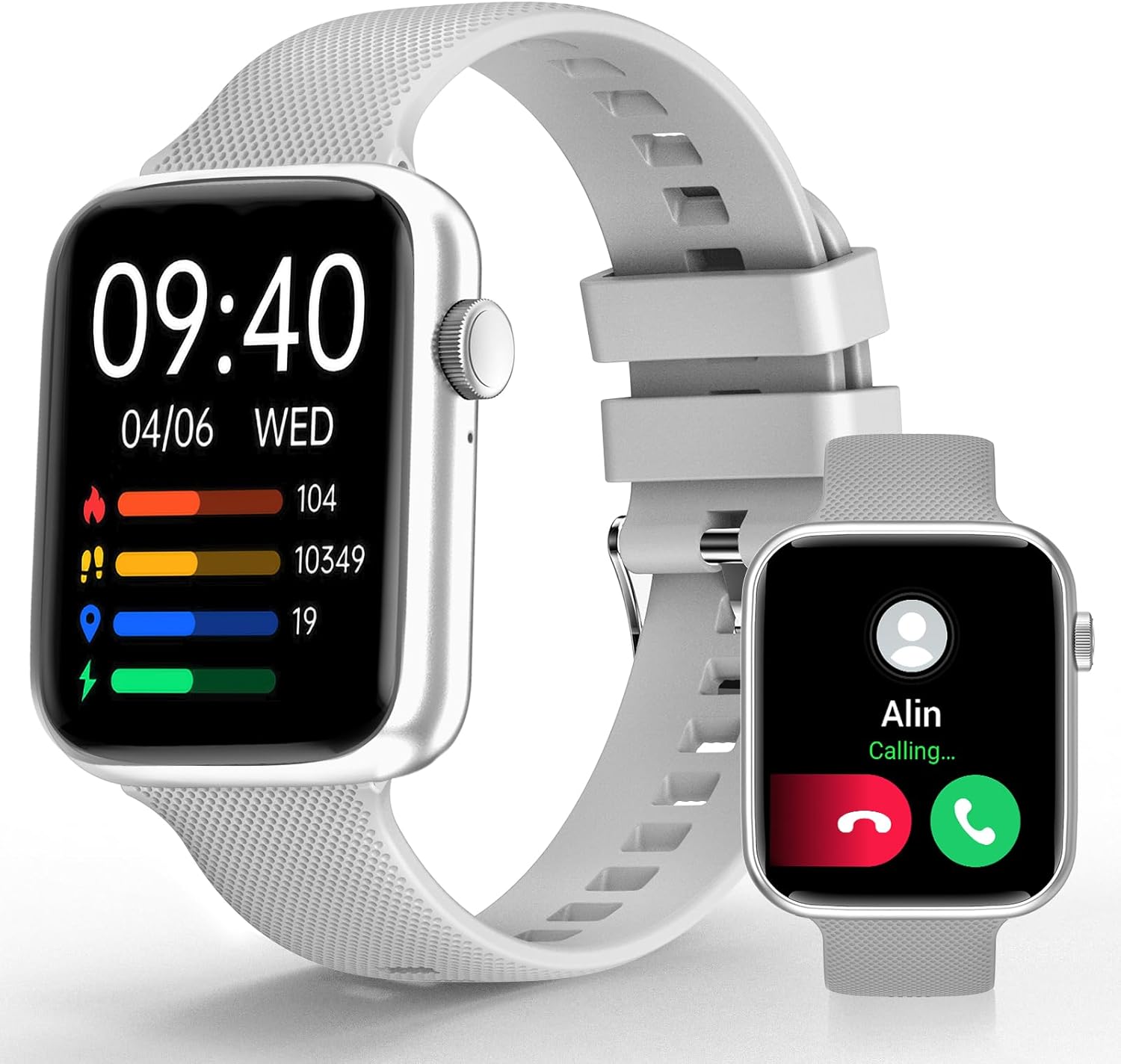
Image: YoYoFit Smartwatch, showcasinด้วยการออกแบบและการแสดงผลที่เพรียวบาง
Getting Started: Setup and Connection
To begin using your YoYoFit Smartwatch, follow these steps to pair it with your smartphone.
1. ดาวน์โหลดแอปและการจับคู่
- Download the "FitCloudPro" App: ค้นหา "FitCloudPro" in your smartphone's app store (compatible with Android 5.1 & iOS 8.5 and above).
- เปิดใช้งานบลูทูธ: เปิดบลูทูธบนสมาร์ทโฟนของคุณ
- Open App and Search: Open the "FitCloudPro" app and navigate to the device pairing section to search for your smartwatch (Model HT15).
- ยืนยันการจับคู่: Follow the on-screen prompts in the app and on your smartwatch to confirm the pairing request.

Image: Visual guide for downloading the FitCloudPro app and initial Bluetooth pairing.
2. Bluetooth Connection Settings for Calls
To enable call functionality directly from your smartwatch:
- การเข้าถึงโหมดเสียง: On your smartwatch, slide the screen left to find the "Audio mode" icon.
- Phone Bluetooth Settings: บนสมาร์ทโฟนของคุณ ไปที่การตั้งค่า > บลูทูธ
- Pair "HT15 Call": ค้นหา and pair with "HT15 Call" in your Bluetooth device list.
- รับสาย: Once connected, you can answer calls directly from your smartwatch.

Image: Steps to enable Bluetooth calling feature on your smartwatch.
การใช้งานสมาร์ทวอทช์ของคุณ
Your YoYoFit Smartwatch features a 1.85" HD color display with a full touch screen interface, providing a clear and responsive user experience.

Image: Details on the smartwatch's 1.85-inch HD display and touch capabilities.
การปรับแต่งหน้าปัดนาฬิกา
Personalize your smartwatch by choosing from over 100 cloud watch faces available in the FitCloudPro app, or upload your own personal photos to create a DIY watch face.

Image: Options for customizing your smartwatch's display with various watch faces.
คุณสมบัติการติดตามสุขภาพ
The YoYoFit Smartwatch is designed to help you monitor your health with continuous tracking capabilities.
- การตรวจวัดความดันโลหิต: Continuously monitor your blood pressure throughout the day.
- การติดตามอัตราการเต้นของหัวใจ: Automatically monitors your heart rate every 5 minutes, with data charts available in the FitCloudPro app.
- การวัดออกซิเจนในเลือด: Track your blood oxygen level at any time.
- การวิเคราะห์คุณภาพการนอนหลับ: Automatically tracks your sleep at night, providing comprehensive analysis of deep sleep, light sleep, and awake time.
- การติดตามรอบเดือน: Record your current menstrual period and receive daily reminders.

ภาพ: เหนือview of the smartwatch's health tracking capabilities including heart rate, blood pressure, and blood oxygen.

Image: Detailed sleep tracking analysis and smart wake alarm feature.
Note: The smartwatch is not a medical device. Health data is for reference only and cannot replace professional medical equipment.
การสื่อสารและคุณสมบัติอัจฉริยะ
Stay connected and informed with your smartwatch's communication and smart functionalities.
- การโทรผ่านบลูทูธ: Answer or make calls directly from your wrist after pairing with your phone's Bluetooth.
- การแจ้งเตือนข้อความ: Receive notifications for messages and social media apps directly on your wrist, accompanied by vibration alerts.
- ผู้ช่วยเสียง AI: Utilize the built-in speaker and mic to interact with your voice assistant for setting reminders, playing music, getting weather updates, and more.
- Practical Reminders: Set reminders for drinking water, moving, and calendar events.

Image: Features for staying connected, including call handling and message notifications.

Image: Demonstrating the intelligent voice assistant for various commands.
Fitness Tracking and Other Functions
The YoYoFit Smartwatch is your ideal companion for an active and organized lifestyle.
- โหมดกีฬา 18 โหมด: Accurately track your steps, distance, calories burned, and other metrics across 18 different sports modes. Workout data is displayed separately for easy viewing and comparison.
- พยากรณ์อากาศ: Check real-time weather updates directly on your wrist.
- การควบคุมเพลง: Control your smartphone's music playback from your smartwatch.
- การถ่ายภาพด้วยกล้องระยะไกล: Use your smartwatch as a remote shutter for your phone's camera.
- นาฬิกาจับเวลาและนาฬิกาจับเวลา: Convenient timing functions for various activities.
- คุณสมบัติการค้นหาโทรศัพท์: ค้นหาสมาร์ทโฟนที่หายไปของคุณได้อย่างง่ายดาย
- สัญญาณเตือนที่ปรับแต่งได้: Set up to 5 alarms with customizable names and repeat options.
- โหมดห้ามรบกวน: Turn on DND to enjoy uninterrupted time.

Image: Visual representation of the 18 sports modes and all-day activity tracking.

Image: Features like weather reports, music control, and remote camera shooting.

Image: Additional tools including stopwatch, timer, and find phone function.
อายุการใช้งานแบตเตอรี่
The YoYoFit Smartwatch is equipped with a large-capacity polymer lithium battery for extended use.
- เวลาในการชาร์จ: ประมาณ 2 ชั่วโมงสำหรับการชาร์จเต็ม
- การใช้งานปกติ: Up to 7-10 days of continuous use.
- เวลาสแตนด์บาย: Over 15 days on low power setting.

Image: Information on the smartwatch's long-lasting battery performance.
ข้อมูลจำเพาะ
| คุณสมบัติ | รายละเอียด |
|---|---|
| ขนาดสินค้า | 10 x 1.52 x 0.43 นิ้ว |
| น้ำหนักสินค้า | 3.68 ออนซ์ |
| หมายเลขรุ่นสินค้า | เอชที15 |
| แบตเตอรี่ | ต้องใช้แบตเตอรี่ลิเธียมโพลิเมอร์ 1 ก้อน (รวมอยู่ด้วย) |
| ขนาดการแสดงผลหน้าจอยืน | 1.85 นิ้ว |
| ความจุของหน่วยความจำ | 128MB |
| ระบบปฏิบัติการ | แอนดรอยด์ |
| คุณสมบัติพิเศษ | Heart rate watch, activity tracker, Bluetooth call watch |
| ความจุของแบตเตอรี่ | 0.18 Amp ชั่วโมง |
| เทคโนโลยีการเชื่อมต่อ | บลูทูธ |
| มาตรฐานการสื่อสารไร้สาย | บลูทูธ |
| ส่วนประกอบของเซลล์แบตเตอรี่ | ลิเธียมโพลีเมอร์ |
| จีพีเอส | GPS ผ่านสมาร์ทโฟน |
| รูปร่าง | สี่เหลี่ยมผืนผ้า |
| ขนาดหน้าจอ | 1.85 นิ้ว |

Image: Detailed dimensions and wrist size compatibility of the smartwatch.
การบำรุงรักษาและการดูแล
To ensure the longevity and optimal performance of your YoYoFit Smartwatch, follow these maintenance guidelines:
- การทำความสะอาด: Regularly wipe the watch screen and strap with a soft, dry cloth. For stubborn stains, a slightly damp สามารถใช้ผ้าเช็ดทำความสะอาดได้ แต่ต้องแน่ใจว่านาฬิกาแห้งสนิทก่อนสวมใส่หรือชาร์จ
- การชาร์จ: Use only the provided magnetic charging cable. Ensure the charging contacts on the watch and cable are clean and dry before charging. Avoid overcharging the battery.
- ความต้านทานน้ำ: While the watch is designed for daily wear and may withstand splashes, avoid prolonged submersion in water, hot water, or steam. Do not wear it during swimming or showering unless explicitly stated in product specifications.
- พื้นที่จัดเก็บ: เมื่อไม่ได้ใช้งานเป็นเวลานาน ควรเก็บสมาร์ทวอทช์ไว้ในที่แห้งและเย็น หลีกเลี่ยงแสงแดดโดยตรงและอุณหภูมิที่สูงหรือต่ำเกินไป
- หลีกเลี่ยงสารเคมี: Do not expose the watch to strong chemicals, detergents, or solvents, as these can damage the materials and finish.
การแก้ไขปัญหา
If you encounter any issues with your YoYoFit Smartwatch, try the following troubleshooting steps:
- นาฬิกาไม่เปิด: ตรวจสอบให้แน่ใจว่านาฬิกาชาร์จเต็มแล้ว เสียบนาฬิกาเข้ากับเครื่องชาร์จอย่างน้อย 30 นาที
- ไม่สามารถจับคู่กับโทรศัพท์ได้:
- ตรวจสอบให้แน่ใจว่าได้เปิดใช้งานบลูทูธบนโทรศัพท์และนาฬิกาของคุณแล้ว
- ตรวจสอบให้แน่ใจว่านาฬิกาอยู่ในระยะบลูทูธของโทรศัพท์ของคุณ
- รีสตาร์ททั้งโทรศัพท์และสมาร์ทวอทช์ของคุณ
- Forget the device in your phone's Bluetooth settings and try pairing again through the FitCloudPro app.
- ข้อมูลสุขภาพที่ไม่ถูกต้อง:
- ตรวจสอบให้แน่ใจว่าสวมนาฬิกาให้พอดีกับข้อมือ ไม่หลวมหรือแน่นเกินไป
- ทำความสะอาดเซ็นเซอร์ที่ด้านหลังของนาฬิกา
- Remember that data is for reference and not for medical diagnosis.
- การแจ้งเตือนไม่ปรากฏ:
- Check app notification settings in the FitCloudPro app and your phone's system settings.
- ตรวจสอบให้แน่ใจว่านาฬิกาเชื่อมต่อผ่านบลูทูธ
- Disable "Do Not Disturb" mode on the watch if it's active.
- อายุการใช้งานแบตเตอรี่สั้น:
- ลดความสว่างหน้าจอ
- จำกัดการตรวจสอบอัตราการเต้นของหัวใจอย่างต่อเนื่องหรือคุณสมบัติที่ใช้ทรัพยากรสูงอื่นๆ
- ปิดการแจ้งเตือนที่ไม่จำเป็น
หากปัญหายังคงอยู่ โปรดดูที่ส่วนการสนับสนุนหรือติดต่อฝ่ายบริการลูกค้า
การรับประกันและการสนับสนุน
Your YoYoFit Smartwatch comes with a standard manufacturer's warranty. Please refer to the warranty card included in your product packaging for specific terms and conditions.
การสนับสนุนลูกค้า
For technical assistance, warranty claims, or any other inquiries, please contact YoYoFit customer support through the following channels:
- ผู้ผลิต Webเว็บไซต์: Visit the official YoYoFit webเว็บไซต์นี้รวบรวมคำถามที่พบบ่อย แหล่งข้อมูลสนับสนุน และข้อมูลการติดต่อ
- หน้าสินค้าบน Amazon: For common questions and community support, you can also refer to the product's detail page on Amazon.
Please have your product model (HT15) and purchase details ready when contacting support.


