1. สินค้าหมดview
The YoYoFit Smartwatch HT15 is a versatile wearable device designed to enhance your daily life with communication, health monitoring, and fitness tracking features. It connects seamlessly with your smartphone to keep you informed and active.
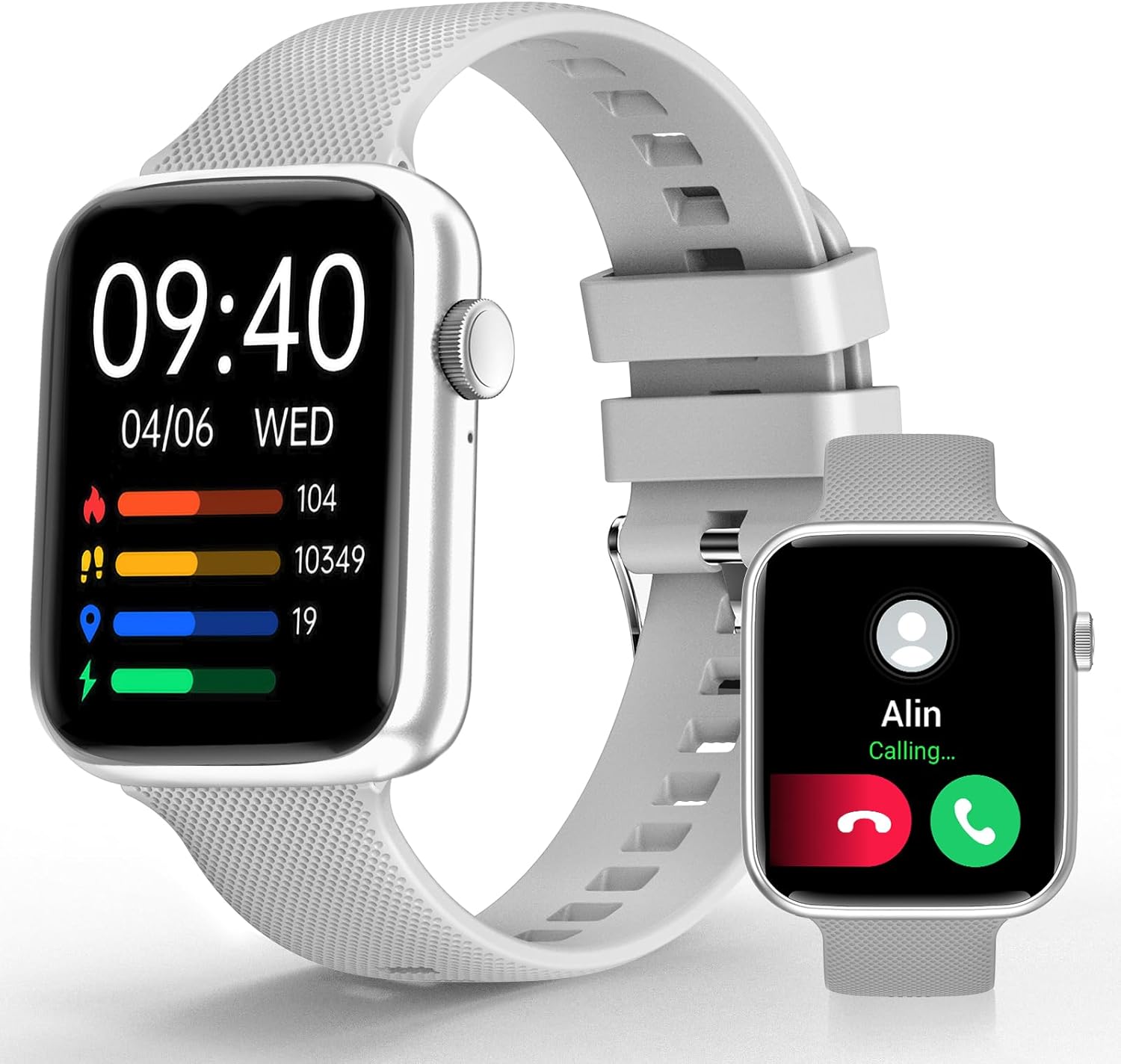
Image 1: YoYoFit Smartwatch HT15. This image displays the smartwatch in grey, showing the time, date, and various activity metrics like heart rate, steps, and calories. An inset image shows an incoming call notification.
2. เนื้อหาบรรจุภัณฑ์
ตรวจสอบให้แน่ใจว่ามีรายการทั้งหมดอยู่ในบรรจุภัณฑ์:
- YoYoFit Smartwatch HT15 (Grey)
- วงนาฬิกา
- สายชาร์จแม่เหล็ก
- คู่มือการใช้งาน (เอกสารนี้)
3. คู่มือการติดตั้ง
3.1 การชาร์จสมาร์ทวอทช์
ก่อนใช้งานครั้งแรก โปรดชาร์จสมาร์ทวอทช์ให้เต็มก่อน เชื่อมต่อสายชาร์จแม่เหล็กเข้ากับจุดชาร์จด้านหลังของนาฬิกา และเสียบปลาย USB เข้ากับอะแดปเตอร์แปลงไฟ (ไม่ได้รวมอยู่ในชุด) หรือพอร์ต USB ของคอมพิวเตอร์
- เวลาในการชาร์จ: ประมาณ 2 ชั่วโมง
- Battery Life: Up to 7-10 days of normal use, 15+ days on standby.

Image 2: Smartwatch charging. The image illustrates the magnetic charging cable connected to the smartwatch, with text indicating "Up to 7 days+ for normal use" and "Up to 15 days+ on low power setting."
3.2 การดาวน์โหลดและการจับคู่แอป
To unlock all features, download and connect your smartwatch to the "FitCloudPro" app.
- Scan the QR code in the manual or search for "FitCloudPro" in the App Store (iOS) or Google Play Store (Android).
- ติดตั้งแอปบนสมาร์ทโฟนของคุณ
- ตรวจสอบให้แน่ใจว่าเปิดใช้งาน Bluetooth บนโทรศัพท์ของคุณแล้ว
- Open the "FitCloudPro" app and follow the on-screen instructions to add your device.
- Select "HT15" from the list of available devices.
- ยืนยันคำขอจับคู่บนโทรศัพท์และสมาร์ทวอทช์ของคุณทั้งคู่

Image 3: App download and pairing steps. This image shows a sequence of smartphone screens demonstrating how to download the "FitCloudPro" app, enable Bluetooth, search for the device, and confirm the pairing request.
3.3 ความเข้ากันได้
The YoYoFit Smartwatch HT15 is compatible with:
- Android 5.1 ขึ้นไป
- iOS 8.5 ขึ้นไป
- Requires Bluetooth 5.0 for connection.
4. คู่มือการใช้งาน
4.1 การนำทางพื้นฐาน
The smartwatch features a 1.85-inch HD color full touch screen. Swipe across the screen to navigate through menus and functions. The side button typically serves as a power button or a return-to-home function.

Image 4: Smartwatch screen details. This image focuses on the 1.85-inch HD touch screen, emphasizing its full-color display and touch functionality.
4.2 ฟังก์ชันการโทร
Once paired via Bluetooth, you can manage calls directly from your wrist:
- รับสาย/โทรออก: Use the built-in speaker and microphone to answer incoming calls or dial out from your watch.
- ข้อความ: Read incoming messages and social media notifications.
- ติดต่อเรา: Store frequently used contacts for quick dialing.
- ประวัติการโทร: View บันทึกการโทรล่าสุดของคุณ

Image 5: Stay Connected On-wrist. This image shows a woman using the smartwatch to answer a call, alongside visual representations of message notifications, built-in mic & speaker, and reminder functions.
4.3 การตรวจติดตามสุขภาพ
The smartwatch provides comprehensive health tracking:
- อัตราการเต้นของหัวใจ: การตรวจสอบอย่างต่อเนื่องตลอดทั้งวัน
- ออกซิเจนในเลือด (SpO2): วัดระดับออกซิเจนในเลือด
- ความดันโลหิต: ตรวจสอบระดับความดันโลหิต
- การติดตามการนอนหลับ: Automatically tracks sleep patterns (deep sleep, light sleep, awake time) and provides quality analysis.
- การติดตามรอบเดือน: Records and reminds you of your menstrual period.
หมายเหตุ: อุปกรณ์นี้ไม่ใช่เครื่องมือแพทย์ ข้อมูลด้านสุขภาพใช้เพื่อการอ้างอิงเท่านั้น และไม่ควรนำไปใช้ในการวินิจฉัยหรือรักษาทางการแพทย์

Image 6: Keep Track of Your Health. This image shows the smartwatch displaying heart rate, blood pressure, and blood oxygen measurements, with a person wearing the watch.

Image 7: Tools for Better ZZZs. This image illustrates the smartwatch's sleep tracking capabilities, showing deep sleep, light sleep, and awake times, along with smart alarm and Do Not Disturb settings.
4.4 การติดตามกิจกรรม
The HT15 tracks your daily activity and supports 18 sports modes:
- ตัวชี้วัดรายวัน: Accurately tracks steps, distance, and calories burned.
- โหมดกีฬา: Includes walking, running, cycling, hiking, yoga, basketball, football, and more. Exercise data is recorded and displayed separately for each workout.

Image 8: Sweat the Smart Way. This image features a woman exercising, with the smartwatch displaying various sports modes (e.g., walking, running, cycling) and all-day activity tracking metrics like steps, calories, and distance.
4.5 ผู้ช่วยเสียง AI
Utilize the built-in AI voice assistant for hands-free control:
- ตั้งเตือนความจำและตั้งนาฬิกาปลุก
- ควบคุมการเล่นเพลง
- Get weather updates.
- Ask questions and receive translations.
4.6 Other Practical Features
- หน้าปัดนาฬิกาที่ปรับแต่งได้: Choose from 100+ cloud watch faces or upload personal photos via the FitCloudPro app.
- พยากรณ์อากาศ: Check current weather conditions directly on your wrist.
- นาฬิกาจับเวลาและตัวจับเวลา: เหมาะสำหรับใช้ในการออกกำลังกายหรือทำกิจกรรมประจำวัน
- การควบคุมเพลง: Play, pause, skip tracks on your connected phone.
- ค้นหาหมายเลขโทรศัพท์: Locate your misplaced smartphone by triggering an alert sound.
- สัญญาณเตือนภัย: Set multiple customizable alarms.
- Sedentary & Drink Water Reminders: Prompts to stay active and hydrated.
- การควบคุมกล้องระยะไกล: ใช้สมาร์ทวอทช์ของคุณเพื่อสั่งงานกล้องของโทรศัพท์จากระยะไกล

Image 9: More Practical Features. This image highlights the smartwatch's diverse functionalities, including customizable watch faces, weather display, music control, timer, stopwatch, and the "Find Phone" feature.
5. การบำรุงรักษา
5.1 การทำความสะอาดสมาร์ทวอทช์ของคุณ
Regularly clean your smartwatch and watch band to ensure optimal performance and hygiene.
- Wipe the screen and watch body with a soft, dampผ้าที่ไม่เป็นขุย
- สำหรับสายรัดซิลิโคน คุณสามารถใช้สบู่และน้ำอ่อนๆ ล้างให้สะอาด แล้วเช็ดให้แห้งสนิท
- หลีกเลี่ยงการใช้สารเคมีรุนแรงหรือวัสดุที่มีฤทธิ์กัดกร่อน
5.2 ความต้านทานต่อน้ำ
The smartwatch is designed to withstand daily activities like hand washing and sweating. However, it is not recommended for swimming or showering, as prolonged exposure to water or hot steam may damage the device.
6 การแก้ไขปัญหา
6.1 อุปกรณ์ไม่เปิด
- ตรวจสอบให้แน่ใจว่านาฬิกาชาร์จเต็มแล้ว เสียบนาฬิกาเข้ากับเครื่องชาร์จแม่เหล็กอย่างน้อย 30 นาที
- Press and hold the side button for several seconds to power on.
6.2 ปัญหาการจับคู่
- ตรวจสอบให้แน่ใจว่าได้เปิดใช้งาน Bluetooth บนสมาร์ทโฟนของคุณแล้ว
- ตรวจสอบให้แน่ใจว่าสมาร์ทวอทช์อยู่ในระยะที่สามารถเชื่อมต่อกับโทรศัพท์ของคุณได้
- รีสตาร์ททั้งโทรศัพท์และสมาร์ทวอทช์ของคุณ
- Forget the device in your phone's Bluetooth settings and try pairing again through the "FitCloudPro" app.
- Check if the "FitCloudPro" app has necessary permissions enabled on your phone.
6.3 การอ่านค่าสุขภาพที่ไม่ถูกต้อง
- ตรวจสอบให้แน่ใจว่าสวมนาฬิกาให้พอดีกับข้อมือ ไม่แน่นหรือหลวมเกินไป
- ทำความสะอาดเซ็นเซอร์ที่ด้านหลังของนาฬิกา
- หลีกเลี่ยงการเคลื่อนไหวมากเกินไปในระหว่างการวัด
- Remember that readings are for reference and not for medical use.
6.4 การแจ้งเตือนไม่ปรากฏ
- Verify that the smartwatch is connected to your phone via Bluetooth.
- Check notification settings within the "FitCloudPro" app to ensure desired apps are enabled.
- Confirm that your phone's notification settings allow the "FitCloudPro" app to display alerts.
7. ข้อมูลจำเพาะ
| คุณสมบัติ | รายละเอียด |
|---|---|
| หมายเลขรุ่น | เอชที15 |
| ขนาดหน้าจอ | 1.85 Inches HD Color Display |
| ขนาดสินค้า | 10 x 1.52 x 0.43 นิ้ว |
| น้ำหนักสินค้า | 3.68 ออนซ์ |
| ประเภทแบตเตอรี่ | ลิเธียมโพลิเมอร์ (ต้องใช้ 1 อัน รวมอยู่ด้วย) |
| ความจุของแบตเตอรี่ | 0.18 Amp ชั่วโมง |
| การเชื่อมต่อ | บลูทูธ 5.0 |
| ระบบปฏิบัติการ | แอนดรอยด์ (ใช้งานได้กับ Android 5.1 ขึ้นไป), ไอโอเอส (ใช้งานได้กับ iOS 8.5 ขึ้นไป) |
| คุณสมบัติพิเศษ | Heart Rate Monitor, Activity Tracker, Bluetooth Call Function, Blood Oxygen Monitor, Sleep Monitor, AI Voice Assistant |

Image 10: Smartwatch dimensions. This diagram provides detailed measurements of the smartwatch (1.8" x 1.52" x 0.43") and indicates the suitable wrist size range (4.9" ~ 8.3").
8. วิดีโอผลิตภัณฑ์
Video 1: YoYoFit Smart Watch for Men and Women. This video provides a visual overview of the smartwatch's features and functionalities, including its design, health tracking, and connectivity options.


