1. บทนำ
This manual provides detailed instructions for the safe and effective use of your Codnida Baby Monitor, Model YM-MWM553+MWZ553C-EU. Please read this manual thoroughly before operating the device and retain it for future reference. This baby monitor is designed to provide secure and reliable surveillance of your child, offering features such as a 5.5-inch 2K HD display, PTZ camera control, two-way audio, and environmental monitoring.
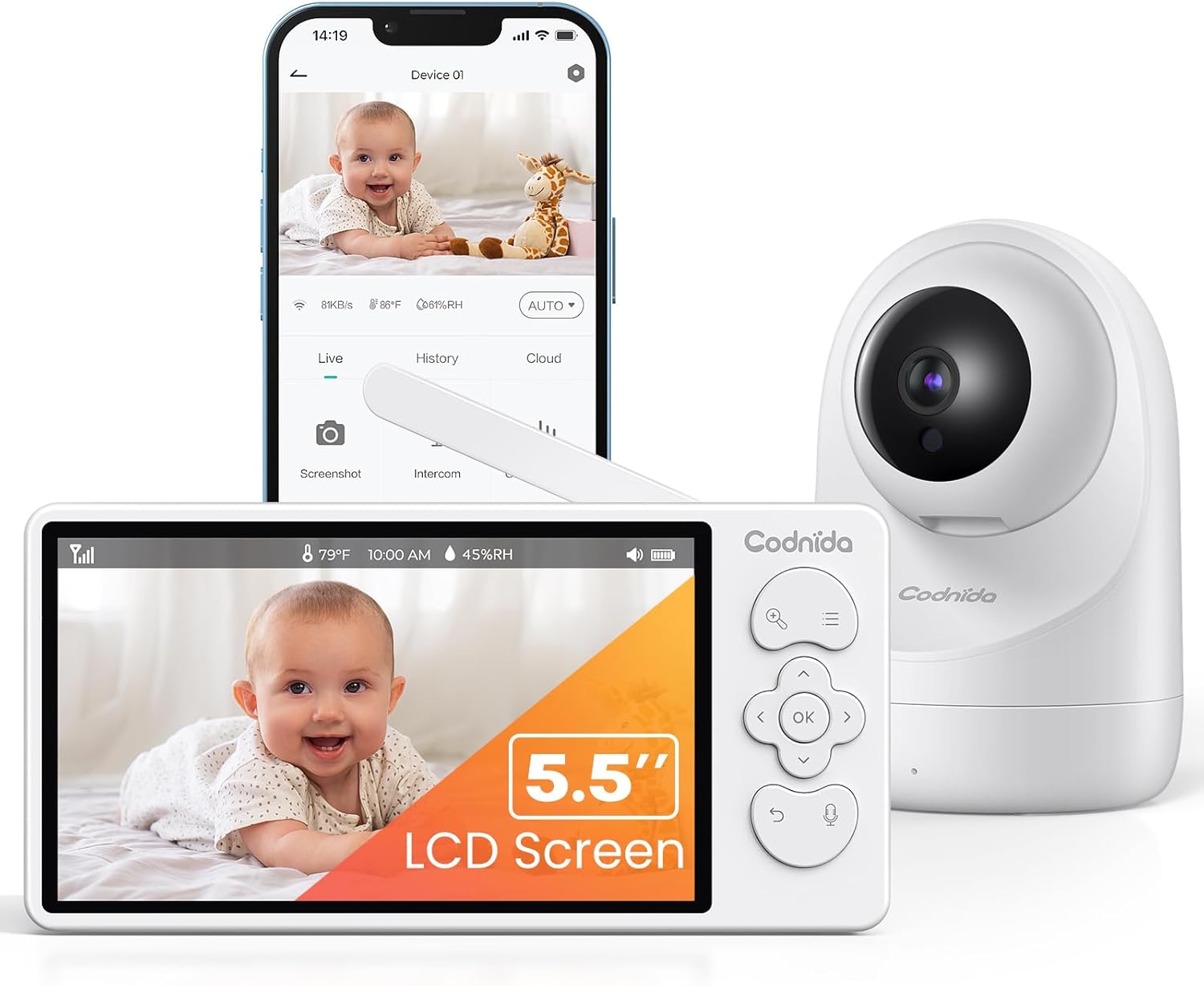
Image 1.1: Codnida Baby Monitor system, showing the monitor, camera, and smartphone interface.
2. เนื้อหาบรรจุภัณฑ์
ตรวจสอบว่ามีรายการทั้งหมดอยู่ในแพ็คเกจ:
- Baby Monitor (Parent Unit)
- Baby Camera (Baby Unit)
- Power Adapters (2x, for monitor and camera)
- USB Charging Cables (2x)
- Wall Mount Kit (screws and anchors)
- คู่มือการใช้งาน (เอกสารนี้)

Image 2.1: All components included in the Codnida Baby Monitor package.
3. สินค้าหมดview
3.1 หน่วยหลัก (จอภาพ)
The parent unit features a 5.5-inch LCD screen for live video feed, control buttons for camera functions, and a built-in microphone and speaker for two-way audio communication.
- หน้าจอ LCD: 5.5-inch 2K HD display.
- ปุ่มควบคุม: Navigation, OK, Menu, Talk, Zoom.
- เสาอากาศ: For wireless signal transmission.
- ไมโครโฟน: สำหรับเสียงแบบสองทาง
- ผู้บรรยาย: For listening to your baby and lullabies.
- พอร์ตไฟ: USB-C for charging.
- แบตเตอรี่: แบตเตอรี่แบบชาร์จไฟได้ในตัว ขนาด 4000mAh
3.2 Baby Unit (กล้อง)
The baby unit is equipped with a 3MP 2K HD camera, infrared LEDs for night vision, and a temperature/humidity sensor.
- เลนส์กล้อง: 3MP 2K HD resolution.
- ไฟ LED อินฟราเรด: For clear night vision up to 8 meters.
- ไมโครโฟน: To detect baby's sounds.
- ผู้บรรยาย: To play lullabies and enable two-way audio.
- เซ็นเซอร์วัดอุณหภูมิ/ความชื้น: Monitors room environment.
- พอร์ตไฟ: USB-C for continuous power.
- รูยึด: สำหรับติดผนัง.
4. การตั้งค่า
4.1 การชาร์จหน่วยหลัก
Before first use, fully charge the parent unit for approximately 8 hours. Connect the provided USB charging cable to the parent unit's power port and the power adapter to an electrical outlet. The battery indicator on the screen will show charging status.

Image 4.1: Charging the parent unit and expected battery life.
4.2 การจ่ายไฟให้กับเครื่อง Baby Unit
The baby unit requires continuous power. Connect the provided USB charging cable to the baby unit's power port and the power adapter to an electrical outlet. Ensure the cable is placed safely away from the baby's reach.
4.3 การจัดวางกล้อง
Place the baby unit (camera) in a location that provides a clear view of your baby. Ensure it is at least 1 meter (3 feet) away from the baby's crib to prevent any entanglement hazards with the power cord. The camera can be placed on a flat surface or mounted to a wall using the provided kit.
- เพื่อความเหมาะสมที่สุด viewing, position the camera to capture the entire crib area.
- Avoid placing the camera near heat sources or direct sunlight.
- Ensure the camera is within the monitor's transmission range (up to 700 meters in open areas).
4.4 การเชื่อมต่อเริ่มต้น
The Codnida Baby Monitor uses FHSS technology for a secure, direct connection without requiring Wi-Fi or an app for basic operation. Simply power on both the parent unit and the baby unit. They should automatically connect. If they do not connect, refer to the troubleshooting section for pairing instructions.

Image 4.2: Secure FHSS connection between monitor and camera.
5. คู่มือการใช้งาน
5.1 เปิด/ปิดเครื่อง
- หน่วยหลัก: Press and hold the power button until the screen turns on/off.
- หน่วยทารก: เครื่องสำหรับเด็กจะเปิดใช้งานโดยอัตโนมัติเมื่อเชื่อมต่อกับแหล่งจ่ายไฟ
5.2 สด View and VOX Mode
The monitor defaults to live view, continuously displaying video from the camera. To conserve battery, you can activate VOX (Voice Operated eXchange) mode.
- โหมด VOX: In VOX mode, the monitor screen remains black. It will automatically light up and display video when sound or motion is detected in the baby's room.
- To activate/deactivate VOX mode, navigate through the menu settings on the parent unit.

Image 5.1: VOX mode for power saving and automatic activation.
5.3 Camera Control (PTZ & Zoom)
The camera offers Pan, Tilt, and Digital Zoom (PTZ) functions, allowing you to adjust the viewมุมจากระยะไกล
- แพน/เอียง: Use the directional buttons on the parent unit to move the camera lens horizontally (350 degrees) and vertically (90 degrees).
- ซูมดิจิตอล: Press the zoom button to activate 2x or 4x digital zoom for a closer view ของลูกน้อยของคุณ
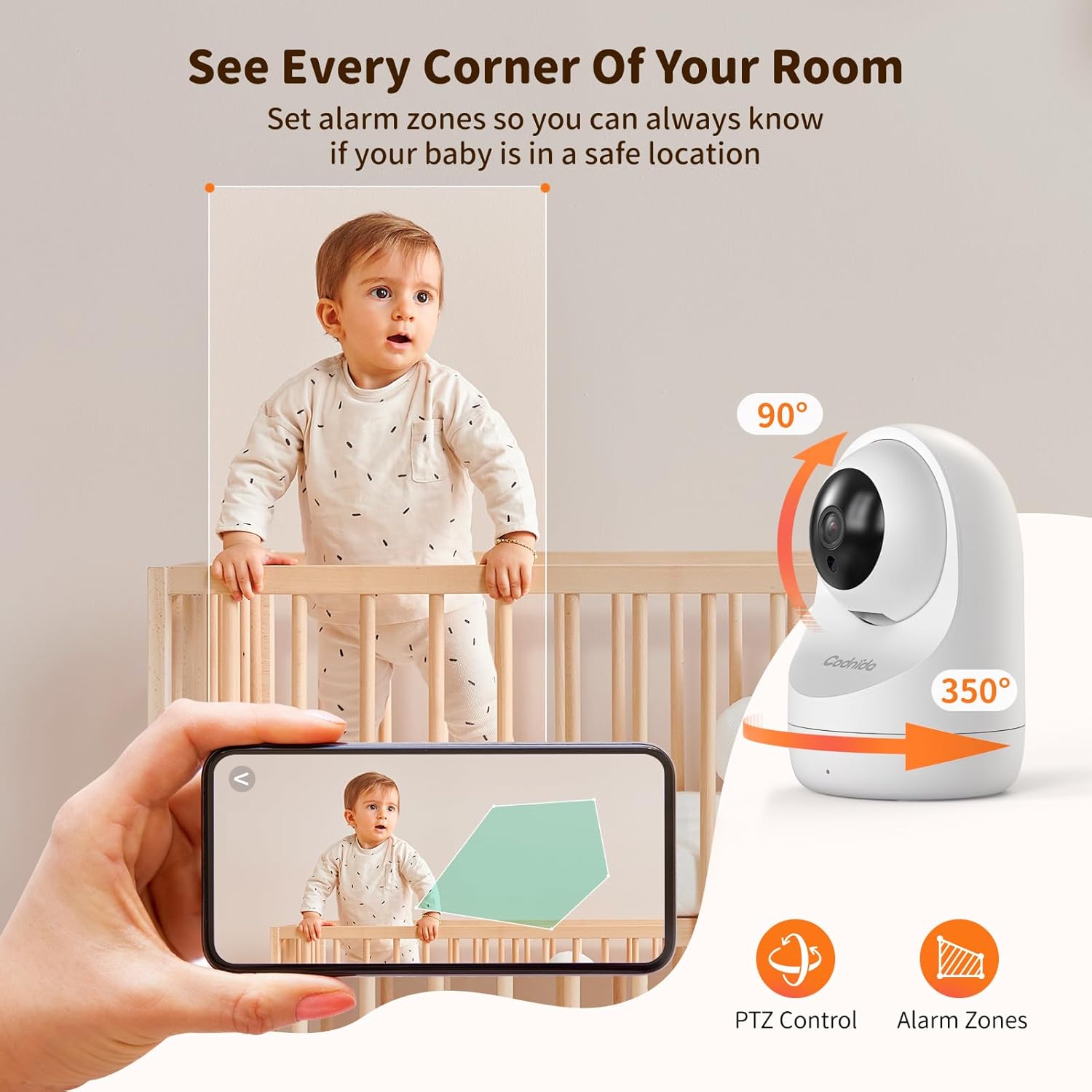
Image 5.2: PTZ control and alarm zone setup.
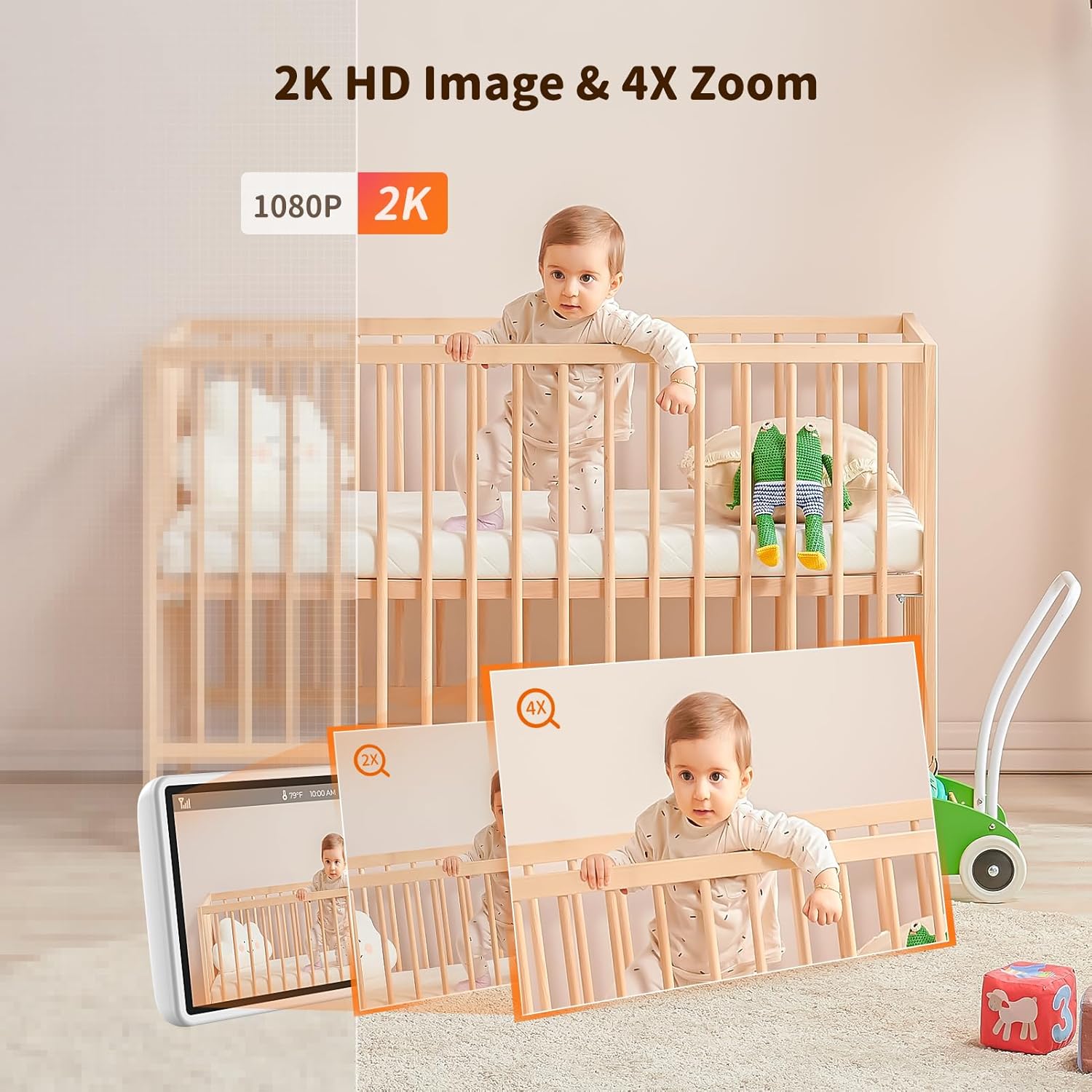
Image 5.3: 2K HD image quality and 4x digital zoom.
5.4 Two-Way Audio and Lullabies
Communicate with your baby or play soothing lullabies directly from the parent unit.
- เสียงสองทาง: Press and hold the 'Talk' button on the parent unit to speak to your baby through the camera's speaker. Release the button to listen.
- เพลงกล่อมเด็ก: Access the menu to select and play built-in lullabies. You can adjust the volume and set a timer for playback.

Image 5.4: Two-way audio communication.

Image 5.5: Night vision and lullaby function.
5.5 Monitoring Features
- การตรวจสอบอุณหภูมิและความชื้น: The baby unit continuously monitors the room's temperature and humidity. These readings are displayed on the parent unit. You can set alert thresholds in the menu.
- คำเตือนการให้อาหาร: Set up feeding reminders through the parent unit's menu to help maintain a consistent feeding schedule.
- Alarm Zones: กำหนดพื้นที่เฉพาะภายในกล้อง view as alarm zones. The monitor will alert you if motion is detected within these zones.

Image 5.6: Temperature and humidity detection.

Image 5.7: Feeding reminder function.
5.6 Recording to SD Card
The Codnida Baby Monitor supports Micro SD cards (FAT32 format, up to 256GB) for video recording. Insert the Micro SD card into the designated slot on the parent unit. You can initiate recording manually or set it to record automatically upon motion/sound detection via the menu settings.
6. การบำรุงรักษา
6.1 การทำความสะอาด
To clean the monitor and camera units, use a soft, dry cloth. Do not use abrasive cleaners or solvents. For the camera lens, use a lens cleaning cloth to avoid scratches.
6.2 การดูแลแบตเตอรี่
- Avoid fully discharging the parent unit's battery frequently.
- Charge the parent unit regularly to maintain battery health.
- Store the device in a cool, dry place if not in use for extended periods.
7 การแก้ไขปัญหา
If you encounter issues with your Codnida Baby Monitor, please refer to the following common solutions:
| ปัญหา | สาเหตุที่เป็นไปได้ | สารละลาย |
|---|---|---|
| ไม่มีภาพ/เสียงบนจอภาพ | Units not powered on, out of range, or not paired. | Ensure both units are powered. Move units closer. Re-pair units via menu settings (refer to manual for specific steps). |
| คุณภาพของภาพไม่ดี | Low light, dirty lens, interference. | Ensure adequate lighting. Clean camera lens. Move units away from other electronic devices. |
| Monitor loses connection frequently | Out of range, signal interference, obstacles. | Move units closer. Reduce obstacles (walls, furniture). Avoid placing near thick walls or metal structures. |
| แบตเตอรี่หมดเร็ว | Continuous live view, high brightness, aging battery. | Activate VOX mode. Reduce screen brightness. Ensure full charge before use. |
| Temperature/Humidity readings incorrect | Sensor obstruction, extreme environmental conditions. | Ensure sensor is not covered. Allow time for sensor to adjust to room conditions. |
8. ข้อมูลจำเพาะ
| คุณสมบัติ | รายละเอียด |
|---|---|
| หมายเลขรุ่น | YM-MWM553+MWZ553C-EU |
| ขนาดจอแสดงผล | 5.5 นิ้ว |
| ความละเอียดวิดีโอ | 2K HD (1296p) |
| ความละเอียดของกล้อง | 3 ล้านพิกเซล |
| เทคโนโลยีไร้สาย | FHSS (ความถี่กระโดดกระจายสเปกตรัม) |
| ช่วงการส่งผ่าน | สูงถึง 700 เมตร (พื้นที่เปิดโล่ง) |
| ช่วงการมองเห็นตอนกลางคืน | สูงสุด 8 เมตร |
| มุมก้าน / เอียง | แพน 350° เอียง 90° |
| ซูมดิจิตอล | 4x |
| แบตเตอรี่หน่วยหลัก | 4000mAh Lithium-ion (1 AAA included for internal components) |
| การสนับสนุนการจัดเก็บข้อมูล | Micro SD card up to 256GB (FAT32 format) |
| คุณสมบัติพิเศษ | Two-Way Audio, Motion Detector, VOX Mode, Temperature/Humidity Sensor, Lullabies, Feeding Reminder |
| วัสดุ | พลาสติก |
| ขนาด (กว้าง x ยาว x สูง) | 10 x 5 x 5 ซม. |
| น้ำหนัก | 860 กรัม |
9. การรับประกันและการสนับสนุน
Codnida offers a รับประกัน 1 ปี for this product and a นโยบายการคืนสินค้าภายใน 30 วัน. For any questions regarding your baby monitor or other Codnida products, please contact customer support through your Amazon account:
- Navigate to "Your account"
- Select "Your orders"
- Locate your Codnida Baby Monitor order
- Click on "Ask a question"
Our support team will assist you with any inquiries or issues you may have.


