1. สินค้าหมดview
The Timex TW2W25300 is a digital watch featuring a unique design inspired by Utagawa Hiroshige's "Maples at Mama" woodblock print. This watch combines classic artistry with modern digital functionality, offering essential timekeeping features for daily use.
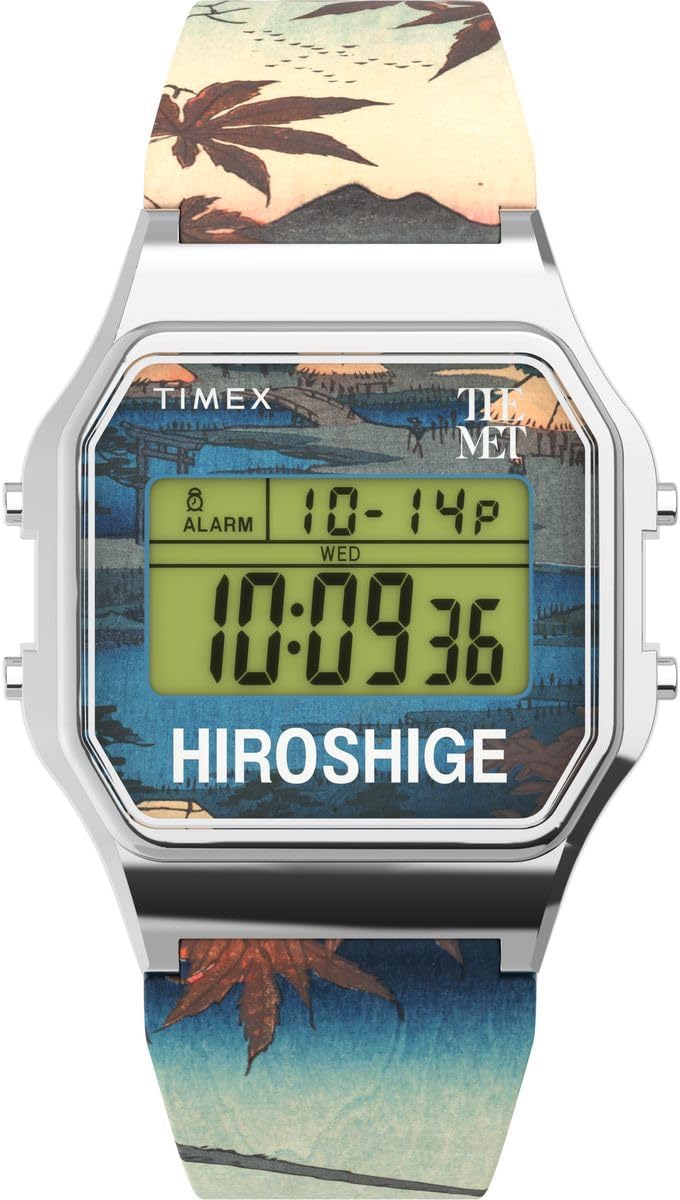
รูปที่ 1: ด้านหน้า view of the Timex TW2W25300 Digital Watch. The watch features a silver-colored case, a digital display, and a strap adorned with a detailed woodblock print.
คุณสมบัติหลัก:
- จอแสดงผลดิจิตอล: การแสดงเวลาดิจิตอลที่ชัดเจนและอ่านง่าย
- ฟังก์ชั่นปฏิทิน: แสดงวันและวันที่
- นาฬิกาจับเวลา สำหรับการจับเวลาเหตุการณ์
- เตือน: ฟังก์ชันตั้งโปรแกรมสัญญาณเตือน
- ไฟกลางคืนอินดิโกล: ให้แสงสว่างในสภาพแสงน้อย
- ความต้านทานน้ำ: Rated for 3 bars (30 meters), suitable for splashes or brief immersion.
- การออกแบบที่เป็นเอกลักษณ์: Features artwork from Utagawa Hiroshige's "Maples at Mama" on the strap.
2. การตั้งค่า
Before using your Timex TW2W25300 watch, it is recommended to set the correct time and date.
2.1 การตั้งเวลาและวันที่
- เข้าสู่โหมดตั้งค่า: กดปุ่มค้างไว้ ชุด button (usually located on the side of the watch) until the time display begins to flash.
- ปรับเวลา: ใช้ โหมด or ปรับ button to change the flashing digits (hours, then minutes). Press ชุด again to move to the next setting.
- กำหนดวันที่: กดต่อไป ชุด to cycle through date settings (month, day, year). Use โหมด or ปรับ เพื่อเปลี่ยนค่า
- ออกจากโหมดตั้งค่า: เมื่อตั้งค่าทั้งหมดถูกต้องแล้วให้กด ชุด one last time or wait for the display to stop flashing to exit the set mode.
Note: Specific button functions may vary slightly. Refer to the quick start guide included in the watch packaging for precise button layouts.
3. คู่มือการใช้งาน
Your Timex TW2W25300 watch offers several functions accessible via its buttons.
3.1 Using the Indiglo Night-Light
To illuminate the watch face in low-light conditions, press the อินดิโกล button (often the top-left button). The light will stay on for a few seconds.
3.2 ฟังก์ชันจับเวลา
- เปิดใช้งานนาฬิกาจับเวลา: กดปุ่ม โหมด button repeatedly until the stopwatch display appears (usually showing "00:00:00").
- เริ่ม/หยุด: กดปุ่ม เริ่ม/หยุด กดปุ่มเพื่อเริ่มจับเวลา กดอีกครั้งเพื่อหยุดชั่วคราว
- รีเซ็ต: While the stopwatch is paused, press the รีเซ็ต button to clear the time.
- ย้อนเวลากลับไป: กดปุ่ม โหมด button to cycle back to the main time display.
3.3 ฟังก์ชั่นปลุก
- ระบบเตือนภัยการเข้าถึง: กดปุ่ม โหมด button until the alarm display appears (often indicated by an alarm icon).
- ตั้งเวลาปลุก: ใช้ ชุด or ปรับ ปุ่มสำหรับตั้งเวลาปลุก (ชั่วโมงและนาที)
- เปิด/ปิดนาฬิกาปลุก: กดปุ่ม เปิด / ปิดนาฬิกาปลุก button (or a combination of buttons) to toggle the alarm on or off. An alarm icon will typically appear on the display when active.
- ปลุกเงียบ: เมื่อเสียงเตือนดังขึ้น ให้กดปุ่มใดก็ได้เพื่อปิดเสียงเตือน
3.4 การแสดงผลปฏิทิน
The watch automatically displays the current day and date. This information is typically visible on the main time display or can be accessed by pressing the โหมด button to cycle through different display modes.
4. การบำรุงรักษา
Proper care will ensure the longevity and performance of your Timex TW2W25300 watch.
4.1 การทำความสะอาด
- เช็ดตัวเรือนนาฬิกาและสายนาฬิกาเป็นประจำด้วยผ้าเนื้อนุ่มและแห้งamp ผ้า.
- หลีกเลี่ยงการใช้สารเคมีรุนแรง ตัวทำละลาย หรือน้ำยาทำความสะอาดที่มีฤทธิ์กัดกร่อน เพราะอาจทำให้พื้นผิวหรือสายนาฬิกาเสียหายได้
4.2 ความต้านทานต่อน้ำ
This watch is water resistant to 3 bars (30 meters). This means it is suitable for:
- การกระเด็นโดยไม่ตั้งใจ
- ฝน
- Brief immersion in water (e.g., washing hands)
สำคัญ: Do not press any buttons while the watch is wet or submerged. This can compromise the water resistance seal. Not suitable for swimming, diving, or showering.
4.3 การเปลี่ยนแบตเตอรี่
The watch uses an Oxide d'argent (Silver Oxide) battery. When the display becomes dim or functions become erratic, it may be time to replace the battery. It is recommended to have the battery replaced by a qualified watch technician to ensure proper sealing and water resistance.
5 การแก้ไขปัญหา
| ปัญหา | สาเหตุที่เป็นไปได้ | สารละลาย |
|---|---|---|
| จอแสดงผลมืดหรือว่างเปล่า | แบตเตอรี่อ่อน | เปลี่ยนแบตเตอรี่ |
| เวลาไม่ถูกต้อง | ไม่ได้ตั้งเวลาไว้ถูกต้องหรือกดปุ่มโดยไม่ได้ตั้งใจ | โปรดดูหัวข้อ 2.1 "การตั้งเวลาและวันที่" เพื่อตั้งเวลาใหม่ |
| สัญญาณเตือนภัยไม่ดัง | สัญญาณเตือนภัยไม่ได้เปิดใช้งานหรือตั้งค่าไม่ถูกต้อง | Refer to Section 3.3 "Alarm Function" to ensure the alarm is set and activated. |
| มีน้ำอยู่ภายในนาฬิกา | ความสามารถในการกันน้ำลดลง (เช่น กดปุ่มใต้น้ำ ซีลชำรุด) | นำนาฬิกาไปที่ศูนย์บริการที่ได้รับอนุญาตโดยทันที อย่าพยายามทำให้แห้งเอง |
6. ข้อมูลจำเพาะ
| คุณสมบัติ | รายละเอียด |
|---|---|
| ยี่ห้อ | ไทม์เม็กซ์ |
| หมายเลขรุ่น | TW2W25300 |
| ประเภทจอภาพ | ดิจิตอล |
| ขนาดเคส | 34 x 34 มม. |
| ความสูงของเคส | 10 มม. |
| สีเคส | เงิน |
| สีหน้าปัด | หลากสี |
| วัสดุสายรัด | พลาสติก |
| ความยาวสาย | 21 ซม. |
| ความกว้างสายคล้อง | 21 มม. |
| ประเภทตัวล็อค | หัวเข็มขัด |
| ความต้านทานต่อน้ำ | 3 บาร์ (30 เมตร) |
| น้ำหนัก | 53 กรัม |
| องค์ประกอบของแบตเตอรี่ | ซิลเวอร์ออกไซด์ |
| คุณสมบัติพิเศษ | Indiglo Night-Light, Chronograph (Stopwatch), Alarm |

รูปที่ 2: ด้านข้าง view of the watch, highlighting its slim profile และปุ่มควบคุม

รูปที่ 3: หลัง view of the watch, displaying the engraved case back with brand and museum collaboration details.
7. การรับประกันและการสนับสนุน
Your Timex TW2W25300 watch is delivered in an original gift box, which typically contains detailed warranty information and instructions for support.
7.1 ข้อมูลการรับประกัน
Please refer to the warranty card or booklet included in the product packaging for specific warranty terms, conditions, and duration. This document will provide details on coverage for manufacturing defects and how to claim warranty service.

รูปที่ 4: Product packaging, including the watch, user guide, and guarantee card.
7.2 การสนับสนุนลูกค้า
For technical assistance, service, or inquiries regarding your watch, please contact Timex customer support. Contact details can usually be found on the Timex official website or within the warranty documentation.
ไทม์เอ็กซ์ อย่างเป็นทางการ Webเว็บไซต์: www.timex.com


