1. สินค้าหมดview
The Rollerhouse Tuya WiFi Smart Roller Shade Motor is designed to automate roller blinds and shades with 1.5-inch (38mm) tubes. This motor integrates with smart home ecosystems like Alexa and Google Home, offering convenient app and timer control without requiring an additional hub.
คุณสมบัติที่สำคัญ ได้แก่:
- WiFi connectivity (2.4Ghz required) for smart home integration.
- Compatibility with Alexa Echo and Google Assistant for voice control.
- Remote and timing control via a mobile application.
- Ability to set up timing schedules, groups, routines, and percentagอี การควบคุม
- Hardwired AC 110V operation, always plugged in.
2. เนื้อหาบรรจุภัณฑ์
ตรวจสอบว่ามีส่วนประกอบทั้งหมดอยู่ในแพ็คเกจของคุณ:
- 1x Blinds Motor (suitable for 36-38mm / 1-1/2 inch tubes)
- 1x รีโมทคอนโทรล
- 1x End Cap
- 2x Mounting Hardware (brackets)
- 1x คู่มือผู้ใช้
- Rubber fittings

This image displays the complete package contents of the Rollerhouse Tuya WiFi Smart Roller Shade Motor, including the motor unit, remote control, end cap, and mounting brackets.
วิดีโอนี้ให้ภาพที่ชัดเจนview of the items included in the Rollerhouse Smart Roller Shade Motor package, showing the motor, remote, power adapter, and mounting hardware.
3. ข้อมูลจำเพาะทางเทคนิค
| แบบอย่าง | PDM25-1.5/25-ET-W |
| กำลังไฟที่กำหนด | 15วัตต์ |
| เอาท์พุต | 1.3เอ |
| ป้อนข้อมูล | ไฟ AC100-240V |
| ความเร็วในการหมุน | 25รอบต่อนาที |
| เส้นผ่านศูนย์กลางมอเตอร์ | 25มม. |
| ความถี่ในการรับ | 50/60เฮิรตซ์ |
| ความยาวสายเคเบิล | 113 ซม. (ประมาณ 44.5 นิ้ว) |
| ขนาดมอเตอร์ | 452mm (approx. 17.8 inches) length |
| การเชื่อมต่อ WiFi | 2.4GHz (ไม่รองรับ 5GHz) |
| ความเข้ากันได้ | Alexa, Google Assistant, Tuya SmartLife App |

This image provides technical specifications such as cable length, motor diameter, rated power, output, input, rotate speed, receive frequency, and lists included accessories like the remote control and metal brackets.
4. คู่มือการติดตั้ง
Follow these steps for proper installation of your smart roller shade motor:
- Measure Tube Dimensions: Accurately measure the Inner Diameter (ID) and Outer Diameter (OD) of your existing roller shade tube. A digital ruler is recommended for precision. The motor is designed for 1.5-inch (38mm) tubes.
- Fit Crown and Drive Adapters: Select and fit the appropriate crown and drive adapters onto the motor shaft. These adapters ensure a secure fit within your shade tube.
- Install End Plug Side Bracket: Securely install the end plug side bracket to your mounting surface.
- Insert Motor into Tube: Carefully insert the motor with its adapters into the roller shade tube.
- ติดตั้งร่มเงา: Mount the entire roller shade assembly, with the motor inside, onto the installed brackets.

This diagram illustrates the initial steps for motor installation, including measuring the inner and outer diameter of the shade tube, fitting the crown and drive adapters, installing the end plug side bracket, and pairing the remote with the motor.

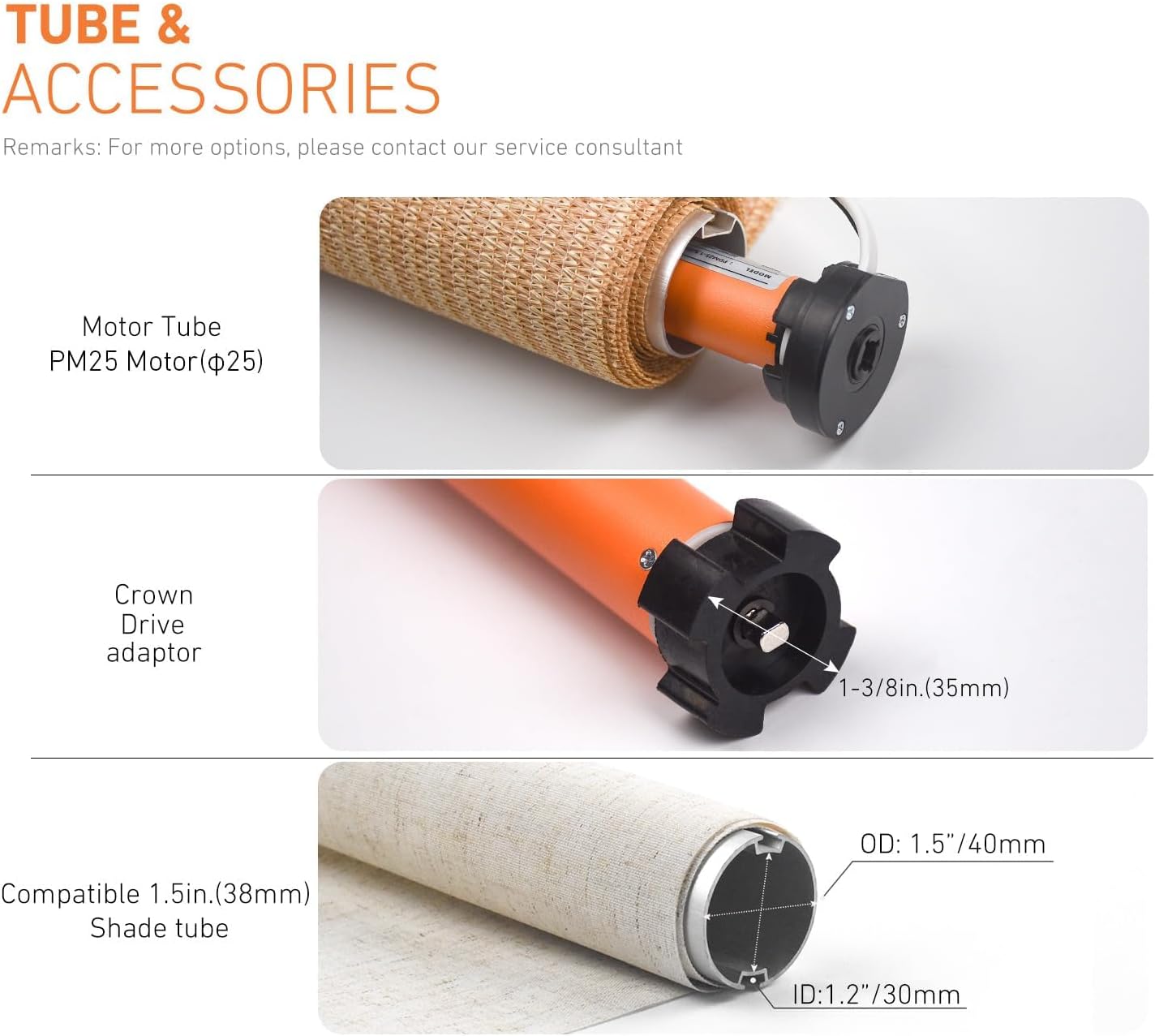
This image illustrates the various tube and accessory components, detailing the motor tube, crown drive adaptor, and the compatible 1.5-inch (38mm) shade tube with its outer and inner diameter measurements.

ภาพระยะใกล้นี้ view highlights key features of the motor, including the power supply connection point, the setting button for configuration, and the motor hole designed for bracket installation.
5. การตั้งค่าและการจับคู่
5.1. Connecting the Remote Control
- Press the motor setting button for 1 second. The motor will jog once.
- Press the pairing button on the remote control.
- The motor will jog once again, indicating successful pairing.
5.2. Connecting to the App (Tuya Smart / Smart Life)
- Download the Smart Life or Tuya Smart app from your app store. You can scan the QR codes below for direct access:
แอพ Smart Life | แอพ Tuya สมาร์ท - เปิดแอปและสร้างบัญชีหรือเข้าสู่ระบบ
- Press the motor setting button one time (motor jogs once). Then press the motor setting button 3 times. The motor will enter network configuration state.
- Follow the in-app instructions to add the device. Ensure your phone is connected to a 2.4GHz WiFi network.

This visual guide details the steps for pairing the remote control with the motor and connecting the motor to the Smart Life or Tuya Smart application, including QR codes for app downloads.
This video illustrates the process of connecting the power supply to the motor and performing a basic test of the remote control to ensure functionality.
6. การดำเนินการ
Once installed and paired, you can operate your smart roller shade motor using the remote control, the mobile app, or voice commands via Alexa or Google Home.
6.1. การทำงานของรีโมทคอนโทรล
Use the dedicated buttons on the remote to raise, lower, or stop the blinds. Refer to the remote's specific instructions for setting upper and lower limits, and intermediate stopping positions.

This image demonstrates the convenience of remote control, allowing users to adjust their blinds from any location using the provided remote or a smartphone application.
6.2. App Control and Scheduling
The Tuya Smart or Smart Life app allows for advanced control:
- เปิดปิด: Manually control the blinds from anywhere.
- เปอร์เซ็นtagอี การควบคุม: Adjust blinds to a specific percentage open or closed.
- ตารางเวลา: Set daily or weekly schedules for automatic opening and closing.
- Intermediate Limits: Program multiple stopping positions for customized light control.
- การควบคุมกลุ่ม: Control multiple motors simultaneously by creating groups in the app.
This visual explains the customizable timer and scheduling features, enabling users to set automatic opening and closing times for their blinds, including intermediate stopping positions.
6.3. การควบคุมด้วยเสียง
Integrate the Tuya Smart or Smart Life app with Alexa or Google Home to enable voice commands for your blinds. Follow the instructions within your smart assistant's app to link the Tuya skill/service.
7 การแก้ไขปัญหา
If you encounter issues with your Rollerhouse Smart Roller Shade Motor, consider the following:
- มอเตอร์ไม่ตอบสนอง:
- Check if the motor is properly plugged into a power source.
- ตรวจสอบให้แน่ใจว่าแบตเตอรี่ของรีโมทคอนโทรลไม่หมด
- Verify that the remote is correctly paired with the motor.
- ปัญหาการเชื่อมต่อแอพ:
- Confirm your WiFi network is 2.4GHz. 5GHz networks are not supported.
- Ensure your mobile device is connected to the same 2.4GHz WiFi network during setup.
- Restart your WiFi router and the motor.
- Attempt to re-pair the motor with the app.
- Incorrect Travel Limits:
- Refer to the detailed instructions in the included user manual for setting and adjusting upper, lower, and intermediate travel limits.
- A factory reset may be necessary if limits are severely misconfigured, followed by re-pairing and limit setting.
- เสียงมอเตอร์:
- Some motor noise during operation is normal. Excessive or unusual noise may indicate an issue with installation or internal components.
- Ensure the motor is securely seated within the tube and brackets.
For further assistance, please contact Rollerhouse customer support.
8. การรับประกันและการสนับสนุน
ผลิตภัณฑ์นี้มาพร้อมกับการรับประกันมาตรฐานจากผู้ผลิต โปรดดูรายละเอียดเงื่อนไขและข้อกำหนดเฉพาะในบัตรรับประกันที่อยู่ในบรรจุภัณฑ์
For technical support, troubleshooting, or warranty claims, please contact Rollerhouse customer service. We offer 24-hour service to assist you with any inquiries.


