การแนะนำ
The VTech KidiZoom Duo Camera FX is an interactive digital camera designed for children aged 3 years and up. It features dual cameras, a 2.4-inch color screen, and a variety of creative tools to enhance photos and videos. Beyond photography, it includes built-in games and an MP3 player for extended entertainment.
คุณสมบัติหลัก:
- 8MP front camera and 2MP selfie cam with 4X digital zoom.
- Over 80 photo and video effects, filters, and frames, including Live AR Avatar, Chin Puppet Theater, and Cartoon Studio.
- Five built-in games for interactive play.
- Voice recording with funny effects and MP3 player functionality (microSD card not included).
- Durable design suitable for young users.
การตั้งค่า
การติดตั้งแบตเตอรี่
The KidiZoom Duo Camera FX requires 4 AA batteries for operation. Batteries are included for demo purposes only; new batteries are recommended for regular use to ensure optimal performance.
- หาช่องใส่แบตเตอรี่ที่ด้านข้างของกล้อง
- ใช้ไขควงเปิดฝาครอบแบตเตอรี่
- ใส่แบตเตอรี่ AA ใหม่ 4 ก้อน โดยตรวจสอบให้แน่ใจว่าขั้วถูกต้อง (+/-)
- Securely close the battery cover and tighten the screw.

Image: VTech KidiZoom Duo Camera FX with wrist strap, showing the side where the battery compartment is located.
เปิดเครื่องเบื้องต้น
After installing batteries, press the power button to turn on the camera. The VTech logo will appear on the screen, indicating successful startup.

ภาพ: ด้านหลัง view of the camera, highlighting the screen and control buttons. The screen shows a child's face with a filter applied.
คำแนะนำการใช้งาน
การถ่ายภาพและวิดีโอ
The camera features an 8MP front camera and a 2MP selfie cam. Use the 2.4-inch color screen or the dual viewfinders to compose your shots. The 4X digital zoom allows for closer capture of subjects.
- To take a photo: Aim the camera and press the shutter button (typically the large button on top).
- To record a video: Switch to video mode (refer to on-screen icons) and press the shutter button to start/stop recording.

Image: A child holding the camera, demonstrating the action of taking a photo.
Creative Effects and Filters
Explore over 80 built-in photo and video effects, filters, and frames to add a unique touch to your creations. These include:
- Live AR Avatar: Interact with augmented reality characters.
- Chin Puppet Theater: Transform your face into a puppet.
- Cartoon Studio: Animate your photos.
- ภาพพาโนรามา: Capture wide-angle shots.

Image: A child using a creative filter on the camera, showing a stage background effect.
Built-in Games and Music Player
The camera offers more than just photography. Enjoy five interactive games, such as finding lost ducklings or helping aliens. You can also record your voice with fun effects or load your own MP3 music files onto a microSD card (not included) to use the camera as a music player.

Image: A child wearing headphones and holding the camera, illustrating its music player functionality.
การบูรณาการสื่อ
รูปภาพสินค้า
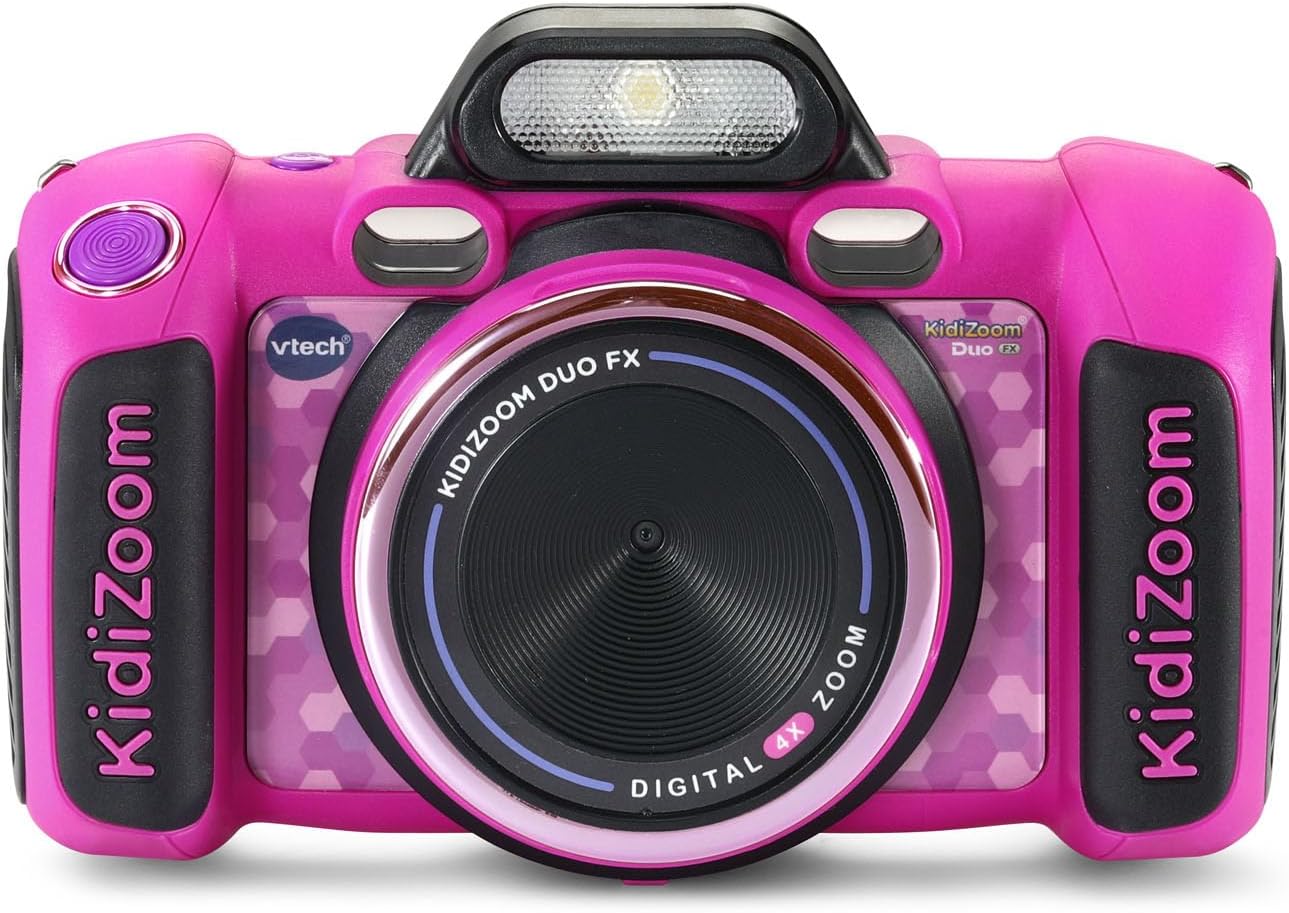
ด้านหน้า view of the VTech KidiZoom Duo Camera FX in pink.

The camera is designed for durability, shown here in a simulated drop scenario.

อดีตample of a fun filter: a child appears to be weightlifting with cartoon weights.

The camera connected to a laptop, illustrating how photos and videos can be transferred.
วิดีโอผลิตภัณฑ์อย่างเป็นทางการ
Video: VTech Kid Zoom FX Camera - Pink Demo Video. This video provides a demonstration of the camera's features and functionality.
วิดีโอ: ผลิตภัณฑ์จบแล้วview Video. This video offers a comprehensive overview of the VTech KidiZoom Duo Camera FX.
การซ่อมบำรุง
การทำความสะอาด
To clean the camera, wipe it gently with a slightly damp cloth. Do not use harsh chemicals or abrasive cleaners. Ensure the camera is completely dry before use or storage.
การดูแลแบตเตอรี่
Always use fresh, high-quality AA batteries. Remove batteries if the camera will not be used for an extended period to prevent leakage. Dispose of used batteries responsibly.
พื้นที่จัดเก็บ
Store the camera in a cool, dry place away from direct sunlight and extreme temperatures. Avoid storing in dusty or humid environments.
การแก้ไขปัญหา
กล้องไม่เปิด
- ตรวจสอบว่าได้ติดตั้งแบตเตอรี่อย่างถูกต้องและตรงขั้วหรือไม่
- เปลี่ยนแบตเตอรี่เก่าหรือที่หมดแล้วด้วยแบตเตอรี่ใหม่
- ตรวจสอบให้แน่ใจว่าได้กดปุ่มเปิด/ปิดอย่างแน่นหนา
คุณภาพของภาพไม่ดี
- ตรวจสอบให้แน่ใจว่าเลนส์สะอาดและไม่มีรอยเปื้อน
- Check lighting conditions; the camera performs best in well-lit environments.
- Hold the camera steady when taking photos.
Cannot Delete Photos/Videos
As noted in customer reviews, deleting photos can be tedious as there is no grid view; you have to scroll through each photo individually and manually delete each one. Connect the camera to a computer to manage and delete files more efficiently.
ข้อมูลจำเพาะ
| คุณสมบัติ | ค่า |
|---|---|
| ยี่ห้อ | VTech |
| ชื่อรุ่น | คิดิซูม |
| หมายเลขรุ่น | 80-519935 |
| ช่วงอายุ คำอธิบาย | 3 ปีขึ้นไป |
| ความละเอียดของเซนเซอร์ภาพ | 8 MP |
| ขนาดหน้าจอ | 2.4 นิ้ว |
| ประเภทแบตเตอรี่ | 4 x AA |
| ซูมดิจิตอล | 4 เท่า |
| ความจุของหน่วยความจำ | 256MB |
| รองรับ File รูปแบบ | JPEG (Image), MP4 (Video), MP3/WAV (Audio) |
| เทคโนโลยีการเชื่อมต่อ | ไมโคร USB |
| น้ำหนักสินค้า | 0.9 ปอนด์ |
| ความสูงของสินค้า | 2.29 นิ้ว |
| ระดับความต้านทานต่อน้ำ | ไม่ทนน้ำ |
การรับประกันและการสนับสนุน
ข้อมูลการรับประกัน
The VTech KidiZoom Duo Camera FX comes with a 90-day warranty against manufacturer defects.
การสนับสนุนเพิ่มเติม
For further assistance, you may refer to the official user manual PDF or visit the VTech store online.


