1. บทนำ
Thank you for choosing the WORKPRO 7.2V Cordless Rotary Tool. This manual provides essential information for the safe and effective operation, maintenance, and troubleshooting of your tool. Please read it thoroughly before use and retain it for future reference.
The WORKPRO 7.2V Cordless Rotary Tool is a versatile and compact device designed for various DIY and craft projects. Its lightweight design and variable speed settings make it suitable for tasks such as sanding, engraving, cutting, drilling, grinding, and polishing.

Figure 1: WORKPRO 7.2V Cordless Rotary Tool with included accessories and storage bag.
2. ข้อมูลด้านความปลอดภัย
ปฏิบัติตามข้อควรระวังด้านความปลอดภัยพื้นฐานเสมอเพื่อลดความเสี่ยงจากการเกิดไฟไหม้ ไฟฟ้าช็อต และการบาดเจ็บส่วนบุคคลเมื่อใช้งานเครื่องมือไฟฟ้า
- อ่านคำแนะนำทั้งหมด: ทำความคุ้นเคยกับการใช้งานเครื่องมือและแนวทางด้านความปลอดภัย
- สวมอุปกรณ์ป้องกันดวงตา: สวมแว่นตานิรภัยหรือแว่นตานิรภัยที่มีกระบังด้านข้างเสมอ
- ชิ้นงานที่ปลอดภัย: เสมอ clamp หรือยึดชิ้นงานด้วยวิธีอื่นเพื่อป้องกันการเคลื่อนไหวในระหว่างการทำงาน
- รักษาพื้นที่ทำงานให้สะอาด: พื้นที่รกทำให้เกิดอุบัติเหตุ
- หลีกเลี่ยงสภาพแวดล้อมที่เป็นอันตราย: ห้ามใช้เครื่องมือไฟฟ้าในดamp หรือบริเวณที่เปียกชื้น หรือตากฝน จัดพื้นที่ทำงานให้มีแสงสว่างเพียงพอ
- เก็บให้ห่างไกลเด็ก ๆ : ผู้เยี่ยมชมทุกคนควรอยู่ห่างจากพื้นที่ทำงานอย่างปลอดภัย
- การแต่งกายให้เหมาะสม: Do not wear loose clothing or jewelry. They can be caught in moving parts. Non-skid footwear is recommended. Wear protective hair covering to contain long hair.
- ใช้เครื่องมือที่เหมาะสม: อย่าบังคับให้เครื่องมือหรือสิ่งที่แนบมาทำงานที่ไม่ได้ออกแบบมา
- ตัดการเชื่อมต่อไฟฟ้า: Disconnect the tool from its power source before making adjustments, changing accessories, or storing it.
- ไม่เกิน: รักษาการวางเท้าและการทรงตัวให้เหมาะสมตลอดเวลา
- ดูแลรักษาเครื่องมือด้วยความระมัดระวัง: รักษาเครื่องมือให้คมและสะอาดเพื่อประสิทธิภาพที่ดีขึ้นและปลอดภัยยิ่งขึ้น ปฏิบัติตามคำแนะนำในการหล่อลื่นและเปลี่ยนอุปกรณ์เสริม
- ตรวจสอบชิ้นส่วนที่เสียหาย: ก่อนใช้เครื่องมือต่อไป ควรตรวจสอบการ์ดป้องกันหรือส่วนอื่นๆ ที่เสียหายอย่างรอบคอบเพื่อพิจารณาว่าเครื่องมือจะทำงานอย่างถูกต้องและทำงานได้ตามที่ตั้งใจไว้
- ห้ามใช้งานขณะกำลังชาร์จ: For safety reasons, do not use the tool while it is being charged.
3. สินค้าหมดview
The WORKPRO 7.2V Cordless Rotary Tool is designed for precision work. Understanding its components is key to effective operation.
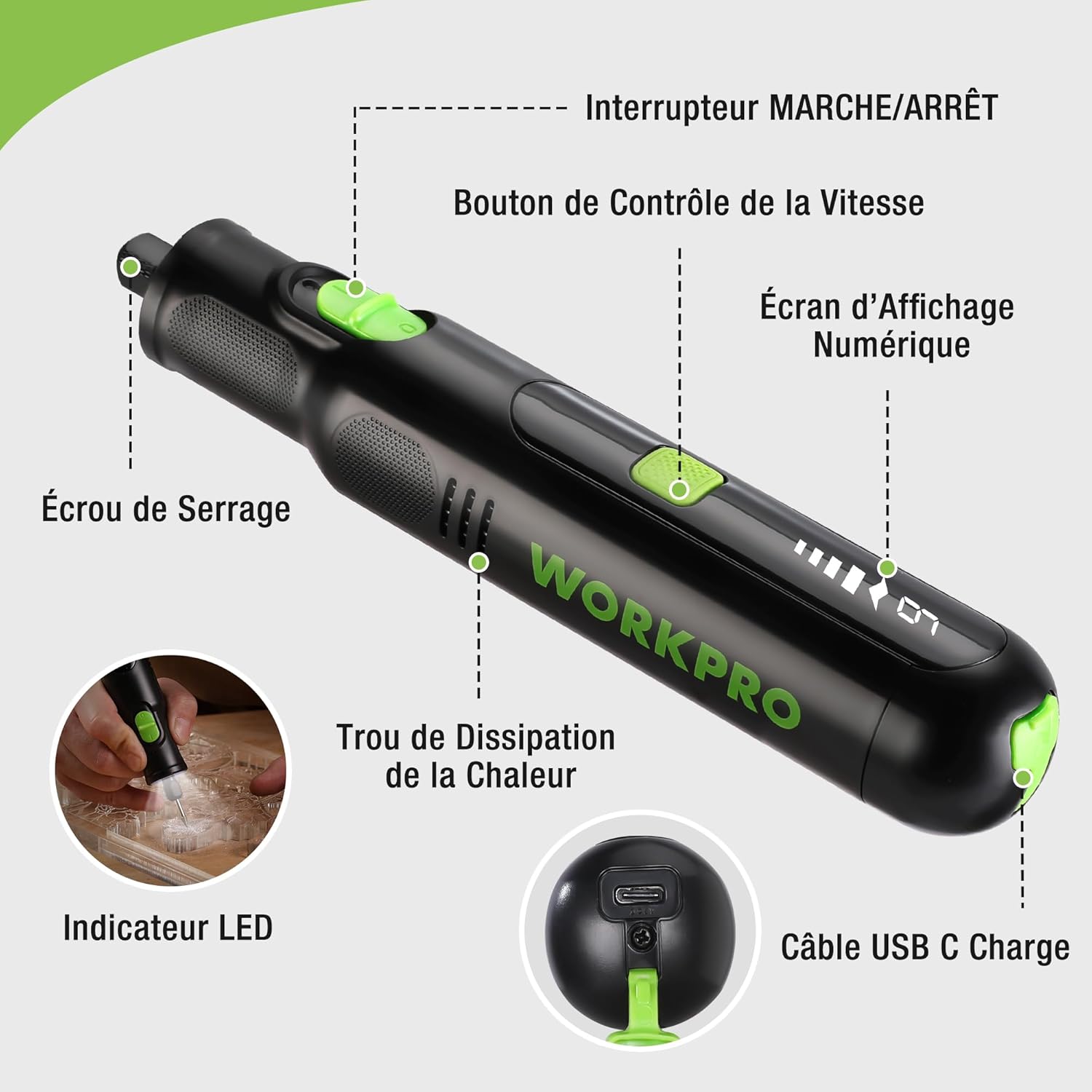
Figure 2: Key components of the rotary tool.
ส่วนประกอบ:
- สวิตช์เปิด/ปิด: เปิดใช้งานและปิดใช้งานเครื่องมือ
- ปุ่มควบคุมความเร็ว: ปรับความเร็วรอบของเครื่องมือ
- หน้าจอแสดงผลดิจิตอล: Shows the current speed setting.
- น็อตคอลเล็ต: Secures the accessory bits in place.
- รูกระจายความร้อน: ช่วยให้มอเตอร์ระบายความร้อนได้อย่างเหมาะสมขณะใช้งาน
- ไฟแสดงสถานะ LED: ช่วยให้พื้นที่ทำงานมีแสงสว่างเพียงพอ
- พอร์ตชาร์จ USB-C: สำหรับชาร์จแบตเตอรี่ภายใน
อุปกรณ์เสริมที่รวมอยู่:
Your WORKPRO rotary tool comes with 117 diverse accessories, enabling a wide range of applications. These include:

รูปที่ 3: เกินview จากอุปกรณ์เสริม 117 ชิ้นที่รวมอยู่ในชุด
- การเจียร/การลับคม: Grinding stones and wheels for material shaping and sharpening.
- งานแกะสลัก: Diamond bits for detailed carving and engraving.
- การขัดเงา: Wool felt wheels, felt wheels, screw mandrels, and metal brushes for achieving smooth, shiny finishes.
- การกัด: Milling bits for precise material removal.
- การตัด: Cutting discs and saw blades for various cutting tasks, along with a cutting disc holder.
- ขัด: Sandpaper, rubber sanding drums, and sanding bands for surface preparation and finishing.
- คอลเล็ต: 2.35mm and 3.2mm collets to accommodate different shank sizes.
- การเจาะ: 2.35mm and 3.2mm drill bits for small-scale drilling.
- ประแจ: For securing and loosening collet nuts.
4. การตั้งค่า
4.1 การชาร์จเครื่องมือ
The tool is equipped with a 7.2V 1100mAh Lithium-ion rechargeable battery. Before first use, fully charge the tool.
- Connect the provided USB-C charging cable to the tool's USB-C charging port.
- Connect the other end of the USB cable to a compatible USB power source (e.g., computer, USB wall adapter).
- หน้าจอแสดงผลดิจิทัลจะแสดงสถานะการชาร์จ โดยปกติการชาร์จเต็มจะใช้เวลาประมาณ 2 ชั่วโมง
- เมื่อชาร์จเต็มแล้ว ให้ถอดสายชาร์จออก
Note: For optimal battery life, it is recommended to store the tool with the battery charged between 50% and 75%. Recharge the tool at least once every 3 to 6 months if not used regularly.

Figure 4: Charging the rotary tool via USB-C.
4.2 การติดตั้งอุปกรณ์เสริม
The WORKPRO rotary tool features an automatic spindle lock design for easy and secure accessory changes.
- โปรดตรวจสอบให้แน่ใจว่าเครื่องมือปิดอยู่
- คลายน็อตยึดที่ด้านหน้าของเครื่องมือออก
- Select the appropriate collet size for your desired accessory (2.35mm or 3.2mm). Insert the collet into the tool if not already present.
- Insert the shank of the accessory bit into the center of the collet nut. Ensure the bit is fully seated.
- Hand-tighten the collet nut. For a secure fit, use the included wrench to tighten the collet nut firmly. Do not overtighten.

Figure 5: Two-step accessory replacement process.

Figure 6: Detailed installation steps for various accessories.
Note: The automatic spindle lock engages when the tool is off, allowing for accessory changes without needing to press a separate button. A slight clicking sound when the tool stops is normal due to this mechanism.
5. คู่มือการใช้งาน
5.1 การเปิด/ปิดเครื่อง
To turn the tool ON, slide the ON/OFF switch to the 'ON' position. To turn it OFF, slide the switch to the 'OFF' position.
5.2 การปรับความเร็ว
The tool features 6 variable speed settings, ranging from 5000 RPM to 30000 RPM. Press the Speed Control Button to cycle through the speeds. The current speed setting will be displayed on the digital screen.
- Speed I: 5000 RPM
- Speed II: 10000 RPM
- Speed III: 15000 RPM
- Speed IV: 20000 RPM
- Speed V: 25000 RPM
- Speed VI: 30000 RPM
Choose the appropriate speed for your task and material. Lower speeds are generally suitable for polishing, delicate work, and softer materials, while higher speeds are for cutting, grinding, and harder materials.

Figure 7: Variable speed settings and powerful motor.
5.3 ไฟ LED แบบบูรณาการ
The tool includes an integrated LED light that illuminates the work area, improving visibility in dimly lit spaces and for detailed tasks.

Figure 8: Using the LED light for precision engraving.
5.4 การสมัคร
The WORKPRO rotary tool is highly versatile and can be used for:
- การตัด: Use appropriate cutting discs for various materials.
- การแกะสลัก: Utilize diamond bits for intricate designs on wood, plastic, or soft metals.
- การขัดเงา: Apply felt wheels and polishing compounds to restore shine to surfaces.
- ขัด: Use sanding bands and drums for smoothing rough edges or preparing surfaces.
- การเจาะ: Employ small drill bits for precision holes.

รูปที่ 9: อดีตamples of versatile applications.
6. การบำรุงรักษา
6.1 การทำความสะอาด
- ควรถอดเครื่องมือออกจากแหล่งจ่ายไฟทุกครั้งก่อนทำความสะอาด
- ใช้แบบนุ่มๆamp ใช้ผ้าเช็ดทำความสะอาดภายนอกเครื่องมือ ห้ามใช้สารเคมีรุนแรงหรือน้ำยาทำความสะอาดที่มีฤทธิ์กัดกร่อน
- Use a small brush or compressed air to clear dust and debris from the heat dissipation holes and around the collet area.
6.2 การดูแลและจัดเก็บแบตเตอรี่
- To prolong battery life, avoid completely discharging the battery regularly.
- For long-term storage, ensure the battery is charged to approximately 50-75%. Recharge the tool every 3 to 6 months to prevent deep discharge and maintain battery health.
- Store the tool in a cool, dry place, away from direct sunlight and extreme temperatures.
6.3 ช่องเก็บอุปกรณ์เสริม
Keep all accessories organized in the provided storage bag or a suitable container to prevent loss and damage.
7 การแก้ไขปัญหา
This section addresses common issues you might encounter with your WORKPRO rotary tool.
| ปัญหา | สาเหตุที่เป็นไปได้ | สารละลาย |
|---|---|---|
| เครื่องมือไม่เปิด | แบตเตอรี่หมดประจุ | Charge the tool fully using the USB-C cable. |
| Tool stops unexpectedly during use. | แบตเตอรี่เหลือน้อยหรือเครื่องมือมีโหลดเกิน | Recharge the battery. Reduce pressure on the tool or use a lower speed setting for the task. |
| Clicking sound when turning off. | Normal operation of the automatic spindle lock. | This is a normal function and does not indicate a fault. |
| Accessory bit is loose or wobbles. | น็อตยึดหัวจับไม่แน่นพอ หรือหัวจับมีขนาดไม่ถูกต้อง | Ensure the correct collet size is used for the accessory. Tighten the collet nut firmly with the included wrench. |
| Reduced performance or short runtime. | Battery degradation or improper charging/storage. | Ensure proper charging and storage practices are followed (refer to Section 6.2). If the issue persists, the battery may need replacement. |
8. ข้อมูลจำเพาะ
Below are the technical specifications for the WORKPRO 7.2V Cordless Rotary Tool (Model W123024A).
| คุณสมบัติ | ข้อมูลจำเพาะ |
|---|---|
| ยี่ห้อ | เวิร์คโปร |
| หมายเลขรุ่น | W123024A |
| เล่มที่tage | 7.2 โวลต์ |
| ประเภทแบตเตอรี่ | ลิเธียมไออน (มี 1 อัน) |
| ความจุของแบตเตอรี่ | 1100 มิลลิแอมป์ |
| ความเร็วในการหมุนสูงสุด | 30000 รอบต่อนาที |
| ความเร็วตัวแปร | 6 (5000-30000 รอบต่อนาที) |
| เวลาในการชาร์จ | ประมาณ 2 ชั่วโมง |
| ระยะเวลาการใช้งาน (ความเร็วสูงสุด) | ประมาณ 45 นาที |
| น้ำหนัก | 227 กรัม |
| ขนาด (กว้าง x ยาว x สูง) | 25.2 x 16.8 x 5.5 ซม. |
| คุณสมบัติพิเศษ | Cordless, Integrated LED Light, Automatic Spindle Lock |
| ส่วนประกอบที่รวมอยู่ | อุปกรณ์เสริม 117 ชิ้น |
| ผู้ผลิต | บริษัท หางโจว เกรทสตาร์ อินดัสเทรียล จำกัด |
9. การรับประกันและการสนับสนุน
For warranty information, please refer to the documentation provided at the time of purchase or contact your retailer. WORKPRO is committed to providing quality products and customer satisfaction.
If you encounter any issues or have questions regarding your WORKPRO 7.2V Cordless Rotary Tool, please contact the seller or WORKPRO customer support through their official website or contact channels. Please have your model number (W123024A) and purchase details ready when seeking support.


