1. บทนำ
ขอบคุณสำหรับการซื้อasing the SHARP 55GP6260E Quantum Dot Google TV. This manual provides essential information for the safe and efficient use of your television. Please read it thoroughly before operating the device and retain it for future reference.
ข้อมูลด้านความปลอดภัย
Always follow basic safety precautions when using this television to reduce the risk of fire, electric shock, and injury. Do not expose the TV to rain or moisture. Do not open the cabinet. Refer all servicing to qualified personnel.
2. เนื้อหาบรรจุภัณฑ์
โปรดตรวจสอบให้แน่ใจว่าสินค้าทั้งหมดที่ระบุไว้ด้านล่างนี้รวมอยู่ในแพ็คเกจของคุณแล้ว:
- SHARP 55GP6260E Main Unit
- รีโมทคอนโทรล
- แบตเตอรี่ AAA 2 ก้อน
- ชุดติดตั้งสำหรับขาตั้งทีวี
- คู่มือแนะนำ
3. การตั้งค่า
3.1 การติดตั้งขาตั้งทีวี
Carefully place the TV screen-down on a soft, flat surface. Attach the included stand feet to the designated slots at the bottom of the TV using the provided screws from the installation kit. Ensure the stand is securely fastened before placing the TV upright.

Image: Close-up of the TV stand feet, showing their design and how they attach to the television base.
3.2 การติดตั้งบนผนัง (ทางเลือก)
The SHARP 55GP6260E supports a VESA standard of 400 x 300 mm. Use a compatible wall mount (not included) and follow the instructions provided with the wall mount. Ensure the wall can support the weight of the TV and mount.
3.3 Initial Power-On and Google TV Setup
After securely placing the TV or mounting it, connect the power cord to the TV and a power outlet. Press the power button on the remote control or the TV. Follow the on-screen instructions to complete the initial Google TV setup, including network connection, Google account login, and channel scanning.

Image: A technical diagram illustrating the overall dimensions of the 55-inch SHARP television, including width, height, and depth, both with and without the stand.
4. การเชื่อมต่อ
The television offers a variety of ports for connecting external devices:
- สาย HDMI 2.1 (4 เส้น): For high-definition audio and video input, with eARC support on one port for enhanced audio return channel.
- ยูเอสบี (x2): สำหรับเชื่อมต่ออุปกรณ์จัดเก็บข้อมูล USB เพื่อเล่นสื่อหรือสำหรับการอัปเดตซอฟต์แวร์
- อินพุตเสาอากาศ: สำหรับการเชื่อมต่อเสาอากาศภาคพื้นดิน
- อินพุตดาวเทียม: สำหรับการเชื่อมต่อจานดาวเทียม
- แจ็คหูฟัง: เพื่อการฟังเสียงส่วนตัว
- เอาต์พุตเสียงออปติคัลดิจิตอล: สำหรับเชื่อมต่อกับระบบเสียงภายนอก
- อินพุตมินิคอมโพสิต / CVBS + อินพุตเสียง: สำหรับเชื่อมต่ออุปกรณ์อนาล็อกรุ่นเก่า
- บลูทูธ: สำหรับการเชื่อมต่อแบบไร้สายกับอุปกรณ์เสียงหรืออุปกรณ์เสริมที่ใช้งานร่วมกันได้
- ไวไฟ : สำหรับการเชื่อมต่ออินเตอร์เน็ตแบบไร้สาย
- แลน (RJ45): For wired internet connectivity.

Image: The back panel of the SHARP television, clearly displaying the arrangement of various input and output ports for external device connections.
5. คู่มือการใช้งาน
5.1 อินเทอร์เฟซ Google TV
Your SHARP 55GP6260E features Google TV, providing a personalized experience with access to a vast library of content. Navigate using the remote control to browse pre-installed applications like Netflix, YouTube, Google Play Movies & TV, Google Play Store, and Prime Video. Utilize the integrated Google Assistant for voice commands and Chromecast for casting content from your mobile devices.
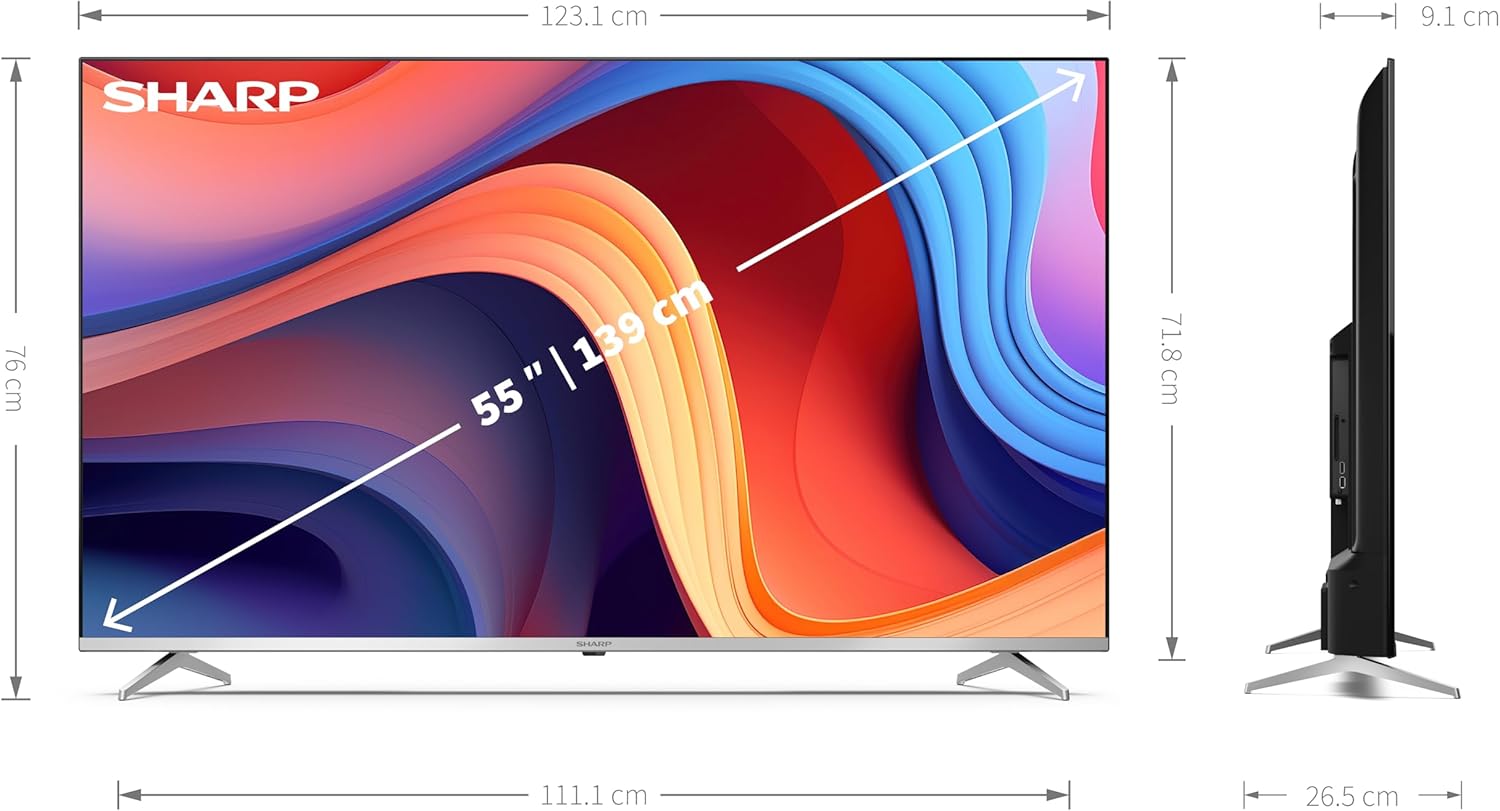
Image: The SHARP television screen showcasing the Google TV interface, featuring a personalized content feed and icons for popular streaming applications such as YouTube, Prime Video, and Disney+.
5.2 การปรับปรุงภาพและเสียง
Experience superior visual and audio quality with the following technologies:
- Quantum Dot Technology (Q-COLOUR): Delivers an ultimate color space for vibrant and accurate colors.
- ความละเอียด 4K Ultra HD: Provides stunning clarity and detail with 3840 x 2160 pixels.
- HDR10, HLG, and Dolby Vision: Support for high dynamic range content, offering enhanced contrast and brightness.
- Active Motion 1000: Improves motion clarity for fast-paced scenes.
- ระบบเสียง Dolby Atmos: Creates an immersive 3D audio experience.
- ระบบลำโพงในตัว: Features a front silk tweeter (10 W) and a downward-firing woofer (10 W) for balanced sound.
6. การบำรุงรักษา
6.1 การทำความสะอาดโทรทัศน์
ก่อนทำความสะอาด ให้ถอดปลั๊กไฟออก ใช้ผ้านุ่มและแห้งเช็ดหน้าจอและตัวเครื่อง สำหรับคราบฝังแน่น ให้เช็ดเบาๆampen the cloth with water or a mild, non-abrasive screen cleaner. Never spray liquid directly onto the screen or cabinet.
6.2 การอัปเดตซอฟต์แวร์
Your Google TV may receive automatic software updates. Ensure your TV is connected to the internet to receive the latest features and security patches. You can also manually check for updates through the TV's settings menu.
7 การแก้ไขปัญหา
If you encounter issues with your television, refer to the following common troubleshooting steps:
- ไม่มีไฟฟ้า: Check if the power cord is securely connected to both the TV and the power outlet. Try a different outlet.
- ไม่มีภาพ/เสียง: ตรวจสอบให้แน่ใจว่าได้เลือกแหล่งสัญญาณเข้าที่ถูกต้อง ตรวจสอบการเชื่อมต่อสายเคเบิลทั้งหมด (HDMI, เสาอากาศ ฯลฯ)
- คุณภาพภาพไม่ดี: Adjust picture settings (brightness, contrast, sharpness). Check the signal strength for antenna/satellite.
- ไม่มีการเชื่อมต่ออินเทอร์เน็ต: Verify Wi-Fi password or LAN cable connection. Restart your router and modem.
- รีโมทคอนโทรลไม่ทำงาน: ใส่แบตเตอรี่ AAA กลับเข้าไป ตรวจสอบให้แน่ใจว่าไม่มีสิ่งกีดขวางระหว่างรีโมทและเซ็นเซอร์อินฟราเรดของทีวี
สำหรับปัญหาที่ซับซ้อนกว่านี้ โปรดติดต่อฝ่ายบริการลูกค้า
8. ข้อมูลจำเพาะ
| คุณสมบัติ | ข้อมูลจำเพาะ |
|---|---|
| ยี่ห้อ | คม |
| หมายเลขรุ่น | 55GP6260E |
| ขนาดหน้าจอ | 55 นิ้ว (139 ซม.) |
| เทคโนโลยีการแสดงผล | คิวเลด ควอนตัมดอท |
| ปณิธาน | 4K Ultra HD (3840 x 2160 พิกเซล) |
| ระบบปฏิบัติการ | กูเกิลทีวี |
| อัตราการรีเฟรช | 60 เฮิรตซ์ |
| คุณสมบัติพิเศษ | Quantum Dot Technology, Dolby Vision, Dolby Atmos, HDR10, HLG, Active Motion 1000, Frameless Design |
| เทคโนโลยีการเชื่อมต่อ | Bluetooth, HDMI, Wi-Fi, LAN |
| พอร์ต HDMI | 4 (HDMI 2.1 with eARC) |
| พอร์ต USB | 2 |
| มาตรฐาน VESA | 400 x 300 มม. |
| ขนาดสินค้า (รวมขาตั้ง) | 123.1 x 76 x 26.5 ซม. |
| ขนาดสินค้า (ไม่รวมขาตั้ง) | 123.1 x 71.8 x 9.1 ซม. |
| สี | เงิน |
| แบตเตอรี่ | 2 AAA (รวม) |
| ความพร้อมของอะไหล่ | ไม่มีข้อมูล |
| รับประกันการอัปเดตซอฟต์แวร์จนถึง | ไม่มีข้อมูล |
ข้อมูลด้านพลังงาน
For detailed energy consumption data, please refer to the energy label and product information sheet.

Image: The official EU Energy Label for the SHARP 55GP6260E television, indicating its energy efficiency class and power consumption in kWh/1000h for both SDR and HDR content.

Image: A detailed product information sheet for the SHARP 55GP6260E television, providing comprehensive technical data and compliance information.
You can find more information in the EPREL database: https://eprel.ec.europa.eu/qr/1763513
9. การรับประกันและการสนับสนุน
Your SHARP 55GP6260E television comes with a manufacturer's warranty. Please refer to the warranty card included in your package for specific terms and conditions. For technical support, service, or warranty claims, please contact Sharp customer service.
- ผู้ผลิต: คม
- อีเมลฝ่ายบริการลูกค้า: kamil.gorczyca@sharpconsumer.eu
- เป็นทางการ Webเว็บไซต์: www.sharpconsumer.com


