1. บทนำ
This manual provides essential information for the safe and efficient use of your GEMBIRD TSL-PS-S4U-01-W Power Strip. Please read these instructions carefully before operating the device and retain them for future reference.
2. ข้อมูลด้านความปลอดภัย
- Do not exceed the maximum load rating of the power strip.
- ห้ามต่อปลั๊กพ่วงหลายตัวเข้าด้วยกัน
- อุปกรณ์นี้มีไว้สำหรับใช้ภายในอาคารเท่านั้น
- ควรเก็บให้ห่างจากน้ำและสภาพแวดล้อมที่มีความชื้นสูง
- ห้ามถอดชิ้นส่วนหรือดัดแปลงรางปลั๊กไฟ
- ตรวจสอบให้แน่ใจว่าปลั๊กไฟเสียบเข้ากับเต้ารับที่ผนังจนสุด
- เก็บให้พ้นจากมือเด็ก
3. สินค้าหมดview
The GEMBIRD TSL-PS-S4U-01-W is a multi-functional power strip designed to provide convenient power distribution for various electronic devices. It features multiple AC outlets and USB charging ports.
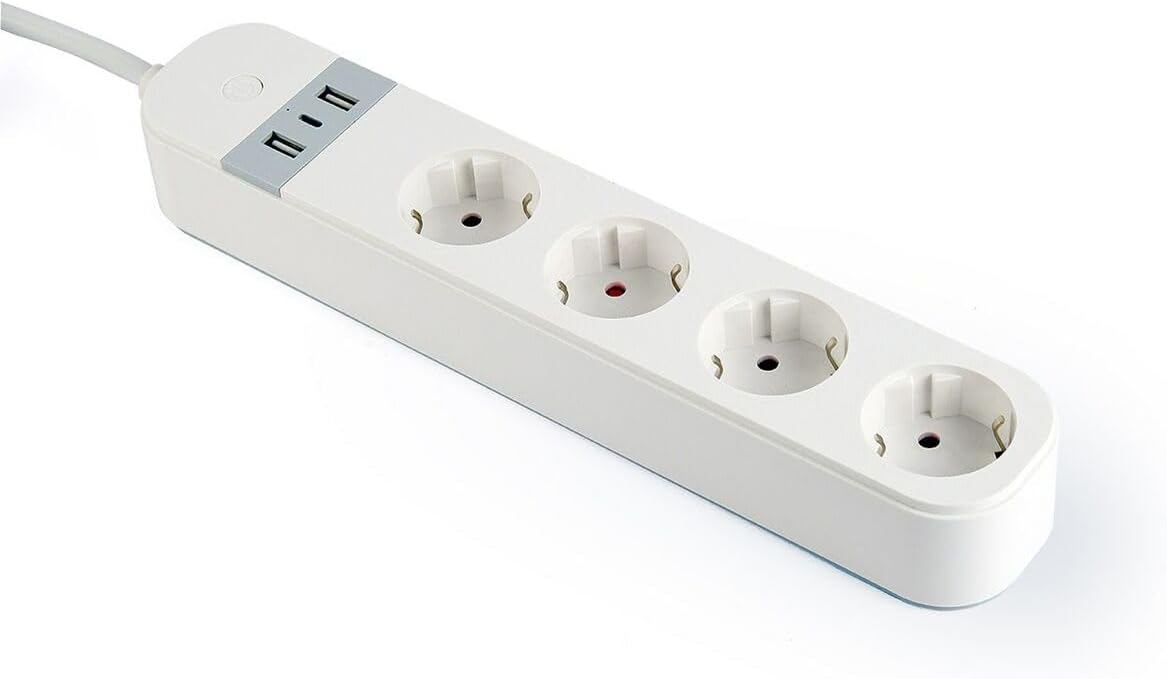
รูปที่ 1: GEMBIRD TSL-PS-S4U-01-W Power Strip. This image displays the GEMBIRD TSL-PS-S4U-01-W Power Strip. It is white in color and features three Type E electrical outlets arranged in a line. At one end, there is a control panel with two USB-A charging ports and a small circular power button with an LED indicator. A power cable extends from this end. The overall design is sleek and rectangular.
4. การตั้งค่า
- แกะ: แกะปลั๊กพ่วงออกจากบรรจุภัณฑ์อย่างระมัดระวัง
- การจัดวาง: Place the power strip on a stable, dry surface, away from heat sources and direct sunlight. Ensure adequate ventilation around the unit.
- เชื่อมต่อกับพลังงาน: Plug the power strip's main cable into a grounded wall outlet.
- เปิดเครื่อง: Press the power button on the power strip. The LED indicator will illuminate, indicating the unit is powered on.
5. คู่มือการใช้งาน
5.1 การใช้เต้ารับไฟฟ้ากระแสสลับ
- Ensure the power strip is turned on (LED indicator illuminated).
- Plug your electronic devices into the available AC outlets.
- To turn off power to all connected devices, press the power button. The LED indicator will turn off.
5.2 การใช้งานพอร์ตชาร์จ USB
- Connect your USB-powered devices (e.g., smartphones, tablets) to the USB charging ports using appropriate USB cables.
- The USB ports are active when the power strip is turned on.
6. การบำรุงรักษา
- การทำความสะอาด: Disconnect the power strip from the wall outlet before cleaning. Use a soft, dry cloth to wipe the surface. Do not use liquid cleaners or aerosols.
- พื้นที่จัดเก็บ: When not in use for extended periods, store the power strip in a cool, dry place.
- การตรวจสอบ: Periodically inspect the power cord and the power strip for any signs of damage. If damage is found, discontinue use immediately.
7 การแก้ไขปัญหา
| ปัญหา | สาเหตุที่เป็นไปได้ | สารละลาย |
|---|---|---|
| Power strip not turning on. | Not plugged into wall outlet; wall outlet not active; power button not pressed. | Ensure power strip is securely plugged in. Test wall outlet with another device. Press the power button firmly. |
| อุปกรณ์ไม่สามารถชาร์จผ่าน USB ได้ | Power strip is off; faulty USB cable; device not compatible. | Ensure power strip is on. Try a different USB cable. Check device's charging requirements. |
| Overload indicator (if present) is on. | Too many devices connected, exceeding maximum load. | Unplug some devices to reduce the load. Reset the power strip by turning it off and on. |
8. ข้อมูลจำเพาะ
| คุณสมบัติ | รายละเอียด |
|---|---|
| หมายเลขรุ่น | ทีเอสแอล-PS-S4U-01-W |
| ยี่ห้อ | นกเจมเบิร์ด |
| สี | สีขาว |
| AC Outlets AC | 3 (Type E) |
| พอร์ต USB | 2 (แบบ ก) |
| ความยาวสายเคเบิล | 1.5 เมตร |
| คุณสมบัติ | ไฟ LED แสดงสถานะ |
| การรับรอง | การรับรอง RoHS, CE |
| ขนาดสินค้า | 3.74 x 2.56 x 12.99 นิ้ว |
| น้ำหนักสินค้า | 660 กรัม |
| ผู้ผลิต | เจมเบิร์ด |
9. ข้อมูลการรับประกัน
GEMBIRD products are manufactured to high-quality standards. For specific warranty terms and conditions, please refer to the warranty card included with your purchase or visit the official GEMBIRD webไซต์นี้ โปรดเก็บหลักฐานการซื้อไว้เพื่อใช้ยืนยันการรับประกัน
10. การสนับสนุน
For technical support, product inquiries, or assistance with troubleshooting, please contact GEMBIRD customer service. Contact details can typically be found on the product packaging or the official GEMBIRD webเว็บไซต์.


