การแนะนำ
This manual provides comprehensive instructions for the setup, operation, and maintenance of your Blaupunkt 43QD7050 43-inch 4K Ultra HD QLED Google TV. Please read this manual thoroughly before using the television to ensure proper functionality and safety.

ภาพ: ด้านหน้า view of the Blaupunkt 43QD7050 QLED Google TV, highlighting its display and features.
ข้อมูลด้านความปลอดภัยที่สำคัญ
Always follow basic safety precautions when using this television to reduce the risk of fire, electric shock, and injury. Keep this manual for future reference.
- อย่าให้โทรทัศน์โดนฝนหรือความชื้น
- อย่าปิดกั้นช่องระบายอากาศ
- ตรวจสอบให้แน่ใจว่าสายไฟมีการต่อสายดินอย่างถูกต้อง
- ถอดปลั๊กโทรทัศน์ในระหว่างที่มีพายุฝนฟ้าคะนองหรือเมื่อไม่ได้ใช้งานเป็นเวลานาน
- ส่งต่อการบริการทั้งหมดไปยังบุคลากรบริการที่มีคุณสมบัติเหมาะสม
มีอะไรอยู่ในกล่อง
ตรวจสอบให้แน่ใจว่าอุปกรณ์ทุกชิ้นครบถ้วนก่อนแกะกล่องโทรทัศน์
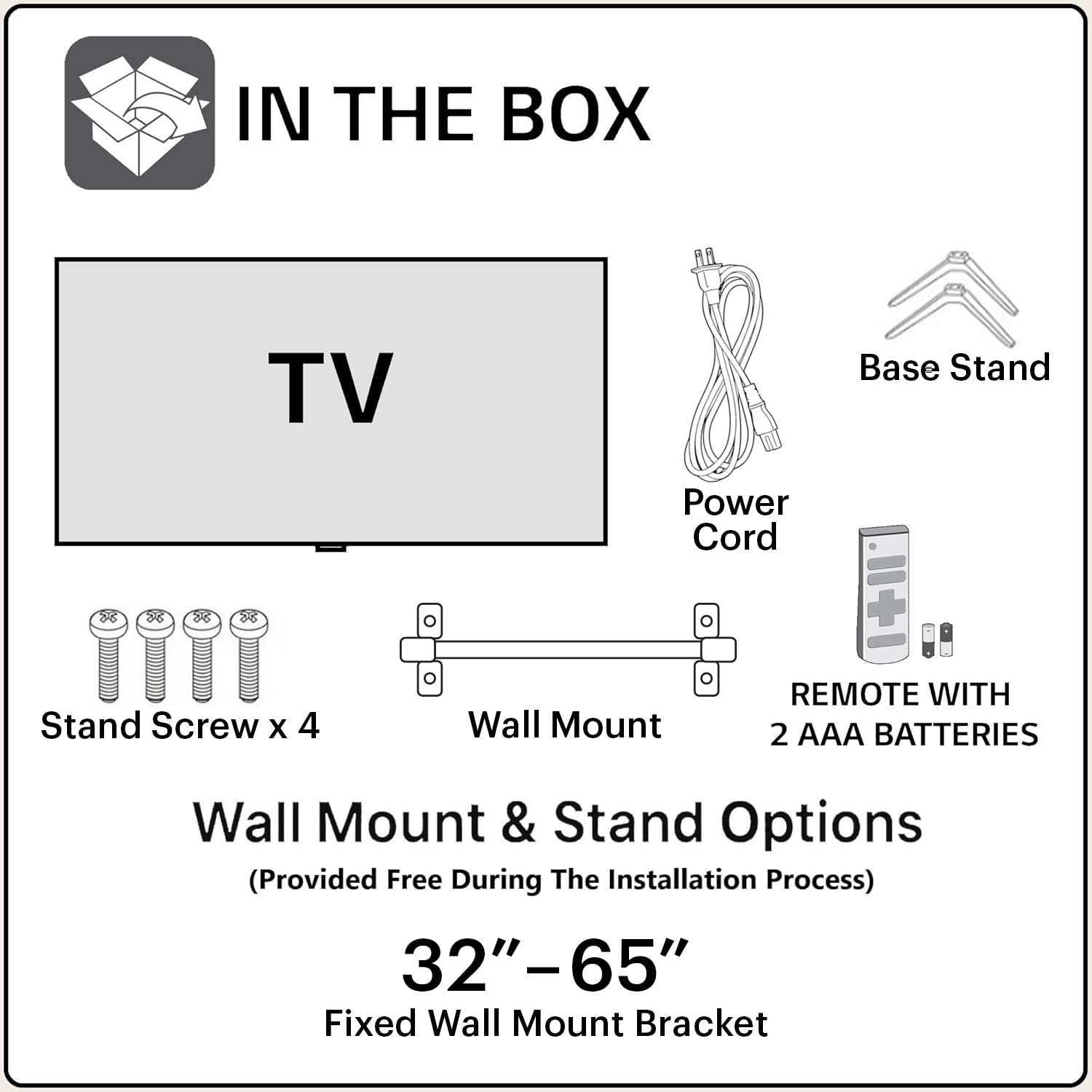
Image: Diagram showing the items included in the product packaging: TV, remote control, wall mount, stand screws, power cord, and AAA batteries.
- 1 x Blaupunkt 43QD7050 LED TV
- 1 x รีโมทคอนโทรล
- 1 x Wall Mount Bracket (for 32"-65" models)
- แบตเตอรี่ AAA 2 ก้อน (สำหรับรีโมทคอนโทรล)
- 1 x สายไฟ
- 1 x Base Stand Set (with 4 stand screws)
- คู่มือการใช้งาน (เอกสารนี้)
ร่างกายเกินview
ด้านหน้า View

ภาพ: ด้านหน้า view ของโทรทัศน์, โชว์asing the screen and minimal bezels.
ด้านข้าง View

ภาพ: ไซด์โปรfile of the television, illustrating its slim design.
หลัง View และท่าเรือ

ภาพ: ด้านหลัง view of the television, detailing the location of various input and output ports.
The rear panel of the TV includes various ports for connectivity:
- พอร์ต HDMI (x3): For connecting devices like gaming consoles, set-top boxes, and Blu-ray players. One port supports eARC.
- พอร์ต USB (x2): สำหรับเชื่อมต่ออุปกรณ์จัดเก็บข้อมูล USB
- พอร์ตอีเธอร์เน็ต: สำหรับการเชื่อมต่ออินเตอร์เน็ตแบบใช้สาย
- อินพุตเสาอากาศ/สายเคเบิล: สำหรับเชื่อมต่อเสาอากาศหรือเคเบิลทีวี
- เสียงออก: สำหรับเชื่อมต่อระบบเสียงภายนอก
- กำลังไฟเข้า: สำหรับเชื่อมต่อสายไฟ
คู่มือการติดตั้ง
1. การติดตั้งขาตั้ง (ทางเลือก)
If you choose to place the TV on a stand, follow these steps:
- วางทีวีคว่ำหน้าลงบนพื้นผิวที่นุ่มและเรียบอย่างระมัดระวังเพื่อป้องกันไม่ให้หน้าจอเสียหาย
- จัดวางฐานรองให้ตรงกับรูสกรูที่ด้านล่างของทีวี
- ยึดขาตั้งแต่ละอันด้วยสกรูที่ให้มา
2. การติดตั้งบนผนัง (ทางเลือก)
The TV comes with a wall mount bracket. Professional installation is recommended for wall mounting. Ensure the wall can support the weight of the TV.
- Refer to the wall mount bracket's instructions for specific installation details.
- Ensure adequate ventilation around the mounted TV.
3. การเชื่อมต่ออุปกรณ์ต่อพ่วง
เชื่อมต่ออุปกรณ์ภายนอกของคุณเข้ากับพอร์ตที่เหมาะสมบนแผงด้านหลังของทีวี
- ช่องต่อ HDMI: Use HDMI cables to connect devices like set-top boxes, gaming consoles, or Blu-ray players.
- ยูเอสบี: เสียบอุปกรณ์ USB เพื่อเล่นสื่อ
- อีเธอร์เน็ต: เชื่อมต่อสายอีเธอร์เน็ตเพื่อการเชื่อมต่ออินเทอร์เน็ตแบบใช้สายที่เสถียร
- พลัง: เชื่อมต่อสายไฟเข้ากับช่องรับไฟของทีวี จากนั้นจึงเชื่อมต่อกับเต้ารับที่ผนัง

Image: Visual representation of the TV's connectivity options including HDMI, Bluetooth, Dual Band Wi-Fi, and USB.
4. การเปิดเครื่องครั้งแรกและการตั้งค่า Google TV
- เสียบปลั๊กทีวีเข้ากับเต้ารับไฟฟ้า
- กดปุ่มเปิด/ปิดบนรีโมทคอนโทรลหรือทีวี
- ปฏิบัติตามคำแนะนำบนหน้าจอเพื่อทำการตั้งค่าเบื้องต้นให้เสร็จสมบูรณ์ รวมถึงการเลือกภาษา การเชื่อมต่อเครือข่าย (Wi-Fi หรืออีเทอร์เน็ต) และการลงชื่อเข้าใช้บัญชี Google
คำแนะนำการใช้งาน
ฟังก์ชั่นการควบคุมระยะไกล

Image: Layout of the Blaupunkt TV remote control, showing buttons for power, navigation, volume, and quick access to streaming services.
The remote control allows you to navigate the TV's features:
- ปุ่มเปิด/ปิด: เปิดหรือปิดทีวี
- แผงนำทาง (ขึ้น/ลง/ซ้าย/ขวา/ตกลง): สำหรับการนำทางและเลือกเมนู
- ปุ่มย้อนกลับ: กลับไปยังหน้าจอที่แล้ว
- ปุ่มโฮม: เข้าถึงหน้าจอหลักของ Google TV
- เพิ่ม/ลดระดับเสียง: ปรับระดับเสียง
- ปุ่มปิดเสียง: ปิดเสียงหรือเปิดเสียง
- ปุ่มเข้าถึงด่วน: ปุ่มเฉพาะสำหรับ Netflix, Prime Video, YouTube และบริการอื่นๆ
- ปุ่ม Google Assistant: เปิดใช้งานการควบคุมด้วยเสียง
การนำทางอินเทอร์เฟซ Google TV
Google TV organizes your content from various streaming services into a personalized home screen.

Image: Screenshot of the Google TV interface, displaying personalized movie and show recommendations and a unified watchlist.
- Use the navigation pad to browse through recommended content, apps, and settings.
- Select an item by pressing the OK ปุ่ม.
- Access the full list of installed apps from the "Apps" tab.
คุณสมบัติอัจฉริยะ
- Voice Control (Google Assistant): กดปุ่ม Google Assistant บนรีโมทของคุณ แล้วพูดคำสั่งเพื่อค้นหาเนื้อหา ควบคุมอุปกรณ์สมาร์ทโฮม หรือรับข้อมูล
- มิเรอร์หน้าจอ: Cast content from your compatible smartphone or tablet to the TV using the built-in casting feature.
- แอพและเกม: Access a wide range of applications and games from the Google Play Store.

Image: Display of the TV screen showcasing a selection of over 10,000 available apps and games, including popular streaming services.
การซ่อมบำรุง
- การทำความสะอาดหน้าจอ: เช็ดหน้าจอเบาๆ ด้วยผ้าเนื้อนุ่มที่ไม่เป็นขุย สำหรับคราบฝังแน่น ให้ใช้น้ำยาทำความสะอาดหน้าจอสำหรับโทรทัศน์โดยเฉพาะ โดยทาลงบนผ้าก่อนแล้วค่อยเช็ดลงบนหน้าจอ
- ทำความสะอาดตู้: ใช้ผ้าแห้งนุ่มเช็ดทำความสะอาดตู้ทีวี ห้ามใช้สารทำความสะอาดที่มีฤทธิ์กัดกร่อนหรือตัวทำละลาย
- การอัปเดตซอฟต์แวร์: ทีวีอาจได้รับการอัปเดตซอฟต์แวร์โดยอัตโนมัติ โปรดตรวจสอบให้แน่ใจว่าทีวีของคุณเชื่อมต่อกับอินเทอร์เน็ตเพื่อรับการอัปเดตเหล่านี้ ซึ่งจะช่วยปรับปรุงประสิทธิภาพและเพิ่มคุณสมบัติใหม่ๆ
การแก้ไขปัญหา
โปรดดูส่วนนี้เพื่อดูวิธีแก้ไขปัญหาทั่วไป
| ปัญหา | วิธีแก้ปัญหาที่เป็นไปได้ |
|---|---|
| ไม่มีไฟฟ้า | ตรวจสอบให้แน่ใจว่าสายไฟเสียบเข้ากับทีวีและเต้ารับไฟฟ้าที่ใช้งานได้แน่นดีแล้ว ตรวจสอบไฟแสดงสถานะเพาเวอร์บนทีวี |
| ไม่มีภาพแต่มีเสียง | ตรวจสอบแหล่งสัญญาณเข้า กดปุ่ม "Input" บนรีโมทเพื่อเลือกแหล่งสัญญาณ ตรวจสอบให้แน่ใจว่าอุปกรณ์ภายนอกเปิดใช้งานและเชื่อมต่ออย่างถูกต้อง |
| ไม่มีเสียงแต่มีภาพ | Check the volume level and ensure the TV is not muted. Verify audio settings in the TV menu. If using external speakers, check their connections and power. |
| รีโมตคอนโทรลไม่ทำงาน | เปลี่ยนแบตเตอรี่ในรีโมทคอนโทรล ตรวจสอบให้แน่ใจว่าไม่มีสิ่งกีดขวางระหว่างรีโมทและเซ็นเซอร์อินฟราเรดของทีวี |
| คุณภาพของภาพไม่ดี | Check the cable connections. Adjust picture settings (brightness, contrast, sharpness) in the TV menu. For external devices, ensure they are outputting at the correct resolution. |
| ปัญหาการเชื่อมต่อ Wi-Fi | Restart your router and modem. Go to the TV's network settings and reconnect to your Wi-Fi network. Ensure the TV is within range of your router. |
ข้อมูลจำเพาะ
Detailed technical specifications for the Blaupunkt 43QD7050 QLED Google TV.

Image: Diagram illustrating the physical dimensions of the Blaupunkt 43QD7050 TV, including screen size, width, height, and depth.
| คุณสมบัติ | รายละเอียด |
|---|---|
| แบบอย่าง | 43QD7050 |
| ขนาดหน้าจอ | 43 นิ้ว (108 ซม.) |
| เทคโนโลยีการแสดงผล | คิวแอลอีดี |
| ปณิธาน | 4K Ultra HD (3840 x 2160) |
| อัตราการรีเฟรช | 60 เฮิรตซ์ |
| ระบบปฏิบัติการ | กูเกิลทีวี |
| เอาท์พุตเสียง | 60 วัตต์ |
| คุณสมบัติด้านเสียง | Dolby Digital Plus, DTS TruSurround, CyberSound Gen2 Technology |
| การเชื่อมต่อ | Dual Band Wi-Fi, 3 HDMI ports (eARC support), 2 USB ports, Ethernet, Bluetooth |
| คุณสมบัติพิเศษ | 4K HDR, Google Assistant, Screen Mirroring, HDR 10+ |
| หน่วยความจำ (RAM/พื้นที่จัดเก็บ) | แรม 2GB / พื้นที่เก็บข้อมูล 16GB |
| ขนาดสินค้า (กxยxส) | 97 x 10 x 55 ซม. (ไม่รวมขาตั้ง) |
| น้ำหนักสินค้า | 5.9 กก. |
| รุ่นปี | 2024 |

Image: Representation of the MediaTek MT9602 processor, highlighting its quad-core ARM Cortex A53 CPU and Mali-G52MC1 GPU for performance.
การรับประกันและการสนับสนุน
Your Blaupunkt 43QD7050 television comes with a manufacturer's warranty.
- การรับประกันสินค้า : 1 ปีนับจากวันที่ซื้อสินค้า
- Remote Accessories Warranty: 6 เดือนนับจากวันที่ซื้อ
- การรับประกันการเรียกร้อง: The brand warranty can be availed using the purchase invoice.
- รายการที่ไม่ครอบคลุม: Light bleeding and dot issues (Mura issues) occurring within acceptable Mura Inspection standards (2% guideline) are not considered panel defects and are not covered.
For customer support, service requests, or further inquiries, please contact:
- ติดต่อโทรฟรี: 1800-274-4342
- อีเมลไอดี: consumercare@blaupunkttv.in
- ที่อยู่ผู้ผลิต: B-29,30,31, Phase-II, Noida, Gautam Buddha Nagar, Uttar Pradesh, 201301, India.
Please have your product model number (43QD7050) and purchase invoice ready when contacting support.


