1. บทนำ
This manual provides detailed instructions for the installation, operation, and maintenance of your darkFlash DRX70 ATX Mid-Tower Gaming PC Case. Please read this manual thoroughly before beginning assembly to ensure proper setup and safe usage. Retain this manual for future reference.
2. ข้อมูลด้านความปลอดภัย
- Always disconnect power from all components before installation or maintenance.
- จับแผงกระจกนิรภัยด้วยความระมัดระวังเพื่อป้องกันการแตกหัก
- Avoid exposing the case to extreme temperatures or humidity.
- เก็บชิ้นส่วนเล็กๆ และสกรูให้ห่างจากเด็ก
- Ensure proper grounding for all electrical components.
3. เนื้อหาบรรจุภัณฑ์
ตรวจสอบว่ามีส่วนประกอบทั้งหมดอยู่ในแพ็คเกจของคุณ:
- darkFlash DRX70 ATX Mid-Tower PC Case
- 3 x 120mm Fixed RGB Fans (pre-installed in front)
- กล่องอุปกรณ์เสริม (บรรจุ สกรู สแตนด์ออฟ สายรัด ฯลฯ)
- คู่มือการใช้งาน
4. สินค้าหมดview
The darkFlash DRX70 is an ATX mid-tower case designed for optimal airflow and component visibility. It features a magnetic mesh front panel for enhanced air intake and a tempered glass side panel to showcase your build.
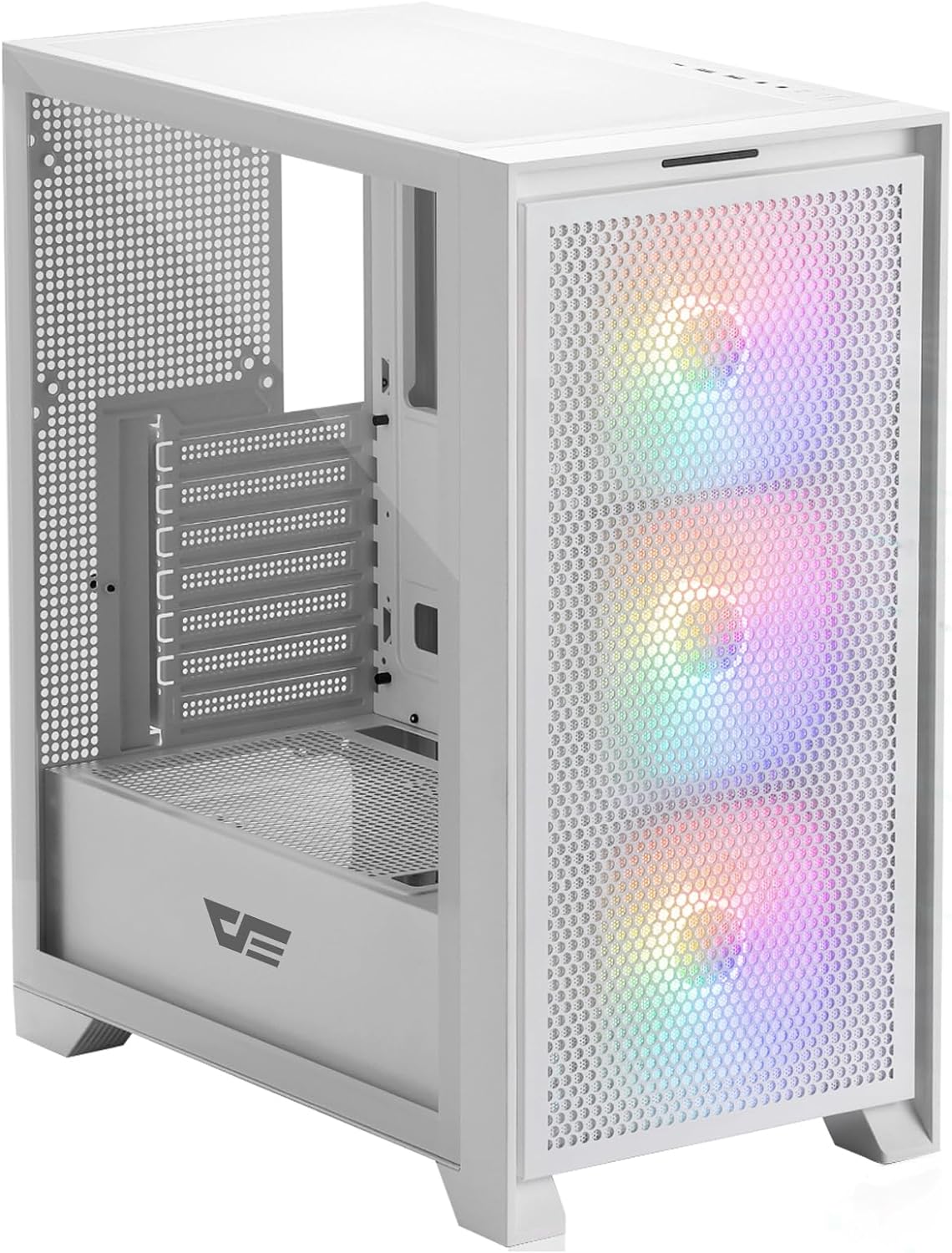
รูปที่ 4.1: ด้านหน้า view of the darkFlash DRX70 PC case with pre-installed RGB fans.
คุณสมบัติหลัก:
- Magnetic Mesh Front Panel: Optimizes air intake and is easily removable for cleaning.
- แผงด้านข้างกระจกนิรภัย: ให้ความกระจ่างใส view ของส่วนประกอบภายใน
- Pre-installed 3x120mm Fixed RGB Fans: Enhances cooling and adds aesthetic lighting. Note: Lighting is fixed, not addressable.
- ตัวกรองฝุ่น: Magnetic dust filters on top and bottom for easy maintenance.
- Anti-slip Bottom Structure: Ensures stability on various surfaces.
- USB 3.0 Ready: Convenient front I/O panel connectivity.
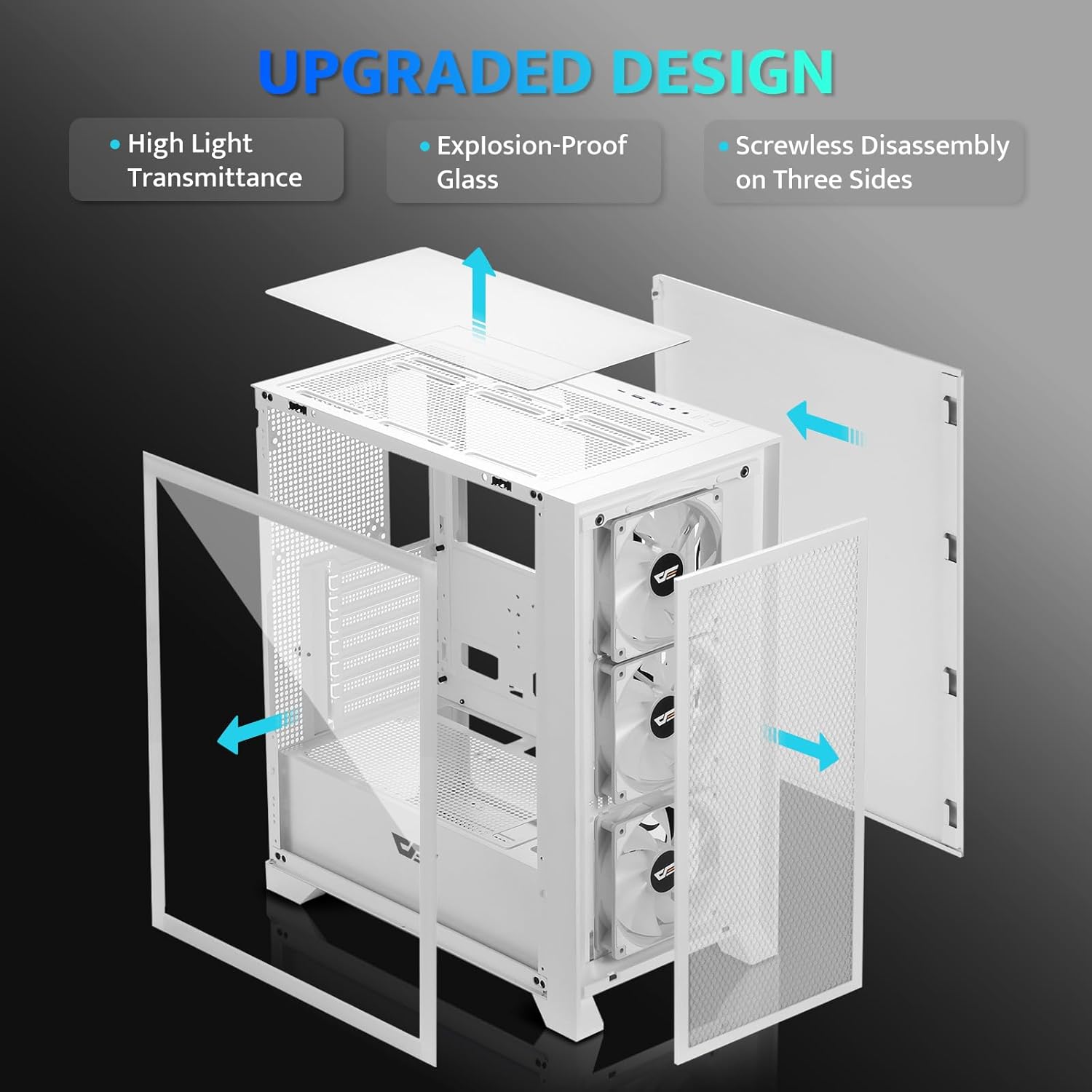
รูปที่ 4.2: ระเบิด view illustrating the removable panels for easy access and assembly.

Figure 4.3: Detail of the magnetic mesh front panel, designed for optimal airflow and easy removal.

Figure 4.4: Airflow channels within the DRX70 case, demonstrating efficient cooling paths.

Figure 4.5: The top I/O panel featuring USB 3.0, USB 2.0, HD Audio jacks, Reset, and Power buttons.
5. การตั้งค่าและการติดตั้ง
Follow these general steps for assembling your PC within the DRX70 case. Refer to your individual component manuals for specific installation details.
5.1 การเตรียมคดี
- วางเคสไว้บนพื้นผิวที่มั่นคงและเรียบ
- Remove the tempered glass side panel by unscrewing the thumb screws and carefully sliding it off.
- Remove the magnetic mesh front panel by gently pulling it away from the chassis.
- Remove the rear side panel by unscrewing the thumb screws and sliding it back.
5.2 การติดตั้งส่วนประกอบ
- เมนบอร์ด : Install the necessary standoffs for your motherboard form factor (ATX, M-ATX, ITX). Carefully place the motherboard into the case and secure it with screws.
- หน่วยจ่ายไฟ (PSU): Install the PSU into its designated compartment at the bottom rear of the case. Secure it with screws from the rear.
- ไดรฟ์จัดเก็บข้อมูล: Install 2.5" SSDs or 3.5" HDDs into the drive bays. The case supports 1x 2.5" SSD and 2x 2.5"/3.5" HDDs.
- การ์ดจอ (GPU): Install your graphics card into the appropriate PCIe slot on the motherboard and secure it. The case supports GPUs up to 350mm in length.
- การระบายความร้อน: The case comes with 3x 120mm fixed RGB fans pre-installed in the front. Additional fans or a 280mm radiator can be installed as per the specifications.
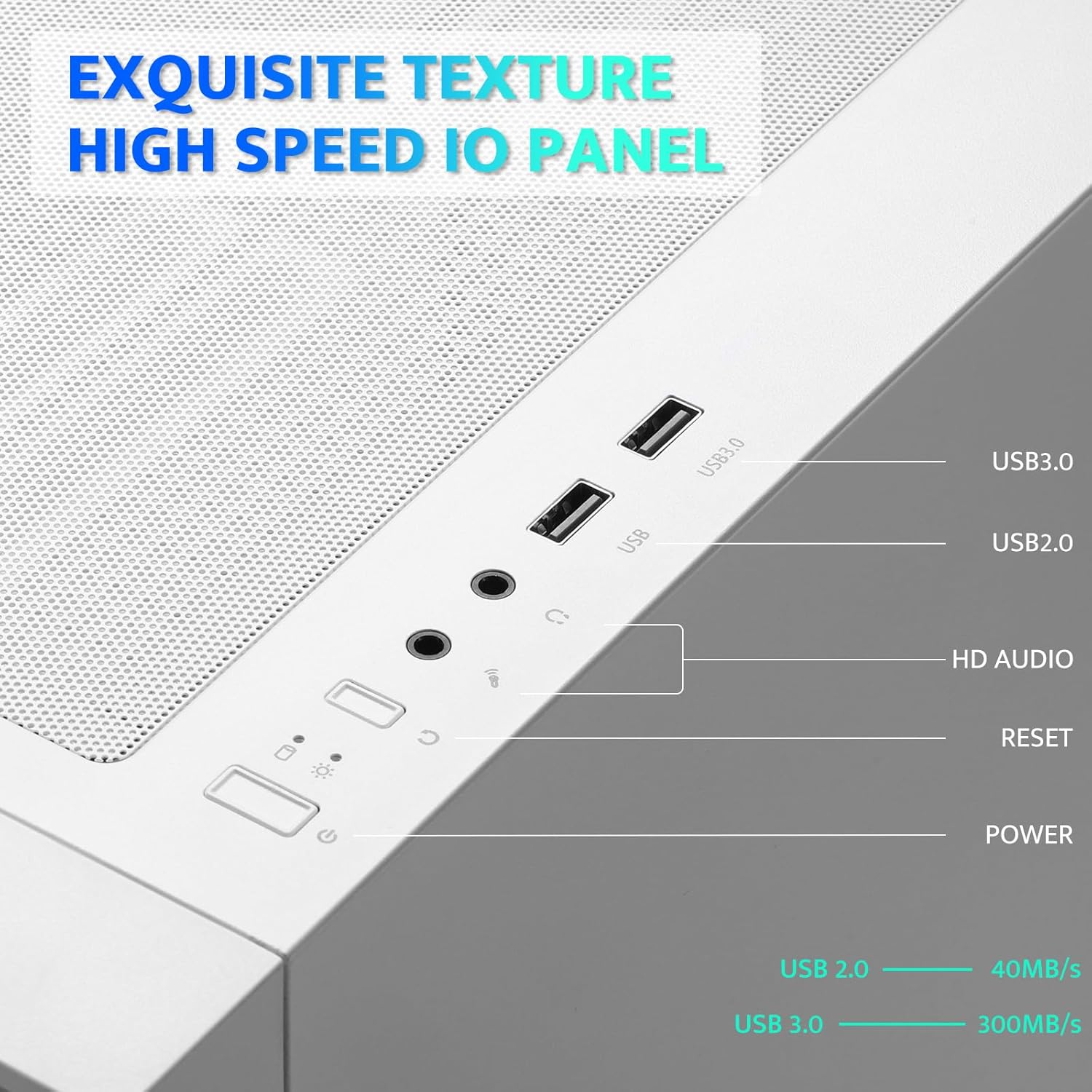
Figure 5.1: Internal layout with maximum component dimensions for CPU cooler, GPU, PSU, and radiator support.
5.3 การจัดการสายเคเบิล
Utilize the cable routing cutouts and tie-down points behind the motherboard tray to manage cables. This improves airflow and aesthetics. The DRX70 is designed to simplify cable management by allowing most connectors to be routed to the rear of the motherboard.

Figure 5.2: Illustration of cable management optimization, showing how cables can be concealed behind the motherboard tray.
6. คู่มือการใช้งาน
เมื่อติดตั้งและเชื่อมต่อส่วนประกอบทั้งหมดแล้ว คุณสามารถเปิดระบบได้
6.1 การเปิด/ปิดเครื่อง
- กดปุ่ม พลัง button on the top I/O panel to turn on your PC.
- To turn off, use the operating system's shutdown function or press and hold the พลัง button for several seconds.
6.2 ฟังก์ชันของแผง I/O ด้านหน้า
- พอร์ต USB 3.0: สำหรับการถ่ายโอนข้อมูลความเร็วสูงกับอุปกรณ์ที่รองรับ
- พอร์ต USB 2.0: สำหรับอุปกรณ์ USB มาตรฐาน
- แจ็คเสียง HD: สำหรับการเชื่อมต่อหูฟังและไมโครโฟน
- ปุ่มรีเซ็ต: เพื่อรีสตาร์ทระบบ
6.3 การทำงานของพัดลม
The pre-installed 120mm fans provide cooling and feature fixed RGB lighting. These fans operate continuously when the system is powered on. The RGB lighting pattern is not user-addressable.
7. การบำรุงรักษา
การบำรุงรักษาตามปกติจะช่วยให้มั่นใจได้ถึงประสิทธิภาพสูงสุดและอายุการใช้งานที่ยาวนานของส่วนประกอบพีซีของคุณ
7.1 Cleaning Dust Filters
The DRX70 case includes magnetic dust filters on the front and top panels, and a panel dust filter at the bottom. These should be cleaned periodically to prevent dust buildup and maintain airflow.
- Gently pull the magnetic dust filters off the chassis.
- Use a soft brush or compressed air to remove accumulated dust.
- Reattach the filters.

Figure 7.1: Magnetic dust filter for easy removal and cleaning.
7.2 การทำความสะอาดทั่วไป
เช็ดภายนอกเคสด้วยผ้านุ่มๆamp cloth. Avoid using harsh chemicals or abrasive materials that could damage the finish or tempered glass.
8 การแก้ไขปัญหา
If you encounter issues with your PC case, consider the following common solutions:
- ไม่มีไฟฟ้า: Ensure the PSU is properly connected to the wall outlet and the power switch on the PSU is in the 'ON' position. Verify all internal power cables (24-pin ATX, CPU, GPU) are securely connected. Check front panel power button connections to the motherboard.
- พัดลมไม่หมุน: Confirm that the fan power cables are correctly connected to the motherboard or fan controller.
- พอร์ต USB ไม่ทำงาน: Check that the USB headers from the front I/O panel are correctly plugged into the motherboard.
- แจ็คเสียงไม่ทำงาน: Ensure the HD Audio cable from the front I/O panel is correctly connected to the motherboard's audio header.
For persistent issues, consult the manuals for your individual PC components or seek professional assistance.
9. ข้อมูลจำเพาะ
| คุณสมบัติ | ข้อมูลจำเพาะ |
|---|---|
| ชื่อรุ่น | DRX70M ATX Computer Case |
| ยี่ห้อ | ดาร์กแฟลช |
| ประเภทเคส | มิดทาวเวอร์ |
| ความเข้ากันได้ของเมนบอร์ด | ATX, M-ATX, ITX |
| ขนาด (กxยxส) | 15 x 9 x 18.1 นิ้ว (381 x 228.6 x 459.7 มม.) |
| น้ำหนักสินค้า | 11.6 ปอนด์ (5.26 กก.) |
| วัสดุ | โลหะ พลาสติก กระจกนิรภัย |
| พัดลมที่ติดตั้งล่วงหน้า | 3 x 120mm Fixed RGB Fans (Front) |
| รองรับพัดลมสูงสุด | พัดลมสูงสุด 8 ตัว |
| ฐานรองหม้อน้ำ | Up to 280mm (Top), 120mm (Rear) |
| ความสูงสูงสุดของตัวระบายความร้อนซีพียู | 180มม. |
| ความยาวสูงสุดของ GPU | 350มม. |
| ช่องเก็บของ | 1x 2.5" SSD, 2x 2.5"/3.5" HDD |
| พอร์ต I / O ด้านหน้า | 1x USB 3.0, 1x USB 2.0, HD Audio, Power, Reset |
10. การรับประกันและการสนับสนุน
darkFlash provides a 1-year assurance for computer cases. This warranty covers manufacturing defects and ensures product quality. For warranty claims or technical support, please contact darkFlash customer service through their official webไซต์หรือผู้ค้าปลีกที่ซื้อผลิตภัณฑ์
โปรดเก็บหลักฐานการซื้อไว้เพื่อใช้ยืนยันการรับประกัน


