การแนะนำ
The ttec AirBeat Snap True Wireless Bluetooth Earphones are designed to provide a superior audio experience for music and calls. Featuring advanced Bluetooth 5.3 connectivity, touch controls, and a lightweight, sweat-resistant design, these earbuds offer comfort and performance for daily use, gaming, and more.
This manual provides detailed instructions on setting up, operating, maintaining, and troubleshooting your ttec AirBeat Snap earphones. Please read it carefully before use to ensure optimal performance and longevity of your device.
เนื้อหาแพ็คเกจ
กรุณาทำเครื่องหมายในช่องสำหรับรายการต่อไปนี้:
- 1 x ttec AirBeat Snap True Wireless TWS Bluetooth Earphones (Left and Right Earbuds)
- 1 x Earphone Charging and Storage Case
- 3 x Sets of Earbud Tips (Sizes: S, M, L)
- 1 x สายเคเบิล USB-A ถึง USB-C สำหรับชาร์จ
- 1 x คู่มือผู้ใช้ (เอกสารนี้)
การตั้งค่า
1. การชาร์จครั้งแรก
ก่อนใช้งานครั้งแรก ควรชาร์จหูฟังและเคสชาร์จให้เต็ม
- Place both earbuds into the charging case. Ensure they are correctly seated; the indicator lights on the earbuds should illuminate.
- เสียบสายชาร์จ USB-C เข้ากับพอร์ตชาร์จบนเคส และเสียบปลายอีกด้านหนึ่งเข้ากับแหล่งจ่ายไฟ USB (เช่น พอร์ต USB ของคอมพิวเตอร์ อะแดปเตอร์ติดผนัง)
- The charging indicator on the case will show charging status. A full charge typically takes approximately 1.5 hours.
- เมื่อชาร์จเต็มแล้ว ให้ถอดสายชาร์จออก

Image: ttec AirBeat Snap earbuds placed inside their white charging case, ready for charging or storage.
2. Pairing with a Device (Bluetooth 5.3)
The ttec AirBeat Snap uses Bluetooth 5.3 for a stable and fast wireless connection.
- Open the charging case. The earbuds will automatically enter pairing mode, indicated by flashing lights (if applicable, refer to specific light indicators in product documentation).
- บนอุปกรณ์ของคุณ (สมาร์ทโฟน แท็บเล็ต แล็ปท็อป) ไปที่การตั้งค่าบลูทูธ
- เปิดใช้งานบลูทูธและค้นหาอุปกรณ์ที่ใช้งานได้
- Select "ttec AirBeat Snap" from the list of found devices.
- Once connected, you will hear a confirmation tone, and the earbud indicator lights will change (e.g., turn off or solid).
MonoSmart Technology: Both earbuds can be used independently. Simply take one earbud out of the case, and it will automatically connect to your paired device. If both are out, they will connect as a stereo pair.

Image: Illustration showing the ttec AirBeat Snap earbuds next to a smartphone with Bluetooth settings open, highlighting Bluetooth 5.3 and MonoSmart Technology for fast and easy connection.
คำแนะนำการใช้งาน
การควบคุมแบบสัมผัส
The ttec AirBeat Snap features intuitive touch sensors on each earbud for easy control of music, calls, and voice assistants.
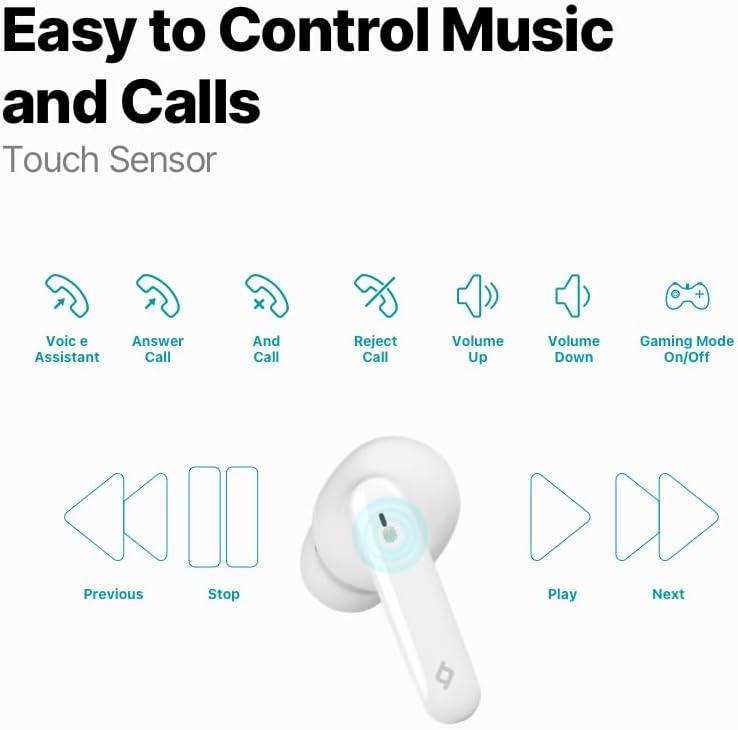
Image: Diagram illustrating the touch control functions for the earbuds, including voice assistant, answer/end/reject call, volume up/down, gaming mode on/off, previous/next track, play/stop.
| การกระทำ | การทำงาน |
|---|---|
| แตะครั้งเดียว (ซ้าย/ขวา) | เล่น/หยุดเพลง, รับ/วางสาย |
| แตะสองครั้ง (ซ้าย) | เพลงก่อนหน้า |
| แตะสองครั้ง (ขวา) | เพลงถัดไป |
| แตะสามครั้ง (ซ้าย) | ลดระดับเสียง |
| แตะสามครั้ง (ขวา) | เพิ่มระดับเสียง |
| กดแบบยาว (2 วินาที) | ปฏิเสธสาย เปิดใช้งานผู้ช่วยเสียง |
| Quadruple Tap (Left/Right) | เปิด/ปิดโหมดเกม |
ประสบการณ์ทางดนตรี
Enjoy superior sound and deep bass for an impressive music experience.

Image: The ttec AirBeat Snap earbuds floating above their open charging case, with sound waves emanating, illustrating superior sound and deep bass.
Gaming Mode (60ms Low Latency)
Activate Gaming Mode for an outstanding gaming and video experience with ultra-low latency of 60ms, ensuring synchronized audio and visuals.

Image: The ttec AirBeat Snap earbuds positioned next to a smartphone displaying a mobile game, emphasizing the 60ms low latency feature for an enhanced gaming experience.
อายุการใช้งานแบตเตอรี่และการชาร์จ
The earbuds provide up to 5 hours of battery life on a single charge. The ultra-compact USB-C charging case extends the total usage time up to 28 hours.
Charge&Go Feature: A quick 15-minute charge provides approximately 1.5 hours of usage.
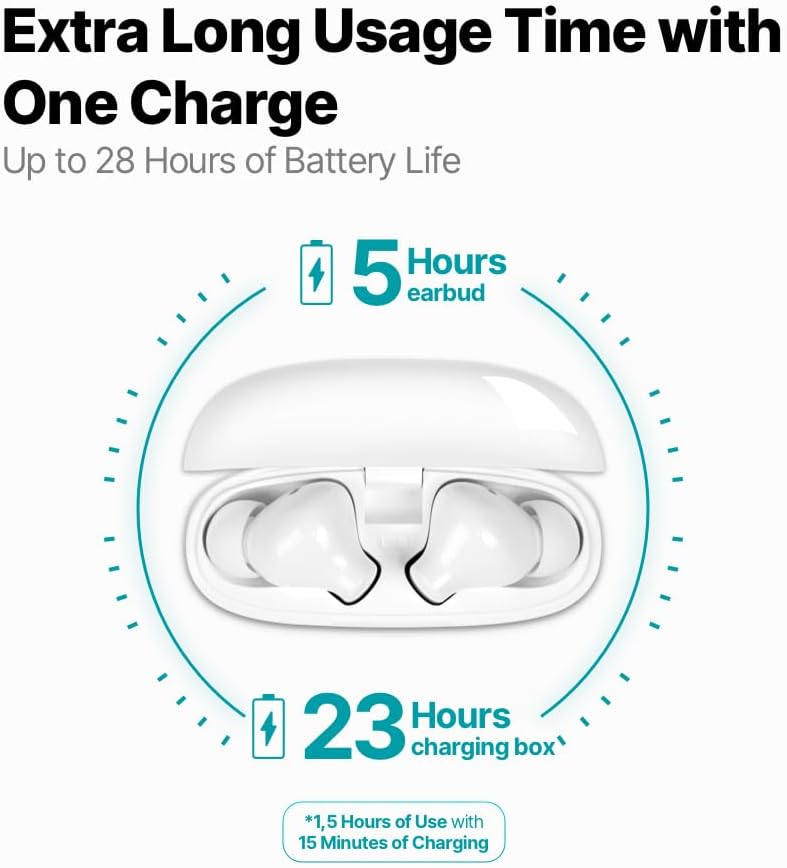
Image: An infographic showing the ttec AirBeat Snap earbuds in their charging case, indicating 5 hours of battery life for the earbuds and an additional 23 hours from the charging case, totaling 28 hours. It also highlights the Charge&Go feature.
การซ่อมบำรุง
การทำความสะอาด
- ทำความสะอาดหูฟังและกล่องชาร์จเป็นประจำด้วยผ้าแห้งนุ่มที่ไม่เป็นขุย
- ห้ามใช้สารทำความสะอาดที่มีฤทธิ์กัดกร่อน แอลกอฮอล์ หรือตัวทำละลายเคมี
- ค่อยๆ กำจัดขี้หูหรือเศษสิ่งสกปรกออกจากปลายหูฟังและตาข่ายลำโพงโดยใช้แปรงขนนุ่มขนาดเล็กหรือสำลี
- Ensure charging contacts on both earbuds and the case are clean and free of dust.
พื้นที่จัดเก็บ
- เมื่อไม่ได้ใช้งาน ควรเก็บหูฟังไว้ในกล่องชาร์จเสมอ เพื่อปกป้องหูฟังและให้หูฟังชาร์จไฟอยู่เสมอ
- เก็บอุปกรณ์ไว้ในที่แห้งและเย็น หลีกเลี่ยงแสงแดดโดยตรงและอุณหภูมิที่สูงหรือต่ำเกินไป
Water and Sweat Resistance (IPX6 Rated)
The ttec AirBeat Snap earbuds are IPX6 rated, meaning they are resistant to strong jets of water and sweat. This makes them suitable for workouts and outdoor activities.
- ห้ามจุ่มหูฟังลงในน้ำ
- Do not expose the charging case to water, as it is not water-resistant.
- After exposure to sweat or water, wipe the earbuds dry before placing them back into the charging case to prevent damage to the charging contacts.

Image: A person wearing the ttec AirBeat Snap earbuds, demonstrating their sweat and water-resistant design with an IPX6 rating, suitable for active use.
การแก้ไขปัญหา
| ปัญหา | สาเหตุที่เป็นไปได้ / วิธีแก้ไข |
|---|---|
| หูฟังไม่จับคู่กับอุปกรณ์ |
|
| หูฟังเอียร์บัดเดียวเท่านั้นที่ใช้งานได้ |
|
| ระดับเสียงต่ำหรือคุณภาพเสียงไม่ดี |
|
| หูฟังไม่ชาร์จ |
|
| ระบบควบคุมแบบสัมผัสไม่ตอบสนอง |
|
ข้อมูลจำเพาะ
| คุณสมบัติ | รายละเอียด |
|---|---|
| ชื่อรุ่น | AirBeat Snap |
| หมายเลขรุ่นผลิตภัณฑ์ | 2KM147 |
| ยี่ห้อ | TTEC |
| เทคโนโลยีการเชื่อมต่อ | ไร้สาย (บลูทูธ 5.3) |
| อายุการใช้งานแบตเตอรี่ของหูฟังเอียร์บัด | นานถึง 5 ชั่วโมง |
| อายุการใช้งานแบตเตอรี่ของเคสชาร์จ | Up to 23 hours (total 28 hours with earbuds) |
| เวลาในการชาร์จ | Approx. 1.5 hours (for full charge) |
| Charge&Go Feature | ชาร์จ 15 นาที ใช้งานได้ 1.5 ชั่วโมง |
| น้ำหนักเอียร์บัด | 3.5 กรัม (อันละ) |
| น้ำหนักเคสชาร์จ | 30 กรัม |
| ขนาดเอียร์บัด (ยาว x กว้าง x สูง) | 32 x 21 x 2.3 มม. |
| Charging Case Dimensions (L x W x H) | 57 x 23 x 44 มม. |
| ระยะการทำงาน | สูงสุด 10 เมตร |
| ระดับความต้านทานต่อน้ำ | IPX6 (เอียร์บัดเท่านั้น) |
| โหมดการเล่นเกมที่มีความหน่วงต่ำ | 60มิลลิวินาที |
| คุณสมบัติหลัก | Touch Control, Lightweight, Microphone Included, Volume Control, Sweat Resistant, MonoSmart Technology |
| อุปกรณ์ที่รองรับ | Mobile Phone, Laptop, Desktop Computer, Tablet |
| สี | สีขาว |
| ASIN | B0CQ7YZPFG |
การรับประกันและการสนับสนุน
For warranty information and customer support, please refer to the official TTEC webหรือติดต่อตัวแทนจำหน่ายในพื้นที่ของคุณ เก็บหลักฐานการซื้อไว้เพื่อใช้ในการเคลมประกัน
หมายเหตุสำคัญ: As per health and hygiene regulations, products that come into direct contact with the human body, such as earphones, can only be returned if their packaging has not been opened, the product has not been tried, damaged, or used.


