1. บทนำ
Thank you for choosing the Baseus PowerCombo Charging Station. This manual provides detailed instructions for the safe and efficient use of your Baseus PowerCombo 100W and PowerCombo Pro 40W 7-in-1 Charging Stations. These devices are designed to provide versatile and high-speed charging for a wide range of electronic devices, including laptops, smartphones, tablets, and other peripherals.
โปรดอ่านคู่มือนี้อย่างละเอียดก่อนใช้ผลิตภัณฑ์และเก็บคู่มือนี้ไว้เพื่อใช้อ้างอิงในอนาคต
2. สินค้าหมดview
The Baseus PowerCombo series offers two main variants: the 100W model and the Pro 40W model. Both models integrate AC outlets with USB charging ports to create a comprehensive power solution.

Figure 2.1: Baseus PowerCombo 100W (top) and PowerCombo Pro 40W (bottom) Charging Stations.
2.1. Baseus PowerCombo Pro 40W Charging Station
This compact charging station features 3 AC outlets, 2 USB-C Power Delivery (PD) ports, and 1 USB-A port, allowing you to charge up to 6 devices simultaneously. It is ideal for bedside tables, small offices, or travel.

รูปที่ 2.2: ระยะใกล้ view of the Baseus PowerCombo Pro 40W Charging Station.

Figure 2.3: The PowerCombo Pro 40W efficiently powering up to 6 devices.
2.2. Baseus PowerCombo 100W Charging Station
The 100W model provides higher power output, featuring 3 AC outlets, 2 USB-C ports, and 2 USB-A ports, capable of charging up to 7 devices simultaneously. Its 100W USB-C output is suitable for fast-charging laptops.

รูปที่ 2.4: ระยะใกล้ view of the Baseus PowerCombo 100W Charging Station.

Figure 2.5: The PowerCombo 100W efficiently powering up to 7 devices.
2.3. เนื้อหาบรรจุภัณฑ์
- 1 x Baseus PowerCombo Charging Station (100W or Pro 40W, depending on purchase)
- 1 x Power Adapter (integrated cable)
- 2 x USB Cable (Note: These are generic USB cables, specific types may vary)
3. การตั้งค่า
- แกะอุปกรณ์ออกจากกล่อง: นำแท่นชาร์จและอุปกรณ์เสริมทั้งหมดออกจากบรรจุภัณฑ์อย่างระมัดระวัง
- เลือกตำแหน่ง: Place the charging station on a stable, flat surface away from direct sunlight, heat sources, and liquids. Ensure adequate ventilation around the unit.
- เชื่อมต่อกับพลังงาน: Plug the integrated power cable of the Baseus PowerCombo into a standard wall outlet. The indicator light on the unit will illuminate, indicating it is powered on.
- เชื่อมต่ออุปกรณ์ของคุณ: Plug your electronic devices into the appropriate AC outlets, USB-C ports, or USB-A ports.
4. คู่มือการใช้งาน
The Baseus PowerCombo Charging Stations are designed for simple plug-and-play operation. Once connected to a power source, they are ready to charge your devices.
4.1 การใช้งานเต้ารับไฟฟ้ากระแสสลับ
- Plug any device requiring a standard AC power connection (e.g., laptop chargers, lamps, small appliances) into the available AC outlets.
- Ensure the total power consumption of devices connected to the AC outlets does not exceed the maximum rated power for the unit (e.g., 1250W for 100W model, 1250W for 40W model).
4.2. Using USB-C Ports
- Connect your USB-C compatible devices (e.g., laptops, smartphones, tablets) using a USB-C to USB-C cable.
- การ รุ่น 100W offers up to 100W Power Delivery (PD) from its USB-C ports, capable of fast-charging most laptops, including MacBook Pro 16" (up to 45% in 30 minutes).
- การ Pro 40W model offers a total of 40W PD output from its two USB-C ports (20W max per port), ideal for fast-charging iPhones and iPads.

Figure 4.1: The PowerCombo 100W providing high-speed charging for a MacBook Pro.

Figure 4.2: The PowerCombo Pro 40W simultaneously fast charging an iPhone and iPad.
4.3. Using USB-A Ports
- Connect your USB-A compatible devices (e.g., older smartphones, smartwatches, power banks) using a USB-A cable.
4.4. การชาร์จพร้อมกัน
Both PowerCombo models are designed to charge multiple devices simultaneously. The intelligent power distribution ensures optimal charging speeds for all connected devices, up to the unit's maximum total output.
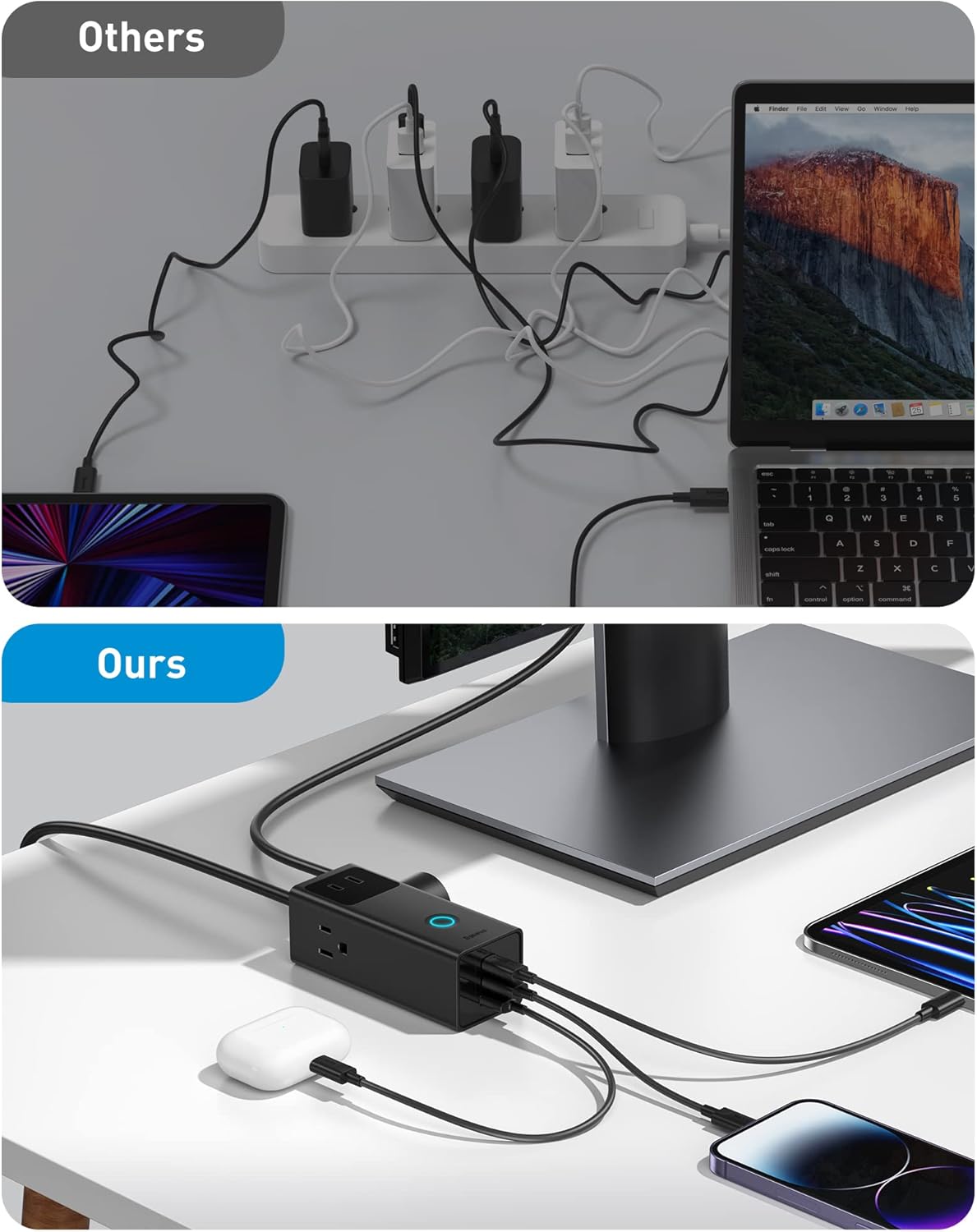
Figure 4.3: The compact design of Baseus PowerCombo helps in better cable management compared to traditional multi-charger setups.
5. ข้อมูลด้านความปลอดภัย
To ensure safe operation and prevent damage to the product or connected devices, please adhere to the following safety guidelines:
- สำหรับใช้ภายในอาคารเท่านั้น: This product is designed for indoor use in dry locations. Do not expose it to rain, moisture, or extreme temperatures.
- หลีกเลี่ยงการโอเวอร์โหลด: Do not exceed the maximum power rating of the charging station. Overloading can cause overheating and potential damage.
- การป้องกันไฟกระชาก: Both PowerCombo models feature built-in 1200J surge protection to safeguard your devices from power surges and spikes.
- BDIP Technology: Baseus' self-developed BDIP technology continuously monitors charging status (up to 86,400 times a day) and actively cuts off power in 0.1 seconds if malfunctions like overload are detected.
- การระบายอากาศที่เหมาะสม: Do not cover the charging station or place it in an enclosed space that restricts airflow.
- จัดการด้วยความระมัดระวัง: Do not drop, disassemble, or attempt to repair the unit yourself. Refer all servicing to qualified personnel.
- เด็กและสัตว์เลี้ยง: Keep the charging station and its cables out of reach of children and pets.

Figure 5.1: Illustration of the integrated 1200J surge protection technology.
6 การแก้ไขปัญหา
If you encounter issues with your Baseus PowerCombo Charging Station, please refer to the following common problems and solutions:
| ปัญหา | สาเหตุที่เป็นไปได้ | สารละลาย |
|---|---|---|
| อุปกรณ์ไม่ชาร์จ | การเชื่อมต่อหลวม ไฟดับtage, overloaded circuit, faulty cable/device. | Ensure the charging station is securely plugged into a live outlet. Check all cable connections. Try a different cable or device to rule out issues with them. Reduce the number of connected devices if overloaded. |
| ความเร็วในการชาร์จช้า | Using a non-fast charging port, cable not supporting fast charge, device not supporting fast charge, multiple devices drawing power. | Ensure you are using the correct USB-C PD port for fast charging. Use a high-quality cable that supports fast charging. Check if your device supports the fast charging protocol (e.g., PD 3.0). Disconnect other high-power devices if necessary. |
| ไฟแสดงสถานะดับ | No power, unit malfunction. | Check the wall outlet with another device. Ensure the power cable is fully inserted. If the issue persists, contact customer support. |
| เครื่องรู้สึกอุ่น | Normal operation under load, poor ventilation. | It is normal for the unit to feel warm during heavy use. Ensure there is adequate ventilation around the unit. If it becomes excessively hot or emits a burning smell, immediately unplug it and contact support. |
หากปัญหายังคงอยู่หลังจากลองวิธีแก้ปัญหาเหล่านี้แล้ว โปรดติดต่อฝ่ายสนับสนุนลูกค้าของ Baseus เพื่อขอความช่วยเหลือเพิ่มเติม
7. ข้อมูลจำเพาะ
Technical specifications for the Baseus PowerCombo Charging Stations:
| คุณสมบัติ | Baseus PowerCombo 100W | Baseus PowerCombo Pro 40W |
|---|---|---|
| AC Outlets AC | 3 | 3 |
| พอร์ต USB-C | 2 | 2 |
| พอร์ต USB-A | 2 | 1 |
| เอาท์พุต USB-C สูงสุด | 100W (พอร์ตเดียว) | 20W (single port), 40W (total) |
| พอร์ต USB รวม | 4 | 3 |
| ระบบป้องกันไฟกระชาก | 1200เจ | 1200เจ |
| คุณสมบัติด้านความปลอดภัย | BDIP Technology (Overload protection) | BDIP Technology (Overload protection) |
| การเชื่อมต่อ | ยูเอสบี | ยูเอสบี |
| คุณสมบัติพิเศษ | ชาร์จเร็ว | ชาร์จเร็ว |
8. การบำรุงรักษา
- การทำความสะอาด: Disconnect the charging station from the power outlet before cleaning. Use a soft, dry cloth to wipe the surface. Do not use liquid cleaners or aerosol sprays.
- พื้นที่จัดเก็บ: เมื่อไม่ได้ใช้งานเป็นเวลานาน ควรเก็บแท่นชาร์จไว้ในที่แห้งและเย็น หลีกเลี่ยงแสงแดดโดยตรงและอุณหภูมิที่สูงหรือต่ำเกินไป
- การดูแลสายเคเบิล: หลีกเลี่ยงการดัดหรือบิดสายไฟมากเกินไป และอย่าวางสิ่งของหนักทับสายไฟ
9. การรับประกันและการสนับสนุน
ผลิตภัณฑ์ของ Baseus ผลิตขึ้นตามมาตรฐานคุณภาพสูงและมีการรับประกันแบบจำกัด สำหรับเงื่อนไขและข้อกำหนดการรับประกันโดยละเอียด โปรดดูบัตรรับประกันที่มาพร้อมกับผลิตภัณฑ์ของคุณหรือเยี่ยมชมเว็บไซต์อย่างเป็นทางการของ Baseus webเว็บไซต์.
For technical support, troubleshooting assistance, or any inquiries regarding your Baseus PowerCombo Charging Station, please contact Baseus customer service through their official webไซต์หรือข้อมูลการติดต่อที่ให้ไว้ในบรรจุภัณฑ์ผลิตภัณฑ์ของคุณ
การสนับสนุนทางออนไลน์: www.baseus.com


