1. บทนำ
The Phanteks 5.5” Hi-Res Universal LCD Display is designed to enhance your PC setup by providing a versatile secondary screen. This display offers a high-resolution visual experience and multiple mounting options for seamless integration into or outside your PC chassis. This manual will guide you through the installation, operation, and maintenance of your new display.
2. เนื้อหาบรรจุภัณฑ์
โปรดตรวจสอบให้แน่ใจว่ามีสิ่งของทั้งหมดที่ระบุไว้ด้านล่างนี้อยู่ในบรรจุภัณฑ์ของผลิตภัณฑ์ของคุณ:
- Phanteks 5.5” Hi-Res Display
- สกรูยึดพัดลม 4 ตัว
- 4x M4 สกรู
- 1x SATA to Micro USB Type B Cable
- สาย HDMI 1x
- 2x Feet (for external placement)
3. สินค้าหมดview
The Phanteks 5.5” Hi-Res Universal LCD Display is engineered for both functionality and aesthetic appeal. Key features include:
- High-resolution 2160 x 1440 IPS display
- Wide range of mounting options – Hidden magnets for mounting on a steel surface. Mount to chassis fan location or fans directly.
- Smooth 60hz refresh rate with 450 nit brightness, IPS Panel with LED backlighting and 99% sRGB support.
- Plug-and-play with HDMI and SATA Power cable included.
- Secondary display with endless possibilities and edge-to-edge tempered glass panel.
4. การตั้งค่า
4.1. การเชื่อมต่อจอแสดงผล
- เชื่อมต่อที่ให้มา สาย HDMI from your graphics card or motherboard to the HDMI input port on the Phanteks display.
- เชื่อมต่อที่ให้มา SATA to Micro USB Type B Cable from an available SATA power connector in your PC to the Micro USB Type B port on the Phanteks display for power.
- Ensure both connections are secure. The display should power on automatically once your PC is running.
4.2. ตัวเลือกการติดตั้ง
The Phanteks display offers flexible mounting solutions:
- การติดตั้งแม่เหล็ก: The display features hidden magnets allowing it to be securely attached to any steel surface within your PC chassis.
- การติดตั้งพัดลม: Use the provided 4x Fan Screws or 4x M4 Screws to mount the display to a 120mm fan bracket or directly to a fan location in your chassis.
- External Placement: Attach the 2x Feet to the display for stable placement outside your PC, such as on your desk.

รูปที่ 1 : ด้านหน้า view of the Phanteks 5.5” Hi-Res Universal LCD Display.

รูปที่ 2: ย้อนกลับ view of the display, highlighting magnetic mounting points and screw holes for fan mounting.
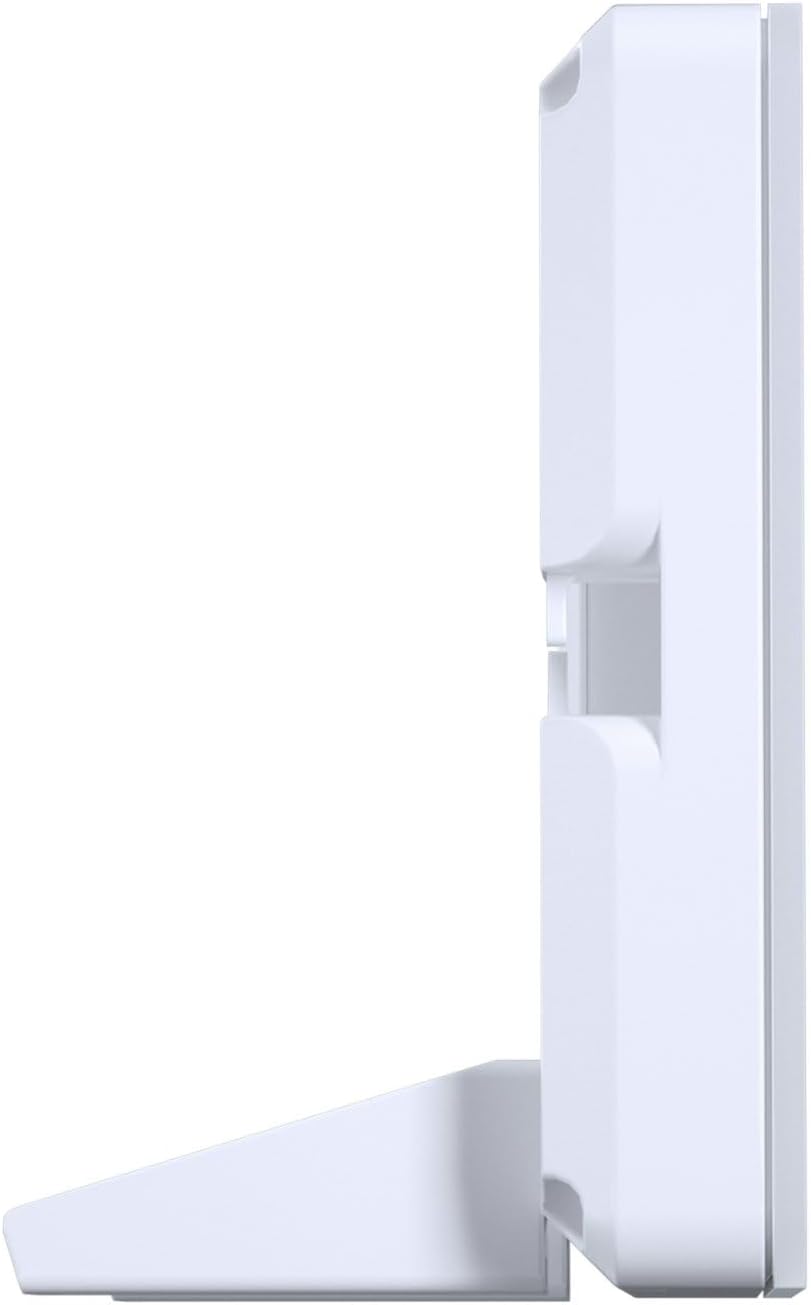
รูปที่ 3: ด้านข้าง view of the display with the included feet attached for desktop use.
4.3. การตั้งค่าซอฟต์แวร์
The Phanteks display is designed for plug-and-play functionality, recognized by your PC as a standard secondary monitor. For advanced customization, such as displaying system statistics (CPU/GPU temperature, usage, etc.) or custom animations, third-party software like AIDA64, Rainmeter, or Wallpaper Engine may be utilized. Refer to the documentation of your chosen software for specific setup instructions.
5. ปฏิบัติการ
Once connected and powered on, the Phanteks display will function as an extension of your main monitor. You can drag windows, applications, or custom monitoring dashboards onto it.
- กำลังแสดงข้อมูล: Use compatible software to output real-time system data, custom images, or videos to the display.
- การปรับแต่ง: Many third-party applications allow for extensive customization of the displayed content, including themes, layouts, and background images/animations.
6. การบำรุงรักษา
To ensure the longevity and optimal performance of your Phanteks display, follow these maintenance guidelines:
- การทำความสะอาด: Gently wipe the screen with a soft, lint-free cloth. For stubborn smudges, use a screen-safe cleaning solution applied to the cloth, not directly to the screen.
- การจัดการ: Avoid applying excessive pressure to the screen or dropping the device.
- สิ่งแวดล้อม: Operate the display in a well-ventilated area and avoid extreme temperatures or humidity.
7 การแก้ไขปัญหา
If you encounter issues with your Phanteks display, refer to the following common troubleshooting steps:
- จอแสดงผลไม่เปิด:
- Ensure both the HDMI and SATA power cables are securely connected.
- Verify that your PC is powered on and the graphics card is functioning correctly.
- Try connecting the display to a different HDMI port on your graphics card/motherboard or a different USB power source.
- Distorted Colors or Flickering:
- Check the HDMI cable for any damage or loose connections. Try a different HDMI cable if available.
- ตรวจสอบให้แน่ใจว่าไดร์เวอร์กราฟิกของคุณเป็นเวอร์ชันล่าสุด
- Verify the display resolution and refresh rate settings in your operating system.
- Display Not Detected by PC:
- รีสตาร์ทพีซีของคุณ
- Ensure the HDMI cable is connected to an active output port on your graphics card.
- Check your display settings in your operating system to see if the secondary monitor is detected but disabled.
8. ข้อมูลจำเพาะ
Detailed technical specifications for the Phanteks 5.5” Hi-Res Universal LCD Display:
| คุณสมบัติ | รายละเอียด |
|---|---|
| ขนาดสินค้า | 5.94 x 3.15 x 0.65 นิ้ว |
| น้ำหนักสินค้า | 7.2 ออนซ์ |
| ผู้ผลิต | แฟนเท็กส์ |
| หมายเลขรุ่นสินค้า | PH-HRLCD_WT01 |
| ขนาดการแสดงผลหน้าจอยืน | 5.5 นิ้ว |
| ปณิธาน | ขนาด 2160x1440 |
| ความสว่างของภาพ | 450 นิต |
| สเปกตรัมสี | sRGB99% |
| อัตราการรีเฟรช | 60เฮิรตซ์ |
| คำอธิบายพื้นผิวหน้าจอ | มันเงา |

Figure 4: Display dimensions: 5.94" (L) x 3.15" (B) x 0.65" (H).
9. การรับประกันและการสนับสนุน
For warranty information, technical support, or service inquiries, please refer to the official Phanteks webหรือติดต่อฝ่ายบริการลูกค้า โปรดเก็บหลักฐานการซื้อไว้เพื่อใช้ในการเคลมประกัน


