1. บทนำ
Welcome to the NARWAL S10 Pro user manual. This document provides essential information for the safe and efficient operation, maintenance, and troubleshooting of your new cordless wet dry vacuum mop. Please read this manual thoroughly before first use and keep it for future reference.

Image: The NARWAL S10 Pro Cordless Wet Dry Vacuum Mop with its charging base and accessories.
2. อะไรอยู่ในกล่อง
Your NARWAL S10 Pro package includes the following components:
- Vacuum Mop Unit (including Roller Brush and HEPA Filter)
- รับมือ
- ฐานทำความสะอาดตัวเอง
- แปรงทำความสะอาด
- แปรงลูกกลิ้งสำรอง
- แผ่นกรอง HEPA สำรอง
- คู่มือการใช้งาน

Image: A close-up of the NARWAL S10 Pro's cleaning head and various accessories, including a spare roller brush and filter.
3. การตั้งค่า
- การแกะกล่อง: นำส่วนประกอบทั้งหมดออกจากบรรจุภัณฑ์อย่างระมัดระวัง เก็บบรรจุภัณฑ์ไว้สำหรับการขนส่งหรือจัดเก็บในอนาคต
- จับประกอบ: Insert the handle into the main body of the vacuum mop until it clicks securely into place.
- ตำแหน่งการวางฐานชาร์จ: Place the self-cleaning base on a flat, stable surface near a power outlet. Ensure there is enough space around the base for easy access.
- ค่าใช้จ่ายเริ่มต้น: Place the assembled vacuum mop onto the charging base. The display will indicate charging status. Fully charge the device before its first use.
Video: A user unboxes the NARWAL S10 Pro, assembles the handle, and places it on the charging base for initial setup.
4. คู่มือการใช้งาน
4.1 การเติมถังเก็บน้ำ
- Locate the clean water tank on the back of the main unit.
- Press the release button and pull the tank out.
- Open the tank cap and fill with clean water. For optimal cleaning, use NARWAL-approved cleaning solution as directed. Do not use foaming detergents.
- Securely close the cap and reinsert the tank into the unit until it clicks.
4.2 การเปิดเครื่องและการเลือกโหมด
- กดปุ่มเปิด/ปิดบนด้ามจับเพื่อเปิดอุปกรณ์
- Tilt the handle backward to unlock the vacuum mop from its upright position.
- Use the mode selection button to cycle through available cleaning modes:
- โหมดอัตโนมัติ: Automatically adjusts suction and water flow based on dirt detection for general cleaning.
- โหมดเทอร์โบ: Provides maximum suction and water for stubborn stains and heavy messes.
- โหมดเงียบ: Operates with reduced noise for lighter cleaning tasks.
- โหมดการดูด: สำหรับดูดของเหลวโดยไม่ต้องจ่ายน้ำ

Image: The NARWAL S10 Pro's display illustrating the five available cleaning modes for diverse needs.
4.3 การทำความสะอาดพื้นของคุณ
Guide the vacuum mop across your hard floors. The self-propelling feature assists in movement, requiring minimal effort. For optimal results, move the device in a steady, overlapping pattern. The 180° fold-flat flexibility allows for easy cleaning under furniture and in tight spaces.

Image: The NARWAL S10 Pro head folded flat, showcasing its 180-degree flexibility for reaching under low furniture.

Image: The NARWAL S10 Pro cleaning under a low cabinet, highlighting its ability to reach tight spaces.

Image: A person effortlessly maneuvering the lightweight NARWAL S10 Pro across a floor.

Image: The NARWAL S10 Pro cleaning close to a baseboard, illustrating its precise edge cleaning capability.
5. การบำรุงรักษา
5.1 การทำความสะอาดและทำให้แห้งด้วยตนเอง
After each use, return the vacuum mop to its self-cleaning base. Press the dedicated self-clean button (often indicated by a water droplet icon) to initiate the self-cleaning cycle. The device will clean its roller brush and then activate hot air drying to prevent odors and maintain hygiene.

Image: Visual representation of the NARWAL S10 Pro's self-cleaning and hot air drying functions.
Video: A demonstration of the NARWAL S10 Pro's self-cleaning cycle, showing the brush roll being cleaned and dried.
5.2 Emptying the Dirty Water Tank and Cleaning Filters
- Regularly empty the dirty water tank after each cleaning session. Press the release button and pull out the dirty water tank.
- Separate solid debris from liquid waste using the integrated filter system. Dispose of solids and pour out dirty water.
- Rinse the dirty water tank and the filter thoroughly with clean water. Allow all parts to air dry completely before reassembling.
- The HEPA filter should be cleaned periodically and replaced every 3-6 months, or as needed, depending on usage.

Image: A close-up of the dirty water tank, illustrating the wet-dry waste separation feature.
วิดีโอ: บทนำสั้น ๆview showing the removal and cleaning of the dirty water tank and filter.
5.3 การทำความสะอาดแปรงลูกกลิ้ง
While the self-cleaning function handles most of the brush maintenance, occasional manual cleaning may be necessary. Remove the brush roll cover and then the brush roll itself. Use the provided cleaning brush to remove any tangled hair or debris. Rinse the brush roll under running water and allow it to dry completely before reinstallation.
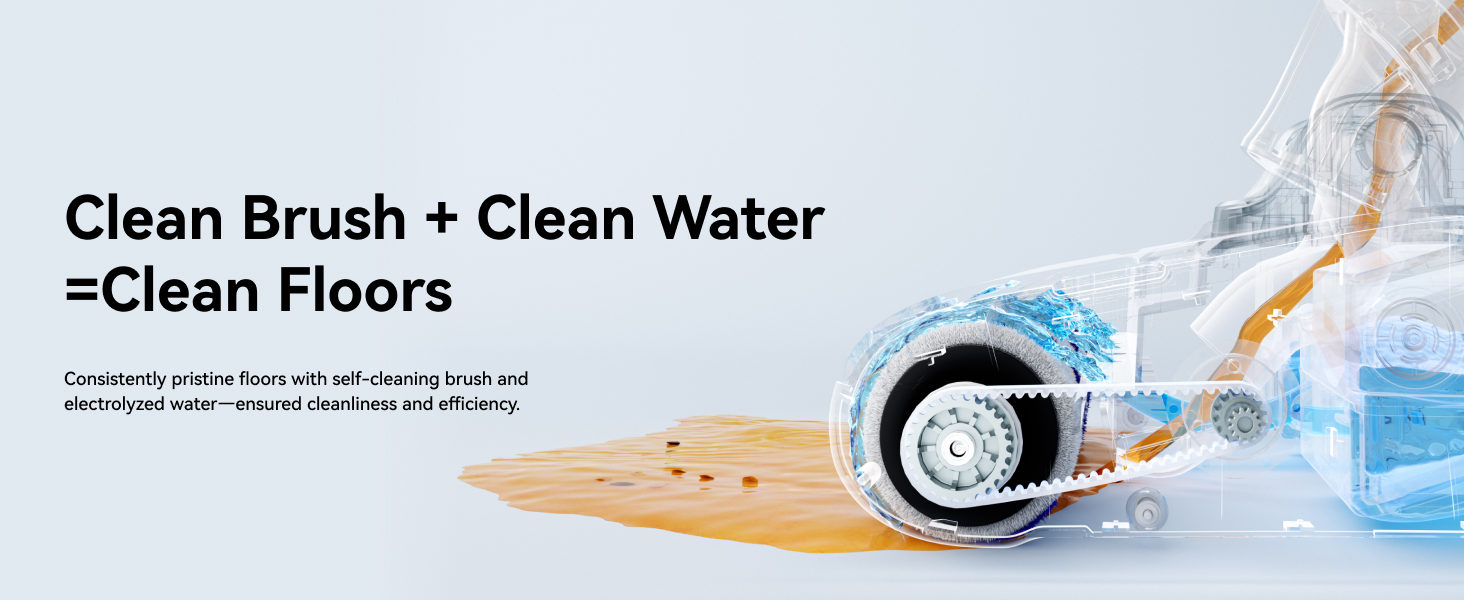
ภาพ: ภายใน view of the NARWAL S10 Pro's cleaning head, showing the brush roll and water flow for effective cleaning.
6 การแก้ไขปัญหา
- ไม่มีไฟฟ้า: Ensure the device is fully charged and correctly seated on the charging base. Check the power adapter connection.
- การดูดไม่ดี: Check if the dirty water tank is full or if the filter is clogged. Clean or replace the filter as needed. Ensure the brush roll is free of obstructions.
- การรั่วไหลของน้ำ: ตรวจสอบให้แน่ใจว่าถังเก็บน้ำสะอาดและถังเก็บน้ำสกปรกติดตั้งอย่างถูกต้องและฝาปิดสนิทดีแล้ว
- เสียงผิดปกติ: Inspect the brush roll for any foreign objects or tangled hair. Remove any obstructions.
- ข้อความแสดงข้อผิดพลาด: Refer to the LCD display for specific error codes and consult the full user manual for detailed solutions.
7. ข้อมูลจำเพาะ
| คุณสมบัติ | รายละเอียด |
|---|---|
| ยี่ห้อ | นาร์วาล |
| ชื่อรุ่น | S10 Pro (YJSC001) |
| คุณสมบัติพิเศษ | 14,000Pa Suction, Cordless, Lightweight, Self-Cleaning & Drying, Wet/Dry, 180° Flexibility |
| ประเภทตัวกรอง | แผ่นกรอง HEPA |
| ไร้สายมั้ย? | ใช่ |
| ความจุถังน้ำสะอาด | 790 มิลลิลิตร |
| วัดtage | 750 วัตต์ |
| เวลาในการชาร์จ | 3.5 ชั่วโมง |
| การใช้ที่แนะนำ | พื้นแข็ง, พื้นกระเบื้อง, พื้นไม้, พื้นเปล่า |
| ขนาดสินค้า | ยาว 28.7 นิ้ว x กว้าง 10.7 นิ้ว x สูง 13.8 นิ้ว |
| ประเภทแบตเตอรี่ | ลิเธียมไอออน |
| ระดับเสียง | 72 เดซิเบล |
| อายุการใช้งานแบตเตอรี่ | สูงสุด 50 นาที |
8. การรับประกันและการสนับสนุน
For warranty information, product registration, or technical support, please visit the official NARWAL webเข้าชมเว็บไซต์หรือติดต่อฝ่ายบริการลูกค้า เก็บใบเสร็จรับเงินไว้เป็นหลักฐานการซื้อ
การสนับสนุนทางออนไลน์: Visit the NARWAL Store on Amazon