1. สินค้าหมดview
The VTech ES2050 is a DECT cordless phone designed for home and office use, featuring an integrated digital answering machine, call blocking capabilities, and enhanced audio functions. This manual provides detailed instructions for setting up, operating, and maintaining your phone.

The VTech ES2050 DECT Cordless Phone with its base unit, showcasing the handset's backlit display and keypad, and the base unit's answering machine controls.

The VTech ES2050 DECT Cordless Phone positioned in a contemporary living space, highlighting its sleek design and integration into a home environment.

Illustration of the VTech ES2050's Nuisance Call Blocker feature, showing how it helps prevent unwanted calls from ringing through. Up to 100 numbers can be blacklisted.

The VTech ES2050's Digital Answering System, capable of recording up to 30 minutes of messages, with a digital message counter on the base unit.

Depiction of the VTech ES2050's easy one-touch features, including Mute/Alarm, adjustable ring volume and melodies, and a high-quality handsfree speakerphone.

Visual representation of the VTech ES2050's Volume Booster function, which amplifies incoming sounds for enhanced clarity and loudness, beneficial for hearing-impaired users.

The VTech ES2050 handset with its backlit display and keypad illuminated, demonstrating improved visibility in low-light conditions.

A composite image illustrating key features: 100 name and number phonebook, calling numbers displayed with 20 call list records, 10 last number redial, and up to 18 hours talk time / 250 hours standby time.
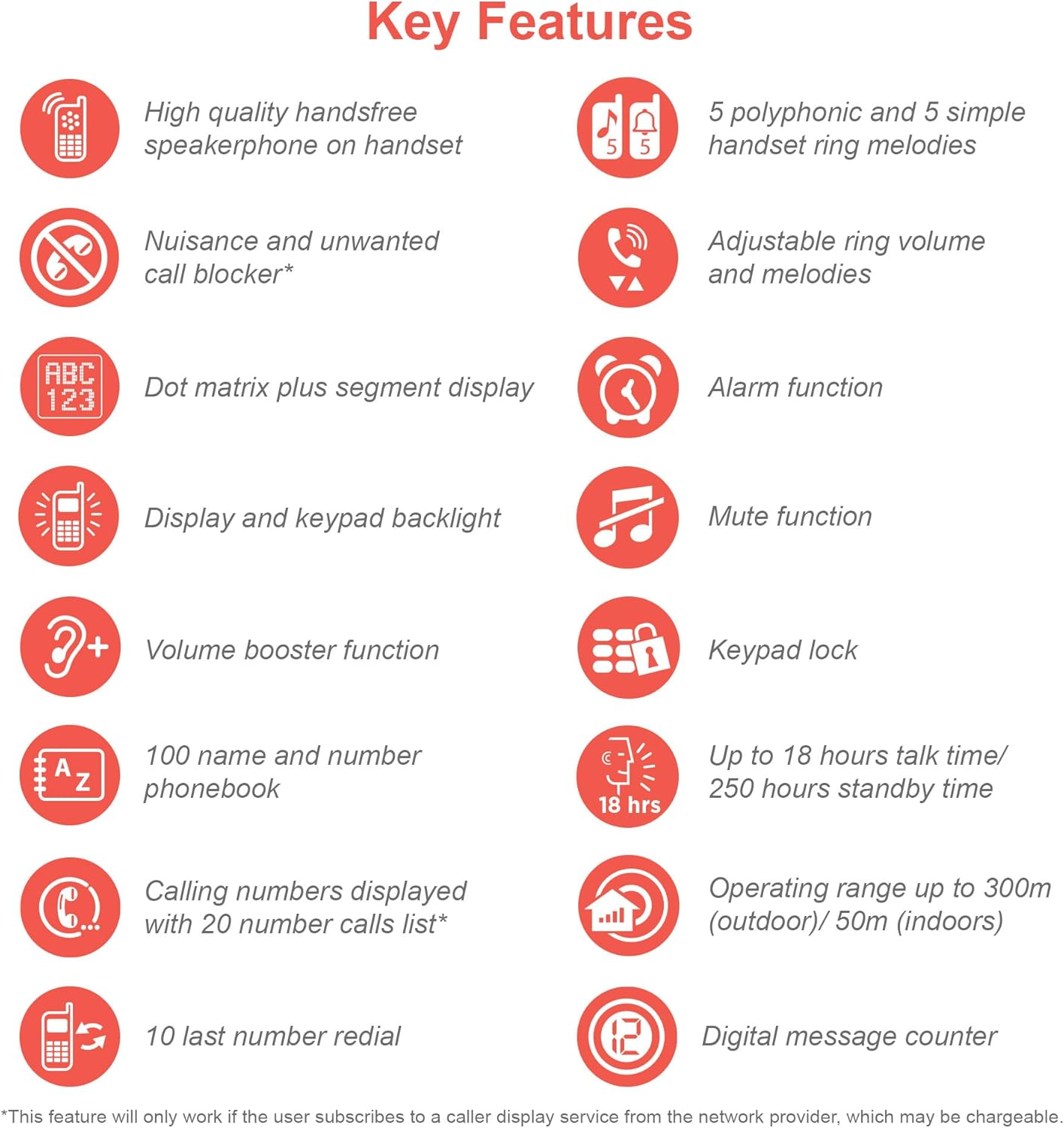
An infographic summarizing the VTech ES2050's key features, including speakerphone, call blocker, polyphonic ringtones, alarm, mute, keypad lock, volume booster, phonebook, call list, redial, talk time, operating range, and digital message counter.
คุณสมบัติหลัก:
- เครื่องตอบรับอัตโนมัติแบบดิจิตอล: 30 minutes recording time.
- Nuisance Call Blocker: Block up to 100 blacklisted numbers.
- ตัวเพิ่มระดับเสียง: Amplifies incoming sounds for enhanced clarity.
- อายุการใช้งานแบตเตอรี่ยาวนาน: Up to 18 hours talk time / 250 hours standby time.
- จอแสดงผลแบ็คไลท์และปุ่มกด: ง่าย viewอยู่ในแสงสลัว
- Handsfree Speakerphone: High-quality speakerphone on handset.
- สมุดโทรศัพท์: 100 name and number capacity.
- สายความเร็ว: 3 speed dial numbers.
- โหมด ECO: For reduced power consumption.
- แสดงหมายเลขผู้โทร / ระบบรอสาย: Stores 20 records.
- โทรซ้ำ: 10 last number redial.
- ฟังก์ชั่นปลุก: Integrated alarm.
- ฟังก์ชั่นปิดเสียง: For privacy during calls.
- ล็อคปุ่มกด: Prevents accidental dialing.
2. อะไรอยู่ในกล่อง
ก่อนที่คุณจะเริ่มต้น โปรดตรวจสอบให้แน่ใจว่ามีส่วนประกอบทั้งหมดครบถ้วน:
- 1 หน่วยฐาน
- โทรศัพท์ไร้สาย 1 เครื่อง
- 1 Charger (for handset)
- 1 Battery Pack (2 AAA batteries included)
- สายโทรศัพท์
- คู่มือเริ่มต้นใช้งานฉบับย่อ (ดูรายละเอียดเพิ่มเติมได้ในคู่มือนี้)
3. คู่มือการติดตั้ง
3.1. การติดตั้งและการชาร์จแบตเตอรี่
- Locate the battery compartment cover on the back of the handset. Slide it open.
- เสียบปลั๊กแบตเตอรี่เข้ากับช่องเสียบภายในช่องใส่แบตเตอรี่ให้แน่นสนิท
- Place the 2 AAA batteries (included) into the compartment, ensuring correct polarity (+ and -).
- เปลี่ยนฝาครอบช่องใส่แบตเตอรี่
- Place the handset on the base unit or charger. The charging indicator light on the handset should illuminate.
- ควรชาร์จโทรศัพท์มือถืออย่างน้อย 16 ชั่วโมงก่อนใช้งานครั้งแรกเพื่อให้แน่ใจว่าแบตเตอรี่มีความจุเต็ม
3.2. การเชื่อมต่อหน่วยฐาน
- ต่อปลายด้านหนึ่งของสายโทรศัพท์เข้ากับช่องเสียบ TEL LINE ที่ด้านหลังของตัวเครื่องหลัก
- เชื่อมต่อปลายอีกด้านหนึ่งของสายโทรศัพท์เข้ากับช่องเสียบโทรศัพท์บนผนัง
- Plug the small end of the power adapter into the POWER jack on the back of the base unit.
- เสียบปลั๊กอะแดปเตอร์ไฟฟ้าด้านใหญ่เข้ากับเต้ารับไฟฟ้ามาตรฐาน
- Ensure all cables are securely connected and routed to prevent tripping hazards.
3.3. การตั้งค่าเริ่มต้น (วันที่และเวลา)
After the handset is charged, you will need to set the date and time. Follow the on-screen prompts on the handset display. If prompted multiple times, ensure each step is confirmed before proceeding.
- กดปุ่ม เมนู/ตกลง ปุ่ม.
- นำทางไปที่ วันที่และเวลา โดยใช้ปุ่มลูกศร
- กด เมนู/ตกลง ที่จะเลือก
- ป้อนวันที่และเวลาปัจจุบันโดยใช้แป้นพิมพ์
- กด เมนู/ตกลง เพื่อบันทึก
4. คู่มือการใช้งาน
4.1. การโทรออกและรับสาย
- ในการโทรออก: ยกหูโทรศัพท์หรือกดปุ่ม พูดคุย button. Dial the number.
- วิธีรับสาย: เมื่อโทรศัพท์ดัง ให้หยิบหูโทรศัพท์ขึ้นมาหรือกดปุ่ม พูดคุย ปุ่ม.
- วิธีวางสาย: วางโทรศัพท์กลับลงบนฐานวาง/แท่นชาร์จ หรือกดปุ่ม จบ ปุ่ม.
4.2. การใช้งานลำโพงโทรศัพท์
ระหว่างการโทร ให้กด ผู้พูด button to activate the handsfree speakerphone. Press it again to switch back to the handset earpiece.
4.3. Digital Answering Machine
- ข้อความที่กำลังเล่น: บนตัวเครื่องฐาน กด เล่น/หยุด.
- การลบข้อความ: ระหว่างการเล่นข้อความ ให้กด ลบ บนหน่วยฐาน
- การบันทึกข้อความขาออก (OGM): Refer to the handset menu for OGM recording options.
4.4. Nuisance Call Blocker
This feature allows you to block unwanted calls. You can add numbers to a blacklist.
- To Block a Number from Call History: Access the Call History, select the number, and choose the "Block" option.
- To Manually Add a Number to Blacklist: Navigate to the Call Blocker menu in the handset settings and add the number.
- The phone can store up to 100 blacklisted numbers.
4.5. Volume Booster
ถึง amplify the incoming sound during a call, press the บูสท์ button (often marked with a speaker icon or "+") on the handset. Press it again to deactivate.
4.6. Phonebook and Speed Dial
- การเพิ่มผู้ติดต่อ: Access the Phonebook menu, select "Add New Entry", and enter the name and number.
- การโทรออกจากสมุดโทรศัพท์: กดปุ่ม สมุดโทรศัพท์ button, scroll to the desired contact, and press พูดคุย.
- สายความเร็ว: Assign frequently called numbers to speed dial keys (e.g., 1, 2, 3). Refer to the handset menu for speed dial setup.
4.7. โหมด ECO
The phone automatically enters ECO mode when the handset is close to the base unit, reducing power consumption and transmission power. This mode is indicated by an ECO icon on the display.
5. การบำรุงรักษา
- การทำความสะอาด: เช็ดโทรศัพท์และฐานด้วยผ้านุ่มๆamp ผ้า ห้ามใช้สารทำความสะอาดที่มีฤทธิ์กัดกร่อนหรือตัวทำละลาย
- การดูแลแบตเตอรี่ For optimal battery life, avoid overcharging by leaving the handset off the charger for extended periods once fully charged. If the phone will not be used for a long time, remove the batteries.
- ที่ตั้ง: วางหน่วยฐานในตำแหน่งศูนย์กลางที่ห่างจากอุปกรณ์อิเล็กทรอนิกส์อื่นๆ ที่อาจทำให้เกิดสัญญาณรบกวนได้
6 การแก้ไขปัญหา
If you experience issues with your VTech ES2050 phone, try the following solutions:
| ปัญหา | วิธีแก้ปัญหาที่เป็นไปได้ |
|---|---|
| ไม่มีเสียงสัญญาณโทรออก / ไม่สามารถโทรออกหรือรับสายได้ |
|
| คุณภาพเสียงไม่ดี / สัญญาณรบกวน |
|
| เครื่องตอบรับอัตโนมัติไม่บันทึกข้อความ |
|
| Handset display is blank or unresponsive. |
|
| Difficulty with menu navigation or settings. |
|
7. ข้อมูลจำเพาะ
| คุณสมบัติ | รายละเอียด |
|---|---|
| หมายเลขรุ่น | ES2050 |
| ประเภทโทรศัพท์ | ไร้สาย DECT |
| ประเภทของระบบตอบรับ | ดิจิตอล |
| ความจุในการบันทึก | 30 นาที |
| เวลาสนทนาทางโทรศัพท์ | นานถึง 18 ชั่วโมง |
| เวลาสแตนด์บายของโทรศัพท์ | นานถึง 250 ชั่วโมง |
| แบตเตอรี่ | แบตเตอรี่ AAA จำนวน 2 ก้อน (รวมอยู่ด้วย) |
| แหล่งพลังงาน | ใช้พลังงานจากแบตเตอรี่ |
| ประเภทการโทรออก | ปุ่มกดเดียว |
| อุปกรณ์ที่รองรับ | Standard Landline Telephone Networks |
| สี | สีดำ |
| ผู้ผลิต | VTech |
| ประเทศต้นกำเนิด | จีน |
8. การรับประกันและการสนับสนุน
For warranty information and technical support, please refer to the official VTech webเข้าชมเว็บไซต์หรือติดต่อฝ่ายบริการลูกค้าของ VTech เก็บใบเสร็จรับเงินไว้เป็นหลักฐานการซื้อ
ผู้ผลิต: VTech
For the most up-to-date support resources, visit the VTech support page or refer to the contact information provided with your product packaging.


